You ask Cursor or Claude Code for a new dbt model. It writes the SQL and Jinja in seconds. The model compiles, dbt build passes and the pull request looks clean. Two weeks later, finance asks why a customer metric moved, and nobody can say which line changed it.
AI made the writing step fast. The review step is the same size it was, and it now covers more code that nobody on the team typed. This guide shows how to review AI-generated dbt code before you merge. It names five ways an AI-written model goes wrong after it compiles. It explains why the usual checks miss them. Then it gives you a review routine to run in the editor.
AI Made Writing Models Faster While Review Stayed Manual
Data teams adopted AI for writing code first. In the dbt Labs State of Analytics Engineering 2026 report, 72% of respondents prioritize AI-assisted coding. Only 24% prioritize AI for pipeline management, which includes testing and observability. The same report found that 71% of data professionals name incorrect or hallucinated output reaching stakeholders as a top concern.
Developers feel the gap in their own work. The Stack Overflow 2025 Developer Survey asked what frustrates developers most about AI tools. The top answer was "AI solutions that are almost right, but not quite," picked by 66%. In the same survey, 46% distrust the accuracy of AI tools and 33% trust it.
An almost-right dbt model is the expensive kind. A syntax error fails the build in seconds. A model that returns plausible numbers passes every gate, and someone outside the data team finds the error first.
Five Ways an AI-Written Model Goes Wrong After It Compiles
Each case below compiles, runs and passes the common not_null and unique tests. Each one also changes a number that someone downstream trusts.
1. A NULL Branch Quietly Returns Zero
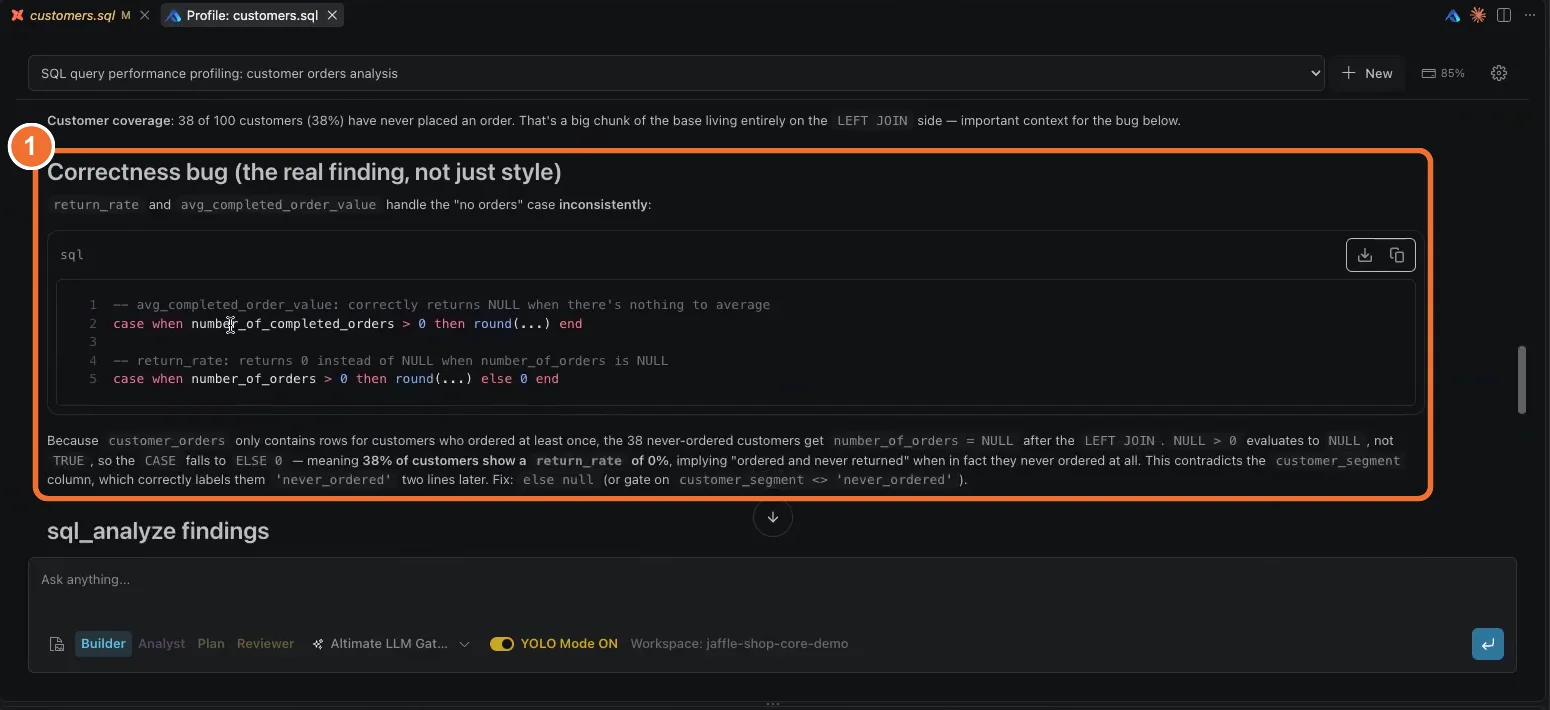
A CASE expression handles the "no orders" case with else 0 in one column and else null in the next. In a demo Jaffle Shop project, 38 of 100 customers had never ordered. The model reported a 0% return rate for all 38 of them, when the honest answer was NULL. Any average built on that column is now wrong.
A simplified version of the pattern looks like this:
case when number_of_orders > 0
     then returned_orders / number_of_orders
     else 0      -- should be null: these customers never ordered
end as return_rate
2. A Join Multiplies Rows
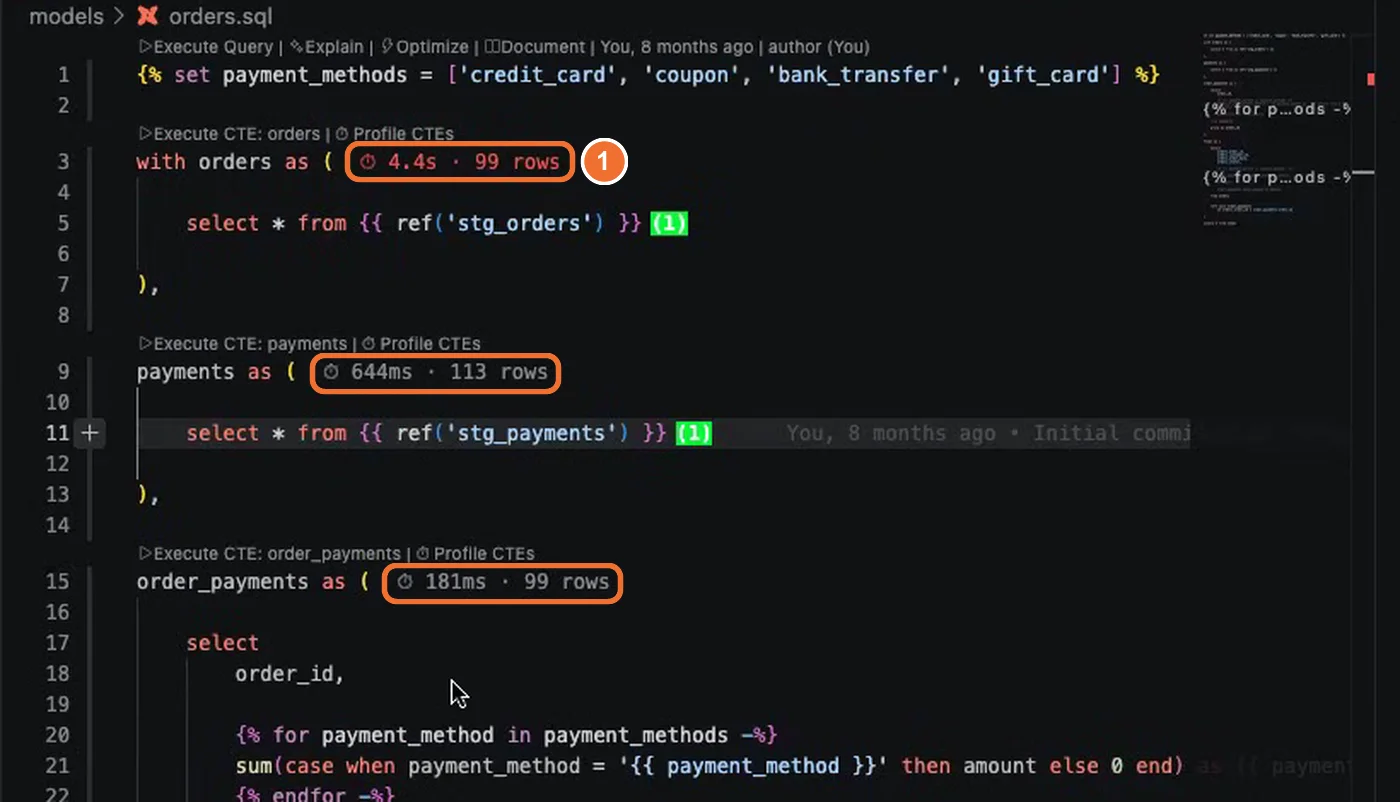
Someone changes a left join to a full outer join, or joins on a key that is not unique. The CTE that held 99 rows now holds about 990. Revenue doubles on the dashboard and every row still looks valid. The dbt anti-patterns guide lists this fan-out join first among the patterns review should catch.
3. A Column Change Breaks a Model Three Hops Away
The assistant renames a column or changes its type in a staging model. Nothing fails in that model. The break shows up in a mart three models downstream, or in a dashboard that reads it. Column-level lineage answers "who reads this column", but dbt Labs gates it to an Enterprise plan with Catalog. Its own documentation says the view does not reflect usage in joins and filters.
4. Logic That No Test Checks
Data tests check the rows a model produces after it builds. They catch a duplicate key or a null. They cannot tell you that a split payment was summed into the wrong bucket. A dbt unit test checks logic on fixed inputs before the model builds, and dbt has supported them since version 1.8. Writing a dbt unit test takes time, because each scenario needs hand-written input and expected-output YAML.
5. A Macro Nobody Can Explain
Generated models lean on whatever ref() calls and macros the assistant found in your project. The compiled SQL shows the result of the Jinja and hides where each piece came from. The reviewer has to trust a macro they never read, or open five files to check it.
Why Compiling, Data Tests and Pull Request Review Miss These Bugs
Most dbt code review happens in a pull request diff, after compile and data tests pass. Each of those checks answers a narrower question than the one you care about.
- Compiling proves the SQL is valid. It says nothing about whether the numbers are right.
- Data tests run after the build and check shape: nulls, keys, accepted values. Wrong logic with clean shape passes.
- Pull request review reads a diff. The reviewer sees the changed lines, and never sees the row counts or the downstream models.
- Asking a chatbot covers only the checks you thought to name in the prompt, and the chatbot cannot see your data.
| Failure | Compile | Data tests | PR diff | Check that catches it |
|---|---|---|---|---|
| NULL branch returns zero | Passes | Passes | Often missed | Read the logic in every branch |
| Join multiplies rows | Passes | Passes unless a key test covers it | Missed | Row count per CTE |
| Column change breaks a model downstream | Passes | Fails late, if at all | Missed | Column-level lineage |
| Logic no test checks | Passes | Passes | Often missed | Unit test |
| Macro nobody can explain | Passes | Passes | Missed | Read every ref() and macro |
Model quality does not close this gap on its own. On the Spider 2.0 benchmark of real enterprise SQL tasks, o1-preview solved 17.1% at launch. The best agent on the Spider 2.0-Lite leaderboard now scores 76.23, so it still misses about one task in four. Better models raise the share of correct SQL. Someone still has to find the rest before stakeholders do.
Run a Five-Question Review Before You Merge
To review AI-generated dbt code, turn the five failure modes into five questions. Answer each one with evidence before you approve the pull request. This makes a dbt code review a checklist instead of a skim.
- Is the logic correct in every branch? Look for CASE expressions, NULL handling and divisions by a column that can be zero.
- Does any join multiply rows? Compare the row count of each CTE with the one before it.
- What breaks downstream if a column changes? Trace the changed columns to every model and dashboard that reads them.
- Is there a unit test for the logic you changed? Data tests alone do not count.
- Can you explain every
ref()and macro the model uses? If not, read them before you approve.
You can answer these by hand with a scratch query per CTE, a search across the project and a YAML file per test. That works, and it takes hours on a long model. The open source dbt Power User extension, a dbt VS Code extension that also runs in Cursor, does the same routine in the editor.
Answer All Five Questions Inside VS Code or Cursor
dbt Power User has 1M+ installs, and 35,000 developers use it every month. Its other name is the PowerUser Plugin for dbt. Each answer below names the feature for one review question, links to a walkthrough, and lists what else that feature does during a review. The playlist shows all five features in a live dbt project.
Logic in every branch. Profile Query sends the compiled SQL to Altimate Code with the prompt already written. The report leads with correctness bugs, such as the NULL branch above, then ranks the fixes.
Also in the editor for this check:
- Validate SQL flags columns that do not exist, keyword typos and unbalanced parentheses while you edit.
- Compare query results keeps the earlier result in a tab. Run the changed query and read the two result sets side by side.
- Review with Altimate appears in the right-click menu while the file has uncommitted git changes, so you can review an AI edit before you commit it.
Rows a join multiplies. Profile CTEs runs every CTE and writes its runtime and row count beside it. The CTE that jumps from 99 rows to 990 holds the fan-out join.
Also in the editor for this check:
- Execute CTE previews the rows of a single CTE from the link above it.
- SQL Visualizer, in beta, draws the CTEs, joins, filters and unions as a graph. Hover a join to see its code.
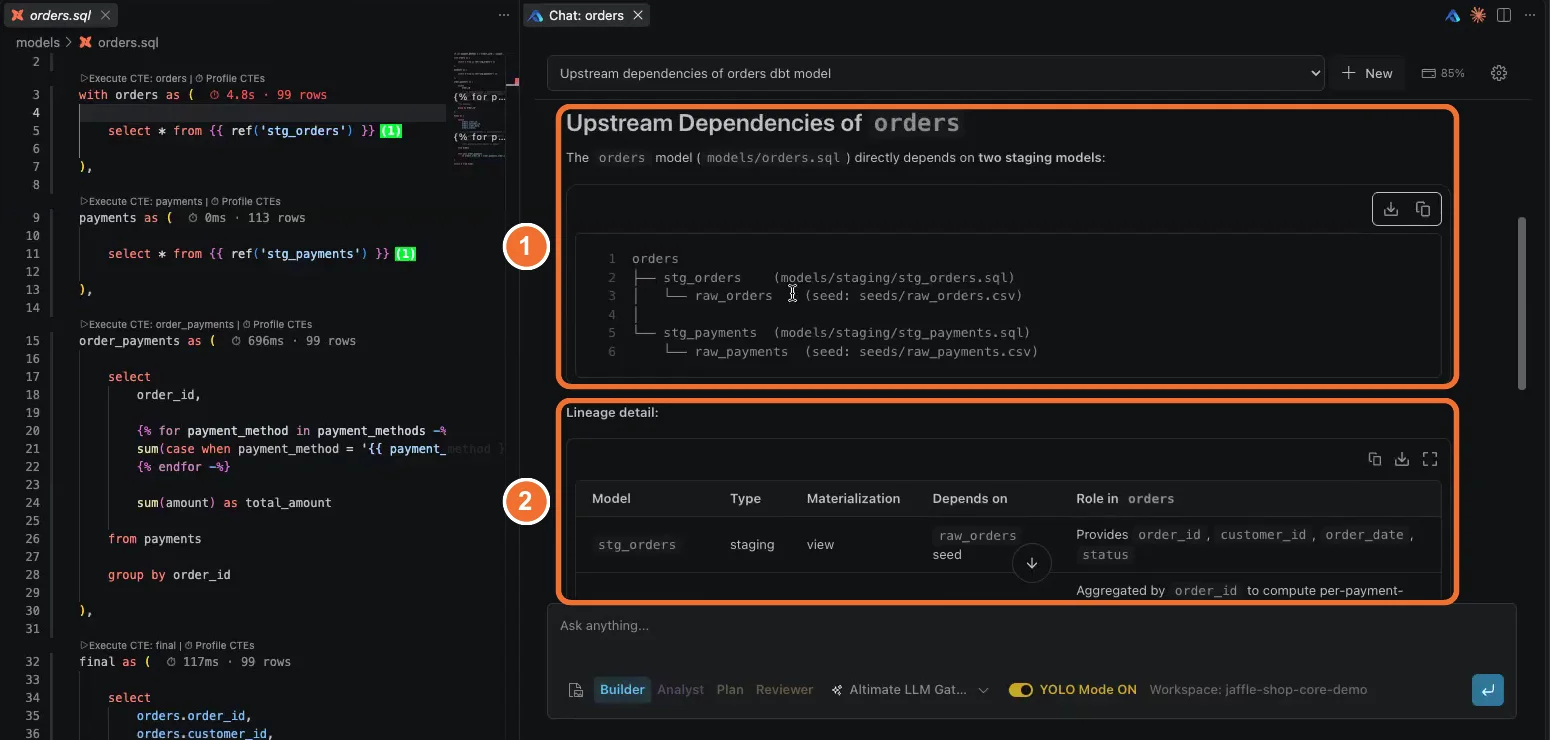
What breaks downstream. The Lineage tab shows model and column lineage on your machine. Altimate Code then answers what depends on a model and how one column gets its value.
Also in the editor for this check:
- Solid and dotted links. In column lineage, a solid line means the data flows through a select. A dotted line means the column appears in a where, join or having clause, which dbt's own column-level lineage view leaves out.
- Transformation icons label each column as original, alias, transformation or unchanged. A code icon shows the SQL that built it.
- Other projects. With dbt-loom, models from other projects appear in the graph as ext nodes.
A unit test for the change. The Documentation Editor proposes unit test scenarios with full YAML and adds the one you approve.
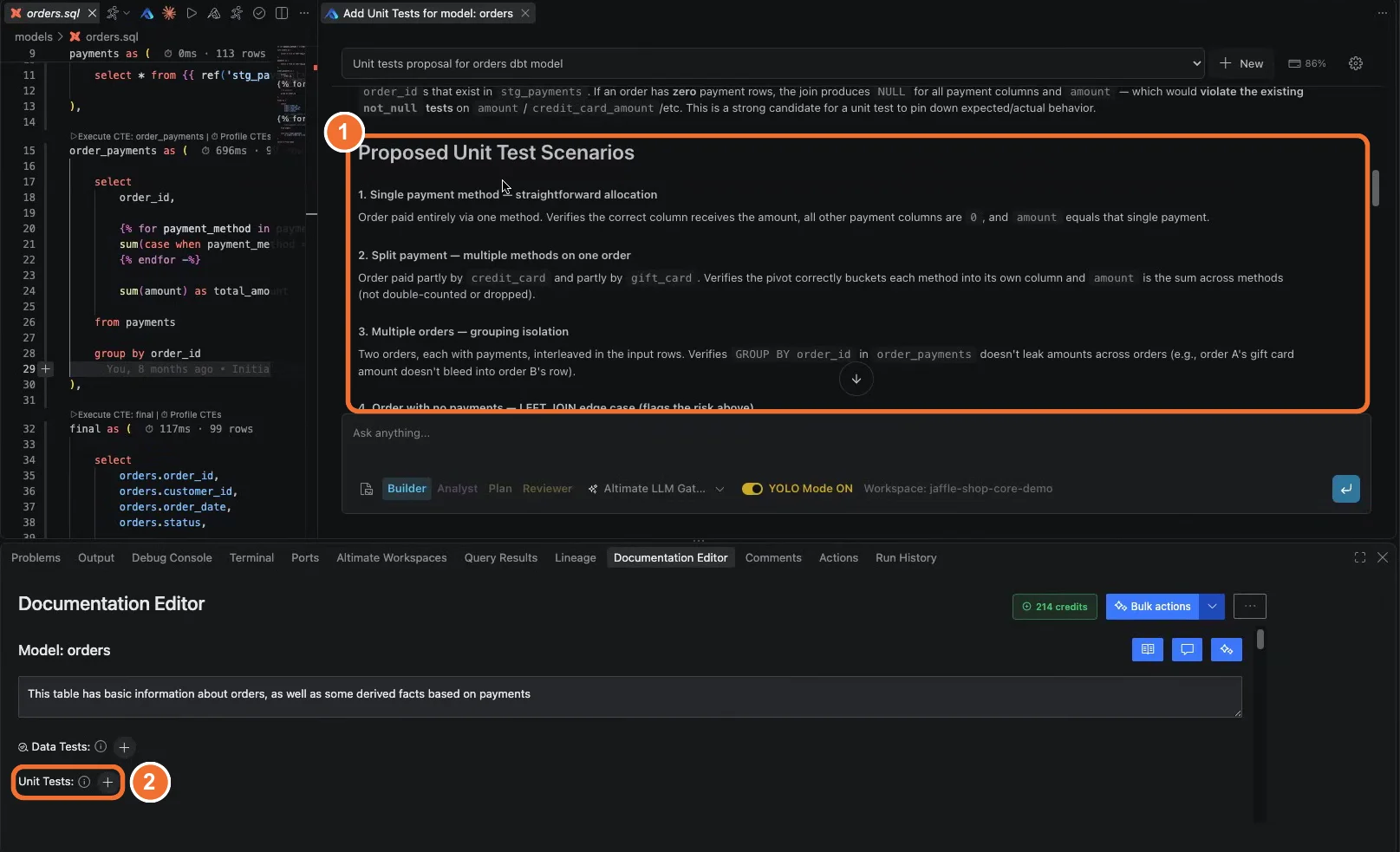
Also in the editor for this check:
- Data tests. The same editor adds unique, not_null, accepted_values and relationships tests. One click lists a column's distinct values for accepted_values.
- Custom tests. Altimate Code writes a custom test with dbt_utils or dbt_expectations when installed, and with a macro otherwise.
- Defer to production runs a model and its tests without first building the parent models. It reads a production manifest.
Every ref() and macro. Hover cards show a model's DAG depth and the models that use a macro, with an explanation one click away.
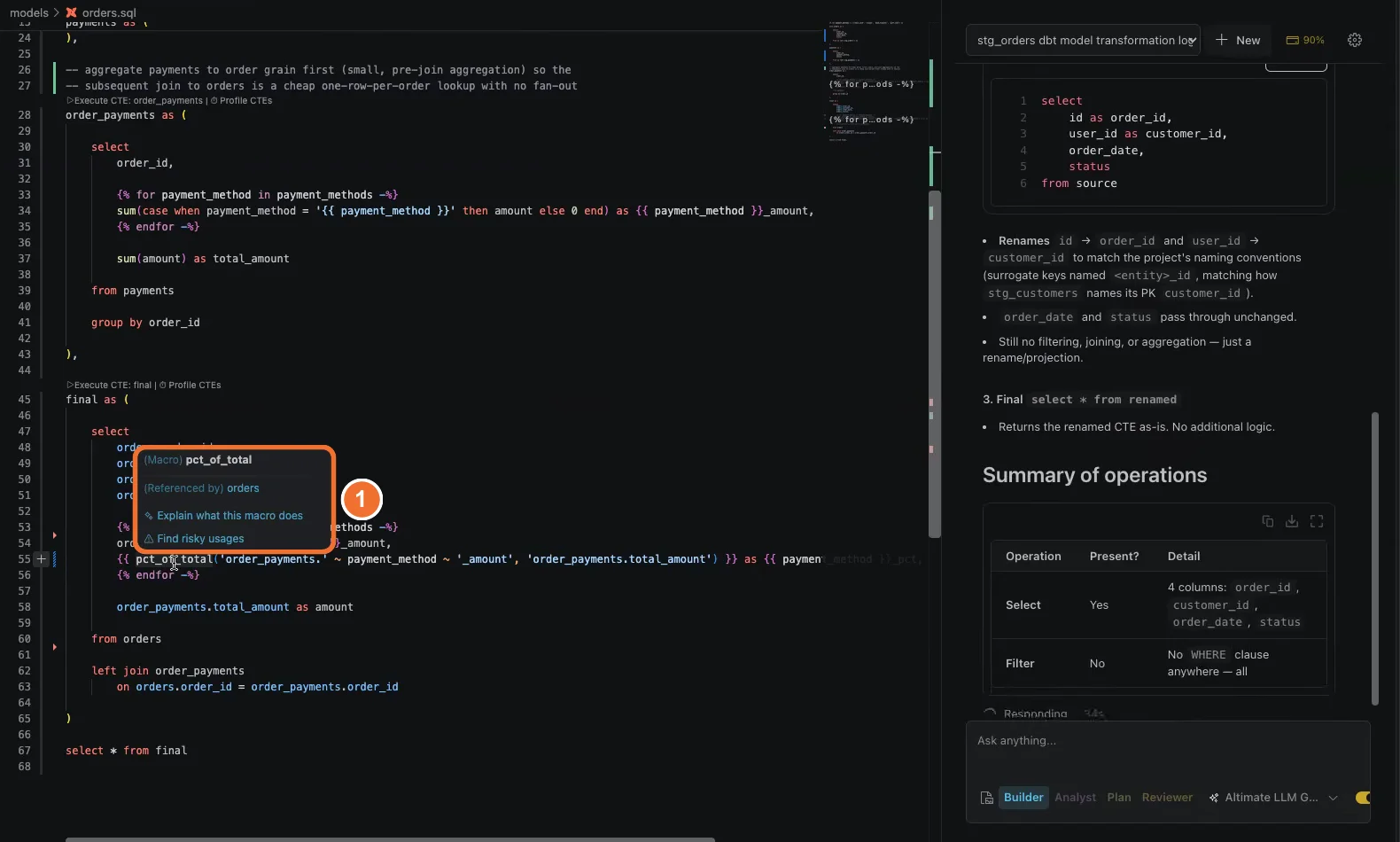
Also in the editor for this check:
- Explain transformation on a ref() hover walks through the model's selects, filters, joins and aggregations.
- Find risky usages on a macro hover checks for missing arguments, wrong types, edge cases and anti-patterns.
- Go to definition works for models, macros, sources and doc blocks. The toolbar shows the compiled SQL that the Jinja renders to.
Model-level lineage, query previews and running a single CTE work without a key. Column lineage and the AI checks need a free Altimate API key, and you can use your own model provider key. Nothing is written to your project until you approve it.
Where the Review Routine Still Needs You
Tools answer the five questions faster. They do not decide whether a change is right for the business. A unit test only checks the scenarios someone chose, so choose at least one edge case, such as an order with no payments. Snowflake does not support EXPLAIN ANALYZE. So on Snowflake, a plan shows estimates instead of measured runtimes. Treat a finding as a lead to confirm with a query, then merge.
Each feature has limits. Column lineage does not support snapshots, and unnest, lateral view flatten and JSON flatten can leave a lineage incomplete. Altimate Code can retry dbt commands, ignore installed packages or write an inaccurate test, so read each generated test before you save it. The Documentation Editor does not show tests written in dbt's alternative format or defined as macros.
Start with the model that changed most recently. Install dbt Power User from the VS Code Marketplace, or from Open VSX for Cursor, and run the five checks on your next pull request. If you already run dbt compile in a loop to read Jinja, the compile loop guide shows how to cut that step too.
Frequently Asked Questions
How do I review AI-generated dbt code?
To review AI-generated dbt code, check five things before you merge. Read the logic in every branch. Compare the row count after each join. Trace the changed columns to the models downstream. Add a unit test for the changed logic, and read every ref() and macro the model uses.
What is the difference between dbt data tests and unit tests?
Data tests run after the model builds and check its rows, such as no nulls or no duplicate keys. Unit tests run on fixed input rows you provide and compare the output to the rows you expect. Data tests find bad data, and unit tests find wrong logic.
Why does an AI-written dbt model pass tests and still return wrong numbers?
Because the common tests check shape, not meaning. A model can have unique keys and no nulls while it sums payments into the wrong bucket or multiplies rows in a join. Only a unit test or a direct check of the logic catches that.
How do I find a fan-out join in a dbt model?
Run each CTE on its own and compare row counts. A fan-out join matches more rows than expected, so one CTE returns far more rows than the CTE before it. Profile CTEs in dbt Power User does this for every CTE in one click.
Is dbt Power User free?
Yes. This dbt VS Code extension is open source and free to install from the VS Code Marketplace or Open VSX. Model lineage, query previews and CTE runs work without a key. Column lineage and the AI features need a free Altimate API key.
Does dbt Power User work in Cursor?
Yes, it does. Cursor installs extensions from Open VSX, where dbt Power User is listed. Every check in this guide works the same way in Cursor as in VS Code.