

'/%3e%3cpath%20id='path1851'%20d='M220.64%2037.3976C210.488%2037.3976%20202.401%2045.0789%20202.401%2055.5219C202.401%2065.965%20210.488%2073.6462%20220.64%2073.6462C230.792%2073.6462%20238.879%2065.965%20238.879%2055.5219C238.879%2045.0789%20230.792%2037.3976%20220.64%2037.3976ZM300.007%2037.3976C289.855%2037.3976%20281.768%2045.0789%20281.768%2055.5219C281.768%2065.965%20289.855%2073.6462%20300.007%2073.6462C310.159%2073.6462%20318.246%2065.965%20318.246%2055.5219C318.246%2045.0789%20310.159%2037.3976%20300.007%2037.3976ZM329.86%2037.5265V73.1709H336.658V58.3699C336.658%2055.8238%20336.142%2051.9399%20336.142%2051.9399C336.142%2051.9399%20338.593%2055.0897%20340.357%2056.7727L358.08%2073.5164H358.811V37.8721H352.014V52.6731C352.014%2055.0897%20352.488%2059.1031%20352.488%2059.1031C352.488%2059.1031%20350.079%2055.867%20348.358%2054.2703L330.592%2037.5265H329.86ZM98.7722%2037.8291V73.2147H106.042V61.6063H111.161C118.345%2061.6063%20124.282%2057.9816%20124.282%2049.6962C124.282%2041.4108%20118.345%2037.8291%20111.161%2037.8291H98.7722ZM134.907%2037.8291V73.1709H158.953V66.7847H142.177V58.5856H156.33V52.3284H142.177V44.2153H158.222V37.8291H134.907ZM171.127%2037.8291V73.1709H194.313V66.7847H178.354V37.8291H171.127ZM246.666%2037.8291V44.2153H256.688V73.1709H263.958V44.2153H274.025V37.8291H246.666ZM220.64%2043.8706C227.05%2043.8706%20231.395%2048.9195%20231.395%2055.5219C231.395%2062.1243%20227.05%2067.1733%20220.64%2067.1733C214.231%2067.1733%20209.886%2062.1243%20209.886%2055.5219C209.886%2048.9195%20214.231%2043.8706%20220.64%2043.8706ZM300.007%2043.8706C306.417%2043.8706%20310.761%2048.9195%20310.761%2055.5219C310.761%2062.1243%20306.417%2067.1733%20300.007%2067.1733C293.598%2067.1733%20289.253%2062.1243%20289.253%2055.5219C289.253%2048.9195%20293.598%2043.8706%20300.007%2043.8706ZM106.042%2044.2583H110.946C114.431%2044.2583%20116.797%2045.7262%20116.797%2049.6962C116.797%2053.6232%20114.517%2055.2193%20110.946%2055.2193H106.042V44.2583Z'%20fill='var(--fill-0,%20white)'/%3e%3c/g%3e%3c/svg%3e)

'/%3e%3cpath%20id='Vector_2'%20d='M23.359%2070.038C23.359%2076.4773%2018.1583%2081.6816%2011.7236%2081.6816C5.28883%2081.6816%200.0881506%2076.4773%200.0881506%2070.038C0.0881506%2063.5987%205.28883%2058.3944%2011.7236%2058.3944H23.359V70.038ZM29.1767%2070.038C29.1767%2063.5987%2034.3774%2058.3944%2040.8121%2058.3944C47.2469%2058.3944%2052.4476%2063.5987%2052.4476%2070.038V99.147C52.4476%20105.586%2047.2469%20110.791%2040.8121%20110.791C34.3774%20110.791%2029.1767%20105.586%2029.1767%2099.147V70.038Z'%20fill='var(--fill-0,%20%23BFBFBF)'/%3e%3cpath%20id='Vector_3'%20d='M40.8121%2023.2872C34.3774%2023.2872%2029.1767%2018.0829%2029.1767%2011.6436C29.1767%205.20434%2034.3774%204.48204e-06%2040.8121%204.48204e-06C47.2469%204.48204e-06%2052.4476%205.20434%2052.4476%2011.6436V23.2872H40.8121ZM40.8121%2029.1972C47.2469%2029.1972%2052.4476%2034.4015%2052.4476%2040.8408C52.4476%2047.2801%2047.2469%2052.4844%2040.8121%2052.4844H11.6354C5.20068%2052.4844%200%2047.2801%200%2040.8408C0%2034.4015%205.20068%2029.1972%2011.6354%2029.1972H40.8121Z'%20fill='var(--fill-0,%20%23E6E6E6)'/%3e%3cpath%20id='Vector_4'%20d='M87.442%2040.8408C87.442%2034.4015%2092.6427%2029.1972%2099.0774%2029.1972C105.512%2029.1972%20110.713%2034.4015%20110.713%2040.8408C110.713%2047.2801%20105.512%2052.4844%2099.0774%2052.4844H87.442V40.8408ZM81.6243%2040.8408C81.6243%2047.2801%2076.4236%2052.4844%2069.9888%2052.4844C63.5541%2052.4844%2058.3534%2047.2801%2058.3534%2040.8408V11.6436C58.3534%205.20434%2063.5541%200%2069.9888%200C76.4236%200%2081.6243%205.20434%2081.6243%2011.6436V40.8408Z'%20fill='var(--fill-0,%20white)'/%3e%3cpath%20id='Vector_5'%20d='M69.9888%2087.5034C76.4236%2087.5034%2081.6243%2092.7077%2081.6243%2099.147C81.6243%20105.586%2076.4236%20110.791%2069.9888%20110.791C63.5541%20110.791%2058.3534%20105.586%2058.3534%2099.147V87.5034H69.9888ZM69.9888%2081.6816C63.5541%2081.6816%2058.3534%2076.4773%2058.3534%2070.038C58.3534%2063.5987%2063.5541%2058.3944%2069.9888%2058.3944H99.1655C105.6%2058.3944%20110.801%2063.5987%20110.801%2070.038C110.801%2076.4773%20105.6%2081.6816%2099.1655%2081.6816H69.9888Z'%20fill='var(--fill-0,%20%23E0E0E0)'/%3e%3c/g%3e%3c/svg%3e)

Autonomous Compute Savings, SLA Safe
Auto Tune reads how your job clusters, SQL warehouses, and all-purpose clusters actually run, then moves each to a cheaper setup on its own. The waste creeps in through default cluster templates that nobody revisits, and at hundreds or thousands of jobs, nobody can revisit them by hand. Auto Tune revisits them continuously. Approve it once; it applies between runs, monitors continuously, and rolls back the moment anything slows down.
Every automated change runs the same loop. No exceptions, no surprises.
Approval-gated — you choose the jobs, warehouses, and clusters it may touch.
Policy-checked — changes clear your SLA rules before they apply.
Atomic — one snapshot, one change, applied only between runs.
Watched — continuous monitoring against the prior baseline.
Reversible — failure or degradation triggers automatic rollback.
Watch a real pass: analysis, gate checks, the applied change, the watch window that follows, and the audit trail every event lands in.
Get Serverless Efficiency at Classic Compute Pricing.
Serverless is often pitched as a better solution where compute requirements are unpredictable, but it trades over-provisioning for a premium rate under Databricks pricing. Altimate's Auto Tune for Databricks fixes the sizing directly, on the classic compute you already own, and shows you which workloads are genuinely ad hoc enough to run on serverless. Already running serverless SQL warehouses? Auto Tune tunes those too.
Spark Waste, Found and Fixed
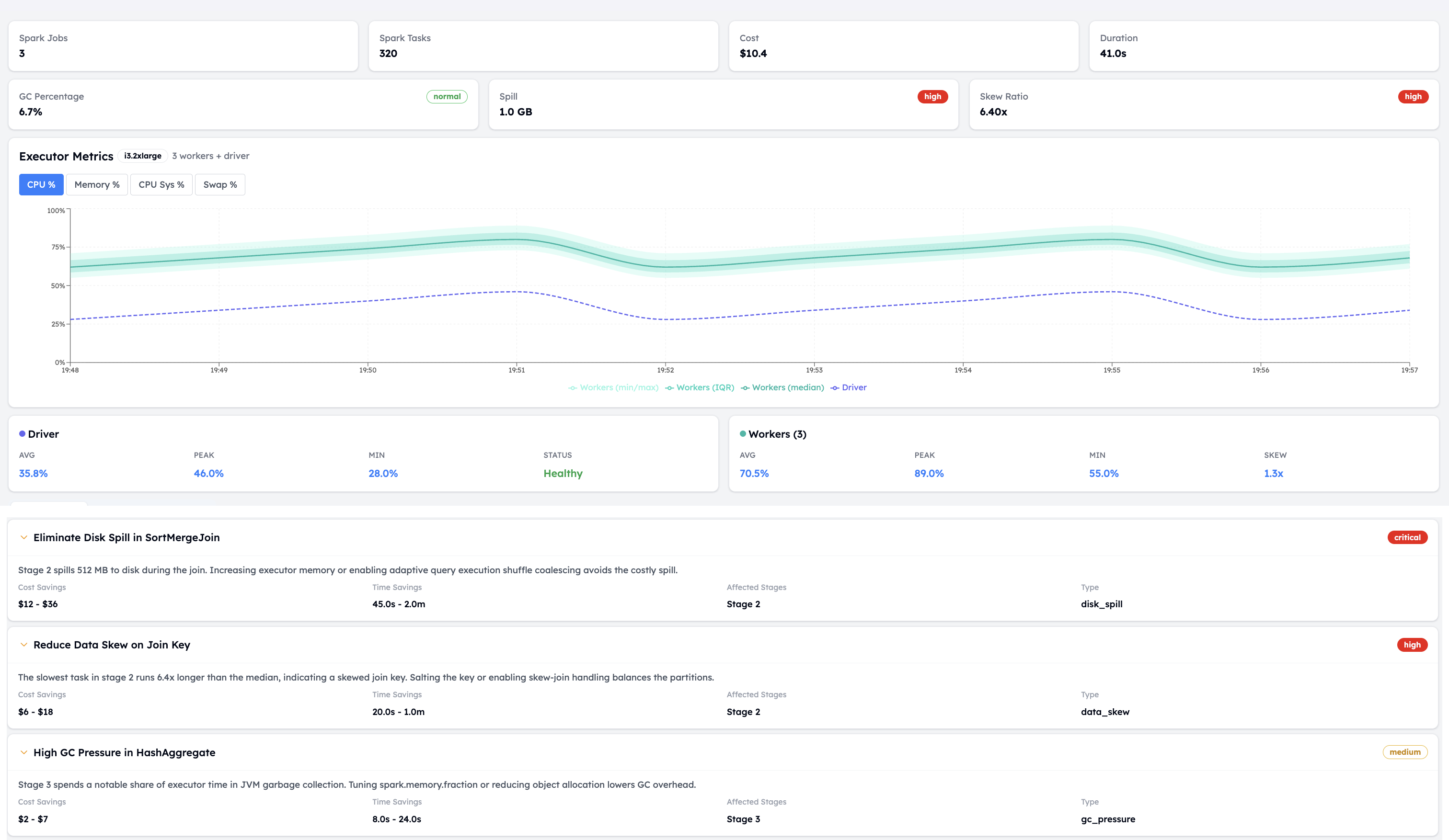
Slow shuffles, oversized executors, steps that run one after another when they could run together. Altimate reads each run, prices it, and recommends the fix — so a job creeping up on cost is caught weeks before month-end, with a concrete change already in hand.
The Fastest-Growing Line on the Bill Is the Least Watched.
Model serving, vector search, AI gateway, and Genie — the fastest-growing spend on the platform. Altimate attributes every dollar by service, team, and day, and flags endpoints serving nobody.
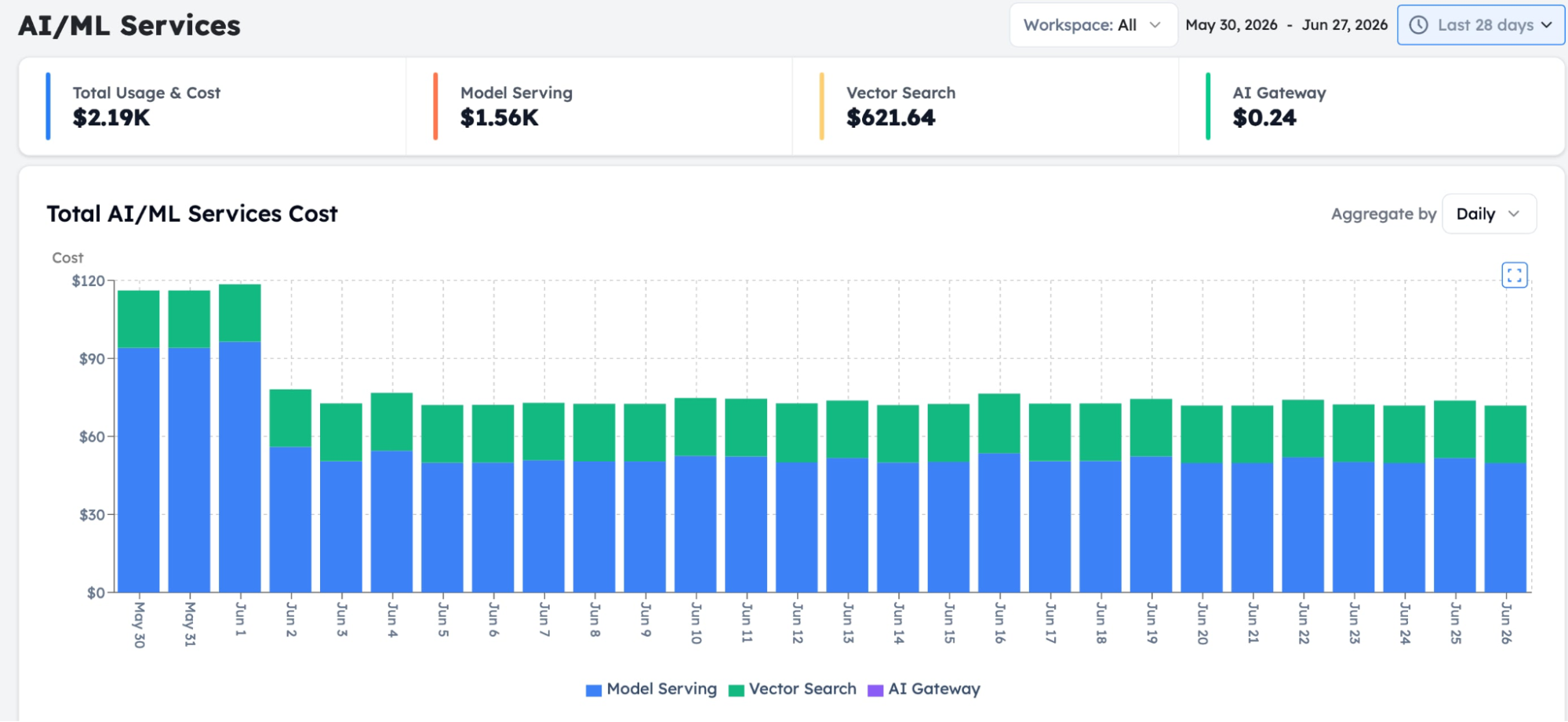
3 idle model-serving endpoints. 30 days. Zero requests. $19,800/month in invisible waste.
We flagged it. They fixed it. $240K saved annually. Zero disruption.

Every Opportunity Sized, Owned, and Tracked to Done.
Spot-instance misconfigurations, wrong instance families, notebooks parked on all-purpose clusters, resources idling for days. A co-pilot does the heavy lifting, turning each into an opportunity with a dollar value, an effort score, and a name next to it.
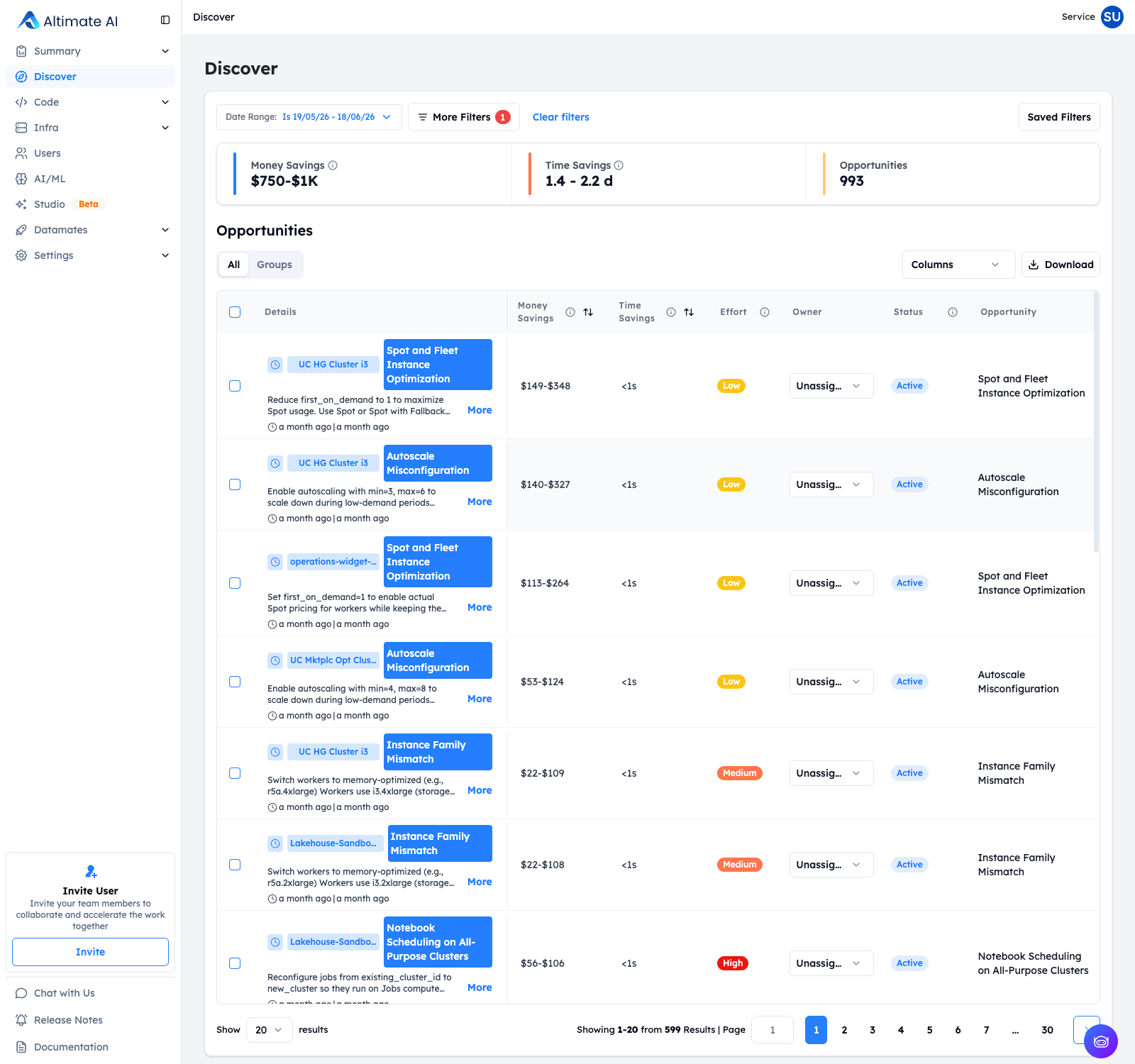
From finding to fix: how an opportunity gets explained, assigned, and closed.
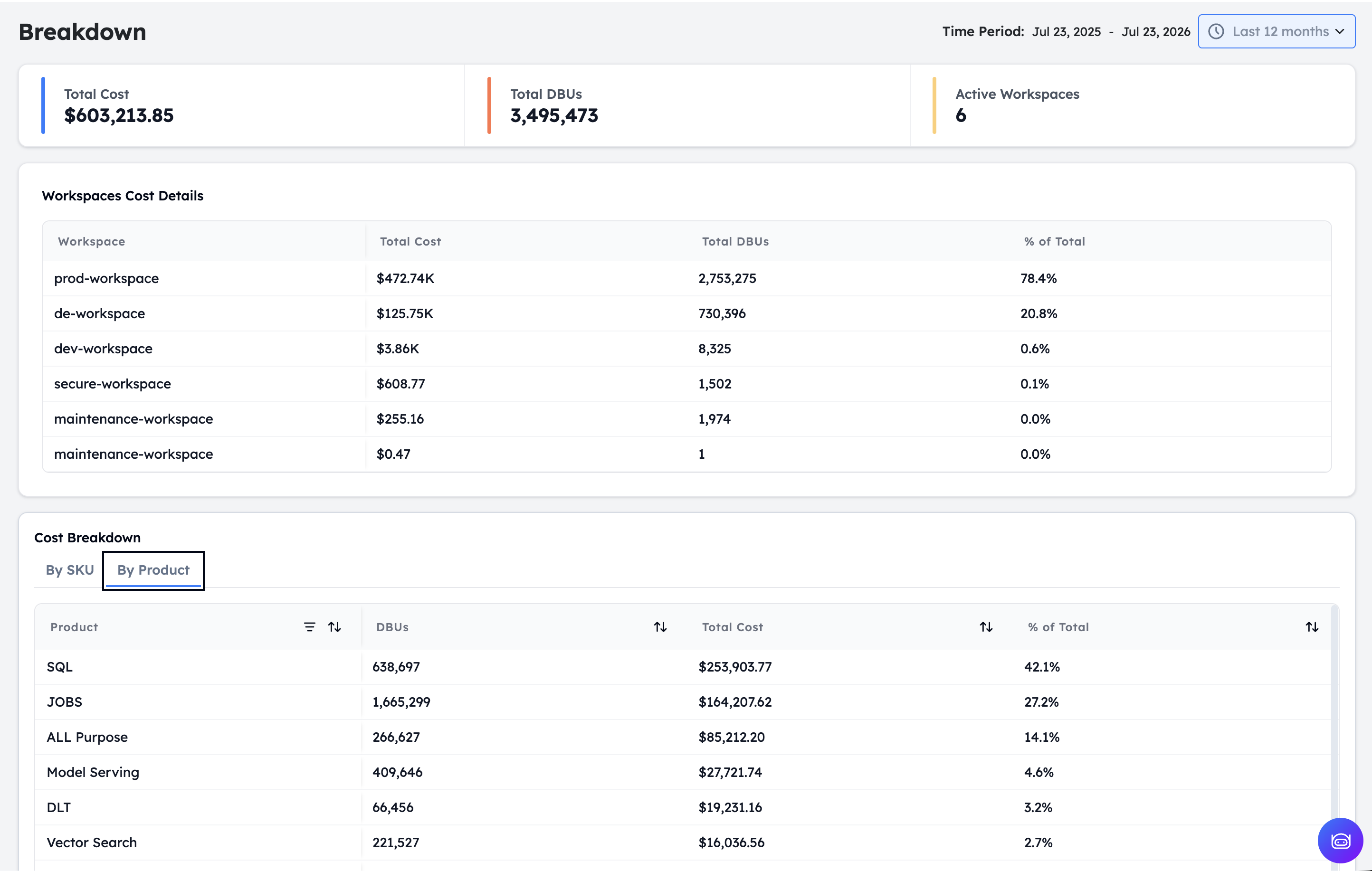
Know Which Team Spent What. See Next Quarter Early.
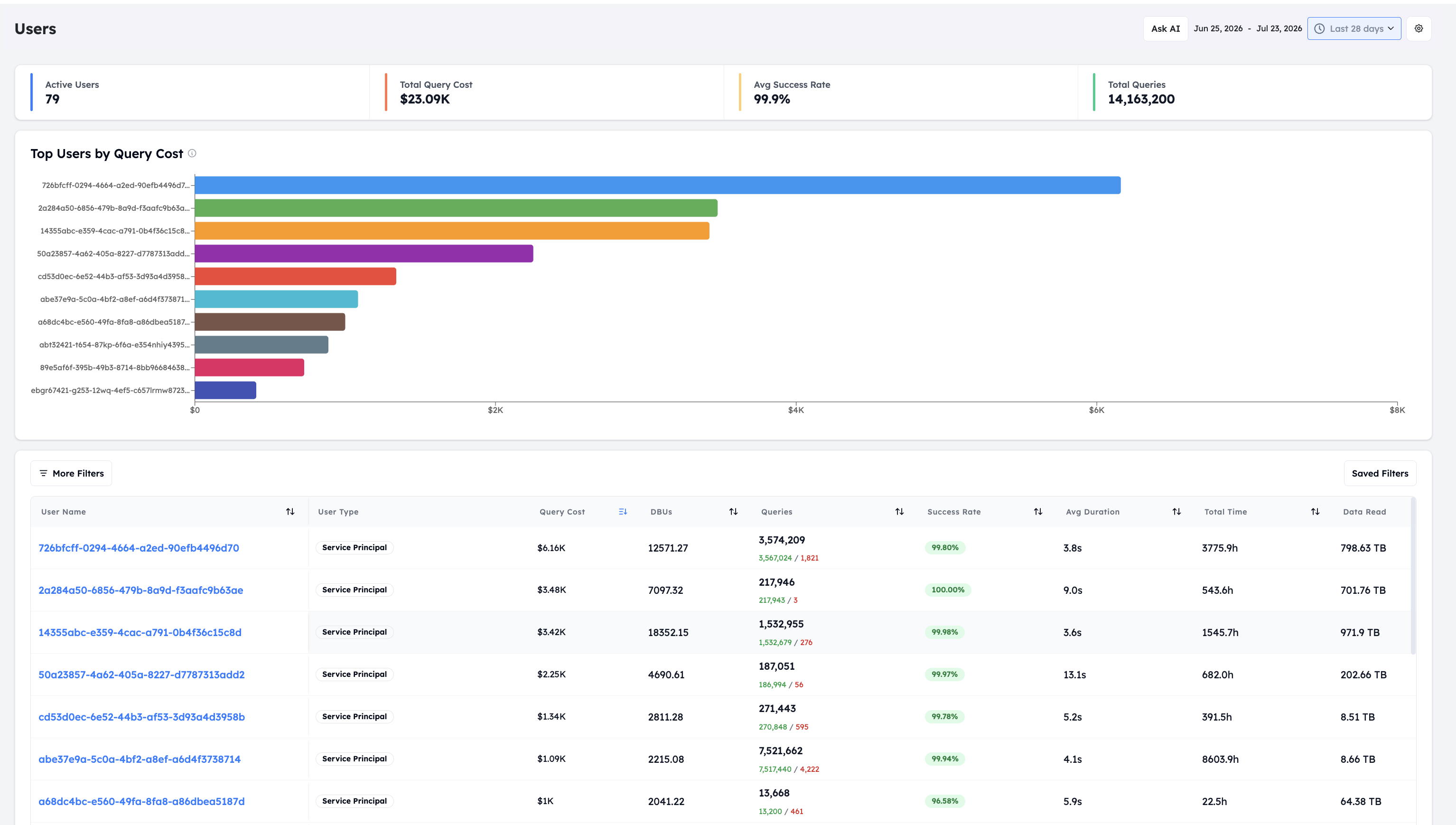
Spend split by team first, then by workspace, SKU, product, and user, and projected forward. Each SKU carries its own rate in the Databricks pricing model, so the split shows which rates drive the bill. Every dollar rolls up to an owning team, so budget conversations happen before the invoice arrives, not after.
Cost Optimization Is a Team Sport.
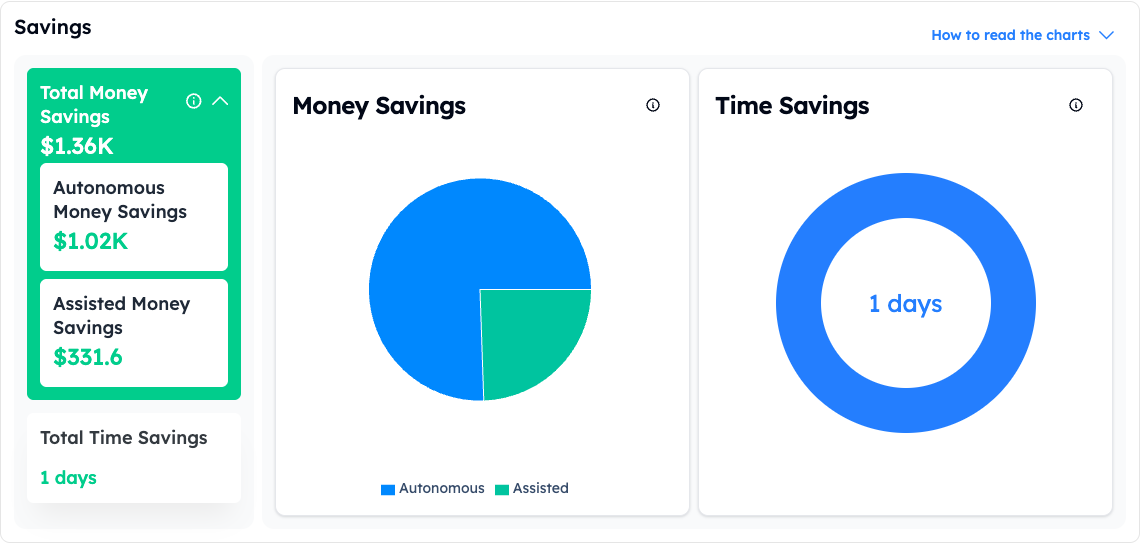
Autonomous savings and the opportunities your team closes land on one Summary page — measured in dollars and engineer-hours, each with an owner. Cost optimization stops being only the platform team's job.
Auto Tune agents apply the change themselves. Gated, monitored, reversible.
A co-pilot does the heavy lifting — sizing each opportunity in dollars, scoring the effort, and naming an owner. Your team gives the final go-ahead.
Questions, Answered.
Native tools give you visibility and storage upkeep. Cost dashboards and budgets show Databricks cost, and Predictive Optimization maintains tables. None of them change a cluster or warehouse config. Altimate acts on compute, the part that dominates the bill, and every action carries a snapshot and an automatic rollback.
A scoped service principal with read-only metadata access for analysis. Write permission exists only on the specific jobs, warehouses, and clusters you enable Auto Tune for, and it changes configuration only: never code, schedules, or data. Unity Catalog is required.
Per run, from your billing data, at your contracted rate rather than list price. Realized savings appear next to each tuned job, warehouse, and cluster, and roll up to the Summary page ledger, which tracks the cost of Databricks next to what Auto Tune saved.
Serverless removes cluster management, but Databricks serverless pricing carries a higher rate, so migrating over-provisioned workloads to serverless replaces one cost problem with another. The cheaper first step is to right-size the compute you already run: Auto Tune resizes job clusters, SQL warehouses, and all-purpose compute automatically, with typical reductions of 20 to 35%. Altimate then shows which workloads are spiky or ad hoc enough that serverless genuinely fits. And if you already use serverless SQL warehouses, Auto Tune optimizes those too.
Engineers rarely know what a job needs before it runs, so they pick a default small, medium, or large template and move on. Those defaults are sized for the worst case, they are almost never revisited, and at hundreds or thousands of jobs no team has time to revisit them manually. Auto Tune reads how each job actually runs and resizes it between runs, approval-gated and rolled back automatically if runtime degrades past 1.5x its baseline.
Auto Tune watches every touched job, warehouse, and cluster continuously. A failed run, or runtime beyond 1.5 times the recent baseline, triggers Backoff: the prior configuration is restored automatically and the event lands in the history.
A Databricks Unit (DBU) is the unit Databricks uses to meter compute. Your DBU cost is the number of DBUs a workload consumes multiplied by the per-DBU rate for its SKU, cloud, and pricing tier. A cluster that is larger than the job needs consumes more DBUs on every run, so right-sizing it lowers the DBU cost directly.
On classic compute, Azure Databricks bills in two parts: DBUs at the Azure Databricks rate for the workload type, plus the Azure virtual machines, storage, and networking underneath. Both parts grow with cluster size, so an over-provisioned cluster raises Azure Databricks cost twice.
Yes. Databricks publishes a pricing calculator, and the Azure pricing calculator covers Azure Databricks. Each one estimates cost from the configuration you plan to run. Altimate measures what each job, warehouse, and cluster actually cost per run, from your billing data, so you can compare the estimate with the real figure.
"Significant money savings on warehouses that were already optimized by us."
Aniket, VP of Data, ThredUp