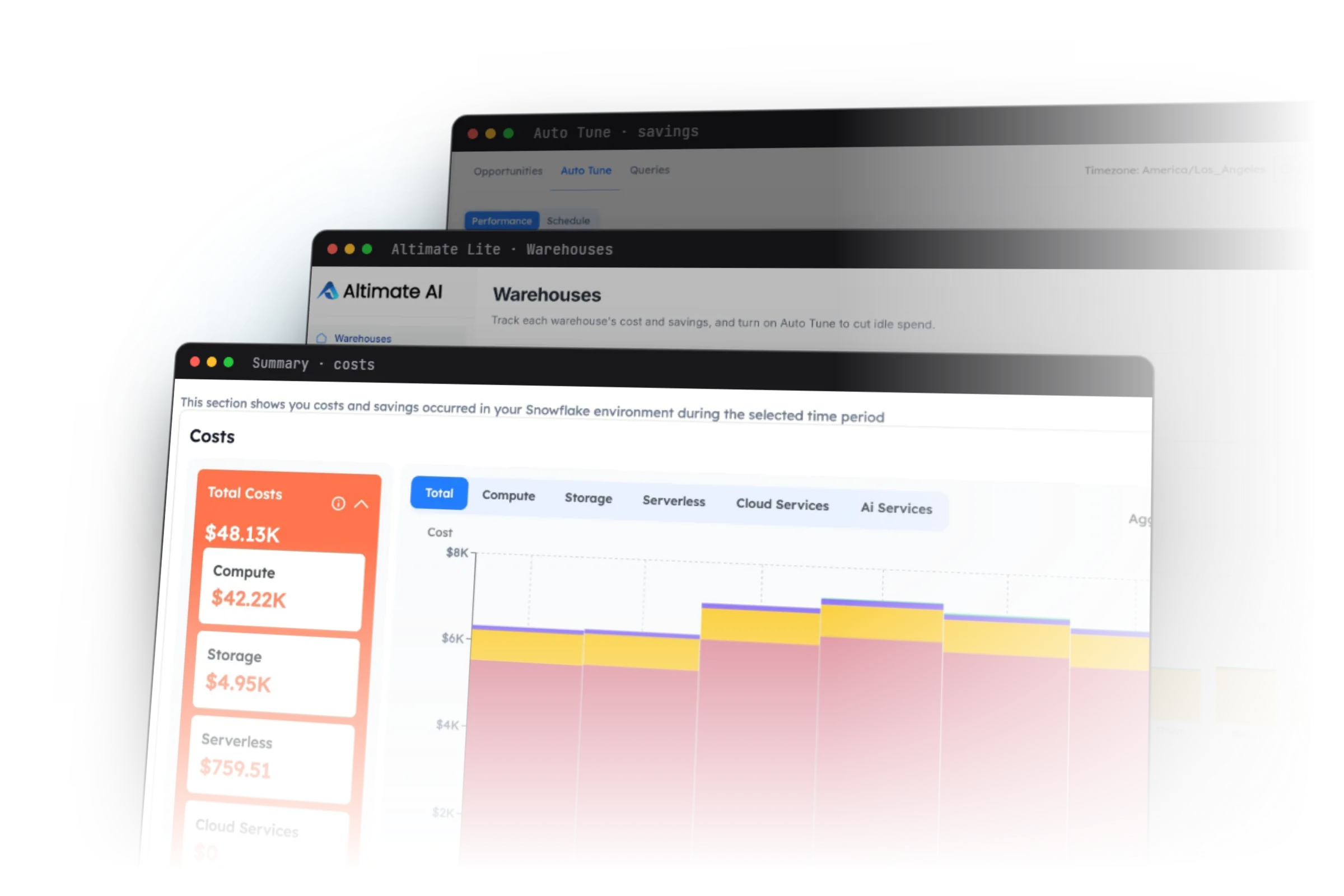
What Auto Tune and AI Cost Visibility Actually Do
Auto Tune takes the idle spend out of every warehouse
Auto Tune suspends a warehouse within about a minute of it going idle, and scales clusters down when demand drops. Nobody has to watch the dashboard.
- Only touches the warehouses you explicitly enable
- Never modifies your data, queries, or roles — it tunes compute settings only
- Turn it on or off per warehouse at any time
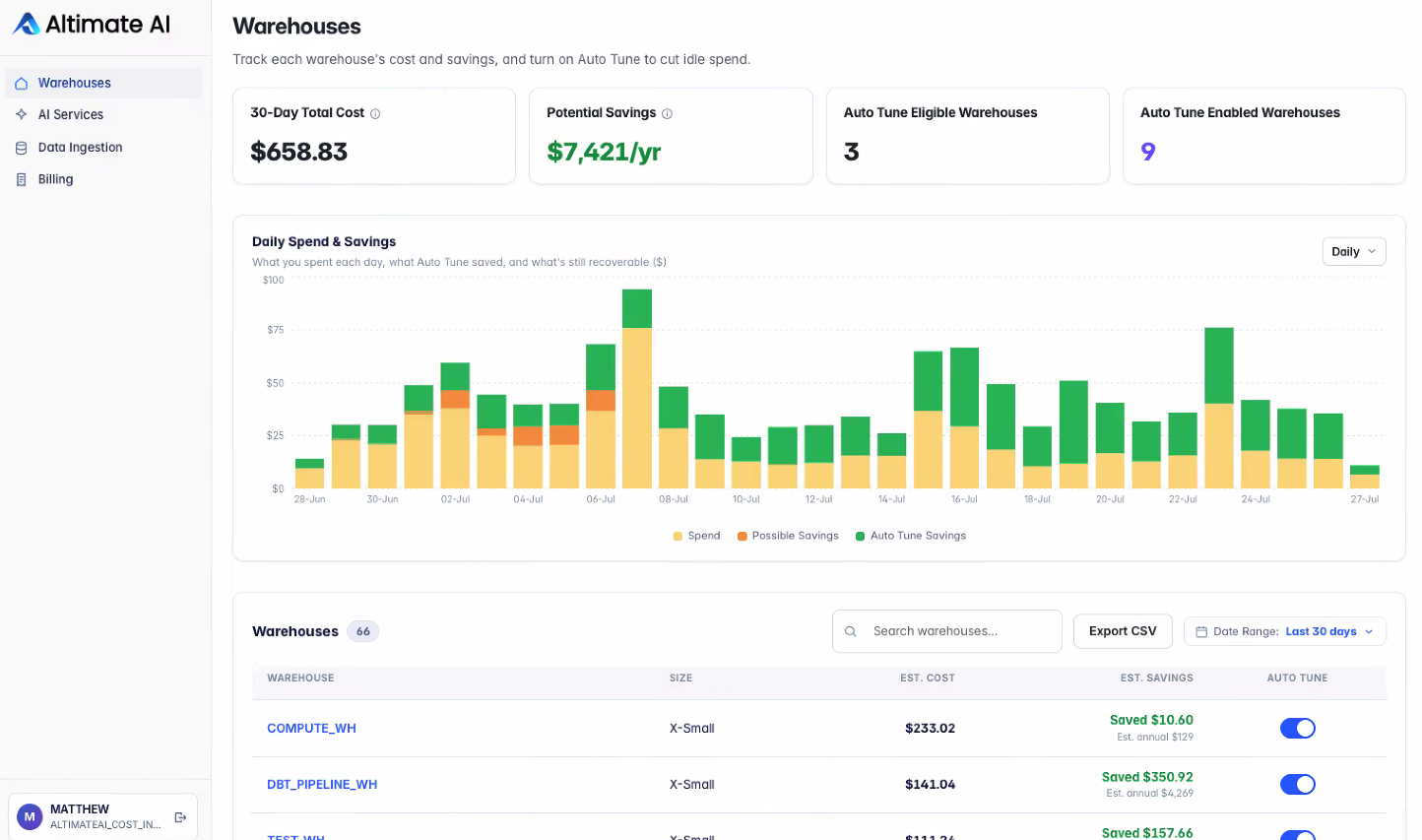
Savings you can point at, per warehouse
Each warehouse shows what Auto Tune actually recovered, not a projection dressed up as a result. Warehouses that are still off show what they would recover if you turned them on.
- Realized savings for enabled warehouses, in dollars
- Projected annual savings for warehouses still eligible
- Daily chart separating spend, recoverable idle, and recovered idle
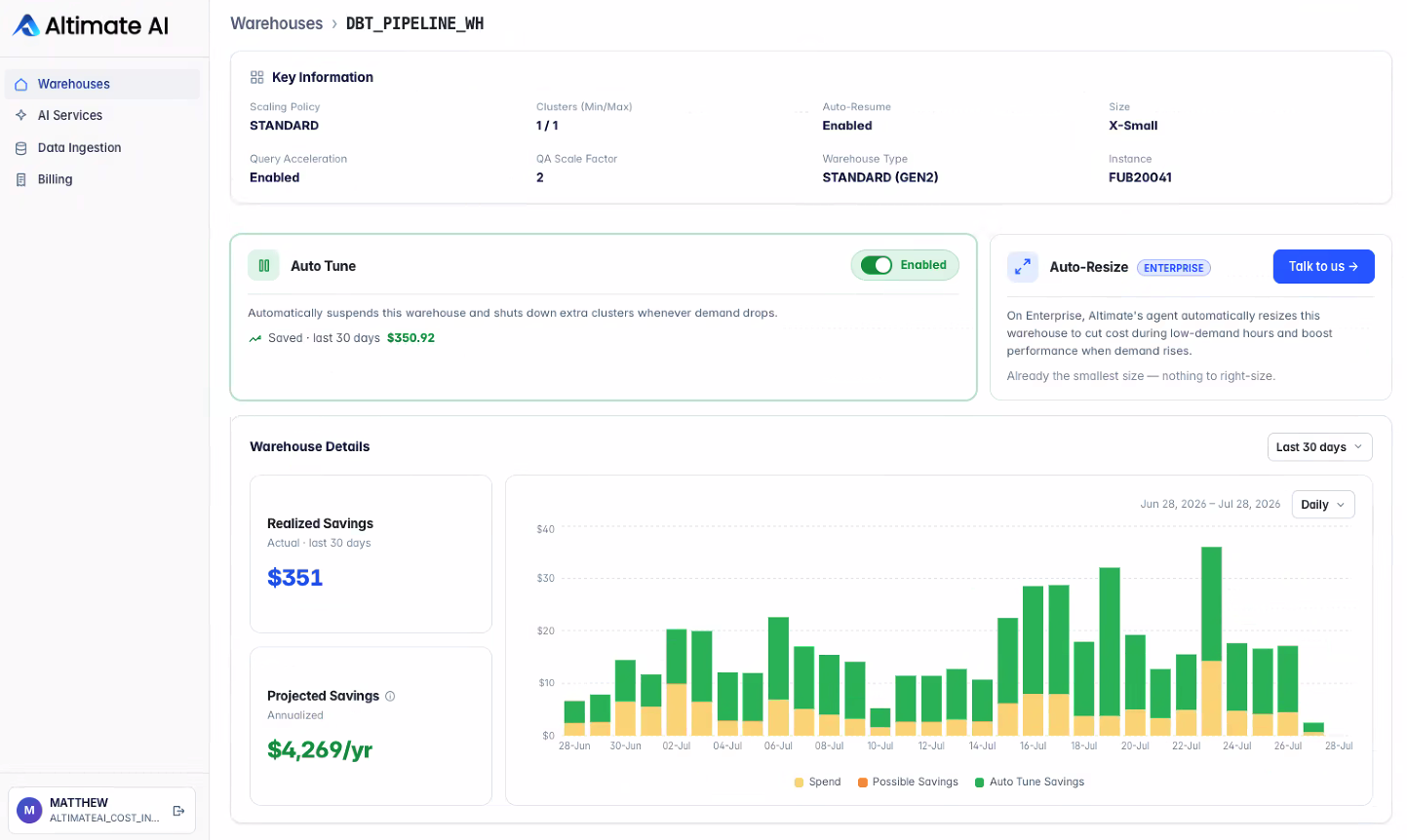
Every decision is timestamped and exportable
Auto Tune keeps a full audit trail of every action it takes — cluster suspensions, scale-downs, resume events.
- Agent Decisions chart showing tuning volume over time
- Line-by-line history with timestamps in your local zone
- Filterable by event type, exportable as CSV
- Turn Auto Tune off at any time without uninstalling the app
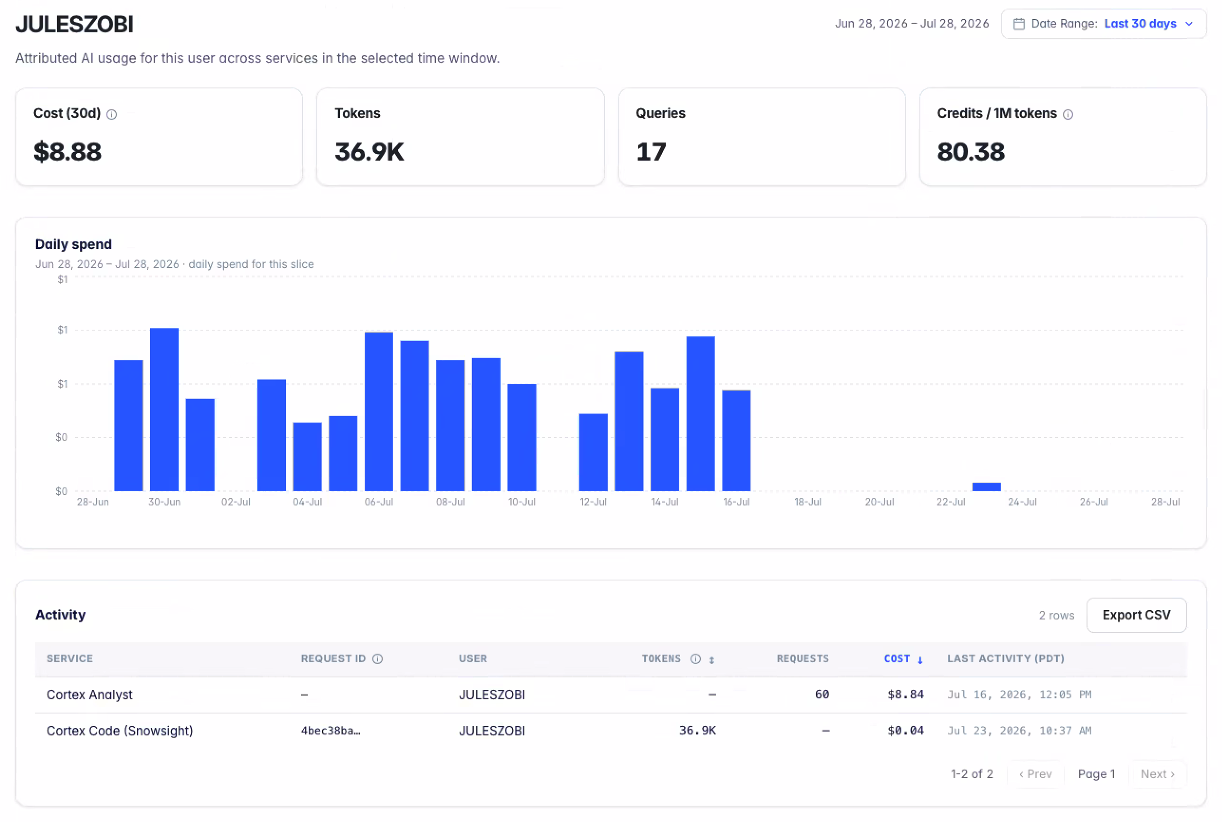
See what your AI services actually cost
Most teams get a token count at the end of the month with no breakdown of what drove it. AI Services itemizes Cortex spend so you can tell finance why this week is double last week.
- Daily spend stacked by service: Cortex Analyst, Search, Code, fine-tuning
- Filter by service, user, and model
- Spot the handful of users or the one expensive model driving the bill
- Cortex is not required — the section stays empty if you do not use it
Nothing Leaves Your Snowflake Account
Auto Tune, the web UI, every ACCOUNT_USAGE query, and every Cortex call run inside your account. Only operational signals travel out, through Snowflake's own Native App event sharing — never query or table contents.
Zero outbound calls
Every query, every tuning decision, and the web UI itself execute inside your Snowflake account. Nothing is sent to an external endpoint.
No InfoSec queue
Nothing leaves your account, so the review that a hosted SaaS tool usually triggers does not apply. Billing runs through Snowflake credits.
Opt-in per warehouse
Auto Tune only touches warehouses you switch on, and only their compute settings. Your data, tables, and queries are never modified.
One command to remove
DROP APPLICATION takes the app, its services, and its warehouse with it. Toggle Auto Tune off at any time without uninstalling.
Installed in Under Five Minutes
All you need is ACCOUNTADMIN access in Snowsight.
Get the app
Sign in to Snowsight as ACCOUNTADMIN, open Marketplace, search for Altimate AI, and click Get. Pick any small warehouse for the install.
Approve the privileges
Six account-level privileges are listed in the install dialog. Approving the dialog is the grant — there is no SQL to run by hand.
Start the app
Go to Apps → Altimate AI, click Start app, then Open web app. Snowflake authenticates you automatically.
Pick your warehouses
Onboarding verifies ACCOUNT_USAGE access, then you choose which warehouses to auto-tune and whether to monitor AI Services.
Watch the Launch Demo
Pradnesh walks through the cost dashboard, the per-warehouse Auto Tune toggle, the decision history, and AI cost observability.
Transparent, and No Sales Call Needed
Turn it on for one or two warehouses, watch the savings and the audit history for a while, and expand once you are comfortable.
You only pay for the warehouses you turn on, however many others exist in the account. Billing runs through Snowflake, so it can be paid with pre-purchased credits.
Lite Is the Front Door to the Platform
Altimate Lite covers Auto Tune and AI cost visibility. The enterprise platform, running in production for customers processing billions of queries, adds the rest.
Altimate Lite
- Auto Tune: idle suspension and cluster scale-down
- Warehouse cost, savings, and decision history
- Cortex AI spend by service, user, and model
- Runs entirely inside your Snowflake account
Altimate Enterprise
- Auto-resize — automatic warehouse right-sizing as workloads shift
- Altimate Studio — a collaborative agent workspace with scheduled reporting, showback and chargeback, and SSO
- Assisted optimization — guided fixes for query code, table and storage configuration, and dbt models, assignable to teams
- Altimate Code — the open-source CLI and VS Code extension that catches costly SQL and dbt mistakes during development
- …and many more
Frequently Asked
No. Auto Tune, the web UI, every ACCOUNT_USAGE query, and every Cortex call run inside your Snowflake account, with zero outbound network calls. Only operational signals travel out through Snowflake's Native App event sharing — never query or table contents.
Private preview customers saved an average of 19% on warehouse costs. The lowest savings observed on any warehouse on any day was 12.4%, and the highest single-day figure was 57.5% — typically weekends, when workloads are least consistent. No degradation in query performance or queue times.
Snowflake's auto-suspend probes warehouse activity every 30 seconds. Auto Tune adjusts configuration every five to six seconds based on idle state, workload shifts, and predicted upcoming load — roughly ten checks in the same window.
It only touches warehouses you explicitly enable on the Warehouses page. It responds within about a minute of a warehouse going idle, and you can disable it at any time without uninstalling the app. Snowflake-managed warehouses, such as Adaptive Compute, are not eligible.
A 21-day free trial, then $100/month plus 2.5% of the daily cost, after savings, of each warehouse you enable Auto Tune on. You only pay for the warehouses you turn on, however many others exist in the account. Billing runs through Snowflake, so you can pay with pre-purchased credits.
Auto Tune and the web UI share a compute pool, and the app's own warehouse only spins up when the UI runs queries. Net savings comfortably outweigh that runtime cost — the first warehouse Auto Tune touches usually pays for the app many times over.
Standard edition and above. Cortex AI is not required — the AI Services section simply stays empty if you are not using Cortex.
Yes. Run DROP APPLICATION, or use Apps → Altimate AI → Manage → Uninstall in Snowsight. That removes the app, its services, and the NATIVE_APP_WH warehouse, while idle-timeout changes already made to your warehouses stay in place. Reinstalling lets you re-enable Auto Tune on the warehouses you choose.
Install It from the Marketplace. Free for 21 Days.
The first warehouse Auto Tune touches usually pays for the app many times over. Want auto-resize, Studio and assisted optimization? Book a demo with the team.