- What it is. Snowflake cost attribution that puts each team's name on its share of the bill. You match assets to a team with ownership rules, by warehouse or by query. It works on Snowflake and Databricks.
- Who it is for. Data platform leads and engineering managers who answer for a team's cloud spend, not for one warehouse.
- What you get. A per-team breakdown of the bill, the queries behind each team's number, and one figure for the spend no team owns yet.
Attribute Snowflake Cost by Warehouse or by Query
Your bill is one number, but the work behind it belongs to different teams. Cost attribution puts each team's name on its share. Altimate does this two ways, and you pick the one that fits how your teams share compute.
- By warehouse. Each team runs its own warehouses, and the cost of each follows whoever owns it. If your team uses five warehouses and mine uses ten, we each pay for ours, and no query tags are needed.
- By query. Several teams share one warehouse. Most teams already tag their queries with an owner and an application, and attribution reads those tags, so one warehouse splits cleanly across the teams that use it.
| Method | Use it when | What it needs |
|---|---|---|
| By warehouse | Each team has its own dedicated compute | Nothing extra, ownership follows the warehouse |
| By query | Several teams share one warehouse | The owner and application tags most teams already set |
Pick one and hold to it. Splitting by warehouse is simpler when compute is dedicated. Splitting by query is what you want when several teams share a warehouse and you need cost per project.
Ownership Rules Decide Which Assets a Team Pays For
An ownership rule is a pattern that says which warehouses, queries or tables belong to a team. You write it once. Anything that matches it later, a warehouse someone spins up next month included, joins the team on its own. Nobody edits the rule again.
| A rule can match | Example |
|---|---|
| A warehouse, by name or tag | Every warehouse whose name starts ANALYTICS_ |
| A query, by role, user or tag | Every query run under the dbt service role |
| A table, by schema or database | Every table in one team's schema |
You can stack several rules on one team. As you add each rule, Altimate shows the cost it would pull in, so you are never guessing what a rule catches. The rules group those assets and attribute their combined cost to the team.

That combined cost is what the Team Spends page reports. Each team's total is the sum of what its ownership rules own, and nothing was tagged by hand to get there. Open a team and you see the individual queries attributed to it, each with its own cost. A spike then traces back to the query that caused it, not to a team in the abstract.

See the Spend No Team Owns Yet
Two numbers tell you how complete your attribution is, and you read them together.
| Number | What it means | How you fix it |
|---|---|---|
| Unaccounted spend | Bill that matched no ownership rule at all | Add rules until they cover every asset |
| Uncategorized | Bill that matched two teams at once | Resolve the rules that overlap |
Altimate never guesses a winner. When two teams claim the same asset it marks the asset Uncategorized, names both teams, and flags the team so you can settle it. You fix both numbers in the ownership rules, never in the bill. The target is a small Uncategorized figure, which means almost every dollar has a team that answers for it.

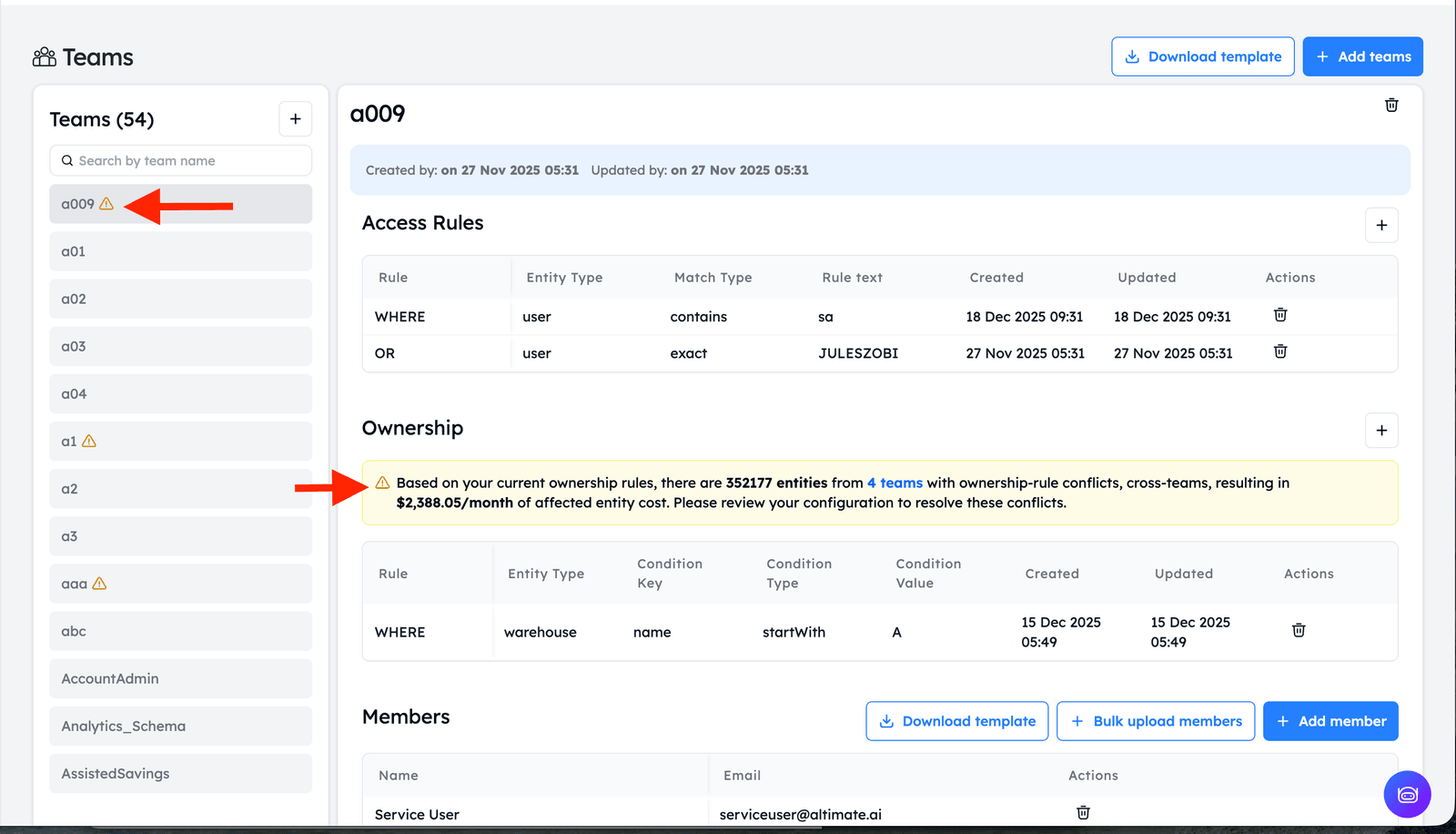
Access rules are the other half of a team. They control what the team can see, not what it pays for, so attribution and visibility stay separate. The Enterprise Platform overview covers the rest.
Talk to us about your warehouse
Frequently Asked Questions
It is the mapping from your cloud bill to the teams that spent it. Ownership rules match every warehouse, query and table to a team, so a bill that arrives as one number leaves as a per-team breakdown. It runs on both Snowflake and Databricks.
Pick one and stick to it. By warehouse applies only the warehouse ownership rules. Every query inherits the owner of the warehouse it ran on, which suits teams with dedicated compute. By query looks at each query on its own, which is what you want when several teams share one warehouse and you need cost per project.
Warehouses match on name or tag. Queries match on warehouse name, user, role or tag. Tables match on name, database or schema. Which operators a field offers, such as equals or startsWith, is set per field, so read the builder rather than assume. Rules inside one group join with AND, and the groups join with OR, so one team can own several unrelated parts of the account.
Only for query-based attribution. If you attribute by warehouse, the team owns whatever runs on its warehouses and no tags are needed. If you attribute by query, attribution reads the owner and application tags most teams already set, so there is nothing new to add.
Altimate does not pick a winner. The asset is marked Uncategorized, the reason names both competing teams, and the team is flagged in the list. Before you save a new rule you get a preview of what it would have owned over the last 28 days, so you catch an overlap before it lands.
Three things usually cause it. Your ownership rules may not cover every asset yet. Two rules may claim the same assets and cancel into a conflict. Or your names and tags may not match the patterns the rules look for. You fix all three in the ownership rules, and the Team Spends page tells you which one you have.
They use the same kind of pattern but do a different job. Ownership rules decide which assets a team pays for, which is attribution. Access rules decide which assets a team can see, which is role-based access control. A rule that gives one team its own view does not change who the cost belongs to.
That is what the per-team totals are for. The Team Spends page gives you the figure a chargeback or showback conversation runs on. It comes from ownership rules, not hand tagging, so it stays current as the account changes.