- What it is. Altimate AI's Auto Tune agents manage your Snowflake warehouse size, idle time, and clustering configuration. It cuts costs while staying within the performance bounds you set. Once enabled, your team doesn't need to do anything further.
- Who it is for. Data platform leads and engineering managers who own the Snowflake bill and the query SLAs those warehouses have to meet.
- What you get. Altimate manages your warehouses based on their workload patterns, inside your performance bounds. Customers save up to 20% of warehouse costs, and the savings are reported in a form both engineering and finance can use.
Auto Tune Runs Autonomous Agents with Human Guardrails
Auto Tune lowers your Snowflake warehouse cost. It runs autonomous agents that decide the optimum warehouse size and idle times. You turn it on warehouse by warehouse.
| Agent | What it does |
|---|---|
| Warehouse Shutdown and Scaling | Scales clusters back and suspends the warehouse before Snowflake's own auto-suspend would fire. |
| Warehouse Sizing | Drops the warehouse one level below its default during low-demand hours, reading the pattern from the same hours in earlier weeks. |
Warehouse Sizing runs in one of two modes:
- Approval mode. You get next week's downsizing schedule and approve the blocks you're happy with. Nothing resizes until you say so. Approved blocks run as Snowflake tasks, so Altimate needs task permissions on your account.
- Real-Time mode. The agent decides on its own, every 15 minutes, without asking. It carries a built-in backoff that watches performance after each resize and reverts the change if performance degrades.
Both modes take custom schedule blocks, so the hours you care about stay yours. A warehouse that idles from 2am to 4am on Tuesdays can sit one size down for those two hours. A warehouse running month-end close stays at its default size for the whole run, whatever the agent would otherwise decide.
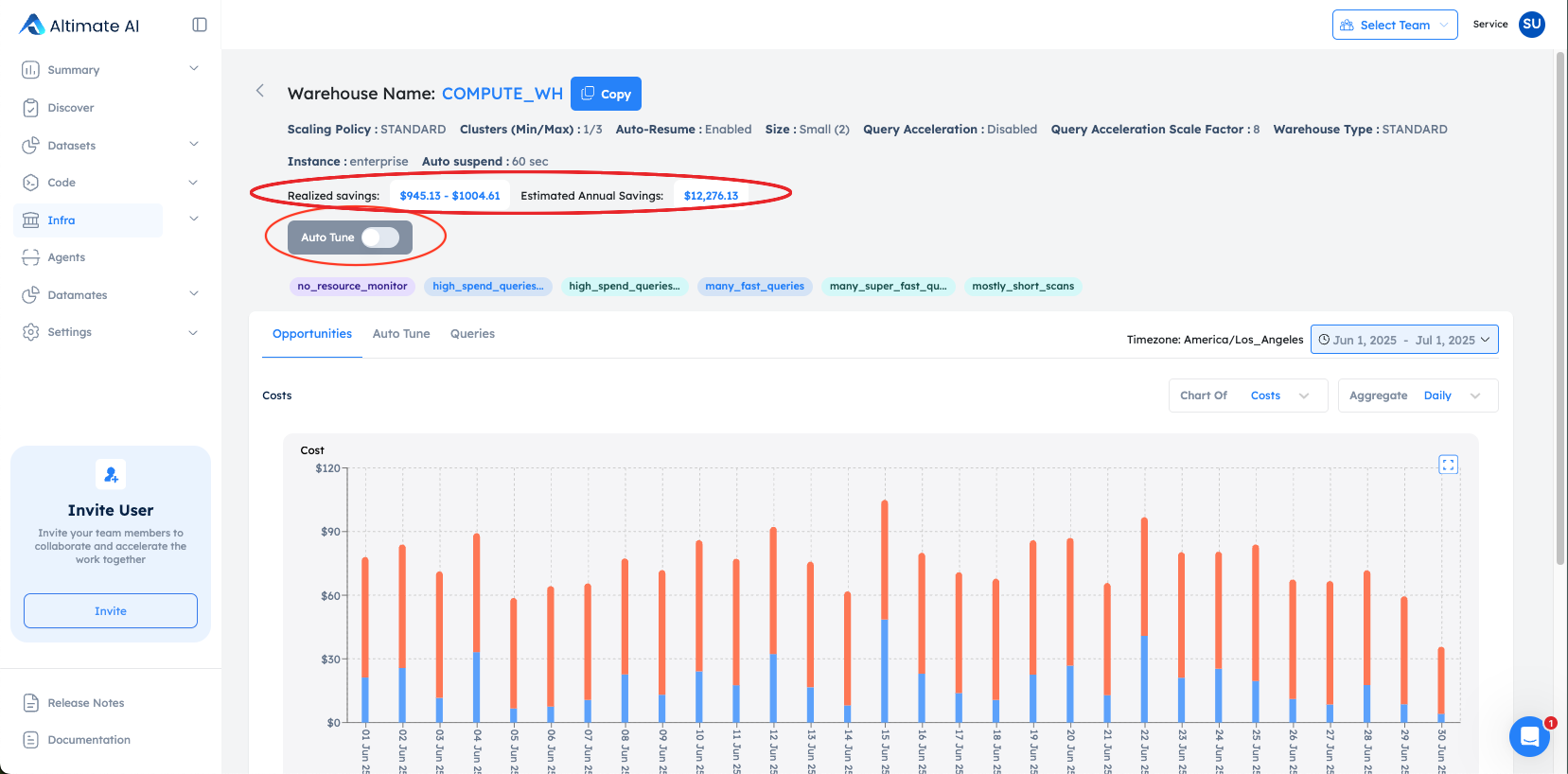
You can check the numbers before turning anything on. With the toggle still off, the warehouse page shows what Auto Tune would save you on any warehouse.
Auto Tune Rolls Back Its Changes If Performance Degrades
Real-Time mode measures two things after every resize: queue time and query execution time. Its baseline is the peak from the same day the week before, so a busy Monday is judged against last Monday.
| Metric | What triggers a rollback |
|---|---|
| Queue time | Queue time passes 150% of the baseline |
| Query latency | Execution time passes 150% of the baseline |
When either threshold is crossed, Auto Tune restores the default size and leaves that warehouse alone for the next hour. After the cool-off, it can trigger again.
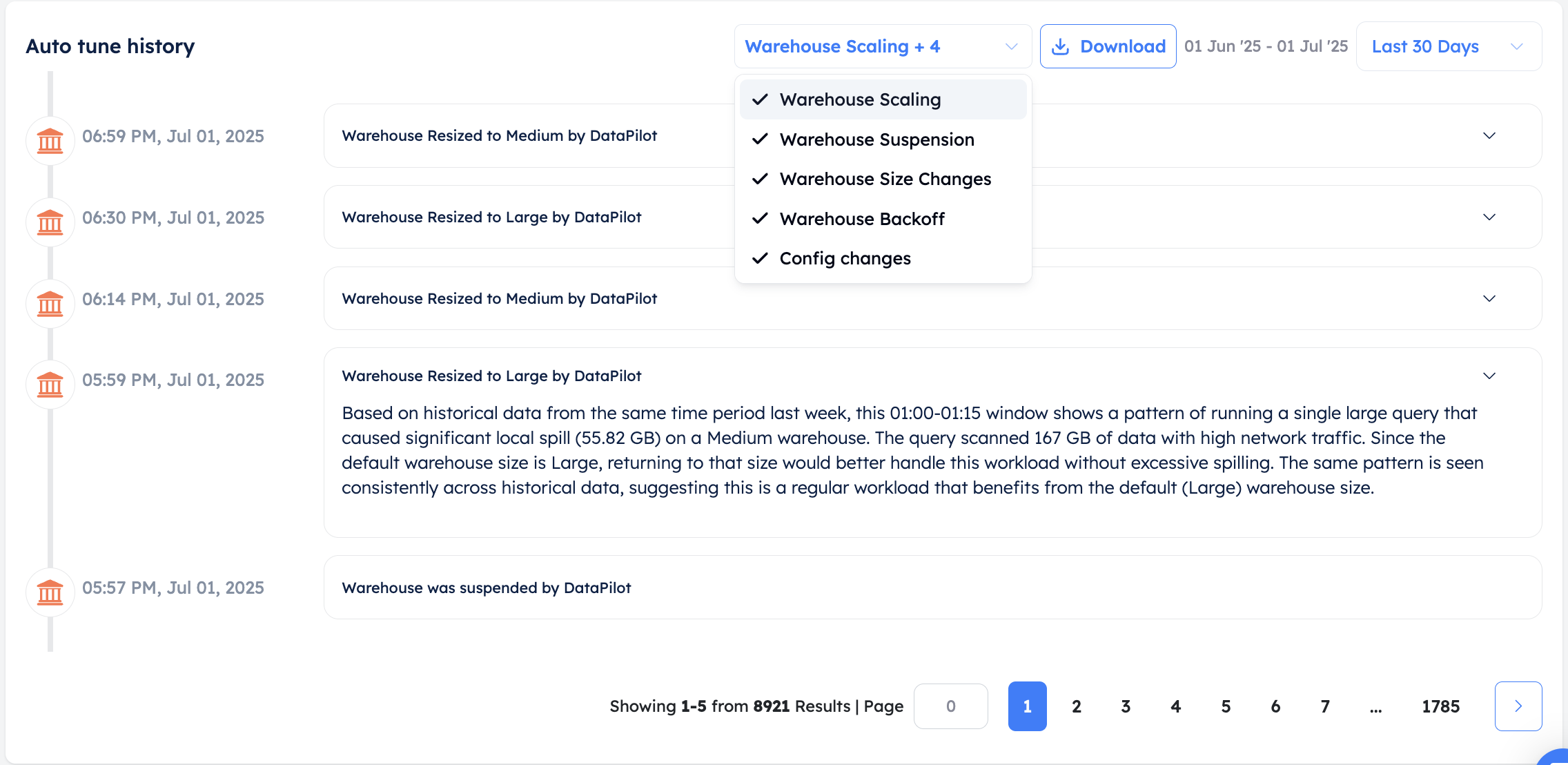
Every agent change goes into an audit trail: the new size, the new config, and the reasoning behind it. You can dig in to understand why a particular change was made.
Auto Tune Reports Savings as a Range
Snowflake checks for suspendable warehouses roughly every 30 seconds, so after your auto-suspend timer fires, the warehouse actually stops sometime in the next 30 seconds. Nobody can tell in advance when. Auto Tune accounts for this by giving you two numbers:
- The best case. The warehouse stopped the instant the timer fired.
- The likely case. It stopped 15 seconds later, halfway through that check interval.
A single number would have to assume the best case, which inflates the savings. The second number is the one that holds up in a finance review.
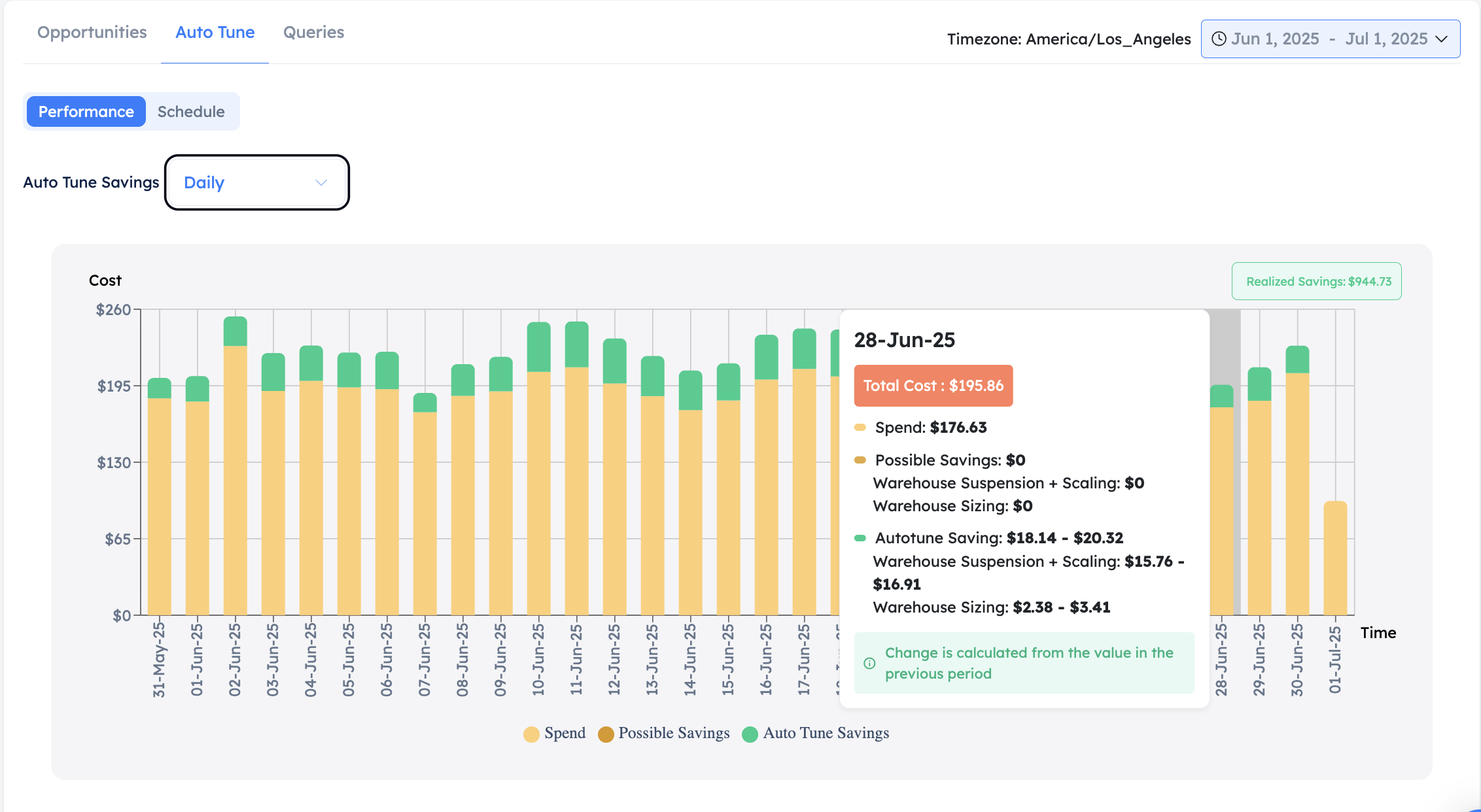
The savings chart tracks cost and savings together, by day, week, or month. Yellow is the spend; green stacked on top is what Auto Tune took off it. Hover a bar and it shows how much of that saving came from each agent.
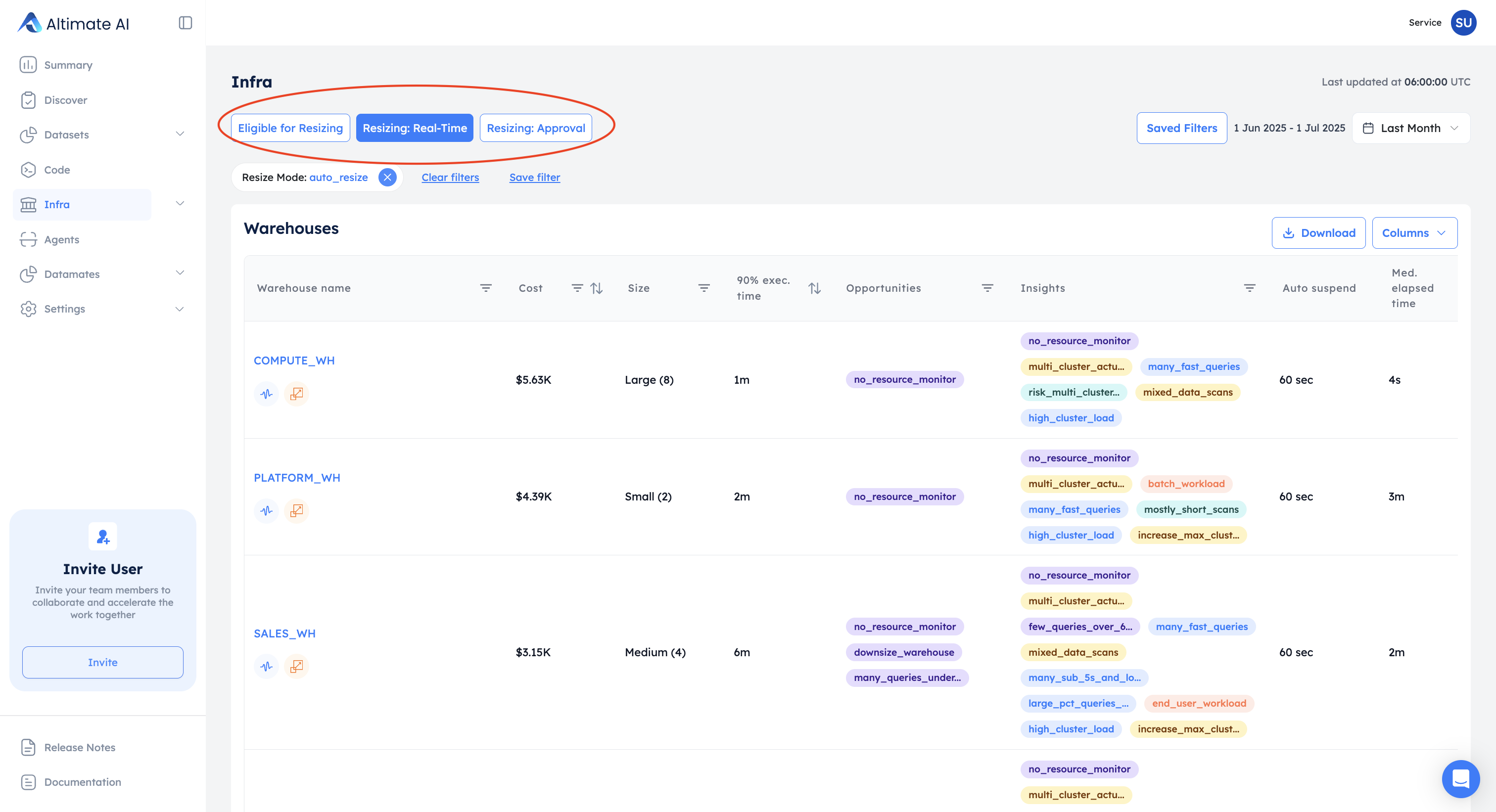
Across the whole account, the same numbers tell you where to start. The Infra page filters warehouses by whether Auto Tune is resizing them. Sort by annual saving and the biggest wins come to the top.
What You Get with Auto Tune Left On
- Warehouse Shutdown and Scaling. Suspends a warehouse sooner than Snowflake's own auto-suspend, with nobody filing a ticket for it.
- Warehouse Sizing. Drops a warehouse one size during its quiet hours. You choose whether it asks you first.
- Automatic rollback. If queue time or query time crosses your threshold, Auto Tune puts the default size back and leaves that warehouse alone for the next hour.
- Custom schedule blocks. Force a smaller size on a window you know is quiet, or hold the default through a window you can't risk.
- Two savings numbers. The best case and the case that usually happens.
Auto Tune cuts warehouse cost by up to 20% across our customers, without giving up the latency budget those warehouses run under. The backoff is why that holds. Cross your queue-time or latency threshold and the default size comes straight back.
You do not have to take the 20% on trust. With both agents still off, the warehouse page already shows Possible Savings for that warehouse in dollars. That number is measured on your own workload. Read it and compare it against our 20% before you switch anything on.
Auto Tune is part of the Enterprise Platform, and Altimate for Snowflake is where a Snowflake team starts.
Talk to us about your warehouse
Frequently Asked Questions
Warehouse Shutdown and Scaling scales clusters back and suspends a warehouse before Snowflake's native auto-suspend fires. Warehouse Sizing downsizes it one level below the default during low-demand periods. You turn each one on separately from the Auto Tune slider on the warehouse page, and the same slider turns both off again.
Auto Tune cuts warehouse cost by up to 20% across our customers, and the backoff keeps that inside your latency budget. Your own number depends on how much idle time and how much predictable low-demand time your warehouses have. With the agents still off, the warehouse page shows Possible Savings in dollars for that warehouse. Check your own figure against our 20%.
It tracks queue time and query execution time against a baseline, the peak on the same day the previous week. Cross the threshold you set, 150% by default, and Auto Tune restores the default size. It then makes no further size change for an hour.
We suggest tightening to 120% or 140% for customer-facing dashboards, interactive queries and anything under an SLA, where a delay is felt straight away. Batch ETL and reporting warehouses can run at 180% or 200% and trade some latency for more savings. The 150% default sits between the two.
Auto Tune re-checks every warehouse daily, and only offers resizing where it should pay off without hurting queries. It looks for three things. Stretches of low load. Patterns that repeat daily or weekly. And enough compute cost to make the saving worth having. The toggle only appears on a warehouse that clears all three. The settings panel says why one does not.
Approval mode gives you a recommended downsizing schedule for the week ahead, and the agent resizes only on the blocks you approve. Real-Time mode re-evaluates every 15 minutes against historical patterns and current load, with no input from you. The backoff protects this mode.
Snowflake checks for suspendable warehouses roughly every 30 seconds. A warehouse therefore stops between 0 and 30 seconds after its auto_suspend timer fires. Auto Tune shows you both ends. The best case assumes it stopped instantly. The usual case assumes it stopped halfway through those 30 seconds. Take the second number to finance and it will hold up.
Auto Tune is part of the Enterprise Platform, whose product documentation sits behind a partner login. The Enterprise Platform overview describes what is in it. A walkthrough on your own Snowflake account is the quickest way to find out which of your warehouses qualify for resizing.