- What it is. Studio is a specialized agent for cost and performance questions across your data stack. It answers on Snowflake, Databricks, dbt, Tableau and the other tools Altimate connects to. Ask in plain English and you get the cause and the fix, not the number on its own. Every figure in the answer links back to the table and the query behind it.
- Who it is for. Data platform leads, engineering managers and the finance partner who has to accept the number.
- What you get. You get one place to ask why the bill moved, which workload moved it, and what to change. This article follows one Snowflake cost question the whole way.
AI Cost Analysis on the Snowflake Page You Have Open
Studio is Altimate AI's specialized agent for your data stack. You ask in plain English about cost, performance and what to change. The answer spans Snowflake, Databricks, dbt, Tableau and more. Every major page in the Enterprise Platform has a chat button that opens it. This article stays on the Snowflake cost question, because that is where most teams start.
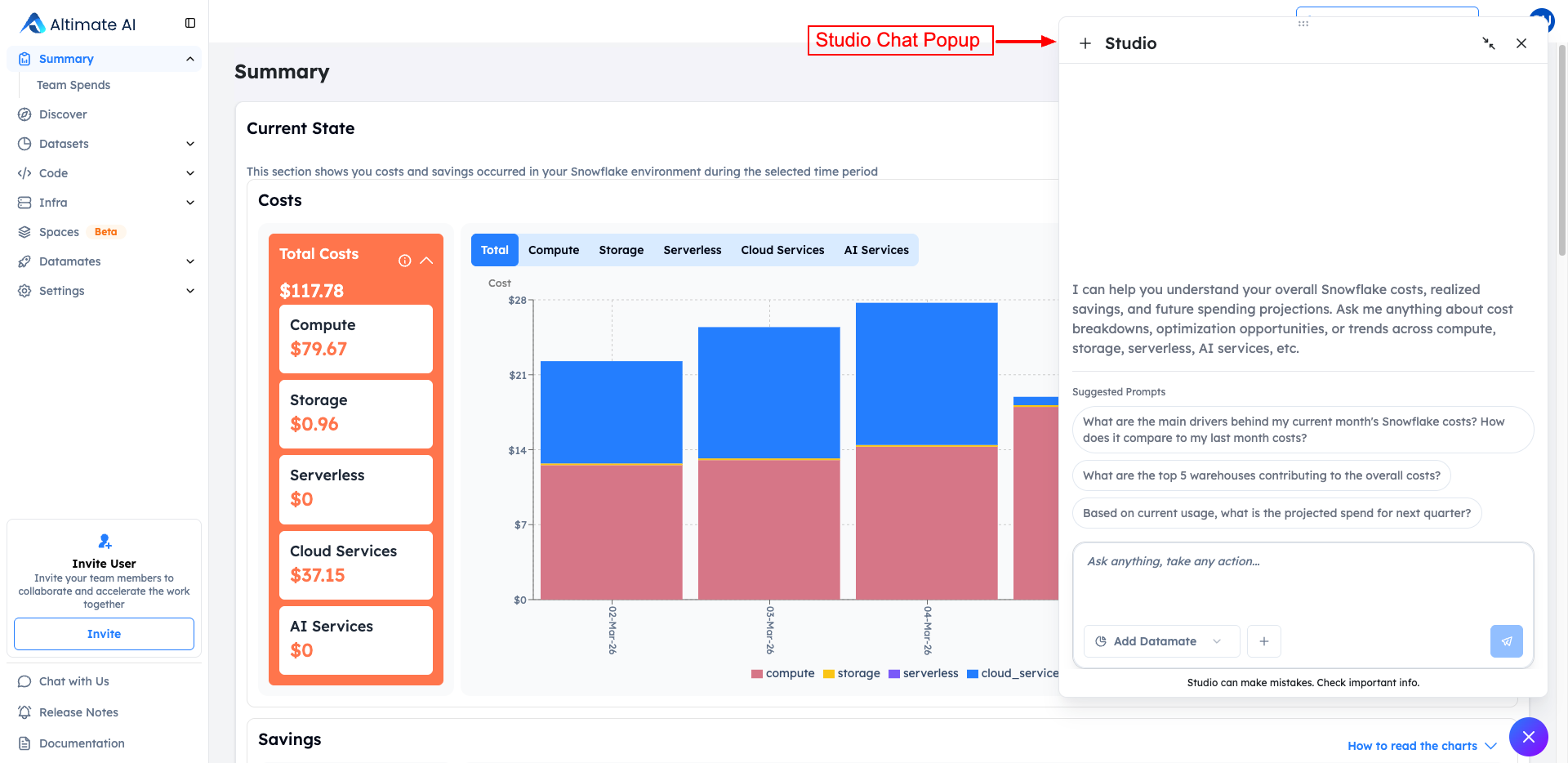
Open it from the cost Summary page and your cost breakdown stays on screen while you type. The questions Studio suggests there are all about spend:
- What drove this month's cost.
- Which five warehouses cost the most.
- What next quarter is projected to cost.
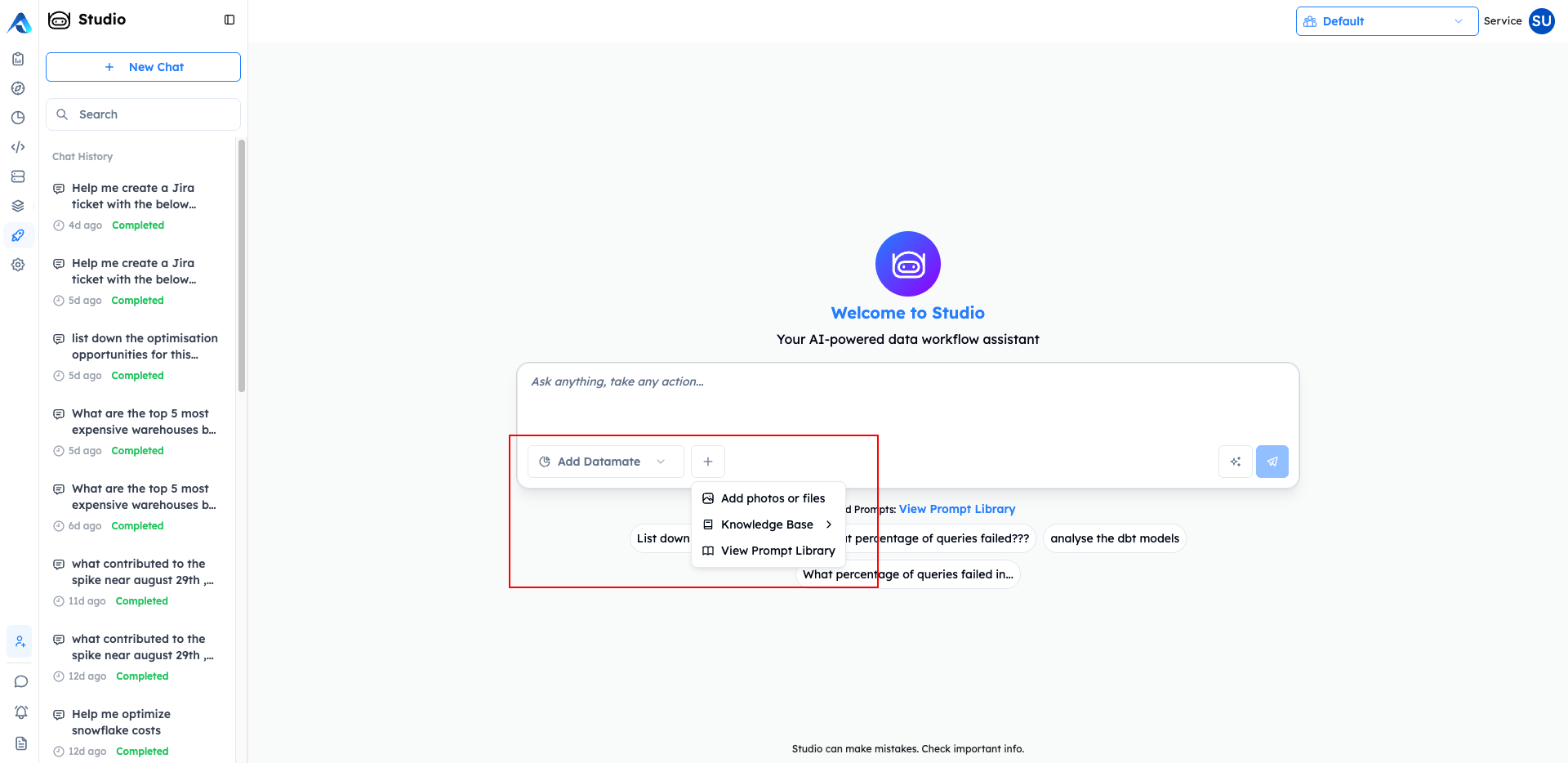
Studio already reads whatever Altimate is connected to. You add more context on top of that, in three forms:
- Attach a file.
- Pull in a Knowledge Base doc.
- Start from a prompt your team already saved.
Studio Answers Across Surfaces, Then Names the Cause and the Fix
Visibility is the first step, and only the first step. Studio reads every cost surface in one thread, so the answer does not stop at which number moved. It runs root cause analysis on that number, then gives you an optimization plan with the saving quantified. On Snowflake, these are the surfaces it draws from:
| Ask about | What the answer breaks down by |
|---|---|
| Warehouses | per-warehouse credits and query cost |
| AI Services | each function, split across four usage types: AI services, AI inference, and the overage version of each |
| Serverless | more than 19 serverless usage types, down to per-table clustering and dynamic-table refresh |
| Workloads | workload tag, matching the Workloads page |
Ask from a notebook page or a stored procedure page and Studio starts from that workload. You never have to name it in the question. Studio answers the same questions for Databricks, counted in DBUs instead of Snowflake credits.
Every Number in a Studio Answer Links to Its Source
A number nobody can trace is a number finance will not accept. Studio puts a small marker next to the numbers in an answer. Click a marker and you get three things:
- The table the number came from.
- The query that produced it.
- The steps it took to get from one to the other.
Read a missing marker as a signal. A sentence with no marker is Studio's own commentary. A number with a marker has a query behind it.
You can then share the answer or put it on a schedule:
- Share conversation. Makes a read-only link to the answer. You choose whether the link expires after 7, 30 or 90 days, or never.
- Schedule report. Re-runs the same conversation daily, weekly or monthly at 09:00 UTC, against fresh data each time.
What You Get Once Studio Is Switched On
- Answers in plain English. You ask about cost, performance or a slow workload, on the page you already have open.
- A source behind every number. Click the marker and you get the table, the query and the steps.
- A link the finance partner can open. It is read-only, and you decide when it expires.
- A report nobody has to rebuild. The same conversation re-runs on a schedule against fresh data.
Studio adds the markers in a separate step, after the answer is already written. The wording never changes to fit a citation. A marker points at exactly what Studio computed. If it cannot trace a number, that number gets no marker at all. That is why an unmarked figure is a real warning rather than a gap in the tooling.
Studio is in Beta today, and Altimate for Snowflake is where a Snowflake team starts.
Talk to us about your warehouse
Frequently Asked Questions
Three things: the source table, the SQL that produced the number, and the steps in between. When an answer mentions a Snowflake object, it also gives you a badge you can click through to that object's page. It lists everything it referenced in a Sources section.
Because Studio could not trace them. Studio adds the markers in a separate step, after it writes the answer. Anything it wrote as commentary rather than computed from your data gets no marker. Read the absence as a signal. A sentence with no marker is opinion, and a number with a marker has a query behind it.
Four. Warehouses gives you per-warehouse credits and query cost. AI Services splits each function across the four usage types, which is what you want when you are reading a Cortex bill. Serverless goes down to more than 19 usage types, including per-table clustering and dynamic-table refresh. Workloads splits by workload tag, the same tag the Workloads page uses.
You pick one of three modes when you create the link. Anyone who has the link, with no login needed. Named people who already have an account in your workspace. Or a connected Slack channel. Links expire after 7, 30 or 90 days, or never. A shared conversation is read-only, so whoever opens it sees a frozen answer and cannot keep asking questions.
Daily at 09:00 UTC, every Monday at 09:00 UTC, or on the first of the month. Every run queries fresh data instead of replaying a cached snapshot. From the schedule view you can pause a report, edit it, run it by hand, or look at its run history.
Yes. Every answer comes with a confidence indicator. If it reads Low Confidence at 50%, Studio is telling you to narrow the question before you act on the answer. Together with the markers, that gives you two ways to check an answer before it goes into a finance review.
None of the three is on by default. Each one is switched on per workspace, so ask your Altimate account team to turn them on for yours. Studio itself is in Beta. The Enterprise Platform overview covers what else is in the platform, and the product documentation sits behind a partner login.