- What it is. Altimate Lite for Snowflake, an app from the Snowflake Marketplace that prices every Cortex feature you use from the usage data Snowflake already records. It installs in under five minutes. No extra setup needed.
- Who it is for. Data platform leads, FinOps managers and AI engineers. Anyone who answers for a Cortex line nobody can currently break apart.
- What you get. Your Cortex Cost Breakdown split by service, by user, and by model.
See What Each Cortex Service Costs You
Altimate Lite runs entirely inside your Snowflake account, and its AI Services page is where the Cortex line comes apart. The app reports each feature on its own, because they bill for different things. Cortex is one half of what the app prices, and the Altimate Lite overview has the warehouse half.
| Service | What it bills for |
|---|---|
| AI SQL Functions | LLM tasks run as SQL functions, directly on your data |
| Cortex Analyst | plain-English questions answered against a semantic model |
| Cortex Search | search over your own documents and unstructured data |
| Cortex Agents | an orchestrated agent combining Analyst and Search |
| Snowflake Intelligence | the natural-language interface for exploring data |
| Cortex Code | the AI coding assistant for SQL and Python |
| Fine-tuning | customizing a base model on your own data |
For the window you pick, the page gives you five things at a glance:
- Total AI cost, in dollars.
- Token count, split into input and output.
- Active users, how many people used Cortex at all.
- Services used, how many of the seven you actually touched.
- A daily cost trend, stacked by service.
Under that, the page ranks every service by spend and gives its share of the total.
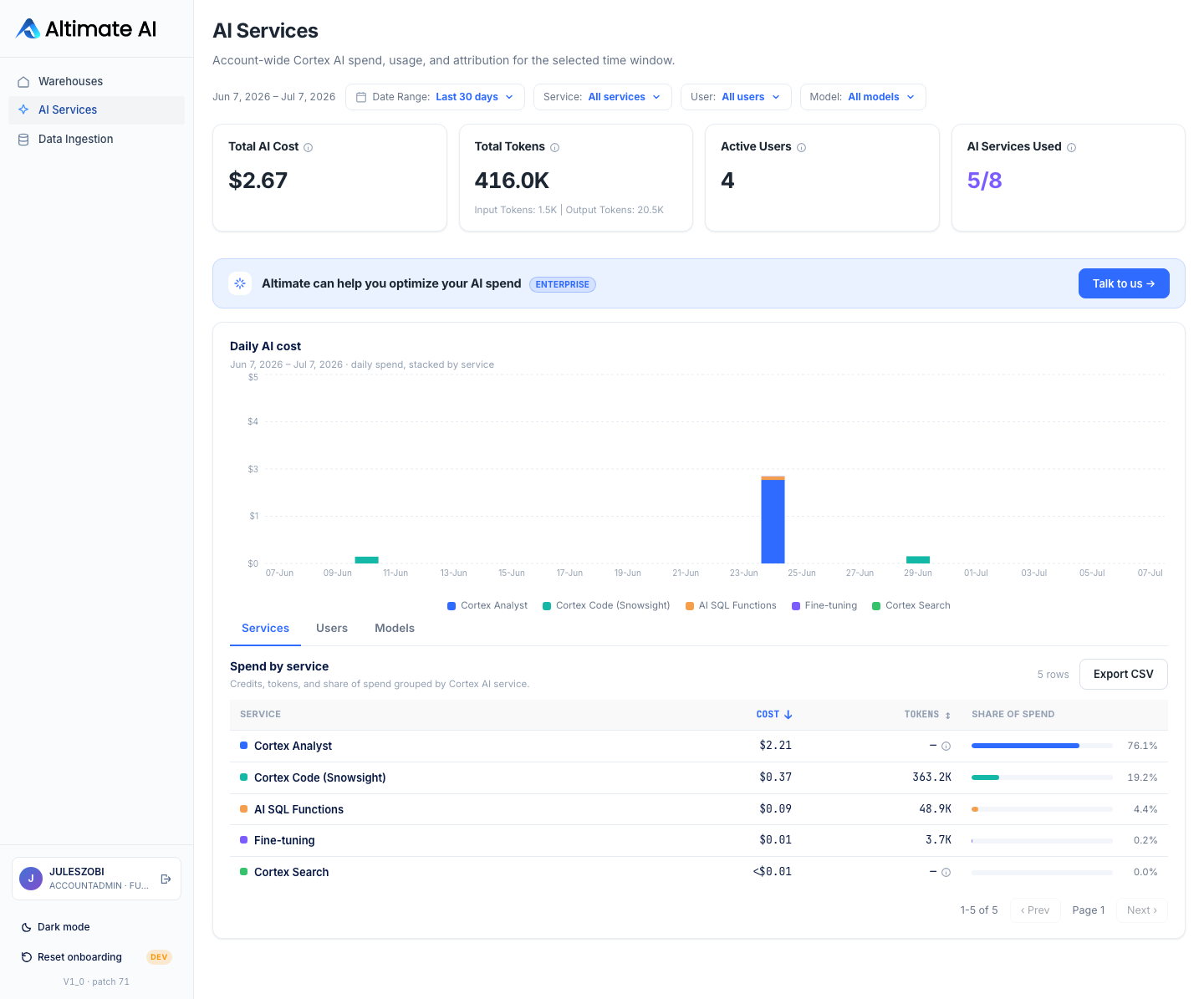
Start with the share column before the cost column. On the account above, Cortex Analyst is 76.1% of all Cortex spend. One service is nearly the whole Cortex line. Fixing Analyst usage is the only work worth doing. The other four services together are the remaining quarter, and they can wait. If instead the top service came in at 30%, spend is spread out and there is no single thing to fix.
Filter the Snowflake Cortex AI Cost Breakdown by Service
Services, Users, and Models are three tabs over the same window, each a ranked table with a share-of-total column. The Service, User, and Model filters above them combine. One service plus one model is a single slice, and every figure on the page redraws around it.
Export CSV then pulls every matching row for the current filter, not just the rows on screen. That turns "which model is driving the Analyst bill for the growth team" into three clicks.
Click any row and the drill-down reaches the individual calls behind the total.
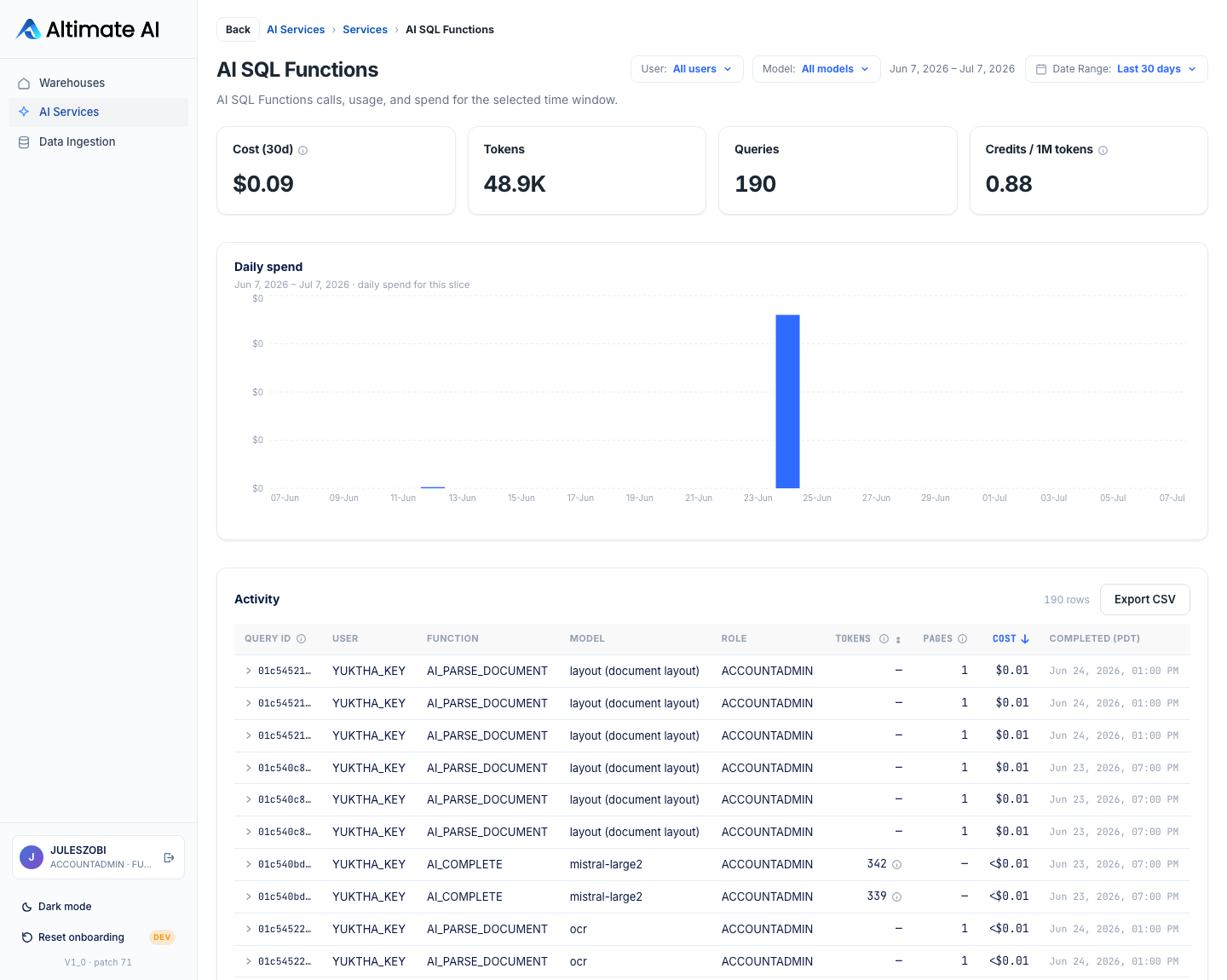
How deep that table goes depends on what Snowflake reports for the service:
| Service | What one row is | What it carries |
|---|---|---|
| AI SQL Functions, Cortex Code, Agents, Intelligence | One call | Query ID or Request ID, plus user, function, model, tokens |
| Cortex Analyst | One user | A Requests count in place of tokens, because Snowflake reports hourly request counts per user |
| Cortex Search | One named search service | A Tag marking query-time or indexing-time credits, because no user or request id exists |
Trace Snowflake Cortex Cost to Each Service, User, or Model
- A service split. Every Cortex feature the app tracks on its own line, with its share of total spend beside it.
- A user and model split. Two more ranked views over the same window, filterable together with the first.
- Call-level evidence. A drill-down that stops exactly where Snowflake's own reporting stops.
Snowflake bills Cortex in credits. Every dollar on this page is a conversion, and the page names the rate it used. Most features draw on the AI Credit pool, priced from your account's own invoiced AI spend. Where that history does not exist, the app falls back to Snowflake's published $2.00 per credit for global routing and $2.20 for regional. Fine-tuning and Cortex Analyst bill regular compute credits at your account's actual rate. When no reliable rate exists, the page shows credits and refuses to guess at dollars.
Cortex is one half of what Altimate Lite prices. The other half is compute, and Auto Tune cuts idle Snowflake warehouse spend from the same install.
How the rate is set for each credit pool is in the AI Services guide.
Talk to us about your warehouse
Frequently Asked Questions
No. Altimate Lite runs entirely inside your Snowflake account, with zero outbound network calls. The AI Services page is built from a copy of your own usage data, stored inside your account. The Cortex calls the app makes for its own features also stay in-account and bill your existing Cortex credits.
Seven of them. AI SQL Functions, Cortex Analyst, Cortex Search and Cortex Agents. Then Snowflake Intelligence, Cortex Code and Fine-tuning. Each gets its own color on the daily cost chart and its own row in the Spend by service table. Services you have never used carry no spend. The adoption tile reports how many are in use.
Snowflake reports them differently. The app does not invent a number to fill the gap. AI SQL Functions, Cortex Code, Agents and Intelligence each expose one row per call, with a Query ID or Request ID. Cortex Analyst only reports hourly request counts per user. Cortex Search carries no user or request id at all.
It depends on which pool the feature bills. Most Cortex features bill a separate AI Credit pool. Those are priced from your account's own invoiced AI spend where that history exists. Where it does not, the app falls back to Snowflake's published flat rate of $2.00 per credit for global routing and $2.20 for regional. Fine-tuning and Cortex Analyst bill regular compute credits instead, priced at your account's actual compute rate.
The page shows credits rather than guessing at dollars. Hovering the Total AI Cost info icon names the exact rate in use for the figure on screen. So a number you take into a budget review traces back to the rate that produced it.
Yes. The Service, User, and Model filters are searchable. They also combine. You can hold one service, one user, one model, or any mix of the three. Every number recalculates around that filter, including the tiles, the daily chart, and all three tables. Export CSV then downloads every matching row.
A refresh runs automatically once a day. The first one happens the moment you install the app, and pulls thirty days of history so the page has something to show straight away. Every refresh after that is incremental. Run now on the Data Ingestion page pulls the latest figures without waiting for the schedule.
The app installs on Snowflake Standard edition or higher, and the SNOWFLAKE.CORTEX_USER database role is one of the privileges surfaced in the install dialog. If your account is not using any Cortex AI features yet, the AI Services page has nothing to show. The Warehouses page works either way.