- What it is. Altimate Lite for Snowflake is a Snowflake Native App you install straight from the Snowflake Marketplace in under five minutes. From there, you flip an Auto Tune toggle on any eligible warehouse to let it run.
- Who it is for. Data platform leads who want to cut wasted compute, and FinOps managers holding a Snowflake budget.
- What you get. Altimate Lite suspends a warehouse as soon as it goes idle, and scales its clusters back when demand drops. It checks far more often than Snowflake's own settings do.
Altimate Lite Cuts Snowflake Warehouse Cost When Idle
Altimate Lite is a Snowflake Native App. The whole app installs into your own Snowflake account and runs there, on your own compute. Altimate never copies anything out. You open no vendor connection and file no data-residency exception. The Altimate Lite overview has the privileges it asks for and the uninstall path.
Auto Tune is the feature that moves the bill. It is a toggle on the Warehouses page. You turn it on per warehouse, so you pick which ones it manages. Turn it on and that warehouse gets tuned against real usage from then on:
- Suspended when it goes idle. Within about a minute of the last query finishing.
- Clusters scaled down when demand drops. Back up again when demand returns.
Two things it never does. It never changes a warehouse's size, and it never touches a warehouse you did not toggle on. Suspend and cluster scale-down are the only two settings it writes.
Why this beats Snowflake's built-in auto-suspend
Snowflake already ships auto-suspend and auto-resume. They work off fixed settings that somebody picked once and rarely revisits.
| Snowflake auto-suspend | Altimate Auto Tune | |
|---|---|---|
| How often it looks | A fixed probe interval | Far more often, on an interval you configure |
| What it acts on | The timeout in the warehouse definition | Real usage, read continuously |
| When it adapts | Only when somebody edits the setting | As the workload changes, on its own |
Auto Tune throttles its own checks back while a warehouse stays quiet. Watching closely costs you almost nothing. The suspend itself still lands within about a minute of the last query finishing.
The Warehouses Page Lists Cost, Savings, and a Toggle
The page gives you two counts, and together they are your to-do list:
- Eligible. Warehouses Auto Tune could take on today, but nobody has turned on yet. This is the work left.
- Enabled. Warehouses it already manages. This is the work done.
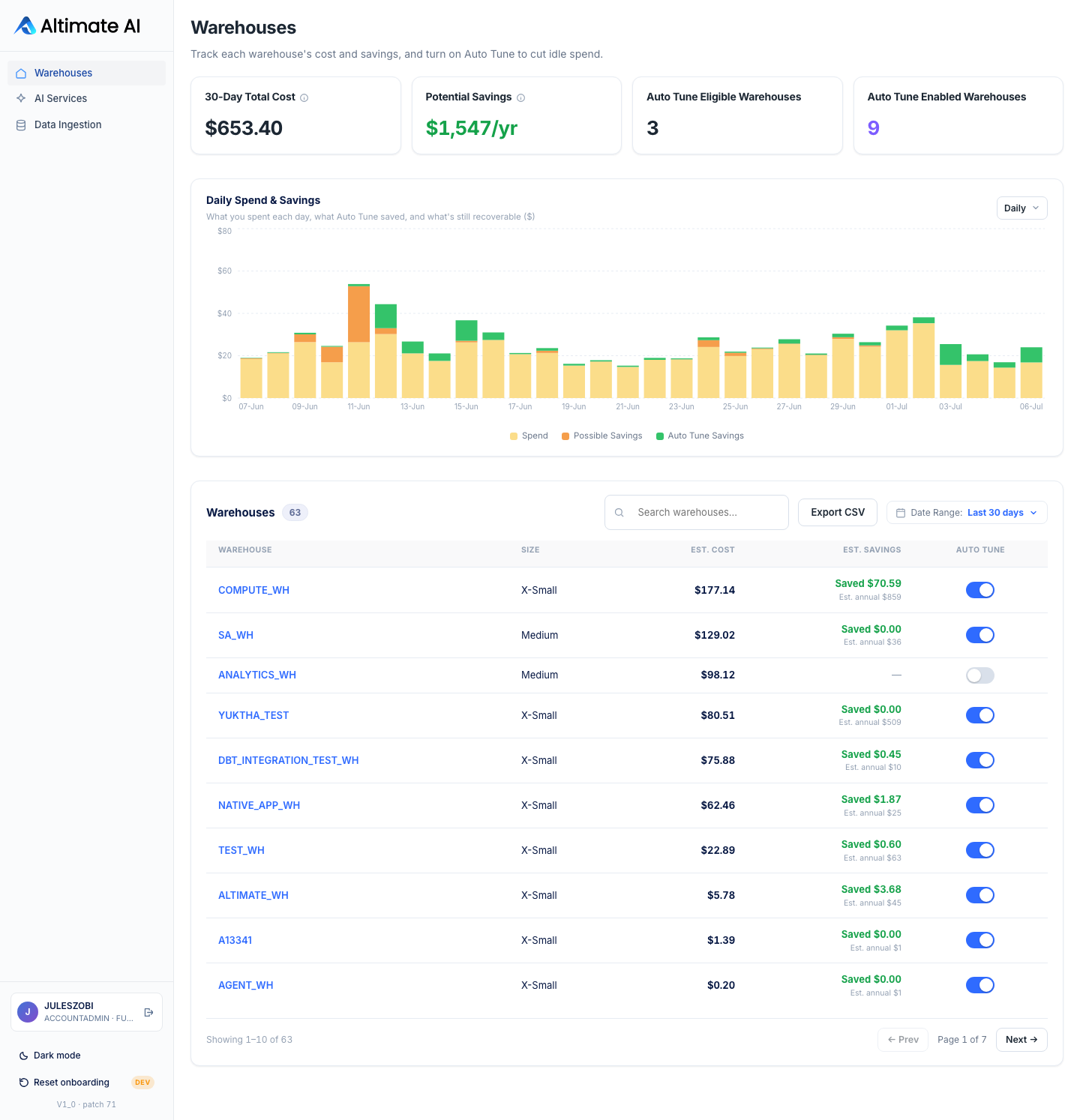
Each day in the Daily Spend & Savings chart stacks three colors:
| Band | Colour | What it is |
|---|---|---|
| Spend | Yellow | What that warehouse actually cost that day |
| Possible Savings | Orange | Idle spend Auto Tune could still recover, where it is off |
| Auto Tune Savings | Green | Idle spend Auto Tune already recovered |
A tall yellow bar with a thick orange cap is uncaptured money. A mostly green bar is a warehouse Auto Tune has already caught up with.
Each row reads either Saved $X, money already captured, or Potential $X, an estimate of what turning it on would recover. Open any warehouse to see its two savings figures together and every decision Auto Tune made on it, timestamped and exportable as CSV. That is the audit trail you hand to whoever asks where the savings came from.
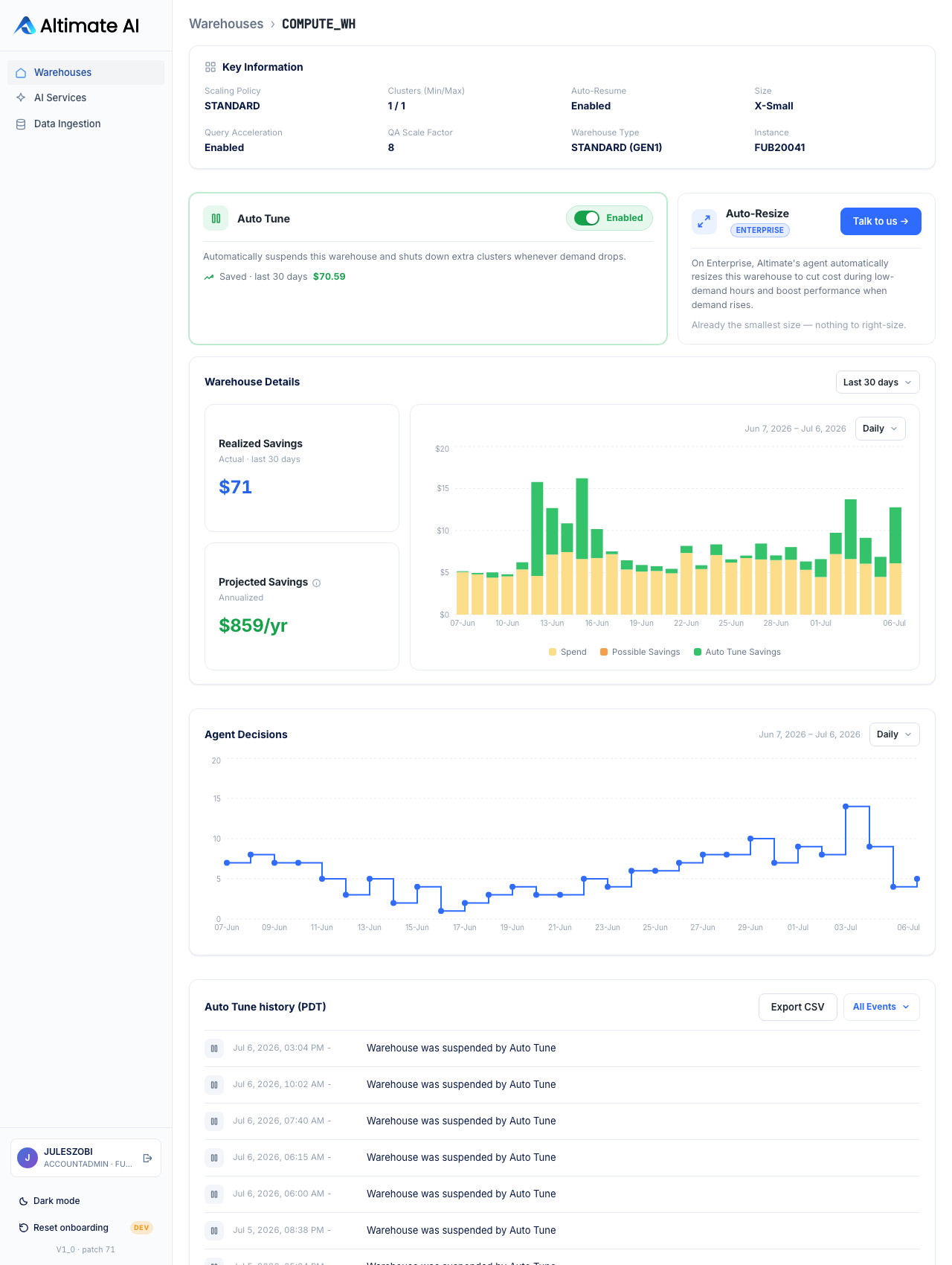
Realized Savings is actual dollars recovered in the window you picked. Projected Savings is always annualized. The two use different time bases deliberately, so a 30-day number never gets read as a year.
Auto Tune Reports What It Saved, Warehouse by Warehouse
- It runs where your data already is. Altimate never copies your usage data out, so nobody has to review where it went.
- Per-warehouse opt-in. Auto Tune acts only on what you toggled on, and one click reverses it.
- Every savings number is backed by a log. Realized dollars for the window you picked, Projected annualized, and a timestamped record of every decision behind both.
Across private preview, customers averaged 19% off warehouse cost. Query performance and queue times held steady. The single best day reached 57.5%, usually a weekend, when workloads are least consistent.
Altimate Lite prices two halves of your Snowflake bill. This page covers warehouse compute. The same install also splits your Cortex AI bill by service, user, and model.
The Warehouses guide covers which warehouse classes Auto Tune can manage and the grant a warehouse sometimes needs first.
Talk to us about your warehouse
Frequently Asked Questions
No. Altimate Lite is a Snowflake Native App, so it runs inside your Snowflake account and makes zero outbound network calls. The Warehouses and AI Services pages are built from a copy of your own usage data that stays in your account and refreshes on a schedule. Data residency follows your account, in every region the Marketplace listing is published in.
The docs name two adjustments. It suspends the warehouse when it goes idle. It scales clusters down when demand drops. So spend tracks real workload, not a setting somebody picked once. Nothing else about the warehouse changes, and it only ever acts on warehouses you toggled on yourself.
On the Warehouses page, as Realized Savings for the window you picked, with Projected Savings annualized beside it. Open any warehouse and you get every decision Auto Tune made on it, timestamped, and Export CSV takes the whole table out. Quote your own figure internally rather than ours. The decision log sitting underneath it is what makes it hold up.
Auto Tune reacts within about a minute of an opted-in warehouse going idle. It checks far more often than Snowflake's own auto-suspend probe does, on an interval you can configure. While a warehouse stays quiet, it throttles those checks back. Turning it off is the same toggle you turned on, and it takes effect without uninstalling the app. The Agent Decisions chart on the detail page shows how often it has acted over the window you picked.
No, and the app tells you which ones it can. Some Snowflake-managed warehouse classes are not eligible at all, and on an eligible warehouse the toggle sometimes asks for one grant before it takes effect. The Warehouses guide names both cases, so approving the install dialog is not always the only grant step.
A row shows Saved when Auto Tune is on and the money has already been captured. It shows Potential when Auto Tune is off, and the figure is then an estimate of what turning it on would recover. Both carry an annualized figure underneath. Export CSV next to the search box downloads the full table.
Auto Tune and the web UI share a single compute pool. The app's own NATIVE_APP_WH warehouse only spins up when the UI runs a usage query. The app's FAQ states that net savings outweigh that runtime cost.
A single DROP APPLICATION removes the application, the services it owns, and the dedicated NATIVE_APP_WH warehouse. It also removes every row of app state, including savings logs and Auto Tune events. It does not undo the idle-timeout changes already applied. Those warehouses keep running with whatever setting Auto Tune last gave them.