Five Things to Know About Snowflake Compute Pools
- Compute pools are Snowflake's container infrastructure. They run what a SQL engine can't: ML model endpoints, Python services, Streamlit container apps and batch pipelines.
- Snowflake compute pools are billed differently from warehouses. You pay by node uptime, not by query. A pool with two minimum nodes charges every hour those nodes are provisioned, running or not.
- Snowflake compute pools offer capabilities that warehouses don't, including GPU support, persistent processes and custom Docker runtimes. Only the right workloads justify the cost.
- Unexpected costs usually come from idle nodes, slow restarts and switches to backup instance families. Each is avoidable with the right configuration.
- Knowing which of your pools are over-provisioned takes metering history and container telemetry. Altimate can help identify these issues across your Snowflake account.
A data science team wants to deploy a recommendation model in production. They first run it through a Snowpark UDF on a standard warehouse. This works for smaller inputs, but larger requests start timing out. They move the workload to a GPU-enabled compute pool using Snowpark Container Services. The model stays loaded in GPU memory, and inference times drop to under 100 milliseconds.
The deployment works well, but a few weeks later the platform team notices unexpected GPU charges on their Snowflake bill. The endpoint handled traffic for only around 80 hours, but the GPU nodes ran for much longer. The choice of compute pool was fine. The cost came from how the team set up and managed the pool.
What Are Snowflake Compute Pools?
A Snowflake compute pool runs containers. It is a cluster of fully managed virtual machine nodes inside Snowpark Container Services. The nodes run Python microservices, trained ML models and REST APIs. They also run Streamlit apps with large binary dependencies, batch pipelines and third-party orchestrators. If you can package your application into a Docker image, you can run it on a compute pool within your Snowflake account.
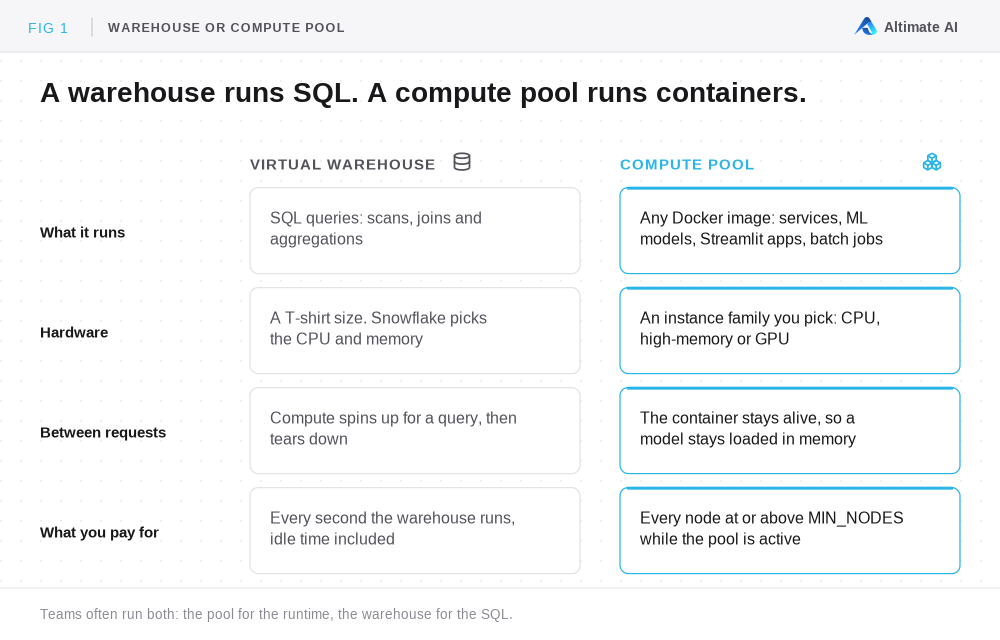
A virtual warehouse is different. It runs SQL queries, including scans, joins and aggregations. It isn't built to run containerised apps or long-running services.
You define the pool with three core parameters.
INSTANCE_FAMILYpicks the hardware: CPU for general compute, high-memory for large in-memory datasets, GPU for training and inference.MIN_NODESsets the floor the cluster never drops below.MAX_NODESsets the ceiling Snowflake can scale up to as job queues grow.
Two more settings decide most of the bill. AUTO_RESUME lets a request wake a suspended pool. AUTO_SUSPEND_SECS sets how long an idle pool waits before it suspends. Here is a small batch pool with all five set:
CREATE COMPUTE POOL batch_pool
  MIN_NODES = 1
  MAX_NODES = 3
  INSTANCE_FAMILY = CPU_X64_S
  AUTO_RESUME = TRUE
  AUTO_SUSPEND_SECS = 300;
The 300 seconds is an example. Pick the value from your own traffic gaps, as the checks further down explain.
Each instance family has its own credit rate. You pay that rate for each active node. There are no T-shirt sizes and no abstract units. The bill shows exactly what hardware you provisioned and for how long.
What Workloads Can Snowflake Compute Pools Run?
Snowflake compute pools run five kinds of workload that a warehouse can't.
ML model serving. A team deploys a fine-tuned language model for a customer-facing feature. The model weighs 14 GB. A standard warehouse can't load it into memory, because it doesn't expose GPU hardware or persistent VRAM. A GPU compute pool loads the model once and serves inference requests in real time, without reloading between calls.
Streamlit container apps. Standard Snowflake Streamlit supports a curated set of Python packages. Teams that build internal tools with custom C libraries, private SDKs or large binary dependencies hit that limit quickly. The Streamlit Container Runtime runs on a compute pool and lets teams bring their own Docker image. It also lets many viewers share one Python process, so each user does not start a fresh interpreter.
Batch pipelines. Scheduled ETL jobs and dbt runs work well in containers. So do geospatial pipelines and image processing. Snowflake starts the nodes, pulls the Docker image, runs the job to completion and scales the pool back down.
Microservices and APIs. Teams embed Snowflake data into external products by running small REST APIs on CPU compute pools. The service stays alive, queries Snowflake on each request and returns results. The external caller never sees warehouse credentials.
Snowflake Native Apps. A Native App that bundles container services creates its own compute pools. Snowflake marks each pool as exclusive to the app and keeps it apart from other workloads in the account. Snowflake removes the pool when someone uninstalls the app.
Compute Pools Run Hardware and Runtimes That Warehouses Cannot
Snowflake compute pools don't replace warehouses. They extend what Snowflake can run, and four differences matter most in practice.
Choose the hardware your workload needs. A warehouse hides its hardware. Snowflake decides the CPU and memory per node at each T-shirt size. A compute pool shows you the hardware class. GPU_NV_S, GPU_NV_M, HIGHMEM_X64_L and GEN_X64_G2_4 each have a published spec. You pick the hardware the workload needs.
Run applications without restarting them for every request. A warehouse starts compute for a query and tears it down. A compute pool runs a container that stays alive between requests. This helps three kinds of application. For ML inference, the model stays loaded in GPU memory. For caching layers, in-memory state persists. For apps that hold sessions, connection pools stay warm.
Use your own runtime and dependencies. Warehouses run Snowflake's SQL engine. Compute pools run any Docker image. Teams bring their own Python versions, native libraries, GPU drivers and system dependencies. They don't wait for Snowflake to add them to a supported package list.
Run workloads that warehouses aren't designed for. Some workloads don't fit a warehouse at all, and they fit naturally into a compute pool:
- Long-running batch jobs.
- Containers that talk to each other over the network.
- Services that listen on HTTP ports.
- Tasks that write straight to object storage.
When Does a Compute Pool Justify Its Cost?
A compute pool pays off when traffic keeps its reserved nodes busy. It gets expensive on a workload that doesn't need dedicated, always-on nodes. That holds even when the workload runs fine on the pool.
A pool with MIN_NODES = 1 on CPU_X64_S charges that family's hourly rate for every hour the pool is ACTIVE or IDLE. A service with requests around the clock keeps the reserved node busy, so the cost pays off. If the service gets requests for 4 hours a day and sits idle the other 20, the pool still charges for all 24.
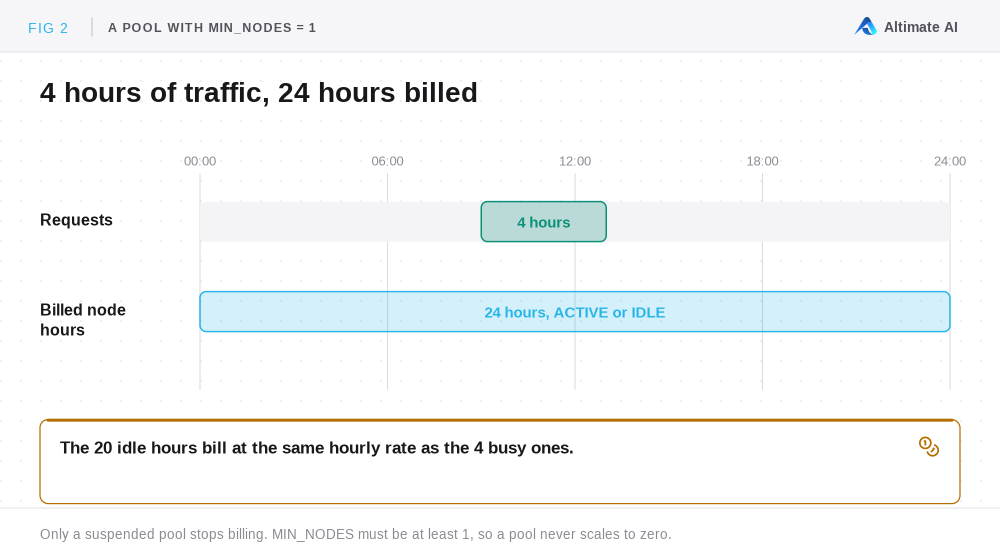
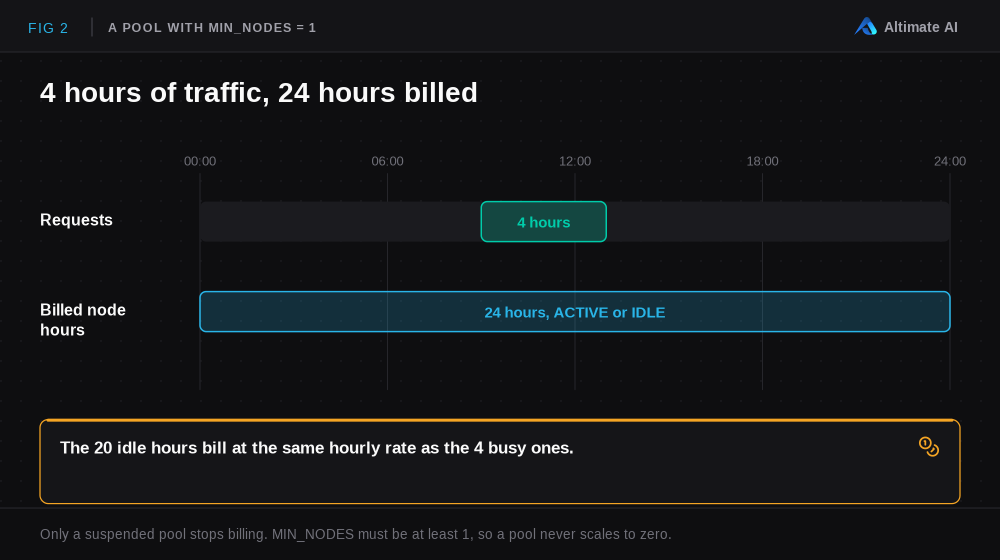
A pool never scales to zero.
MIN_NODESmust be at least 1, so an active pool always holds a node. Only a suspended pool stops billing, so the goal is to suspend soon after the work ends.
For batch workloads, keep AUTO_SUSPEND_SECS as low as your tolerance allows.
The break-even comes down to duty cycle. Duty cycle is the share of the day the pool is busy. Take a GPU pool that serves inference requests for fewer than 6 to 8 hours out of every 24. Most of its bill then pays for idle nodes overnight. Suspend that pool between runs, and resume it when the work starts.
Always-on nodes pay off only when traffic never really stops:
- A customer-facing API serving users across time zones.
- An alerting engine firing queries every few seconds.
- An internal app that engineers in every region use throughout the workday.
When traffic stays steady all day, keeping nodes running can cost less than starting and stopping the pool again and again.
Why Do Snowflake Compute Pool Costs Run Higher Than Expected?
Compute pool costs usually run higher than expected for one of three reasons: cold starts, idle MIN_NODES charges and backup instance family switches.
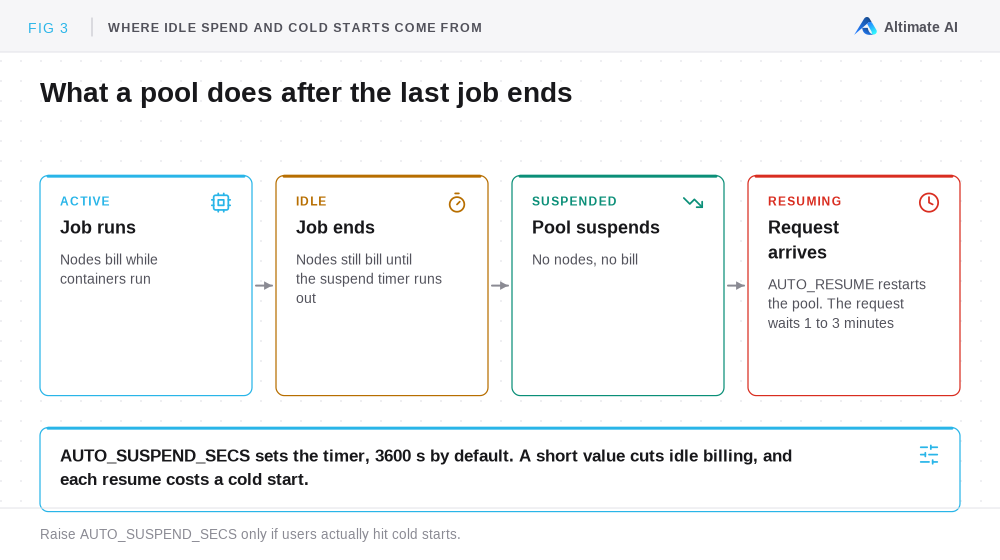
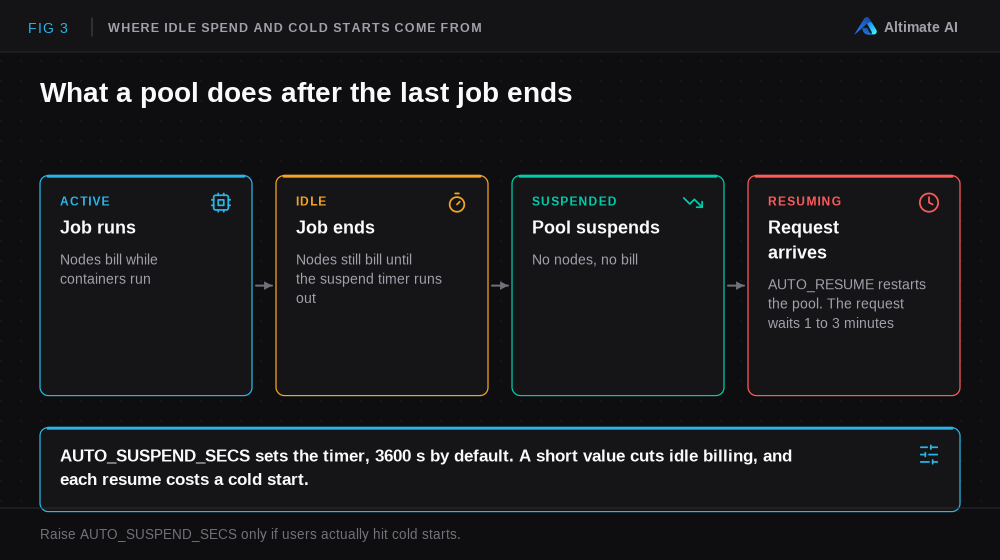
Cold starts. A suspended compute pool takes 1 to 3 minutes to start its VMs when it resumes. With AUTO_RESUME on, an incoming request triggers the restart, but the request waits through that window. The setting to change is AUTO_SUSPEND_SECS, and you keep it as short as your traffic gaps allow. If requests arrive often, a short timeout still keeps the pool warm and users never hit the delay.
If there are long quiet periods, let the pool suspend and accept the wait on resume. Only raise AUTO_SUSPEND_SECS if users actually hit cold starts. Don't hold nodes awake just in case.
Idle MIN_NODES charges. This is the most common source of unexpected spend. Every node up to MIN_NODES keeps billing even when no containers run. Take a pool with MIN_NODES = 2 that finishes a training job and then idles for 50 minutes before it suspends. It burns nearly two node-hours for nothing.
The fix is a short AUTO_SUSPEND_SECS. A suspended pool bills nothing, and the only cost of a quick suspend is the cold start on the next resume.
Check the default.
AUTO_SUSPEND_SECSdefaults to 3600 seconds. A batch pool left on the default can bill for up to an hour of idle time after every job.
Backup instance family switches. You can set BACKUP_INSTANCE_FAMILIES to keep a pool available when the cloud runs short of capacity. Then Snowflake starts a fallback instance, and the credit rate rises to match the backup hardware. Take a pool set for CPU_X64_M that falls back to CPU_X64_L. It bills at the larger rate for as long as the fallback runs. Without a budget alert, nobody notices the switch until the bill arrives.
Check Three Settings Before You Create a Snowflake Compute Pool
Check these three settings before you create a Snowflake compute pool.
| Setting | Default | What to set |
|---|---|---|
AUTO_SUSPEND_SECS | 3600 seconds | Short for batch and dev pools. Real traffic gaps for services |
INSTANCE_FAMILY | None, it is required | The smallest family that fits the working set |
BACKUP_INSTANCE_FAMILIES | None | Production GPU and high-memory pools, with a budget alert |
Set AUTO_SUSPEND_SECS to match your workload's real idle gaps. MIN_NODES must be at least 1, so the pool always holds one node when active. What you control is how long it stays active after the work is done. For batch and dev pools, keep it short. A suspended pool bills nothing, so the gap between job end and suspend is the only idle cost you manage. Pick the lowest value your cold-start tolerance allows. For services where restart time matters, set it from how long your real traffic gaps run.
Pick the instance family from the real working set, not the theoretical peak. A model that fits in 8 GB of VRAM doesn't need a GPU_NV_M. Start with the smallest instance family that runs your workload without running out of memory. Size up only if container metrics show the workload needs more. This way you don't pay for GPU capacity you don't use.
Set BACKUP_INSTANCE_FAMILIES for production GPU and high-memory pools. Cloud capacity limits can stop Snowflake from starting a given instance type, most often in busy regions. Fallback hardware costs more, so set budget alerts that fire when a backup family starts. Don't wait for the bill to find out. Snowflake's own example falls back to the next size up in the same family:
CREATE COMPUTE POOL my_compute_pool
  MIN_NODES = 1
  MAX_NODES = 10
  INSTANCE_FAMILY = GEN_X64_G2_4
  BACKUP_INSTANCE_FAMILIES = ('GEN_X64_G2_8', 'GEN_X64_G2_16');
How Altimate Finds Over-Provisioned Snowflake Compute Pools
Compute pool metering history and container telemetry show how your pools are used. Read across all pools, the same data shows where resources sit idle and which settings to change.
Altimate already does this for Snowflake warehouses. It finds over-provisioned sizes, schedules that don't fit the work, and workloads where a setting change cuts cost without hurting speed. The same approach applies to compute pools.
For Snowflake compute pools, Altimate can help you:
- Identify pools with low duty cycles, the ones charging for 24 hours of node uptime to handle 4 hours of actual traffic.
- Flag oversized instance families, where CPU and memory metrics show the hardware sits mostly unused.
- Surface pools with high
MIN_NODESsettings that hold idle capacity overnight or through weekends, with no service that needs the standby.
Snowflake shows how much your compute pools consume. Usage and telemetry data show whether those resources do useful work.
Frequently Asked Questions
Is a Snowflake compute pool billed like a virtual warehouse?
Not quite. Both bill for uptime. A warehouse bills every second it runs, idle time before auto-suspend included. A pool bills every node at or above MIN_NODES by the second while the pool is active, whether containers run or not. The difference is hardware and runtime: warehouses are SQL compute, and pools are VM nodes that run any container workload.
Do I need to migrate my data to use compute pools?
No, you don't need to migrate data. Containers on a compute pool query Snowflake data through Snowpark or standard connectors. The data stays in your existing tables and stages.
What happens if my primary instance family isn't available?
If you've set BACKUP_INSTANCE_FAMILIES, Snowflake starts the next available family in your fallback list. The pool runs on that hardware and bills at its rate until the primary family is available again.
How do I track what a compute pool costs?
Credits appear per pool in SNOWPARK_CONTAINER_SERVICES_HISTORY in ACCOUNT_USAGE. Apply object tags such as COST_CENTER, ENVIRONMENT and OWNER when you create the pool. Spend then rolls up to the right team instead of showing as an untagged line item.
Can I run a compute pool alongside my existing warehouses?
Yes, you can. Compute pools and virtual warehouses are independent. A Streamlit container app on a compute pool can still send queries to a virtual warehouse for SQL work. Many teams use both: the compute pool for the runtime, and the warehouse for the data processing.
If you want to run this analysis across your account, reach out to the Altimate team. We'll show you which pools are worth keeping on and which ones are running up the bill.