Your sales dashboard is slow every Monday morning. You read that a Snowflake interactive warehouse answers queries in under a second. It bills 0.6 credits an hour at X-Small, against 1 credit for a standard X-Small. You move the dashboard over. It gets faster, and the next month's bill goes up.
Nothing broke. The dashboard is busy from 9am to 6pm and quiet the rest of the day. On a standard warehouse, it ran about five hours a day and auto-suspended the rest, for roughly 5 credits a day. An interactive warehouse cannot auto-suspend in less than 24 hours, so it ran all 24 hours. That is 14.4 credits a day. A lower rate multiplied by more hours gives a larger total.
In short:
- What it is. Interactive warehouses are a Snowflake compute type built for sub-second, high-concurrency serving traffic. They run on your existing tables, so no migration is required.
- When it is cheaper. Steady, all-day serving, such as embedded dashboards, customer-facing APIs, always-on alerting and AI agents.
- When it costs more. Bursty workloads. A standard warehouse suspends between bursts and stops billing, while an interactive warehouse stays on.
- The rule of thumb. If the warehouse is busy fewer than about 14 hours a day, the standard warehouse is cheaper. Against a Gen2 warehouse, the line is about 11 hours.
- The trade-offs. Queries are capped at 5 seconds, and slower ones rerun on a standard fallback warehouse that bills separately. Stored procedures don't run. Interactive tables can only be refreshed or overwritten, not updated incrementally.
The feature is simple to turn on. Picking the workloads that should use it takes a look at their history. Every rate and behavior below comes from Snowflake's interactive warehouse documentation as of September 2026. Re-check any number against the Service Consumption Table before you plan to spend on it.
What Is a Snowflake Interactive Warehouse?
A Snowflake interactive warehouse is built for one kind of work: lots of small, fast queries against the same data. Think of a dashboard thousands of users refresh all day, where each query filters down to a few rows and needs an answer in under a second.
It runs on your existing tables, so you don't need a migration. Standard tables are the recommended default, and they match the speed of Snowflake interactive tables. Choose interactive tables only when you need the most consistent latency. Dynamic and Iceberg tables work too, though Iceberg is slower. Support for querying these table types became generally available in September 2026. Older guides that say interactive warehouses read only interactive tables are out of date.
The speed comes from a local SSD cache. When you attach a table, Snowflake loads that table's data onto the warehouse's local disk ahead of time. Queries then don't have to read it from remote storage. Attaching is optional. A table you don't attach still works, but its data is read from remote storage the first time a query needs it.
When Is a Snowflake Interactive Warehouse Cheaper?
Three examples show where interactive warehouses pay off.
The embedded analytics page. A SaaS product shows each customer a "your usage this month" dashboard. Customers in every time zone open it all day. Every query filters on one customer ID and a recent date range. Traffic never stops, so the warehouse never sits idle, and the lower rate applies to every hour it runs. This is the clearest win.
The order-status API. An e-commerce site answers "where is my order" straight from Snowflake. Each call is a point lookup on one order ID, under a sub-second SLA, around the clock. Pair it with search optimization.
The always-on agent. An alerting or AI agent fires small, selective queries every few seconds to check thresholds or answer questions. Its traffic is bursty minute to minute but steady across the day.
When Is an Interactive Warehouse the Wrong Fit?
- Ad-hoc analysis. Analysts writing one-off queries pull different data each time. The cache keeps filling with data nobody asks for again, and the speed advantage disappears.
- ETL and batch jobs. They run for minutes, not seconds. They hit the 5-second cap every time and end up on the fallback warehouse anyway.
- Heavy queries. Large scans, big joins and expensive distinct counts hit the same 5-second wall.
- Business-hours workloads. Like the sales dashboard in the opening: if the warehouse sits idle much of the day, a standard warehouse that suspends between spikes costs less.
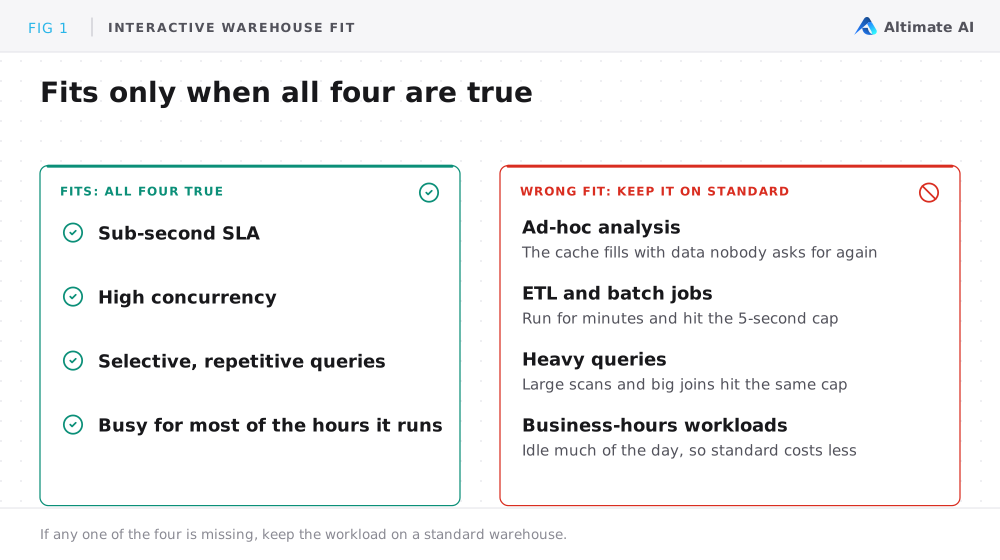
An interactive warehouse fits when all four of these are true:
- Sub-second SLA
- High concurrency
- Selective, repetitive queries
- The warehouse would stay busy for most of the hours it runs
If anything is missing, keep the workload on a standard warehouse.
How Do You Calculate the Interactive Warehouse Break-Even Point?
The discount only pays off if the warehouse stays busy. Auto-suspend can't go below 24 hours. You can suspend manually or on a schedule, but every resume bills at least an hour and starts with a cold cache.
Left on around the clock, an interactive X-Small costs a fixed 14.4 credits a day (0.6 an hour), busy or not. A Gen1 standard X-Small costs 1 credit an hour, only while active. So interactive wins once the standard warehouse would be busy more than about 14 hours a day, roughly a 60% duty cycle.
Snowflake recommends Gen2 for new warehouses. A Gen2 X-Small costs 1.35 credits an hour on AWS and GCP, and 1.25 on Azure. Against a Snowflake Gen2 warehouse, break-even drops to about 11 hours.
| Compared with | Rate at X-Small | Interactive wins above |
|---|---|---|
| Gen1 standard warehouse | 1 credit an hour, only while active | About 14 busy hours a day |
| Gen2 standard warehouse | 1.35 credits an hour on AWS and GCP, 1.25 on Azure | About 11 busy hours a day |
| Interactive with an 11-hour scheduled window | 6.6 credits a day | About 6.6 busy hours a day |
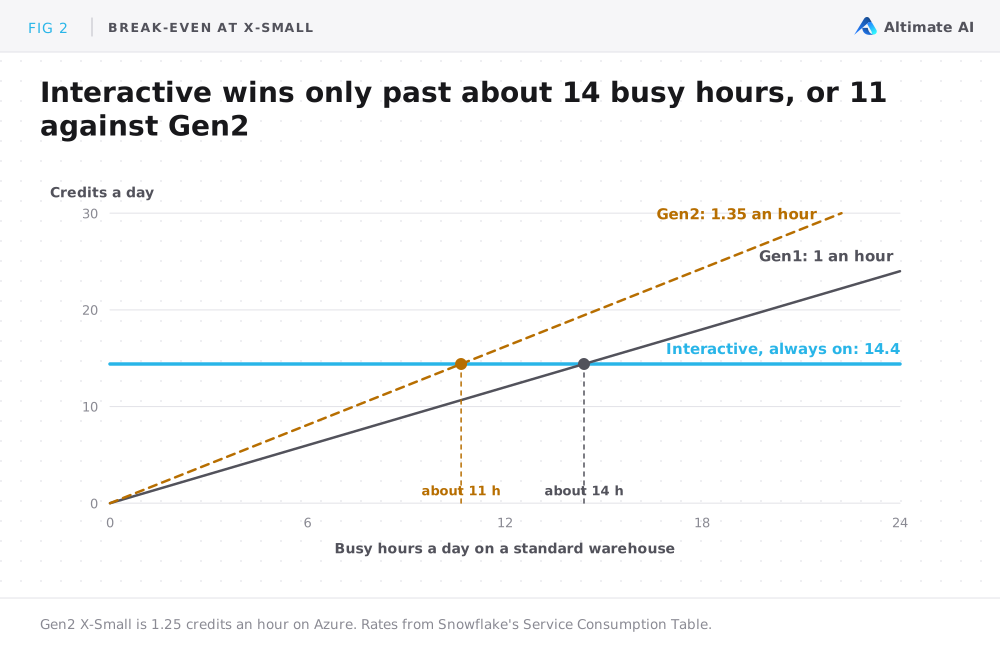
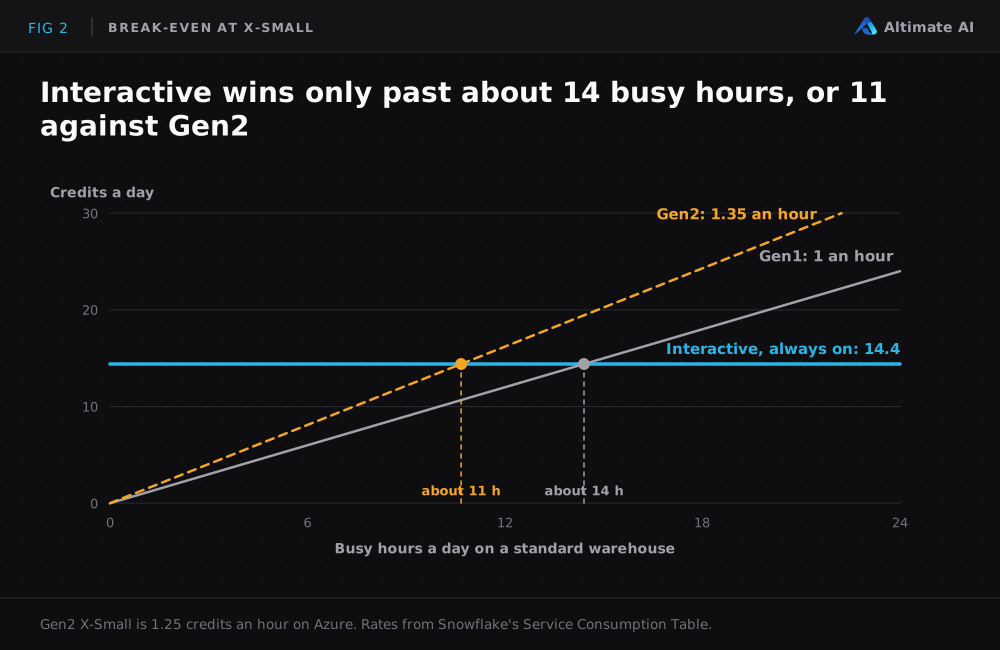
A scheduled overnight suspend shifts the math again. For the sales dashboard in the opening, an 11-hour window costs 6.6 credits a day. Interactive then only wins if the standard warehouse was active more than about 6.6 of those hours. At the dashboard's five active hours, it still doesn't.
What Are the Limits of Snowflake Interactive Warehouses?
Interactive warehouses have three limits that change how you use them.
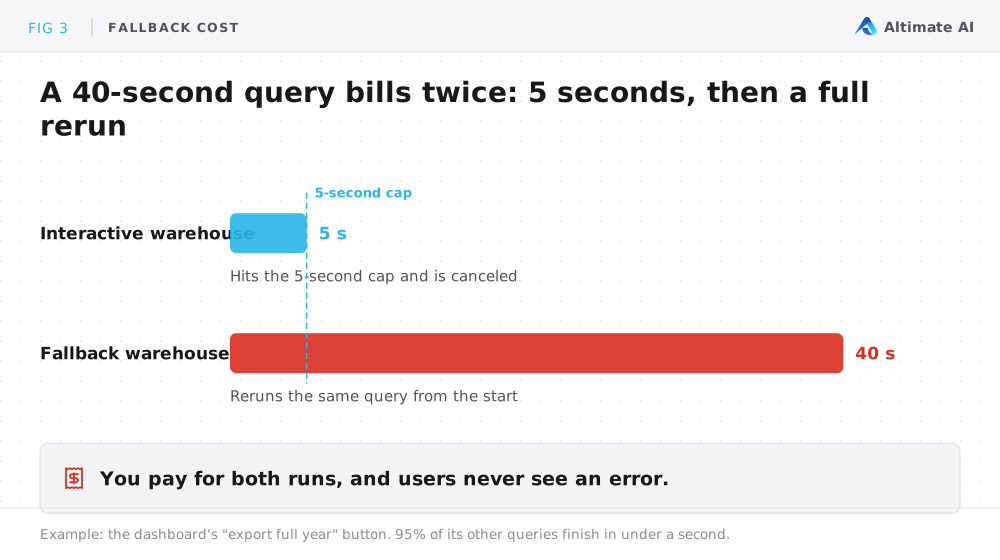
- A hard 5-second cap. Any query that runs longer is canceled. If you set a fallback warehouse, Snowflake reruns the query there, and users never see an error.
- No stored procedures. Anything that runs through a stored procedure call, including Snowflake's
->>pipe operator, stays on a standard warehouse. - Interactive tables are refresh-only. If you opt into interactive tables, you can't update or delete individual rows. You refresh them on a schedule or overwrite them, and they do not support some features, such as streams and fail-safe. If you stick with standard tables, the way you load your data stays the same.
Most of the unexpected cost comes from the fallback warehouse. Say 95% of a dashboard's queries finish in under a second, but its "export full year" button runs a query that takes 40 seconds. Each click first runs for 5 seconds on the interactive warehouse and hits the cap. Snowflake then runs the same query again on the fallback warehouse, so you pay for both runs. Users never see an error, so nobody notices the extra cost until the fallback warehouse shows up on the bill.
How Do You Pilot an Interactive Warehouse Without Overspending?
Take these five steps before you move a workload. Each one catches a mistake that would otherwise show up on next month's bill.
- Split mixed warehouses first. If dashboards and nightly ETL share a warehouse, the ETL will break the 5-second cap. Move the dashboard traffic to its own warehouse and evaluate that.
- Size to the working set, not the table. In Snowflake's own example, a 120 TB table holds a year of data, but most queries hit the last 7 days. That is about 2.2 TB, which fits a LARGE. Older data stays queryable, but it is slower on the first read.
- Cluster on the columns you filter by. A clustering key that doesn't match your WHERE clauses wastes most of the cache benefit, and fixing it later means a rebuild.
- Set up the fallback before launch. Keep it running or on auto-resume. Make it at least as large as the interactive warehouse, since queries that run past 5 seconds usually need more compute.
- Watch two numbers. The first is the remote-read percentage in the query profile, the share of data pulled from remote storage instead of the cache. It should stay near zero once the cache is warm, and a climb means the working set has outgrown the cache. The second is the fallback's spend, which is where hidden cost builds up.
12 Snowflake cost optimization techniques covers the levers for standard warehouses.
How Altimate Can Help You Decide
Every check in this post runs on data you already have: query history and warehouse metering. The work is pulling that data together for every warehouse, over enough history to trust, before you move anything.
Altimate already does this kind of analysis. Today, Altimate Auto Tune finds blocks of time when a Snowflake warehouse can run at a smaller size without slowing its queries. Interactive warehouses are the same question with a different cost curve, and the same approach applies.
For interactive warehouses, Altimate can help you:
- Find the candidates across every warehouse, instead of evaluating them one at a time.
- Check the numbers that decide the move. Look at duty cycle and at query shape against the 5-second cap. Then check clustering fit and the working-set size, which sets how big the warehouse should be.
- Compare against the best version of standard. Sometimes the cheaper move is a right-sized Gen2 warehouse on a better schedule, and not interactive at all.
Snowflake's AI coding assistant, Cortex Code, can assess a single query once you've picked it. The harder question is which workloads to look at first, and that needs account-wide history. For Snowflake's adaptive warehouses, see Adaptive Compute vs Auto Tune.
The rate card shows a lower hourly rate, but only your workload's history shows whether an interactive warehouse costs less for you.
Frequently Asked Questions
Is a Snowflake interactive warehouse always cheaper than a standard one?
No. The hourly rate is lower, but an interactive warehouse can't auto-suspend in under 24 hours. It only wins if the warehouse is busy about 14 hours a day or more, or about 11 hours against Gen2.
Do I need to move my data into interactive tables?
No. Interactive warehouses query standard, dynamic and Iceberg tables directly. Interactive tables are optional, for when you need the most consistent latency.
What happens when a query runs longer than 5 seconds?
The interactive warehouse cancels it. If you set a fallback warehouse, Snowflake reruns the query there. You pay for both runs.
How do I track what an interactive warehouse costs?
Track it like any other warehouse. Its credits show up in the WAREHOUSE_METERING_HISTORY view, billed at the interactive rate. Give the interactive warehouse and its fallback the same cost tag, so the fallback's spend counts toward the same workload.