A data team moved ten Snowflake warehouses to Adaptive. Three got cheaper. One nearly tripled in cost and stayed on Adaptive on purpose, because it served customers who needed faster answers. The other six cost more or saved nothing, and tuning them as standard warehouses saved more than Adaptive did.
Snowflake Adaptive Warehouse cost depends on the workload more than on the feature. Adaptive Warehouses remove warehouse sizing. Snowflake picks the compute for every query, so you stop choosing between Small and X-Large. The feature is built for speed first. Lower cost follows only for some workloads. A warehouse's own history shows which ones before you convert it.
In short:
- What it is. All Adaptive Warehouses in an account share one compute pool. You set two limits instead of a warehouse size, and Snowflake bills each query.
- What it is for. Speed and less tuning work. Snowflake's "1.2x better than Gen2" figure measures throughput on a benchmark. It does not promise a smaller bill.
- When it saves money. Busy, steady warehouses that run similar queries all day for users who will not notice an extra fraction of a second.
- When it costs more. Short bursts, a mix of quick and heavy queries, and warehouses that are already well tuned.
- When paying more is right. A customer-facing app where faster answers carry revenue.
- How to judge it. Compare cost per unit of work. The daily bill moves with how much work the warehouse does, so it can make a bad switch look like a win.
The product facts below come from Snowflake's Adaptive Warehouses documentation as of November 2026. The results come from our analysis of one customer's account in September 2026, with customer and warehouse names withheld. Check current Snowflake pricing before you plan spend.
What Does a Snowflake Adaptive Warehouse Change?
A Snowflake Adaptive Warehouse replaces WAREHOUSE_SIZE and the multi-cluster settings with two parameters. Snowflake then decides, per query, how much compute to use. You can no longer set WAREHOUSE_SIZE, MIN_CLUSTER_COUNT, MAX_CLUSTER_COUNT or SCALING_POLICY on the warehouse.
MAX_QUERY_PERFORMANCE_LEVELis the most compute any single query can get. The default isXLARGE. It is a ceiling, so Snowflake can give a light query less compute than the ceiling allows. That is where some of the savings come from.QUERY_THROUGHPUT_MULTIPLIER(QTM) controls how far the warehouse can stretch when many queries arrive at once. The default is 2. It accepts 0, which means unlimited throughput, or a whole number of 2 or more. A value of 1 is not allowed.
Every Adaptive Warehouse in an account draws from one shared compute pool. There is no auto-suspend setting and nothing to resume by hand. Charges start when a query runs, and Snowflake rolls each query's cost up to its warehouse. Your chargeback by warehouse still works.
Conversion is online and reversible:
ALTER WAREHOUSE <name> SET WAREHOUSE_TYPE = 'ADAPTIVE';
During the switch, the old and new compute both run until in-flight queries finish. You pay for both. Expect a short double-billing spike each time you convert a batch of warehouses, and again if you convert one back. Adaptive needs Enterprise Edition or higher, and it runs in selected AWS, Azure and Google Cloud regions. It cannot convert to or from X5-Large, X6-Large, Snowpark-optimized or interactive warehouses. Our guide to Adaptive Compute and auto-tuning covers the parameters and the billing views in full.
Which Workloads Save Money on Adaptive Warehouses?
Adaptive paid off when four things were true at the same time:
- Sustained, high concurrency. Thousands of queries an hour keep the shared pool busy.
- Moderate, predictable bursts. Demand rises and falls gradually. Sudden 100x spikes leave quick queries stuck behind heavy ones.
- Usage spread across the day. The work does not pack into a few short windows.
- Similar queries and patient users. ETL, ingestion and back-end analytics fit here.
Adaptive struggled on the opposite profile. That means short concentrated bursts, a mix of quick and heavy queries, and light or unpredictable traffic that never keeps the pool busy. It also struggled on warehouses that were already well tuned, because they had no waste left to remove.
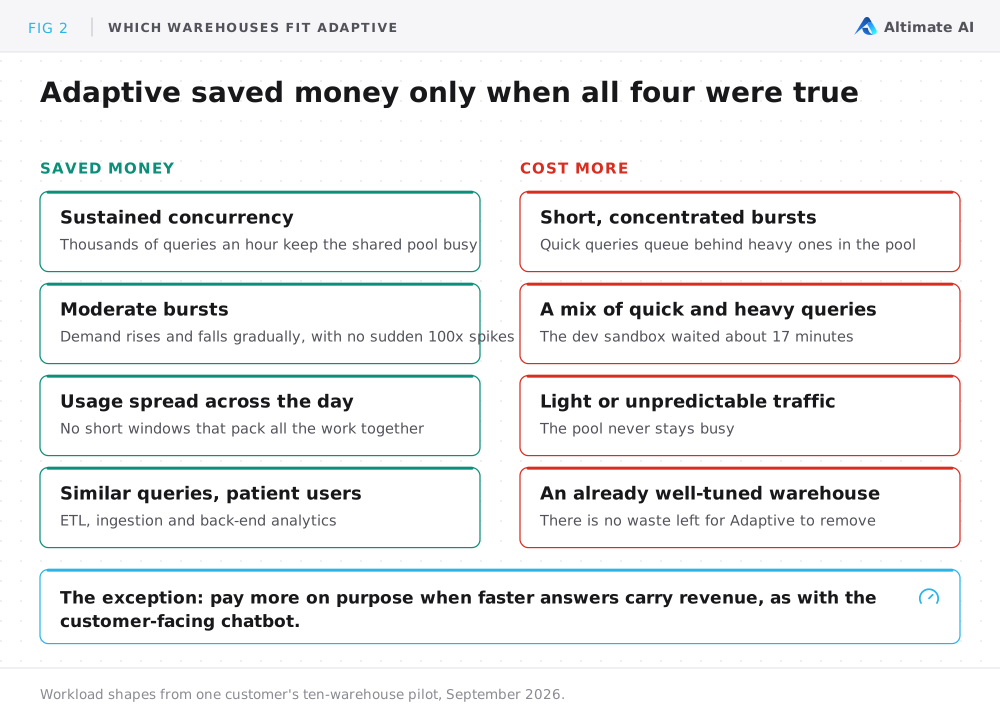
One exception cuts across both lists. Some workloads earn money from speed, such as customer-facing SLAs, user-facing APIs and interactive apps that carry revenue. Adaptive can be worth a higher bill on those. Most internal tools also get faster. Nobody's revenue depends on that speed, so the extra cost rarely pays for itself.
Three of Ten Warehouses Got Cheaper on Adaptive
A data team running about 500 active warehouses asked us to judge a pilot. They had read Snowflake's performance claims and chose ten warehouses to try on Adaptive. We told them, warehouse by warehouse, which ones were better off. We compared each warehouse against its own history over periods of equal length, at the customer's own credit price. For warehouses that went back to standard, we also checked the period after the switch back.
Nine of the ten had enough clean history for a fair comparison. Three were clear wins.
| Workload | Result on Adaptive | Decision |
|---|---|---|
| Marketing-ops (campaign attribution) | About a quarter cheaper | ✓ Kept |
| Ingestion partner (third-party connector loads) | About 10% cheaper | ✓ Kept |
| dbt dev (engineers iterating on models) | A few percent cheaper | ✓ Kept |
| AI chatbot (customer-facing retrieval) | Nearly 3x the cost, much faster answers | ✓ Kept for the speed |
| Finance interactive (FP&A what-if models) | About 2.5x the cost | ✗ Back to standard |
| Data science (model experiments) | More than 2x the cost | ✗ Back to standard |
| Dev sandbox (bursty stored procedures) | Nearly 4x the cost, long queues | ✗ Back to standard |
| HR (people-ops) | About 60% more | ✗ Back to standard |
| Bulk ETL (scheduled overnight batch) | Looked cheaper at first, same unit cost | - No saving |
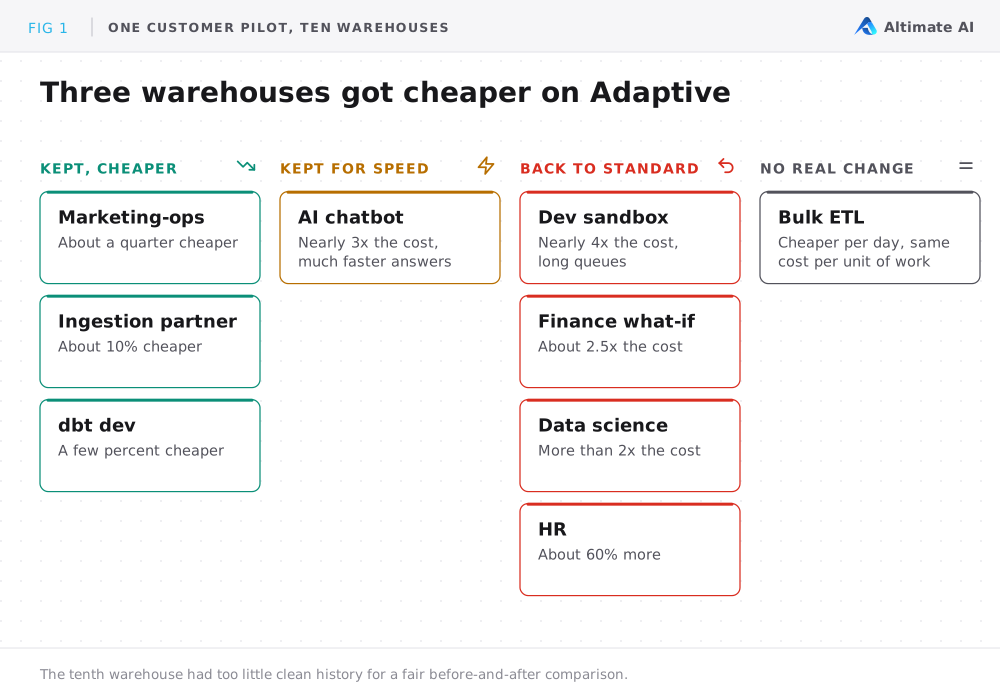
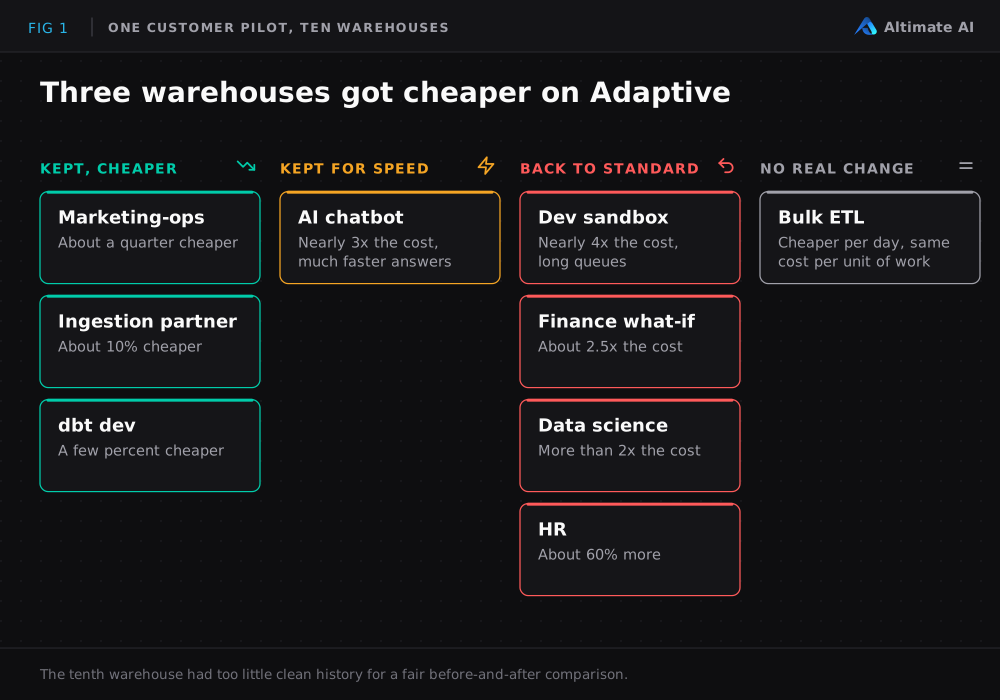
Three warehouses got cheaper. The clearest win was a marketing-ops warehouse that ran campaign attribution for the growth team. It was busy all through the business day and ran mostly similar read queries against the same tables. Its users would not notice an extra 200 milliseconds, and its monthly bill dropped by about a quarter. A warehouse loading data from third-party connectors had the same shape and saved about 10%. A dbt development warehouse that engineers use all day saved a few percent. All three also got faster, so the team kept them.
The AI chatbot cost more on purpose. The chatbot serves customers with small queries, very spiky traffic and users who expect answers in under a second. On Adaptive, its monthly cost nearly tripled, which looks like an obvious revert on a cost-only dashboard. But the queueing disappeared and the slowest responses got much faster. The extra cost was small next to the revenue the bot touches. The business approved it as the price of a response-time guarantee.
Two warehouses got faster but not cheaper enough. A finance warehouse for the FP&A team's what-if models cost about 2.5x as much on Adaptive. A data-science warehouse for model experiments and notebooks cost more than twice as much. The two got faster, like the chatbot. They serve internal users, and a few seconds saved on a what-if model is worth less than a customer-facing SLA. The team moved them back to standard.
Two warehouses got slower and more expensive. A dev sandbox mixed heavy stored procedures with quick edits, all packed into short afternoon windows. It never queued on its old standard setup. On Adaptive, quick queries got stuck behind heavy ones in the shared pool, some for about 17 minutes. Daily cost nearly quadrupled.
An HR warehouse showed the same pattern at about 60% more. Both went back to standard, and their costs dropped straight back to where they had been. That snap-back shows Adaptive caused the increase.
The bulk ETL saving disappeared. This warehouse ran the overnight batch and stepped up through larger sizes on a schedule for each pipeline stage. Right after the switch, jobs ran much faster and the daily bill fell. A week in, it looked like tens of thousands of dollars a year in savings. Then the pipeline used the freed capacity, and query volume grew by about three quarters over the following weeks. Measured as cost per unit of work, nothing had changed.
The warehouses that went back to standard still had waste. We kept tuning them as standard warehouses with Altimate Auto Tune. It suspends a warehouse before Snowflake's auto-suspend fires. It also drops the warehouse one size in quiet hours. On those warehouses, tuning saved more than Adaptive had, with no performance trade-off.
The team picked the ten likeliest fits out of about 500. The results were still mixed. In a large account, expect most warehouses to stay on standard. Adaptive is one way to run a warehouse well, and it needs a per-warehouse decision.
How to Measure Snowflake Adaptive Warehouse Cost After a Switch
Daily spend rises and falls with how much work a warehouse does. A warehouse that does 75% more work after the switch costs more per day, even if Adaptive did not change its unit cost at all. The bulk ETL warehouse shows the other direction. Faster jobs let the pipeline schedule more jobs.
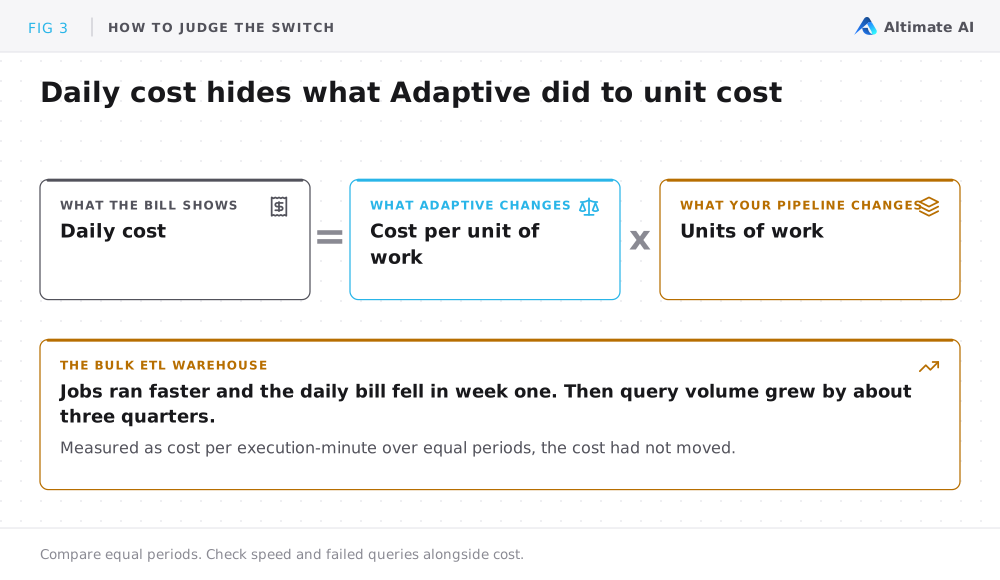
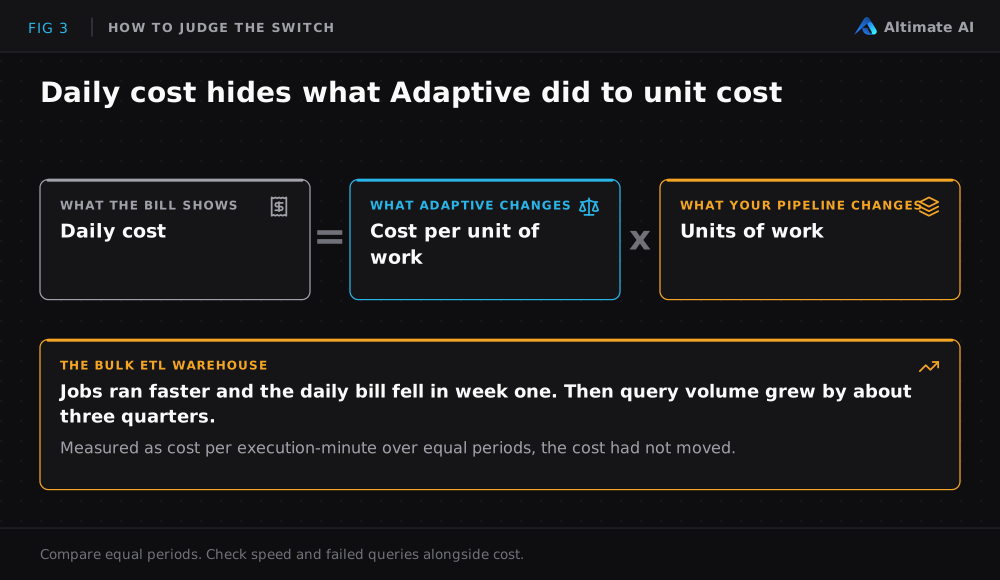
To measure Snowflake Adaptive Warehouse cost fairly, compare cost per unit of work over periods of equal length. Cost per execution-minute is one such unit. Check that the workload did not change, and look at speed and failed queries beside cost. Per-query cost for Adaptive Warehouses is in SNOWFLAKE.ACCOUNT_USAGE.QUERY_METERING_HISTORY. Its data can arrive up to an hour late, and queries with very low or zero credit usage may be left out.
Three Controls You Lose on an Adaptive Warehouse
Adaptive trades direct control for performance. Three losses show up in practice.
You share a pool. Each Adaptive Warehouse keeps its own MAX_QUERY_PERFORMANCE_LEVEL and QTM, so different workloads can still have different settings. But a sudden burst on one Adaptive Warehouse can affect the headroom another one sees. Give a latency-critical workload its own account if another team's bursts must never reach it.
The familiar controls disappear. There is no cluster count. QTM controls concurrency instead. It does not map one to one onto the old cluster count. Snowflake notes that a higher QTM reduces queueing at the cost of potentially higher spend. Query Acceleration Service is built in, with no separate setting and no separate credit column. A resource monitor with a suspend action disables an Adaptive Warehouse, and Snowflake rejects new jobs sent to it.
You lose a view into sizing. On a standard warehouse, QUERY_HISTORY.WAREHOUSE_SIZE records the size that ran each query. A warehouse drifting to LARGE when you set MEDIUM shows up the next day. On Adaptive, that column reads ADAPTIVE for every query and never shows the compute Snowflake used. You have to infer sizing from unit cost, queueing and failures. If your monitoring relied on that column, that check stops working the day you convert.
How to Pilot Snowflake Adaptive Warehouses Without Overspending
Check five things before you move a warehouse. Each one catches a mistake that otherwise shows up on next month's bill.
- Screen the workload first. Look for more than about 3,000 queries an hour, with moderate bursts and usage spread across the day. The queries should be similar and the users patient. Outside that profile, measure first and expect surprises.
- Look at how the warehouse runs today. A warehouse that runs at a large size even in quiet hours has the most waste for Adaptive to remove. A well-tuned one has little left to save, even when Adaptive works perfectly. The bulk ETL warehouse looked like a strong fit and still came out even.
- Start with the defaults, then lower the ceiling. Begin with
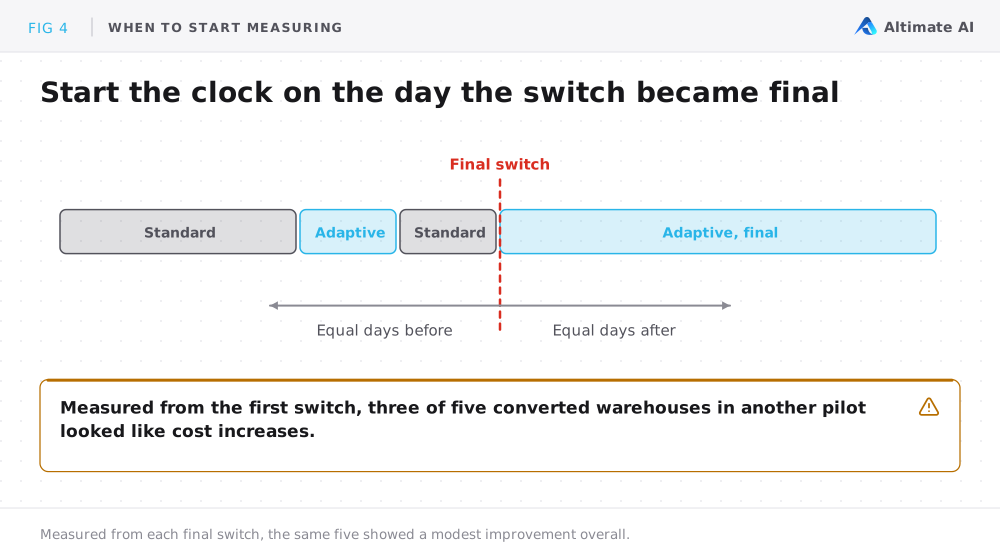
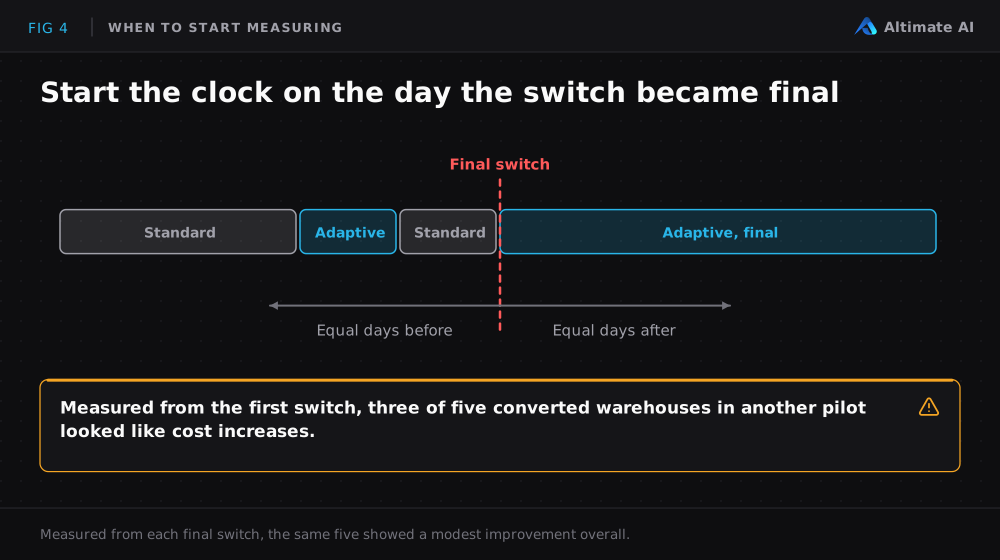
MAX_QUERY_PERFORMANCE_LEVEL = XLARGEandQTM = 2. For cost-sensitive workloads, step the ceiling down to LARGE or MEDIUM and watchWAREHOUSE_LOAD_HISTORYfor queueing. Leave QTM at 2 unless the workload needs more room to burst. - Start the clock when the switch is final. Warehouses sometimes flip between standard and Adaptive for weeks during testing. Measured from the first switch, the "after" period mixes both types plus the switching costs. In another engagement, three of five converted warehouses looked like cost increases measured that way. Measured from the day each one stayed on Adaptive, the overall result was a modest improvement. Compare the same number of days before and after that date.
- Confirm the workload stayed the same. We saw one warehouse's daily cost jump 4x on the day it went Adaptive. Almost none of its usual queries were still running, because a new ETL pipeline had moved onto it the same day. The workload had changed, so the switch deserved no blame.
Decide warehouse by warehouse, and revisit the decision as workloads shift. The warehouses that stay on standard still need ongoing tuning.
How Altimate Decides Which Warehouses Should Go Adaptive
Adaptive optimizes for performance, and savings follow when the workload fits. Altimate starts from cost: cut spend without giving up the speed each workload needs. So the question becomes "what is the cheapest way to run this warehouse at the speed it needs?" Sometimes the answer is Adaptive. In the pilot above, it was more often a well-tuned standard warehouse.
Every check in this post comes from Snowflake's own metering, load and query history. The work is in pulling that history together for every warehouse, measuring it fairly and redoing it as workloads change. For Adaptive Warehouses, Altimate does four things:
- Finds the candidates before you convert. It scores every warehouse against the fit profile and flags the likely wins and losses.
- Measures the result by unit cost. It compares Snowflake Adaptive Warehouse cost per unit of work over matched periods. Speed and failures sit beside it, to catch what the daily bill misses.
- Tunes the two parameters.
MAX_QUERY_PERFORMANCE_LEVELand QTM are your only controls on Adaptive, and the right values depend on the workload. - Keeps tuning the rest with Auto Tune. On standard warehouses, Auto Tune suspends idle compute early and drops a warehouse one size in quiet hours. It reverts the change if queue time or latency crosses a threshold. For idle suspend and cluster scale-down only, Altimate Lite for Snowflake runs as a Native App inside your account.
Snowflake's benchmark reports 1.2x better price-performance than Gen2. Only your own workload history shows what Adaptive will do to your bill. Book a warehouse review. We will show you which warehouses are likely to save money on Adaptive and which would cost more. We will also estimate what tuning could save on the rest.
Frequently Asked Questions
Is Snowflake Adaptive Warehouse cost lower than a standard warehouse?
They cost less only for some workloads. In one customer's ten-warehouse pilot, three got cheaper. One nearly tripled in cost for faster answers. The rest cost more or saved nothing. Busy, steady warehouses with similar queries saved money.
What does Snowflake's 1.2x price-performance claim measure?
Snowflake reports Adaptive Warehouses as 1.2x better than Gen2, based on the TPC-DS 10TB Concurrency Benchmark. That is a throughput figure. It does not promise a smaller bill on your workload.
How do you measure Snowflake Adaptive Warehouse cost after a switch?
Compare cost per unit of work, such as cost per execution-minute, over equal periods before and after the final switch. Check that the workload did not change, and look at speed and failed queries beside cost.
Can you convert an Adaptive Warehouse back to standard?
Yes, you can. Conversion is online and reversible with ALTER WAREHOUSE. During each switch, the old and new compute both run until in-flight queries finish. You pay for both for that short time.