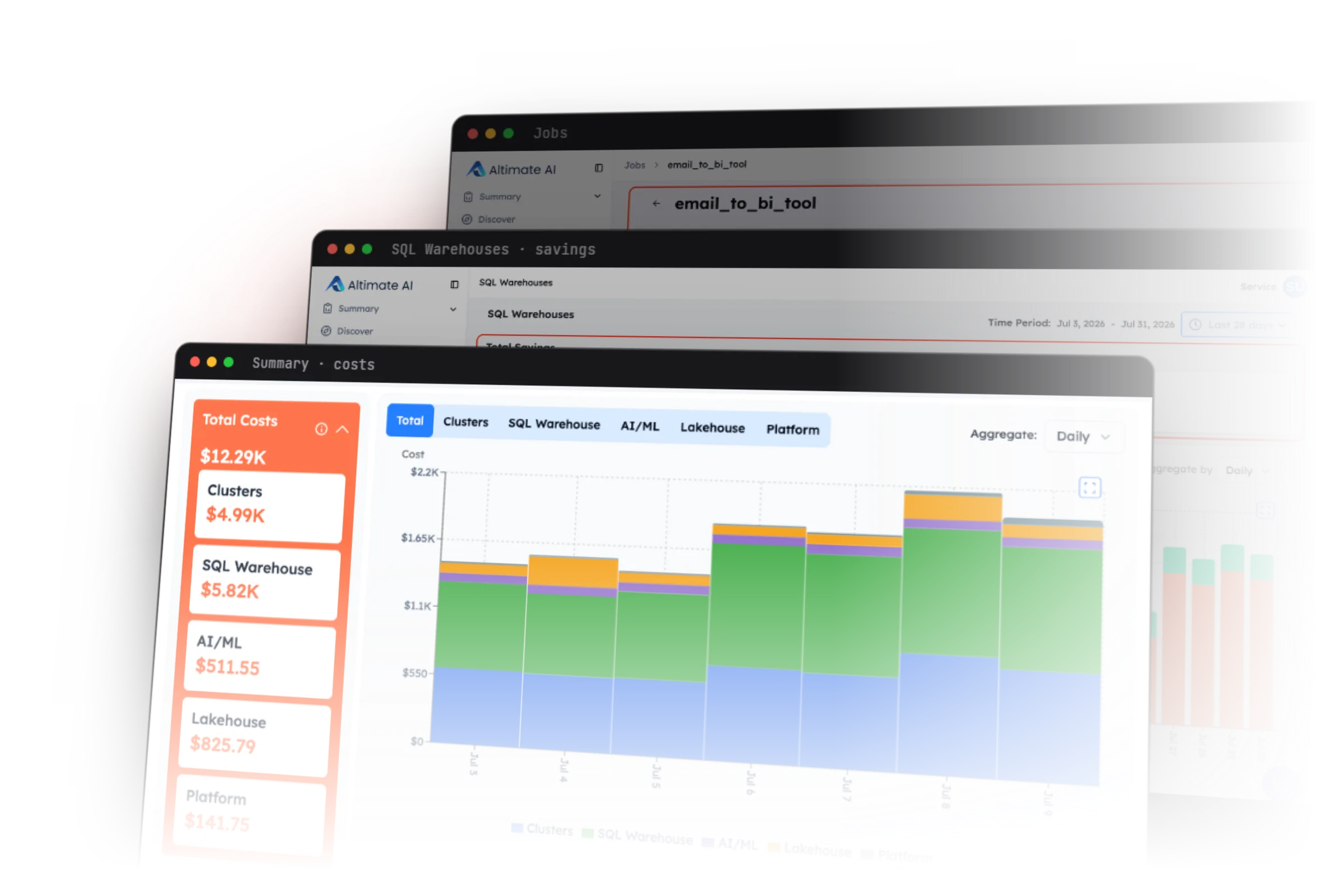
It usually comes up at month-end. FinOps sends the Databricks cost report, and the analytics team's line is higher than last month. Nobody made any obvious changes. To explain the increase, you need the job, the team or the failed run behind it.
The invoice gives you one total. The Cost page in Governance Hub shows spend at list price and its main drivers. It is an account-level view, still in Beta. Neither one names the job, the team or the failed run. Those answers sit in the Databricks system tables, if you know where to look.
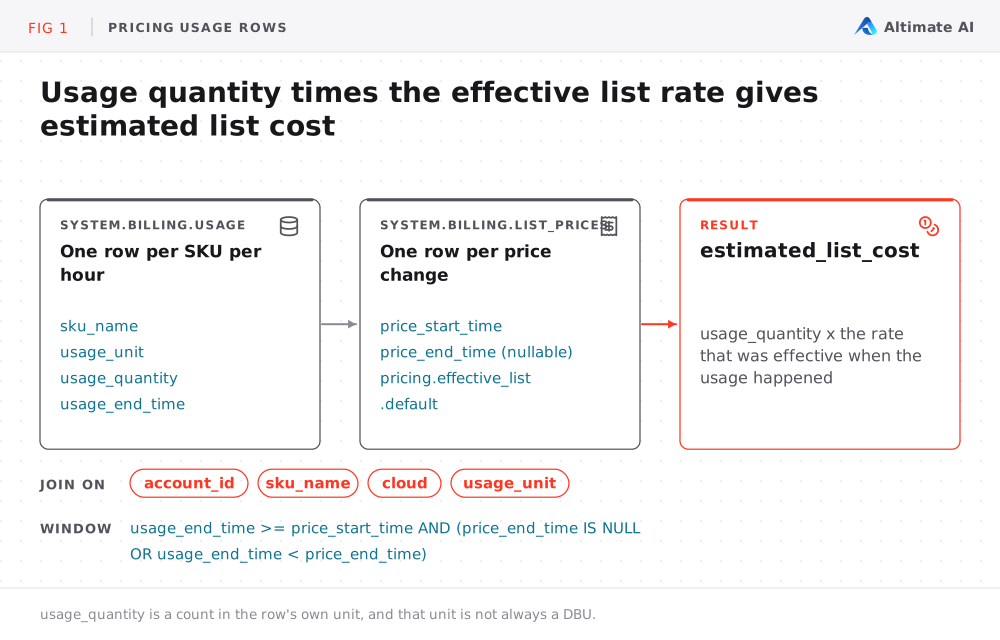
The system.billing.usage table logs every billable event you generate, from cluster-hours to serverless job runs to SQL warehouse compute. It stores usage quantities, not what they cost. The usage_quantity column counts in the row's billing unit, and that unit is not always a DBU. No column in the table holds a cost. If DBUs are new to you, understanding Databricks compute costs explains how they are priced.
In this post I'll follow one question as it narrows. It starts at where the money went and ends at whose budget it belongs to. Along the way, I'll show you where each answer can be wrong.
Every query below needs USE and SELECT on the system schemas. If you don't have that access, ask a teammate who has it to grant it or to run the queries for you. Start by turning usage quantities into cost.
How Do I Turn Databricks Usage Quantities Into Cost?
You turn usage quantities into cost by joining usage_quantity against the SKU's rate. Every query in this post reuses that join, so we write it once as a view. You can also use it as a CTE.
The system.billing.list_prices table holds the rate for each SKU. It only gets a new row when the price changes, so you join on the price's effective window rather than on a date. If you have a discounted or committed-use rate, you might also have a table named system.billing.account_prices.
CREATE OR REPLACE TEMP VIEW priced_usage AS
SELECT
 usage.*,
 list_prices.currency_code,
 list_prices.pricing.effective_list.default AS effective_list_rate,
 usage.usage_quantity * list_prices.pricing.effective_list.default
   AS estimated_list_cost
FROM system.billing.usage AS usage
JOIN system.billing.list_prices AS list_prices
 ON usage.account_id = list_prices.account_id
AND usage.sku_name = list_prices.sku_name
AND usage.cloud = list_prices.cloud
AND usage.usage_unit = list_prices.usage_unit
AND usage.usage_end_time >= list_prices.price_start_time
AND (
     list_prices.price_end_time IS NULL
     OR usage.usage_end_time < list_prices.price_end_time
)
WHERE usage.usage_date >= CURRENT_DATE() - INTERVAL 120 DAYS;
Two details in this join change the total:
- The join includes
usage_unit. A SKU name alone does not say whether a quantity is DBUs, tokens, bytes or hours. - There is no
WHERE record_type = 'ORIGINAL'filter. When Databricks corrects a record, a negativeRETRACTIONcancels the original and aRESTATEMENTadds the corrected value. Filtering to originals keeps the wrong number.
Which Workspaces and SKUs Drove the Databricks Cost?
Start the money trail at the workspace and the SKU. Keep billing_origin_product, sku_name, usage_type and usage_unit in the result, because several products share a SKU and not every quantity uses the same unit. The query reads from the priced_usage view above:
SELECT
 workspace_id,
 COALESCE(billing_origin_product, 'UNKNOWN') AS billing_origin_product,
 sku_name,
 usage_type,
 usage_unit,
 currency_code,
 usage_date,
 SUM(usage_quantity) AS usage_quantity,
 SUM(estimated_list_cost) AS estimated_list_cost
FROM priced_usage
WHERE usage_date >= CURRENT_DATE() - INTERVAL 31 DAYS
 AND usage_date < CURRENT_DATE() - INTERVAL 1 DAY
GROUP BY
 workspace_id,
 COALESCE(billing_origin_product, 'UNKNOWN'),
 sku_name,
 usage_type,
 usage_unit,
 currency_code,
 usage_date
HAVING ABS(SUM(usage_quantity)) > 0
ORDER BY estimated_list_cost DESC;
This query takes you from "the bill went up" to "workspace X ran a lot more of this SKU this week". To look at DBU-based compute only, add AND usage_unit = 'DBU'. Do not add raw quantities across units, because ten DBUs, ten gigabytes and ten thousand tokens are not comparable.
When I ran the query above on one of our Databricks accounts, it showed this:
The top cost drivers over the last 30 days are Vector Search (
$74/day), Apps Compute ($34/day), and Model Serving (~$20/day).
I know the numbers are small, but the same query shows you exactly where the largest share of your money is going.
Which Databricks Jobs Are Driving the Cost?
The workspace and SKU query shows where the money went. The next question is which job is responsible and whether it is getting worse. The query below compares two complete seven-day windows and includes run counts. With both, you can tell a more expensive run from a job that simply ran more often:
WITH latest_jobs AS (
 SELECT
   workspace_id,
   job_id,
   name
 FROM system.lakeflow.jobs
 QUALIFY ROW_NUMBER() OVER (
   PARTITION BY workspace_id, job_id
   ORDER BY change_time DESC
 ) = 1
),
job_windows AS (
 SELECT
   workspace_id,
   usage_metadata.job_id AS job_id,
   currency_code,
   MAX_BY(usage_metadata.job_name, usage_end_time) AS billing_job_name,
   COUNT(DISTINCT CASE
     WHEN usage_date >= DATE_ADD(CURRENT_DATE(), -8)
      AND usage_date < DATE_ADD(CURRENT_DATE(), -1)
     THEN usage_metadata.job_run_id
   END) AS recent_7d_runs,
   COUNT(DISTINCT CASE
     WHEN usage_date >= DATE_ADD(CURRENT_DATE(), -15)
      AND usage_date < DATE_ADD(CURRENT_DATE(), -8)
     THEN usage_metadata.job_run_id
   END) AS prior_7d_runs,
   SUM(CASE
     WHEN usage_date >= DATE_ADD(CURRENT_DATE(), -8)
      AND usage_date < DATE_ADD(CURRENT_DATE(), -1)
     THEN estimated_list_cost ELSE 0
   END) AS recent_7d_estimated_list_cost,
   SUM(CASE
     WHEN usage_date >= DATE_ADD(CURRENT_DATE(), -15)
      AND usage_date < DATE_ADD(CURRENT_DATE(), -8)
     THEN estimated_list_cost ELSE 0
   END) AS prior_7d_estimated_list_cost,
   MAX(usage_end_time) AS last_seen_at
 FROM priced_usage
 WHERE billing_origin_product = 'JOBS'
   AND usage_metadata.job_id IS NOT NULL
   AND usage_date >= DATE_ADD(CURRENT_DATE(), -15)
   AND usage_date < DATE_ADD(CURRENT_DATE(), -1)
 GROUP BY workspace_id, usage_metadata.job_id, currency_code
)
SELECT
 windows.workspace_id,
 COALESCE(
   windows.billing_job_name,
   jobs.name,
   CONCAT('job ', windows.job_id)
 ) AS job_name,
 windows.job_id,
 windows.currency_code,
 windows.recent_7d_runs,
 windows.prior_7d_runs,
 ROUND(windows.recent_7d_estimated_list_cost, 2)
   AS recent_7d_estimated_list_cost,
 ROUND(windows.prior_7d_estimated_list_cost, 2)
   AS prior_7d_estimated_list_cost,
 ROUND(
   windows.recent_7d_estimated_list_cost
     - windows.prior_7d_estimated_list_cost,
   2
 ) AS estimated_list_cost_change,
 ROUND(
   TRY_DIVIDE(
     windows.recent_7d_estimated_list_cost
       - windows.prior_7d_estimated_list_cost,
     windows.prior_7d_estimated_list_cost
   ) * 100,
   1
 ) AS estimated_list_cost_change_pct,
 windows.last_seen_at
FROM job_windows AS windows
LEFT JOIN latest_jobs AS jobs
 ON windows.workspace_id = jobs.workspace_id
AND windows.job_id = jobs.job_id
ORDER BY
 estimated_list_cost_change DESC,
 recent_7d_estimated_list_cost DESC;
usage_metadata.job_id is populated for jobs on Jobs Compute and serverless. Jobs on all-purpose compute or SQL warehouses are not billed as jobs, so they do not appear here. All-purpose vs Jobs compute compares the two billing models. system.lakeflow.jobs is regional, so run this query in each region.
Before you conclude a job got more expensive, check whether it started failing. A job that fails 40 minutes into a run has already spent 40 minutes of DBUs. A job that fails after four minutes has spent very little.
Which Failed Databricks Job Runs Cost the Most?
A job can fail after a few seconds or after most of its work is complete. A count of failures does not show what those failures cost. This query totals each billed run and keeps the runs whose latest terminal state is an error:
WITH latest_jobs AS (
  SELECT
    workspace_id,
    job_id,
    name
  FROM system.lakeflow.jobs
  QUALIFY ROW_NUMBER() OVER (
    PARTITION BY workspace_id, job_id
    ORDER BY change_time DESC
  ) = 1
),
run_cost AS (
  SELECT
    workspace_id,
    usage_metadata.job_id AS job_id,
    usage_metadata.job_run_id AS run_id,
    MAX_BY(usage_metadata.job_name, usage_end_time) AS billing_job_name,
    MAX_BY(identity_metadata.run_as, usage_end_time) AS run_as_identity,
    currency_code,
    SUM(estimated_list_cost) AS run_estimated_list_cost,
    MAX(usage_end_time) AS last_billed_at
  FROM priced_usage
  WHERE billing_origin_product = 'JOBS'
    AND usage_metadata.job_id IS NOT NULL
    AND usage_metadata.job_run_id IS NOT NULL
    AND usage_date >= CURRENT_DATE() - INTERVAL 32 DAYS
    AND usage_date < CURRENT_DATE() - INTERVAL 1 DAY
  GROUP BY
    workspace_id,
    usage_metadata.job_id,
    usage_metadata.job_run_id,
    currency_code
  HAVING ABS(SUM(usage_quantity)) > 0
),
terminal_state AS (
  SELECT
    workspace_id,
    job_id,
    run_id,
    result_state,
    period_end_time
  FROM system.lakeflow.job_run_timeline
  WHERE result_state IS NOT NULL
    AND period_end_time >= CURRENT_TIMESTAMP() - INTERVAL 32 DAYS
  QUALIFY ROW_NUMBER() OVER (
    PARTITION BY workspace_id, job_id, run_id
    ORDER BY period_end_time DESC
  ) = 1
)

SELECT

  cost.workspace_id,

  COALESCE(
    cost.billing_job_name,
    jobs.name,
    CONCAT('job ', cost.job_id)
  ) AS job_name,
  cost.job_id,
  cost.run_id,
  state.result_state,
  cost.run_as_identity,
  cost.currency_code,
  ROUND(cost.run_estimated_list_cost, 2)
    AS failed_run_estimated_list_cost,
  state.period_end_time AS terminal_at,
  cost.last_billed_at
FROM run_cost AS cost
JOIN terminal_state AS state
  ON cost.workspace_id = state.workspace_id
 AND cost.job_id = state.job_id
 AND cost.run_id = state.run_id
LEFT JOIN latest_jobs AS jobs
  ON cost.workspace_id = jobs.workspace_id
 AND cost.job_id = jobs.job_id
WHERE state.result_state IN ('ERROR', 'FAILED', 'TIMED_OUT')
ORDER BY failed_run_estimated_list_cost DESC;
The query deliberately does not price the failed part of a run that was later repaired. A repaired run can carry several terminal states under one run_id. Pricing only the failed attempts needs the start and end of each attempt. For that, use the "Retry patterns" query in the Databricks jobs cost monitoring docs.
How Much of Your Databricks Cost Carries a Valid Team Tag?
Now that you know where and what, the next question is who. Tags answer it, but only when the resources carry them. Measure tag coverage by cost, not by row count:
WITH valid_teams AS (
  SELECT LOWER(team) AS team
  FROM VALUES
    ('analytics'),
    ('finance'),
    ('platform')
  AS teams(team)
),

classified_usage AS (
  SELECT
    currency_code,
    NULLIF(TRIM(LOWER(custom_tags['team'])), '') AS team,
    estimated_list_cost
  FROM priced_usage
  WHERE usage_date >= CURRENT_DATE() - INTERVAL 31 DAYS
    AND usage_date < CURRENT_DATE() - INTERVAL 1 DAY
),
coverage AS (
  SELECT
    usage.currency_code,
    CASE
      WHEN usage.team IS NULL THEN 'missing'

      WHEN valid.team IS NULL THEN 'invalid'
      ELSE 'valid'
    END AS tag_status,
    COALESCE(usage.team, '(missing)') AS team,
    usage.estimated_list_cost
  FROM classified_usage AS usage
  LEFT JOIN valid_teams AS valid
    ON usage.team = valid.team
),
coverage_summary AS (
  SELECT
    currency_code,
    tag_status,
    team,
    SUM(estimated_list_cost) AS estimated_list_cost
  FROM coverage
  GROUP BY currency_code, tag_status, team
)

SELECT
  currency_code,
  tag_status,
  team,
  ROUND(estimated_list_cost, 2) AS estimated_list_cost,
  ROUND(
    100 * estimated_list_cost
      / SUM(estimated_list_cost) OVER (PARTITION BY currency_code),
    2
  ) AS pct_of_estimated_list_cost
FROM coverage_summary
ORDER BY currency_code, estimated_list_cost DESC;
This query catches missing and invalid values. It cannot see a wrong-but-valid tag. That happens when a user has several serverless usage policies and picks the wrong one. If the user does not choose, Databricks can fall back to the first policy alphabetically. The result is a valid-looking tag that points at the wrong team.
Use usage_metadata.usage_policy_id to trace serverless usage back to its policy. To catch a wrong tag, keep a versioned table that maps each resource to its responsible team, and compare the tag against it.
Which User or Service Principal Ran the Workload?
The last thing I'd check is who ran the work. identity_metadata holds that answer, but its meaning changes by product. Treat it as evidence, not as the team that owns the budget:
WITH classified_identity AS (

  SELECT
    billing_origin_product,
    CASE
      WHEN billing_origin_product = 'ALL_PURPOSE'
        THEN 'compute_creator'
      WHEN billing_origin_product = 'SQL'
       AND identity_metadata.owned_by IS NOT NULL
        THEN 'warehouse_owner'
      WHEN identity_metadata.run_as IS NOT NULL
        THEN 'run_as'
      WHEN identity_metadata.created_by IS NOT NULL
        THEN 'app_or_agent_creator'
      ELSE 'unavailable'
    END AS identity_basis,
    CASE
      WHEN billing_origin_product = 'ALL_PURPOSE'
        THEN identity_metadata.run_as
      WHEN billing_origin_product = 'SQL'
       AND identity_metadata.owned_by IS NOT NULL
        THEN identity_metadata.owned_by
      WHEN identity_metadata.run_as IS NOT NULL
        THEN identity_metadata.run_as
      WHEN identity_metadata.created_by IS NOT NULL
        THEN identity_metadata.created_by
      ELSE '(unavailable)'
    END AS identity_value,
    currency_code,
    estimated_list_cost
  FROM priced_usage
  WHERE usage_date >= CURRENT_DATE() - INTERVAL 31 DAYS
    AND usage_date < CURRENT_DATE() - INTERVAL 1 DAY
)
SELECT
  billing_origin_product,
  identity_basis,
  COALESCE(identity_value, '(unavailable)') AS identity_value,
  currency_code,
  ROUND(SUM(estimated_list_cost), 2) AS estimated_list_cost
FROM classified_identity
GROUP BY
  billing_origin_product,
  identity_basis,
  COALESCE(identity_value, '(unavailable)'),
  currency_code
ORDER BY estimated_list_cost DESC;
The identity field means something different on each product:
| Product | Field | What it identifies |
|---|---|---|
| Jobs compute and serverless jobs | run_as |
The configured user or service principal |
| All-purpose compute | run_as |
The identity that created the compute, not its current owner |
| SQL warehouses | owned_by |
The warehouse owner, not the person who submitted each query |
A service principal often appears as an opaque application ID, so keep a governed directory that maps each one to a name and a team. Use identity to investigate, and let your ownership model decide whose budget it is.
Five Ways a Databricks System Tables Cost Query Goes Wrong
Every query above will run and return a number. Each can also be wrong in a way that looks right, so check these five before you act on a result.
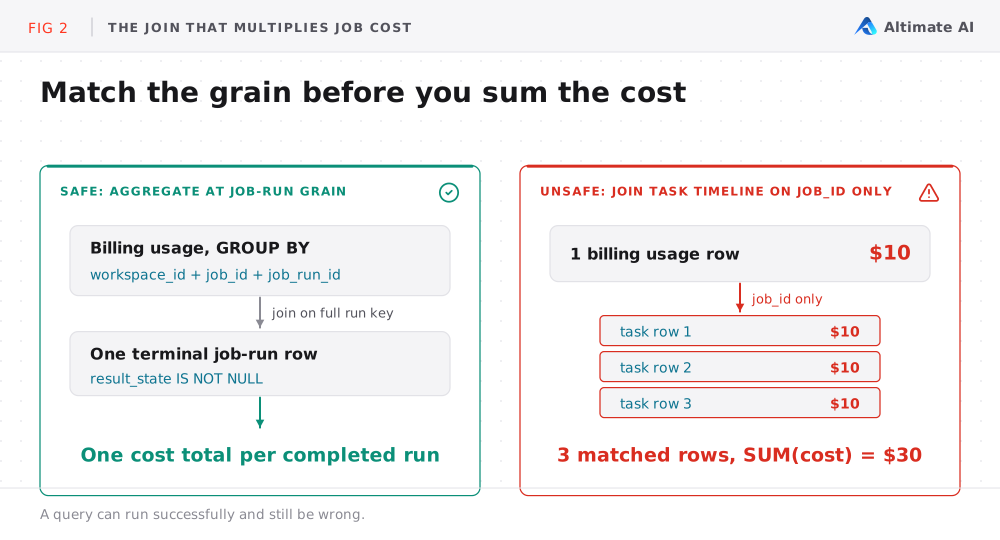
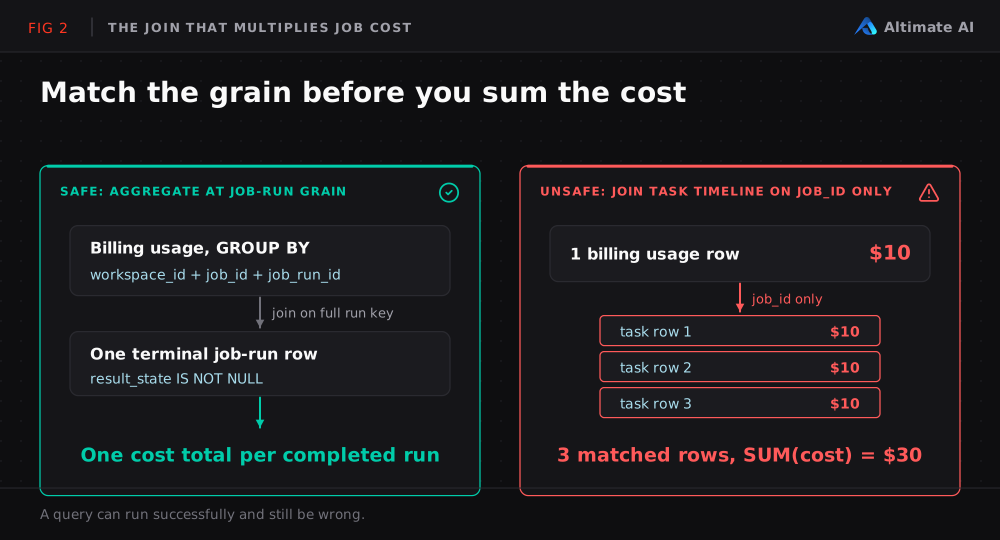
A task-timeline join multiplies cost. system.lakeflow.job_task_run_timeline has a row per task run per hour. Join billing rows to it on job_id alone, and every usage row fans out across every task. Aggregate both sides to a shared grain first, normally workspace_id, job_id, job_run_id and a time bucket, then join.
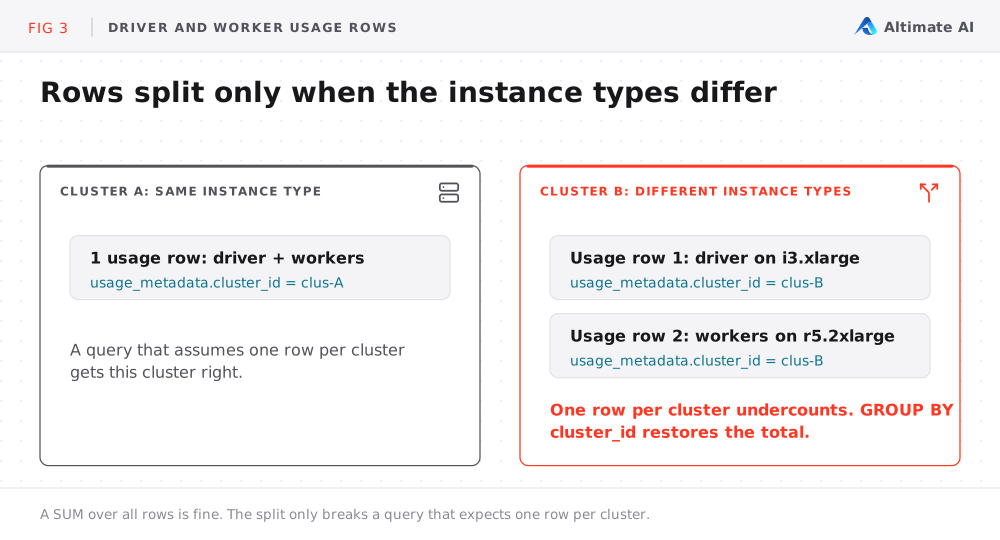
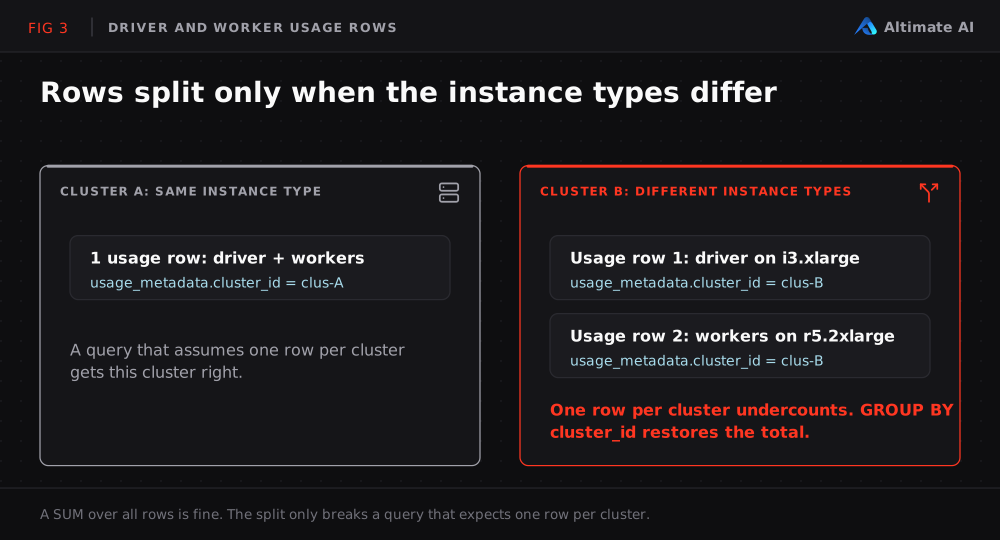
Driver and worker rows split by node type. When a cluster's driver and workers use the same instance type, Databricks combines their usage into one record. When they differ, usage appears in separate records. A SUM over all rows is fine, but a query that assumes one row per cluster silently undercounts. Both records carry the same usage_metadata.cluster_id, so grouping by that ID restores the total.
usage_metadata changes by workload type. A grouping can silently drop records when the field you selected is not populated for that compute type. The all-purpose caveat above is one case of this. Before you group on any nested field, check what share of the base cost has that field populated.
Regional scope breaks enrichment without breaking the query. The usage table is account-wide, while the Lakeflow job and compute tables are regional. A left join keeps the full total but leaves names blank for workspaces outside the current region. An inner join drops those costs. Run regional enrichment in each region and union the results.
The number is still list price, not the invoice. Contracted rates, commitments, credits, taxes, corrections and cloud infrastructure costs all sit between the two. Use the invoice for the financial close and the system tables for day-to-day analysis.
How Do I Check the Cost Total Before I Share It?
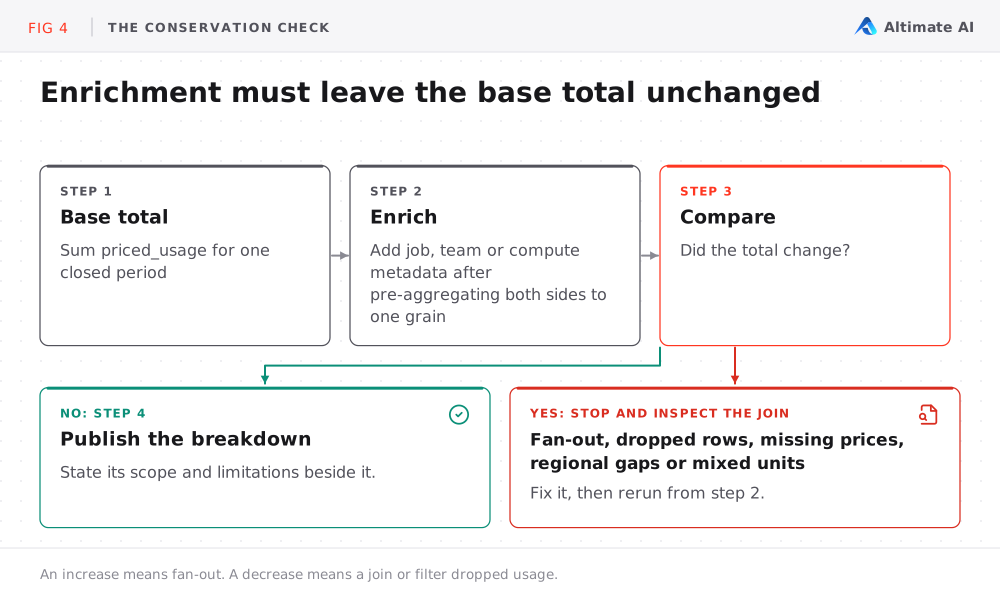
Before I'd trust any of this, I'd run a conservation check. Establish a base total for one closed period, enrich it, and confirm the total did not change. An unexpected increase means fan-out. An unexpected decrease means a join or a filter dropped usage.
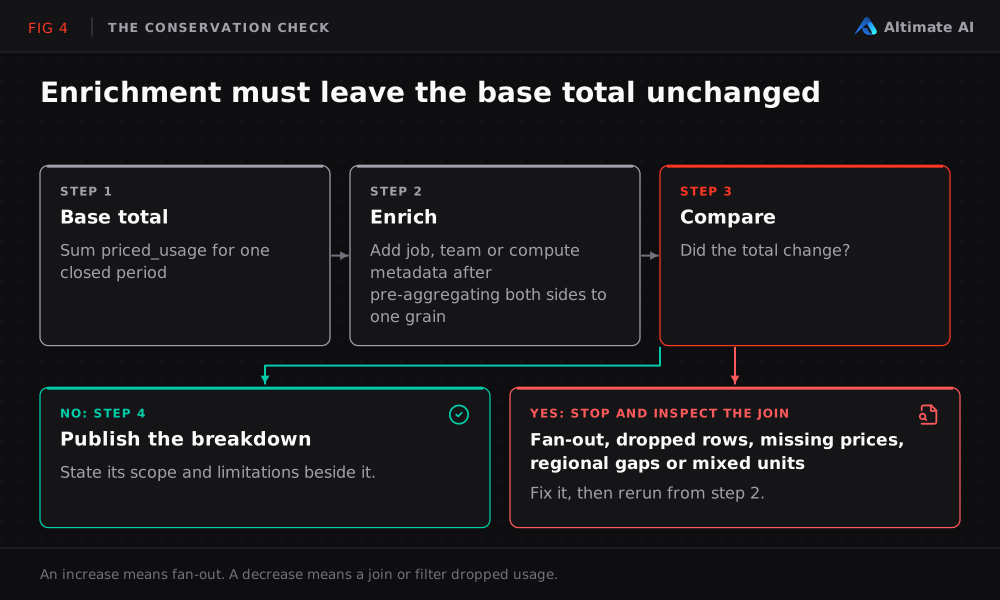
Because the price join is an inner join, also run this anti-join to find usage rows with no matching price. A trustworthy result is zero rows, or only rows you can explain:
SELECT
  usage.sku_name,
  usage.cloud,
  usage.usage_unit,
  MIN(usage.usage_end_time) AS first_unpriced_usage,
  MAX(usage.usage_end_time) AS last_unpriced_usage,
  SUM(usage.usage_quantity) AS unmatched_usage_quantity
FROM system.billing.usage AS usage
LEFT ANTI JOIN system.billing.list_prices AS list_prices
  ON usage.account_id = list_prices.account_id
 AND usage.sku_name = list_prices.sku_name
 AND usage.cloud = list_prices.cloud
 AND usage.usage_unit = list_prices.usage_unit
 AND usage.usage_end_time >= list_prices.price_start_time
 AND (
      list_prices.price_end_time IS NULL
      OR usage.usage_end_time < list_prices.price_end_time
 )
WHERE usage.usage_date >= CURRENT_DATE() - INTERVAL 31 DAYS
  AND usage.usage_date < CURRENT_DATE() - INTERVAL 1 DAY
GROUP BY usage.sku_name, usage.cloud, usage.usage_unit
HAVING ABS(SUM(usage.usage_quantity)) > 0
ORDER BY last_unpriced_usage DESC;
Keep two habits on every query. Show usage_unit beside any usage_quantity, and call a value dbus only after you filter to usage_unit = 'DBU'.
What Do I Do With Each Answer?
| Question | Query above | What to do next |
|---|---|---|
| Where did the money go? | Workspaces and SKUs | Investigate the highest-cost workspace and SKU first |
| Which jobs are driving it? | Two seven-day job windows | Separate frequency from cost per run, then check failures |
| Which failures burned money? | Failed job runs | Fix the expensive failures before anything else |
| Whose budget is it? | Team tag coverage | Enforce tags and investigate wrong-but-valid ownership |
| Who ran it? | Identity | Resolve service principals and map identity to a team |
When the answer is one expensive job cluster, right-sizing Databricks job clusters automatically covers the next step.
How Altimate Keeps These Databricks Cost Views Current
The system tables hold the raw data, and Governance Hub gives you the baseline view. Maintaining these queries as your own Databricks cost dashboard takes ongoing work. Altimate's Databricks cost breakdown keeps the workspace, SKU, resource and trend views up to date. It also connects expensive resources to its tuning workflow.
Altimate does not change the underlying facts. List price is still not the invoice. Shared all-purpose compute still lacks per-job attribution, and identity still needs mapping to financial ownership.
How to Follow the Cost Trail in Your Own Account
Pull up your own account and follow the trail through the Databricks system tables in order. Start wide, then narrow to the job, the failure and the team. Check the total before you act on it, so the number you take to FinOps is one you can defend.
Frequently Asked Questions
What are Databricks system tables?
Databricks system tables are tables in the system catalog that hold your account's operational data. For cost, system.billing.usage logs every billable event and system.billing.list_prices holds the rate for each SKU. The system.lakeflow tables hold jobs and job runs.
Do Databricks system tables show cost in dollars?
No. system.billing.usage stores usage quantities, and no column in the table holds a cost. You get an estimated list cost by joining usage_quantity to the rate in system.billing.list_prices on the price's effective window.
Why does a system tables cost total differ from the Databricks invoice?
The system tables give you list price. Contracted rates, commitments, credits, taxes, corrections and cloud infrastructure costs all sit between list price and the invoice. Use the invoice for the financial close and the system tables for day-to-day analysis.
Can I see all-purpose compute cost per job?
No. Jobs on all-purpose compute or SQL warehouses are not billed as jobs, so they do not appear in a query on usage_metadata.job_id. For all-purpose compute, run_as names the identity that created the compute.