Databricks interactive compute gets expensive when an automated workload is left running on infrastructure that was set up for a person working in the loop.
Interactive compute helps people develop and test code without waiting for a cluster to start each time. Costs can rise when that code becomes a scheduled job but keeps running on the same development cluster.
A data scientist runs a notebook cell, checks the results, changes a feature, and runs it again. Between commands, they might read the output or discuss it with a teammate. Keeping the cluster running makes it easier to pick up where they left off.
Platform teams often configure shared development environments for this kind of work. They allow extra capacity, give several people access, and set a shutdown timeout long enough to accommodate breaks.
Weeks later, the notebook is ready to run every morning at 6 AM. Someone adds a schedule but leaves it attached to the same all-purpose cluster. The job now runs without anyone working through the notebook. It may still be paying for extra capacity and idle time that helped during development.
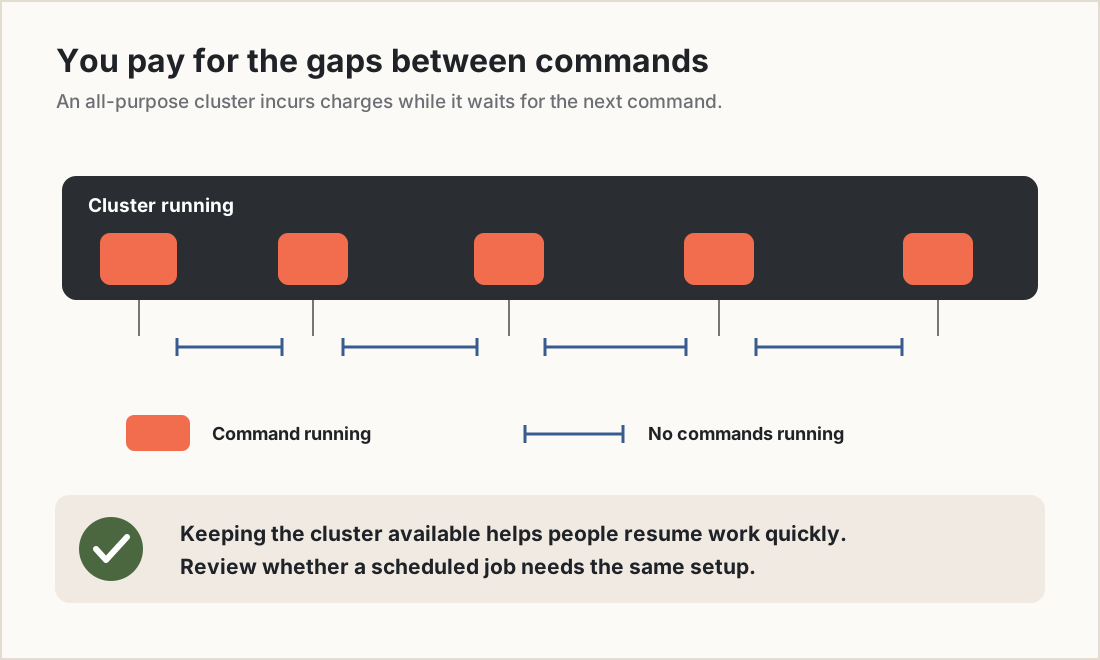
Figure 1. A running all-purpose cluster incurs charges during the gaps between commands.
Why does Databricks interactive compute keep running?
Development involves pauses while people inspect results, debug code, and decide what to try next. A shared cluster that stays available through those pauses helps the team resume quickly. A scheduled batch job has different requirements: finish reliably, meet its deadline, and avoid unnecessary compute costs.
Databricks recommends serverless compute for most supported job workloads. For classic compute, it recommends Jobs compute, which terminates after the run completes. All-purpose compute shuts down according to its inactivity setting and may be shared with other users. For a scheduled job, the choice between all-purpose and Jobs compute decides whether billing stops when the run ends. Exceptions include iterative testing and frequent, short jobs where startup delays matter. For more information, see Databricks guidance for Jobs compute.
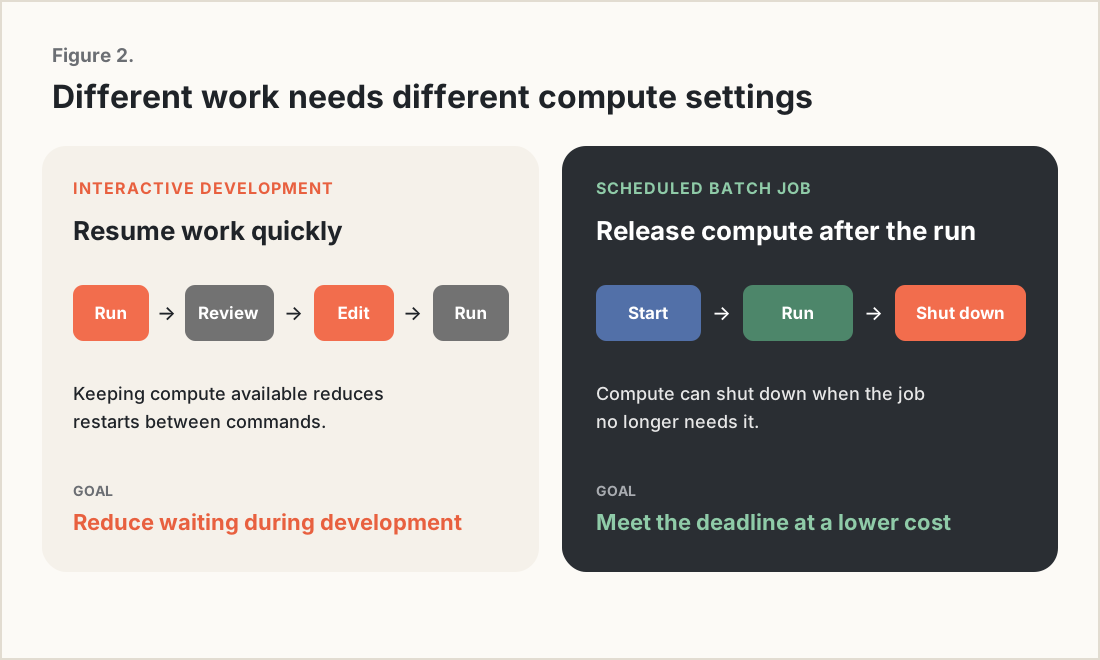
Figure 2. Development benefits from quick reruns. Scheduled batch jobs can often release compute when they finish.
When a notebook becomes a scheduled job, review its compute choice along with its code.
DBU rates alone do not tell you what a Databricks workload costs
A Databricks Unit, or DBU, is a unit of platform usage. Comparing DBU rates helps, but the rate alone does not tell you how much a workload will cost. With classic all-purpose compute, idle time before shutdown still incurs DBU and cloud-instance charges. For more information, see Databricks Cost Optimization: 6 Levers That Cut Your Bill.
A cluster might run commands for only a small part of the day while people review results, attend meetings, or work elsewhere. Keeping it available may be worthwhile during active development. A scheduled job may have little reason to keep that same environment running between executions.
Using smaller workers can reduce the cost of each running hour. Moving a scheduled workload to compute that stops after the run can also reduce the number of hours you pay for. Check both before deciding that cluster size is the main problem.
Auto-termination can leave long gaps of paid idle time
Auto-termination shuts down classic compute after a configured period of inactivity. Databricks considers it inactive once its tracked commands have finished. The configurable timeout ranges from 10 to 10,000 minutes. For more information, see Auto-termination documentation.
Consider a 60-minute timeout. Five-minute commands start at 9:00, 9:50, 10:40, and 11:30. Each arrives before the cluster has been inactive for an hour, keeping it running throughout the morning.
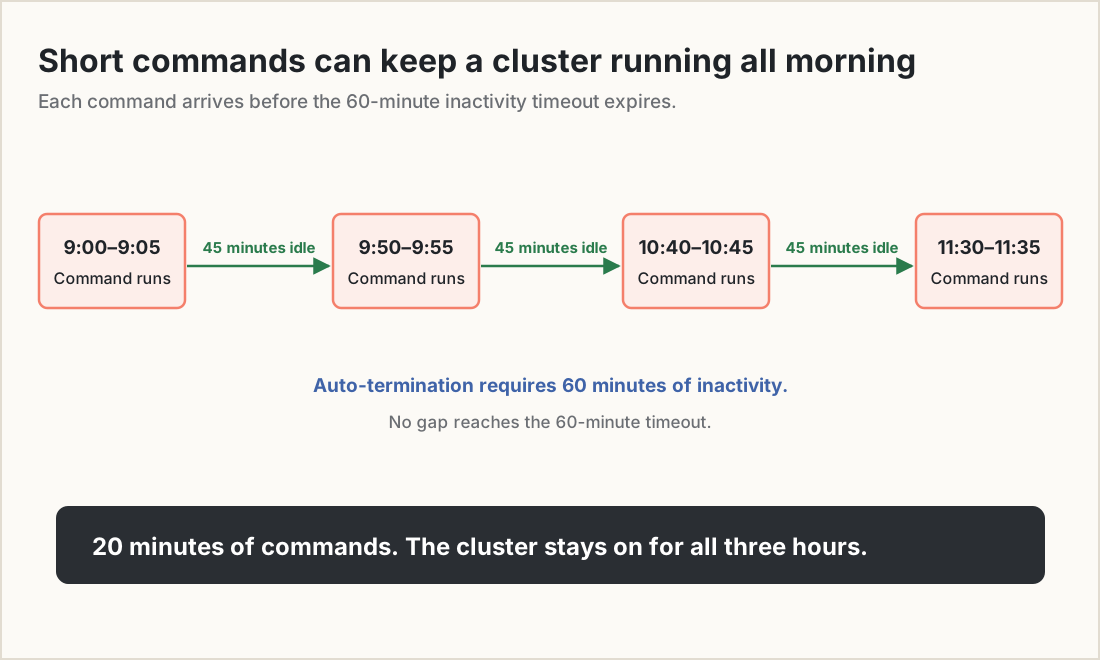
Figure 3. Short commands can keep a cluster running for hours without exceeding its inactivity timeout.
A shorter timeout reduces idle time but makes users restart compute more often. Choose the timeout around how the team works, and review whether scheduled jobs still need that shared environment.
Review compute when a notebook becomes a production job
During development, an all-purpose cluster gives people room to inspect intermediate results, debug joins, and try different approaches. Once the notebook runs on a schedule, those requirements may change. The job configuration can still point to the development cluster unless someone explicitly changes it.
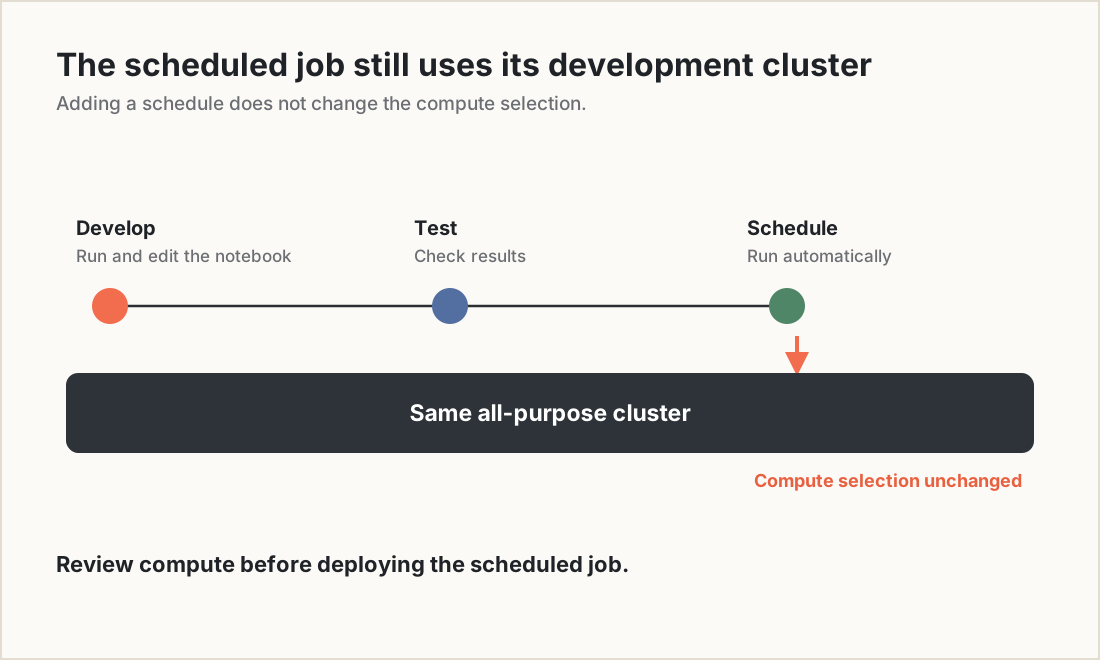
Figure 4. A scheduled job can retain the same all-purpose cluster used during development.
Include a compute review in the production deployment process. Confirm that the selected compute fits the job’s schedule, startup requirements, and dependencies.
Databricks provides a system-table query for identifying jobs that run on all-purpose compute. It gives platform teams a practical starting point for finding workloads to review. For more information, see the Jobs system-table reference.
Does Databricks serverless remove the compute decision?
Serverless notebooks reduce the need to configure and manage infrastructure. Automated workloads still need an appropriate performance mode. Databricks offers two serverless performance modes:
Performance-optimized: Keeps warm capacity available to reduce startup delays.
Standard: Suits batch jobs and pipelines that can tolerate startup times of roughly four to six minutes. Databricks states that it can cost up to 70% less than performance-optimized mode. Standard mode is available for Lakeflow jobs and pipelines, but not notebooks.
The saving is a published maximum, so compare the cost and completion time of your workload. See Serverless performance-mode guidance.
Check compatibility as well. Serverless notebooks and jobs do not support R or Spark RDD APIs, use Spark Connect, and do not provide the classic Spark UI. Some workloads will need code changes or classic compute. For more information, see Databricks Serverless vs Classic Compute.
Choose based on what the workload needs: interactive development, scheduled batch processing, SQL queries, or capabilities available only on classic compute.
Shared clusters make individual job costs harder to track
Shared all-purpose compute also makes it harder to answer a basic question: how much did this pipeline cost last month? The system.billing.usage table includes usage_metadata.job_id for serverless jobs and jobs running on Jobs compute. That field is not populated for jobs running on all-purpose compute. See Billable usage reference.
Several notebooks and jobs can use the same cluster at once. You can see the cluster’s total usage, but assigning an exact share to each workload may require estimates.
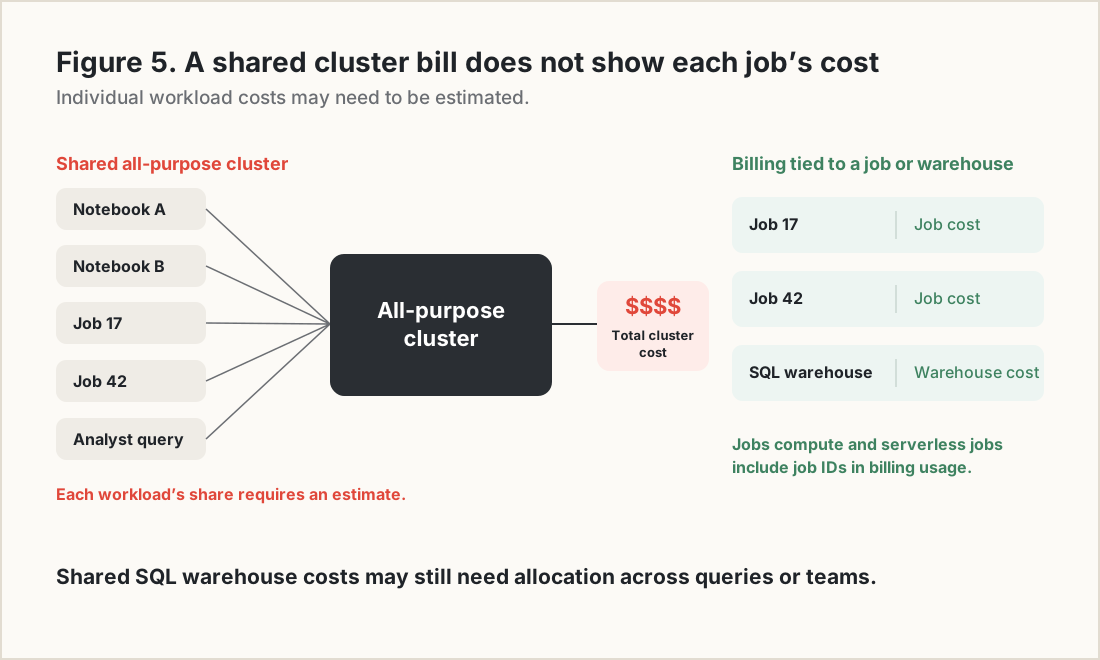
Figure 5. Shared cluster costs may need to be allocated. Jobs compute and serverless jobs provide billing metadata tied to the job.
Moving a production job from all-purpose to Jobs compute can therefore improve cost reporting as well as reduce unnecessary running time.
How to find Databricks jobs running on all-purpose compute
Start by identifying jobs whose compute choice needs review. Then decide whether to move them, resize them, or retain their current configuration. This query adapts the Databricks example to list distinct job and cluster combinations used in the past 30 days. It includes workspace and cluster IDs so the results are easier to investigate.
WITH recent AS (
  SELECT
    workspace_id,
    job_id,
    EXPLODE(compute_ids) AS cluster_id
  FROM system.lakeflow.job_task_run_timeline
  WHERE period_start_time >= CURRENT_DATE() - INTERVAL 30 DAY
),
clusters AS (
  SELECT *
  FROM system.compute.clusters
  QUALIFY ROW_NUMBER() OVER (
    PARTITION BY workspace_id, cluster_id
    ORDER BY change_time DESC
  ) = 1
)
SELECT DISTINCT
  r.workspace_id,
  r.job_id,
  r.cluster_id,
  c.cluster_name,
  c.owned_by
FROM recent r
JOIN clusters c
  USING (workspace_id, cluster_id)
WHERE c.cluster_source IN ('UI', 'API');
Treat the results as a review list. Some jobs may have a valid reason to use all-purpose compute. Use the cluster ID to investigate its billing usage and activity. Cluster-level usage does not establish the exact cost of each job sharing that cluster.
What platform teams should monitor on Databricks
| Signal | What to check |
|---|---|
| Production jobs on all-purpose compute | Whether the job still needs that environment or retained it from development. |
| Cluster running time compared with command activity | Whether long gaps support active development or are avoidable. |
| Auto-termination settings by team | Whether timeouts fit the team’s working patterns. |
| All-purpose spending that cannot be assigned to individual jobs | Whether shared compute is making cost reporting difficult. |
| Newly scheduled notebooks | Whether someone reviewed the compute choice before deployment. |
Make the compute selection part of the deployment
Very short timeouts and strict cluster-size limits can make development slower. A more useful policy is to review compute when a workload becomes scheduled or repeatable.
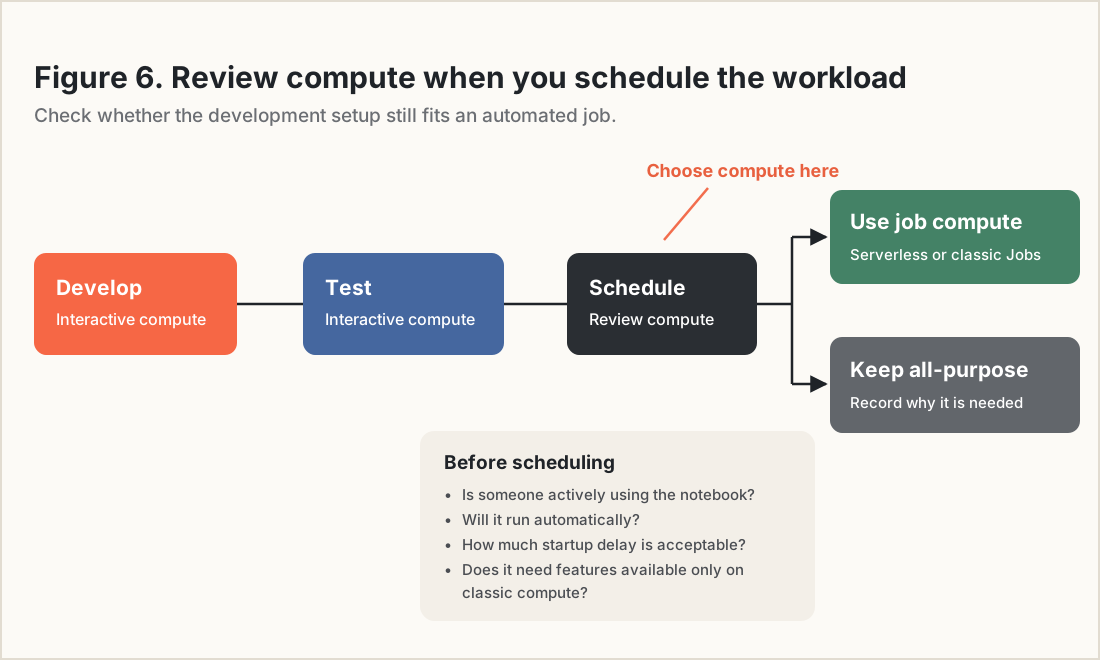
Figure 6. Add a compute review when a notebook is scheduled for regular execution.
Ask four questions:
Is someone actively running commands and waiting for results?
Will the workload run on a schedule or another repeatable trigger?
How much startup delay can it tolerate while meeting its deadline?
Does it need a feature available only on classic compute?
Use the answers to choose serverless jobs, classic Jobs compute, a SQL warehouse, or an all-purpose environment with a documented reason. A requirement for classic compute does not automatically require all-purpose compute. A scheduled job may be able to use classic Jobs compute.
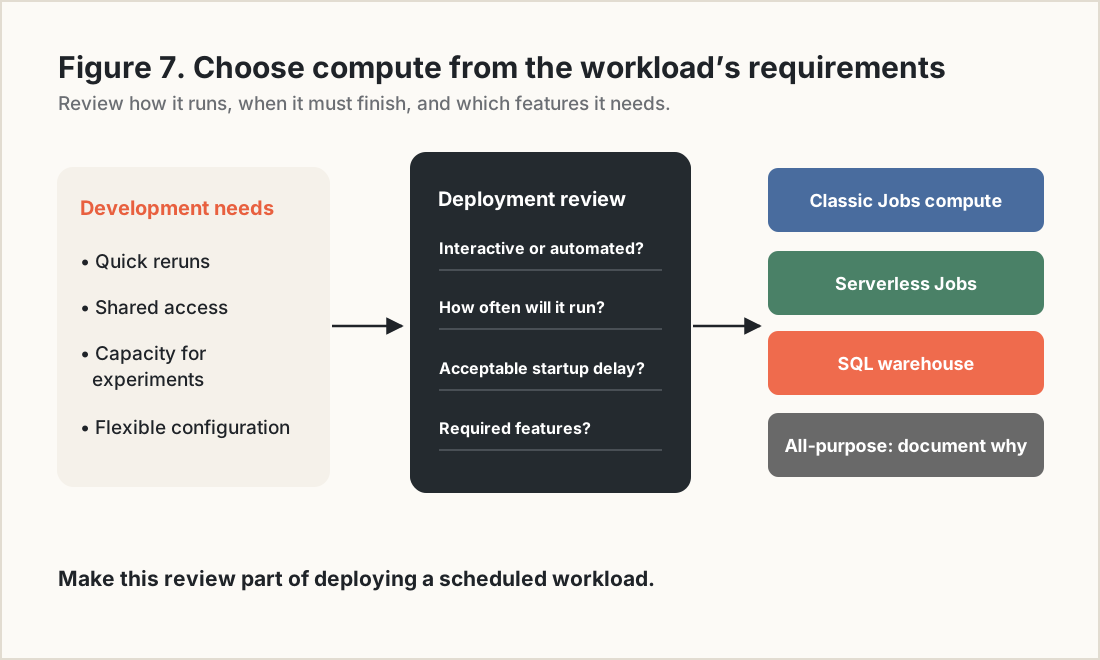
Figure 7. Choose compute based on the workload’s interaction, schedule, startup, and compatibility requirements.
Why compute reviews need automation across many workspaces
A manual review can catch a few scheduled notebooks using development clusters. Across hundreds of workspaces, configurations and usage patterns change too often to rely on occasional checks. Automated cost reviews should identify the workload and how it runs, flag compute choices that need checking, and then assess sizing.
For Altimate, this means using Discover to surface workloads whose compute needs reviewing, followed by Auto Tune for workloads that need sizing changes.
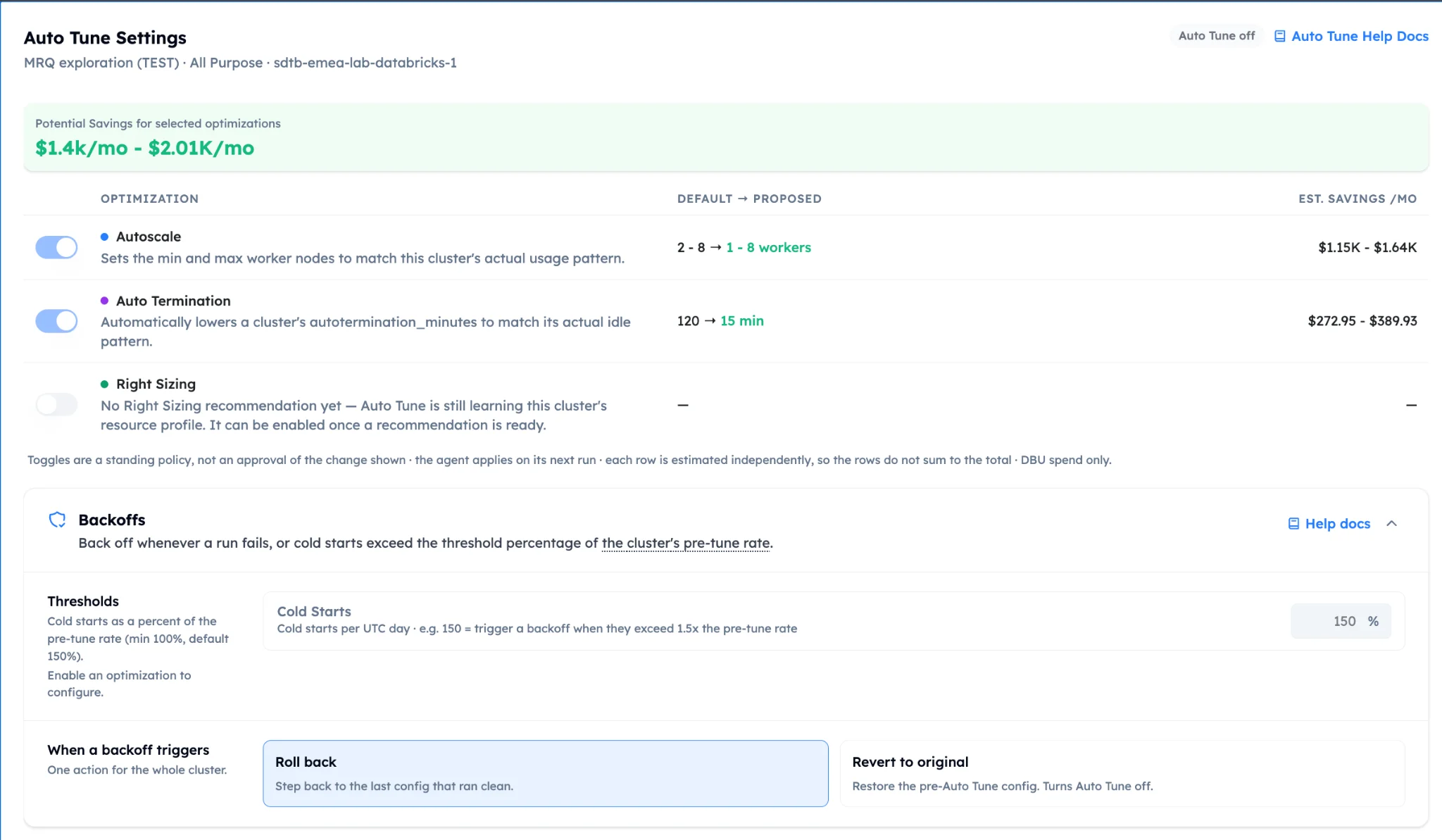
For example, a recommendation to downsize a shared cluster should also consider whether its scheduled jobs belong on separate Jobs compute. Moving those jobs may change the capacity the shared cluster needs.
What should stay on interactive compute?
Interactive compute remains useful for exploratory analysis, notebook development, iterative debugging, collaborative investigations, and data-science experiments. Frequent reruns can justify keeping an environment available. Some development workflows also need capabilities available only on classic compute.
Evaluate that spending against the work it supports. Keeping a cluster running between experiments can be useful. Keeping it running between daily batch jobs needs a separate justification.
What to check before you schedule the next notebook
Check where it will run, how quickly it must start, when its compute will stop, and how its costs will be tracked. That review can uncover costs that cluster sizing alone will miss. Once the compute choice fits the workload, tune its size and settings.
Additional implementation references: Monitor costs using system tables, Monitor serverless compute costs.
Frequently asked questions
What is the difference between all-purpose and Jobs compute?
All-purpose and Jobs compute differ in when they stop billing. Jobs compute terminates after the run completes. All-purpose compute keeps running until its inactivity timeout expires, and several people or jobs can share it at once.
Should a scheduled notebook run on a Databricks job cluster or an all-purpose cluster?
A Databricks job cluster or an all-purpose cluster can both run a scheduled notebook, but only the job cluster stops when the run ends. Databricks recommends serverless compute for most supported job workloads, and Jobs compute when the job needs classic compute. Keep a scheduled job on all-purpose compute only for a documented reason, such as frequent, short runs where startup delays matter.
How long can auto-termination keep an idle cluster running?
The inactivity timeout can be set from 10 to 10,000 minutes, and it counts from the moment the cluster's tracked commands finish. A new command resets it. With a 60-minute timeout, four five-minute commands spread across a morning keep the cluster running all morning.
Why can't I see the cost of a job that runs on all-purpose compute?
The system.billing.usage table fills usage_metadata.job_id for serverless jobs and for jobs on Jobs compute, but not for jobs on all-purpose compute. When several workloads share one all-purpose cluster, you see the cluster's total usage and have to estimate each job's share.