Whenever somebody mentions serverless, two things come to mind: it should be cheaper than normal resources and no infrastructure management, right? This is certainly what has been claimed both from Databricks and from several (potentially sponsored) case studies.
But it is still a very debatable topic.
In this blog post, I will be dissecting Databricks Serverless, which was initially introduced in 2017 for Apache Spark. Today, almost every offering in Databricks has a serverless option. This hosting option has gained a lot of interest.
So, let’s look at:
What Databricks Serverless is, exactly
Compare the cost of Databricks serverless vs classic compute
Under which circumstances should you pick one over the other
But first, let’s talk first about serverless in general.
What is Serverless Compute? And Why Might You Use It?
In simple terms, serverless compute means you run your workloads on third-party infrastructure without managing anything yourself. The managed service does the infrastructure work for you.
Think of serverless compute as a flexible, on-demand service. You use it for the exact time you need and pay only for that period. You do not maintain hardware or handle backend upkeep costs.
Just like any on-demand service, serverless compute has fair-use rules and boundaries. The provider guarantees fast access and manages capacity behind the scenes. The provider still applies operational limits.
Databricks provides multiple types of serverless compute. Below are the key serverless compute types:
Serverless SQL Warehouses: On-demand elastic compute for running SQL queries from the SQL editor, dashboards, and BI tools. Warehouses start in seconds and scale automatically with demand, so there's no sizing decision and no idle cluster sitting around. Billed per DBU-second on its own serverless SQL SKU.
Serverless All Purpose Compute: This serverless compute removes the need to manage the underlying cluster infrastructure. It scales compute resources automatically based on workload demand. It suits interactive development, notebooks, and ad hoc analysis. Pick it for that work when fast startup and less cluster management matter more than cost.
Serverless Jobs Compute Compute for scheduled and triggered jobs (what used to be Workflows). Databricks provisions compute for every run and scales it to match the workload, with smart retries and cloud failover built in. It supports notebook, Python script, dbt, Python wheel, and JAR tasks. With serverless Jobs Compute, Photon and autoscaling are always on.
Serverless Spark Declarative Pipelines: The compute behind Lakeflow Spark Declarative Pipelines. You define the transformation logic and Databricks runs the pipeline without you configuring or deploying any infrastructure. It’s a good fit for streaming and incremental ETL where cluster sizing is hard to predict.
Serverless GPU compute: Still in beta and aimed at deep learning: training and fine-tuning custom models without managing GPU fleets or drivers. It runs on A10s for smaller work and H100s (8 GPUs per node) for large interactive or distributed training.
Standard vs. Performance-Optimized vs. Serverless Compute
Let’s compare three things:
Standard Databricks Compute means any instance type with little effort spent to optimize performance.
Performance-optimized compute refers to an instance family and configuration suited to the kind of workload you want to run. An example is a scheduled long-running job that runs every Monday morning.
Serverless compute, where you don’t need to think about what instance family or thing you’re using.
Here's how the three stack up.
| Standard (classic) | Performance-optimized (classic) | Serverless | |
|---|---|---|---|
| Best fit for | Anything where nobody has looked at the bill yet | Steady, predictable jobs whose shape you already know | Bursty, unpredictable, or interactive work |
| What you configure | A generic instance type and cluster size | Instance family, node type, and autoscale range chosen for the workload | Nothing. Databricks chooses and scales it per run |
| Startup time | Minutes per cluster start (zero once running, billed while idle) | Minutes, same as standard | Seconds |
| Billed for | DBUs plus the underlying cloud VM, for however long the cluster is up | Same as Standard, but sized to cut waste | DBUs only, at a higher per-DBU rate, for the seconds the job actually runs |
| Who tunes it | You, once, when the cluster policy is set | You, per workload, based on profiling the job | Databricks, automatically, on every run |
Databricks Serverless Performance Optimized vs Standard Mode
Serverless jobs use the same two words for a different setting. The Performance optimized toggle on a job's details page picks the serverless performance mode.
Performance optimized on starts and runs the job faster. Databricks designs this mode for time-sensitive work.
Performance optimized off runs the job in standard performance mode. It uses less compute, and startup can take 4 to 6 minutes.
Both modes bill the same SKU, but standard mode consumes fewer DBUs. So standard mode costs less for any job that can wait for its start. The toggle changes only the serverless tasks in a job. The Databricks serverless jobs documentation describes both modes.
Should you use Databricks Serverless Compute?
There are two main reasons to choose serverless.
First, you skip routine maintenance and do not provision capacity up front. So your team focuses on building pipelines instead of managing machines.
Second, resources start in seconds instead of minutes, which removes long wait times and stops you from paying for idle compute.
Serverless tends to be the right call when:
You want zero cluster management, with no configs to write and no sizing to tune. You want startup in seconds rather than minutes.
The workload is spiky, interactive, or unpredictable. Examples are ad hoc SQL, BI dashboards, notebooks, or short jobs.
You are paying for idle time on classic clusters today and want to get rid of it.
Iteration speed matters more to you than fine-grained cost control.
Cost-wise, Databricks serverless carries a higher per-DBU rate than classic compute. In exchange, you pay only for the seconds a job runs. Classic is cheaper per DBU. But you pay for however long the cluster stays up, including idle time. You also carry cloud VM costs separately. The share of billed time spent doing work decides which option costs less, more than the list price does.
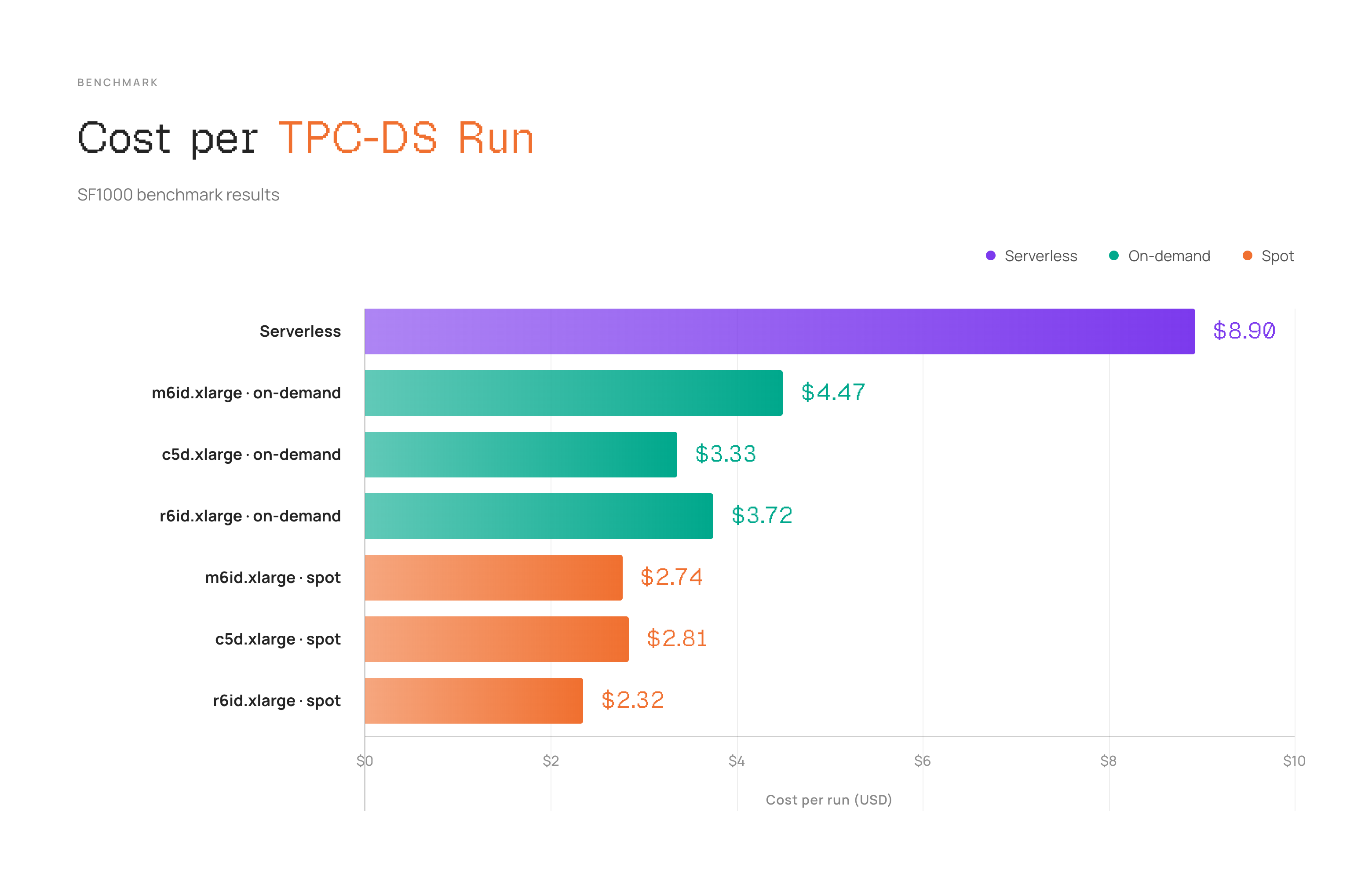
In our benchmark of Databricks serverless vs classic compute, serverless didn’t require much cluster-management work and delivered the shortest runtime. However, the trade-off is price. The serverless run costs $8.90 after a 6% effective-rate discount. The least-expensive on-demand configuration costs $3.33. The least-expensive spot configuration costs $2.32. The serverless premium is 2.7x over on-demand and 3.8x over spot.
Benchmark setup
Below is benchmark setup we used in our comparison:
Workload: TPC-DS at scale factor 1,000 - approximately a 1 TB decision-support dataset under the TPC scaling model.
Serverless: default platform settings.
Classic compute:
m6id.xlarge,c5d.xlarge, andr6id.xlargeworkers, each tested with on-demand and spot capacity.Cluster policy: autoscaling from 4 to 12 workers;
m6id.largeon-demand driver; Databricks Runtime 14.3 LTS with Spark 3.5.0.Sampling: three paired runs per day 06:00, 14:00, and 22:00 for 21 days, giving 63 observations per worker type. Serverless and classic jobs were launched concurrently to reduce time-of-day bias.
Primary measures: effective cost per successful run and end-to-end elapsed time. Runs should use the same region, table snapshot, file layout, query set, and cache policy. Retries and spot reclamations belong in the cost of the completed run.
The two compute models require different accounting.
For classic compute, integrate driver and worker uptime across autoscaling events. Then add both infrastructure and DBU charges:
classic cost = Σ(worker-seconds × [VM rate + DBU rate]) + driver + storage + retry overheadFor serverless, we used metered DBUs at the effective contracted rate. Databricks selects the worker shape and scaling policy for serverless. So this benchmark is a platform-mode comparison rather than an instance-for-instance test. Default serverless settings may also differ in Photon use and execution-engine behavior. Check query plans and cache state before you attribute the runtime gap solely to elasticity.
Benchmark Results for Serverless and Classic Compute
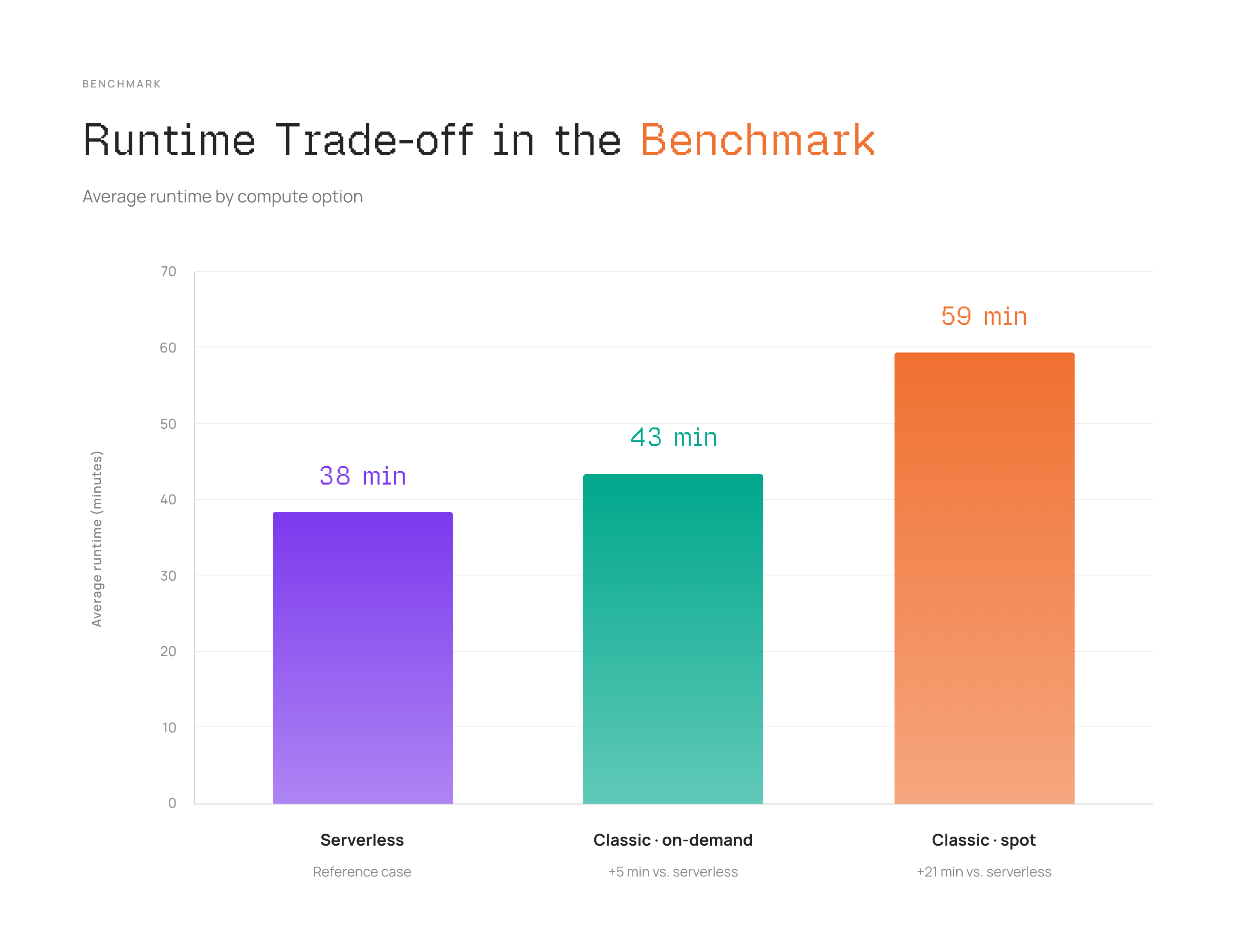
Serverless finishes about 5 minutes sooner than on-demand and 21 minutes sooner than spot. But the additional spend is $5.57 and $6.58 per run, compared with the cheapest option in each class. Put differently, the cost premium is roughly $1.11 in additional cost per minute saved vs on-demand and $0.31 per minute saved vs spot.
Latency-sensitive pipelines may justify the serverless premium. Serverless gives those pipelines tighter completion windows, faster scale-up, and lower operational load. Classic compute remains the stronger cost choice for scheduled workloads with slack in the service-level objective. Classic saves the most when you tune worker families, Photon, shuffle storage, and autoscaling bounds to the query mix. So weigh each decision against the value of a minute saved, rather than cost or runtime in isolation.
Qubika reports the same job swinging from 30% cheaper to 2x more expensive on serverless, depending on the workload. Qubika concludes that you should benchmark your own jobs rather than trust a fixed ratio either way.
The cheaper choice between Databricks serverless and classic compute depends on how long and how often your job runs.
Serverless removes startup and idle overhead, which dominates short jobs. A 4-minute job that previously consumed 12 minutes of cluster time now consumes 4. The longer the job runs, the smaller the startup and idle overhead becomes as a share of the total. On longer jobs, classic compute's lower per-DBU rate starts to win on its own.
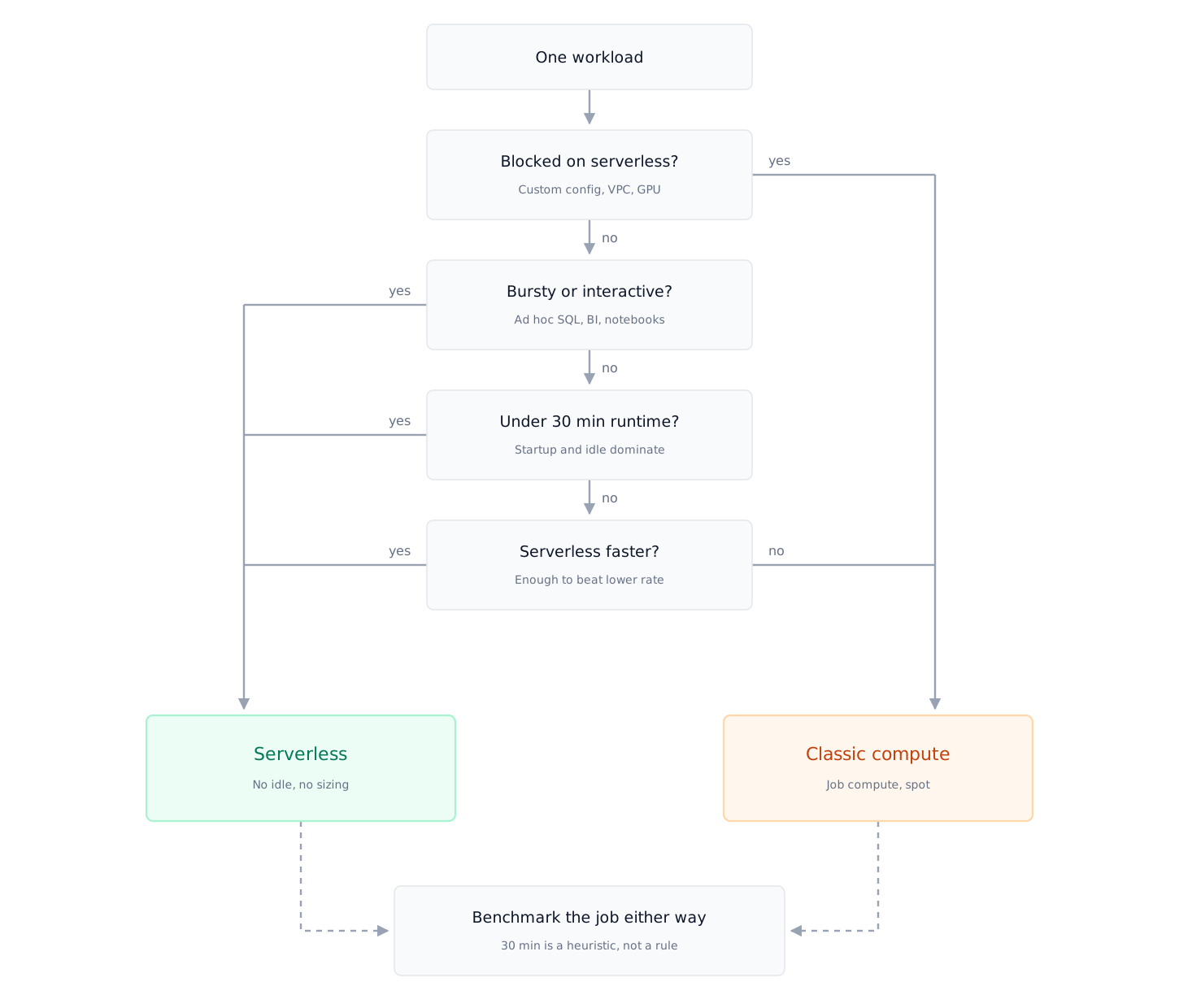
The rough break-even is around 30 minutes of runtime. Below that, serverless is usually cheaper before you even account for the operational savings. Above that, classic wins unless serverless is delivering a 30 to 60% speedup that classic cannot match.
That provides you three ways to decide what to go for once you know a job's typical run duration and how steady its schedule is:
Choose serverless for jobs that run under 30 minutes. Serverless also fits an unpredictable or interactive schedule, such as ad hoc SQL or BI dashboards. Pick serverless when you don’t want infrastructure management or cluster spin-up. With serverless, you also get no separate bill for cloud resource usage.
Choose Classic for jobs that run long and steady. You can size the cluster once and push the cost down further with spot instances or committed-use discounts. Classic also gives you finer control over the cost. Classic also needs more of your own monitoring and debugging.
Run a hybrid, which is where most shops end up. Use serverless for ad hoc and interactive work. Use classic job clusters for the long, predictable ETL that runs the same way every night.
When to Keep Classic Databricks Compute
You can optimize classic compute to a certain extent with spot instances, committed-use discounts, and right-sizing the cluster once. Classic compute also remains the better choice outright in a few concrete situations:
You need custom configuration. Examples are a specific instance type, GPUs, init scripts, OS-level libraries, or nonstandard Spark configs.
The workload is long-running and steady. A steady workload lets you use spot instances or reserved and committed-use discounts. Spot instances and those discounts push the cost well below what serverless would charge for the same hours.
You have strict networking requirements, such as a workload that has to run inside your own VPC or VNet.
You are running heavy ML training or another specialized workload that serverless does not fully support yet. The Databricks serverless GPU offering is in beta as of now.
How to Decide Between Serverless and Classic for Each Job
Neither Databricks compute option is cheaper in every case. Choosing between Databricks serverless and classic compute comes down to each job's runtime and how steady its schedule is. Pull up your longest-running and shortest-running jobs and check where they fall against the 30-minute break-even. For the other levers that cut the bill, such as spot workers, Photon, and auto termination, read Beyond the Databricks Cost Calculator.
Frequently Asked Questions
Is Databricks Serverless Cheaper Than Classic Compute?
The answer depends on job runtime. Serverless removes startup and idle time. That overhead dominates short jobs, so serverless usually wins below about 30 minutes of runtime. Above that, the lower per-DBU rate of classic compute usually wins, unless serverless runs the job 30 to 60% faster.
How Much Did Serverless Cost in the TPC-DS Benchmark?
Serverless cost $8.90 per successful TPC-DS run at scale factor 1,000, after a 6% effective-rate discount. The cheapest on-demand classic configuration cost $3.33, and the cheapest spot configuration cost $2.32. Serverless finished about 5 minutes sooner than on-demand and 21 minutes sooner than spot.
When Should You Keep Classic Databricks Compute?
Keep classic compute when you need a specific instance type, GPUs, init scripts, OS-level libraries, or nonstandard Spark configs. Classic compute also costs less for long, steady workloads that can use spot instances or committed-use discounts. Workloads that must run inside your own VPC or VNet also need classic compute. Heavy ML training stays on classic compute while serverless GPU compute is in beta.