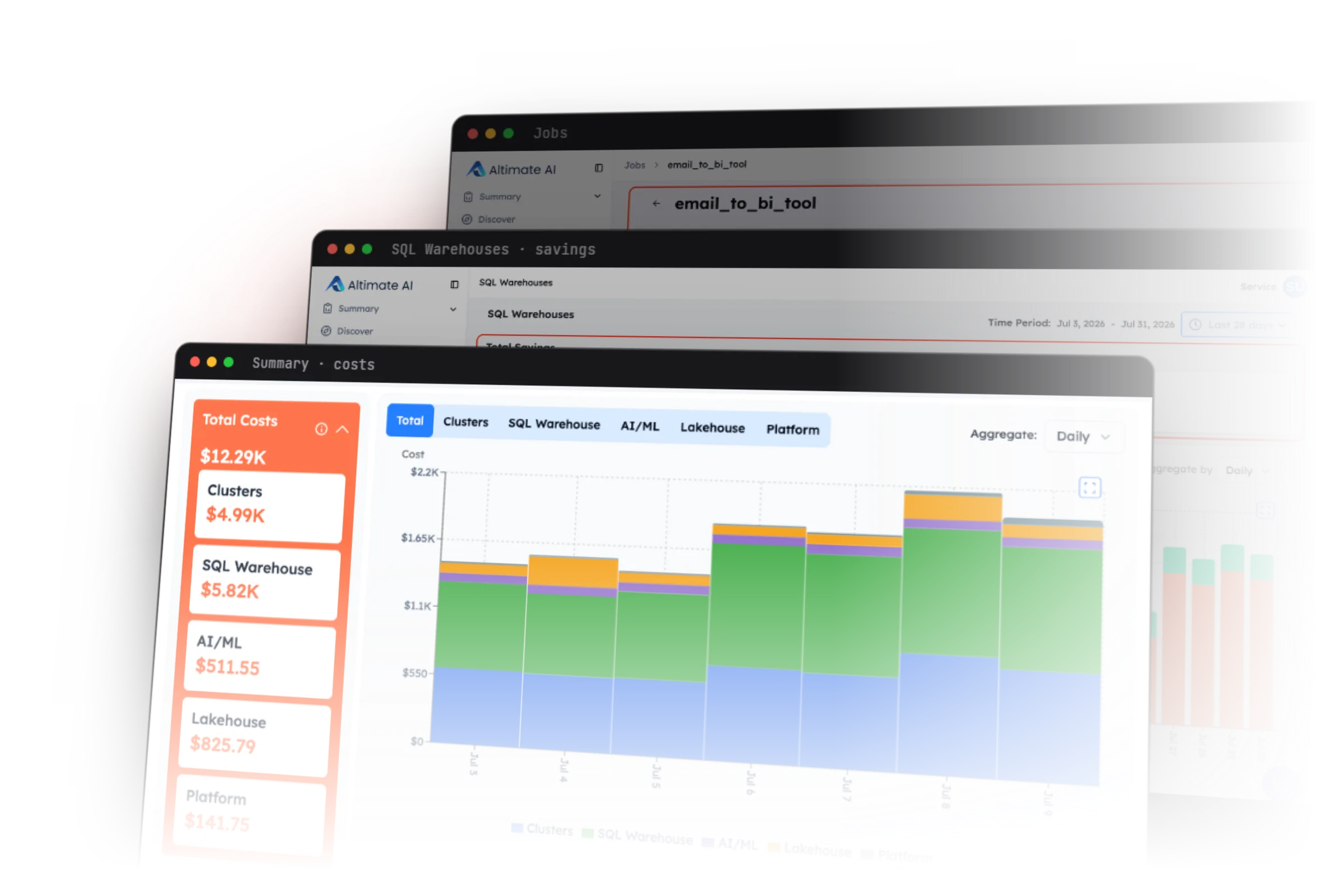
Altimate AI’s Auto Tune learns from each Databricks job’s metrics, converges its cluster toward its right-sized configuration within the bounds you set, and reverts and alerts whenever a run breaches them.
Why do Databricks job clusters end up oversized?
Most Databricks job clusters are sized once and rarely revisited. That first spec is typically a generous one, with more memory, more cores and a bigger node than the run turns out to need, chosen with a safety margin so the job simply works. Nothing forces a second look, so they keep running on that day-one config indefinitely. We see it in the telemetry across hundreds of our customers’ job clusters: most run far below the capacity they pay for, CPU and memory sitting largely idle through each run.
Closing that gap by hand does not scale across hundreds of scheduled jobs, and the attempt carries real risk, because a wrong change can break a production pipeline at three in the morning.
What we wanted to design for at Altimate is a system that keeps every job cluster right-sized, continuously learning from each job’s runs and watching each change for a breach of the configured bounds, so resources stay matched to what it actually needs.
How does Auto Tune keep Databricks job clusters right-sized?
Auto Tune works as a closed loop. It observes each job’s runs for resource utilization, run times and failures, then generates a right-sizing recommendation. It applies that recommendation, measures the runs that follow for any breach of the configured bounds, and decides the next change, tightening the fit each cycle.
Four components carry it, and the sections below take them in this order:
Metrics Store collects the telemetry, run history and billing from every run.
Recommendation engine turns that evidence into a proposed change.
Apply and watch makes the change and measures what happened.
Savings and audit history records what was kept and why.
Auto Tune targets classic job compute, the clusters whose node types and sizes you choose. Serverless is out of scope for now.
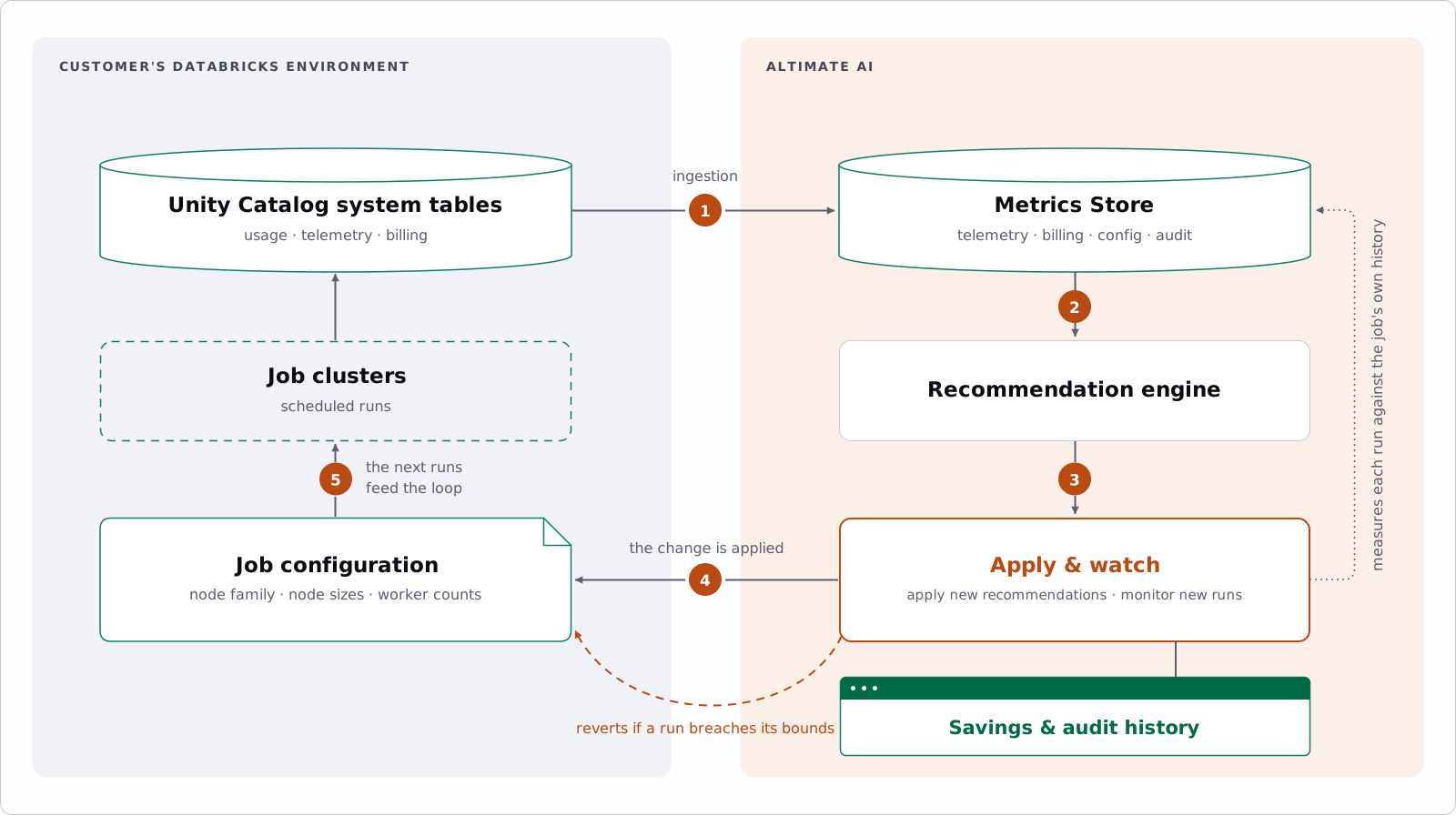
The system learns from each job’s own runs, makes one change, watches the runs that follow, and lets the result decide the next one.
What does the Metrics Store collect?
The Metrics Store holds the telemetry, billing and history behind every decision.
Everything starts with what the workspace already records. The Metrics Store ingests the customer’s own Databricks system tables: per-minute node telemetry for CPU, memory, disk and network, run history and outcomes, and billing. Alongside them it keeps configuration history, so the spec a job ran on last month is still available, and the audit trail of every change Auto Tune has made.
How does the recommendation engine decide a new size?
Databricks cluster sizing runs from memory, CPU, disk and network, one change at a time.
The engine handles Databricks cluster sizing from the dimensions that decide whether a job fits its hardware: how much memory and CPU it needs, whether it needs a local disk attached and at what size and throughput, and how much network bandwidth. It turns those into concrete recommendations: the worker node family and size, the driver, and how the cluster scales, either a fixed worker count or an autoscale range.
One change per cycle, priced on both cost components at the customer’s negotiated DBU rate and the cloud provider’s prices.
A Lakeflow job whose tasks run on several clusters is tuned per cluster. Auto Tune groups the job’s runs by the cluster each set of tasks uses and recommends for each of them on its own, so a job with a small orchestration cluster and a large one for the heavy task gets the right change on each. The settings view below shows this, with a separate recommendation for each of the job’s task clusters.
Before a workspace enables anything, a job owner can see what is proposed for every task cluster of a job, side by side with what runs today, and choose which tasks are in scope.
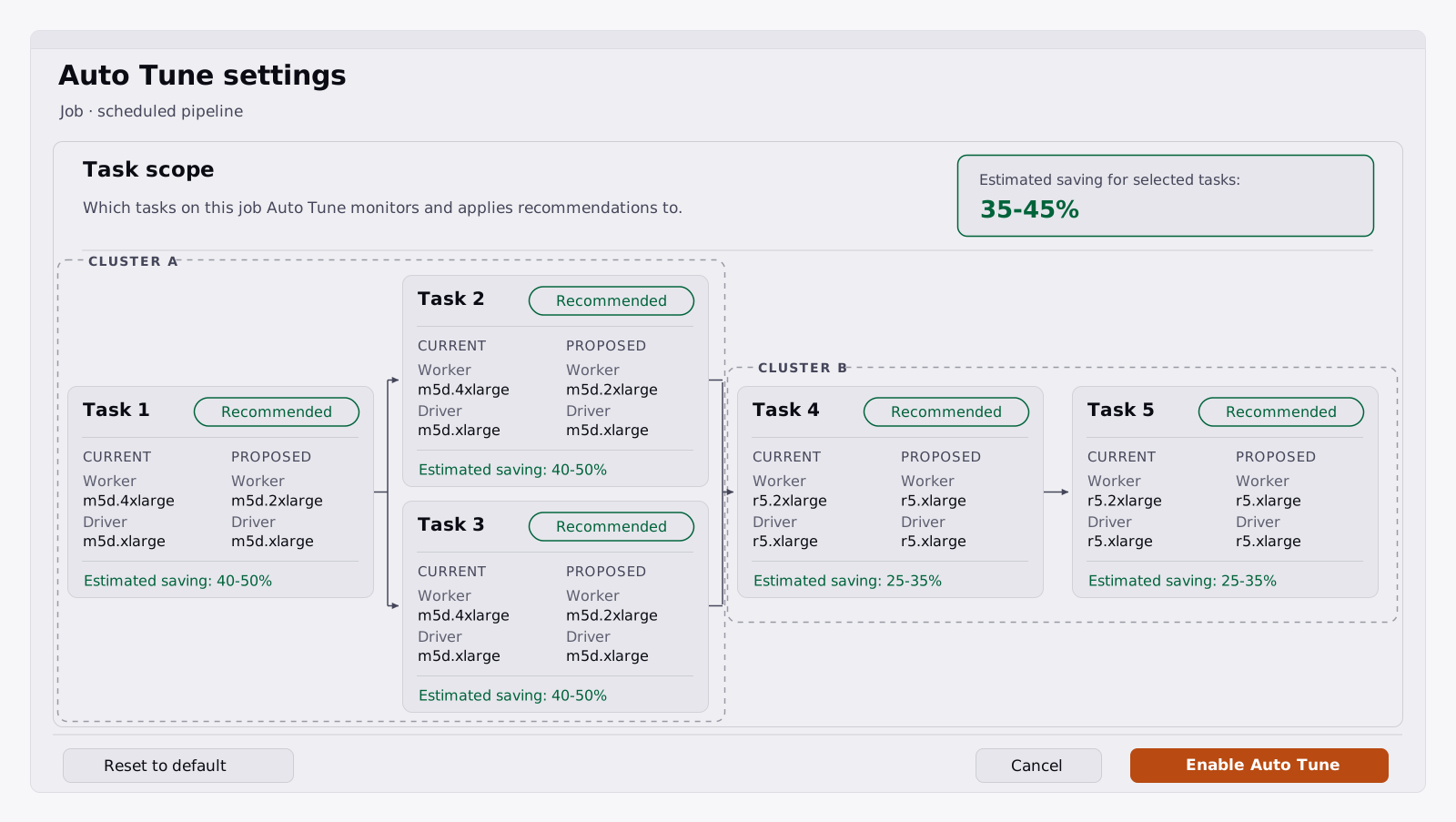
What a job owner sees before enabling: tasks are grouped by the cluster they share, and every task on a cluster gets the same recommendation. This is an illustration of the settings page rather than a live product screen, with task names and figures anonymised.
How does Auto Tune apply a change and watch the result?
Auto Tune applies a change, watches what happens, keeps the learning, and reverts if a run regresses beyond the configured bounds.
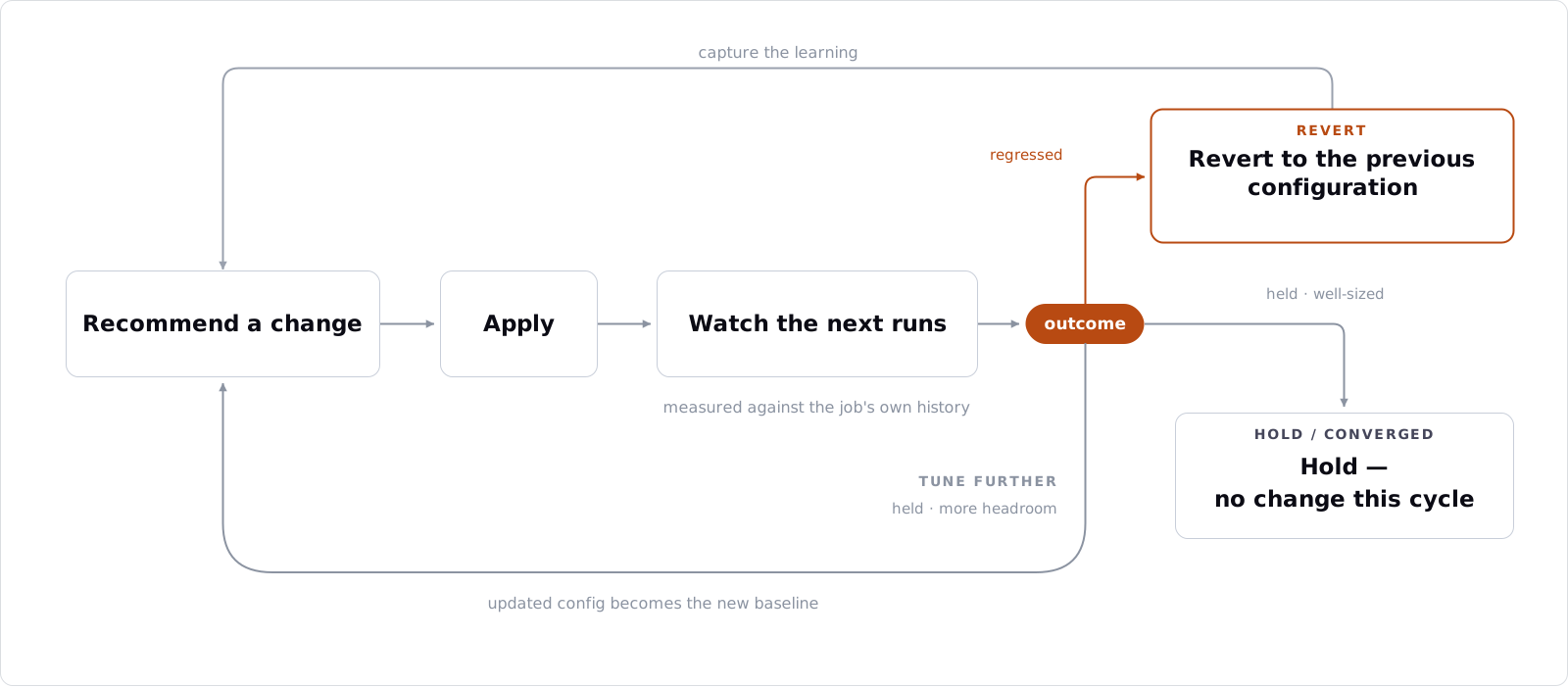
Inside the loop: the next runs decide whether a change is kept, converged on, or reverted.
A proposal is applied to the job configuration, and the next runs are measured against the job’s own history. If the change holds, the updated configuration becomes the new baseline. If the job has converged, no change is made this cycle and it stays monitored. If a run regresses beyond the configured bounds, the previous configuration is restored automatically and the reason is recorded.
The loop does not stop at the first win. A held configuration is monitored for a few days and confirmed as the new stable baseline only once it has proved itself across several runs, and each cycle then builds on the last.
Automatic reversion is what makes unattended tuning acceptable to a platform team: a change that does not work out is reverted and recorded, not left to compound. Auto Tune applies a change only when no run is in flight, so an in-progress run is never cancelled, and it then monitors the job every ten minutes after the change lands.
What does the savings and audit history record?
The history records the measured saving on every job, what changed, and the controls an owner keeps.
The four charts below are representative, each showing one job’s daily cost before and after enablement, measured against each job’s own history rather than a benchmark.
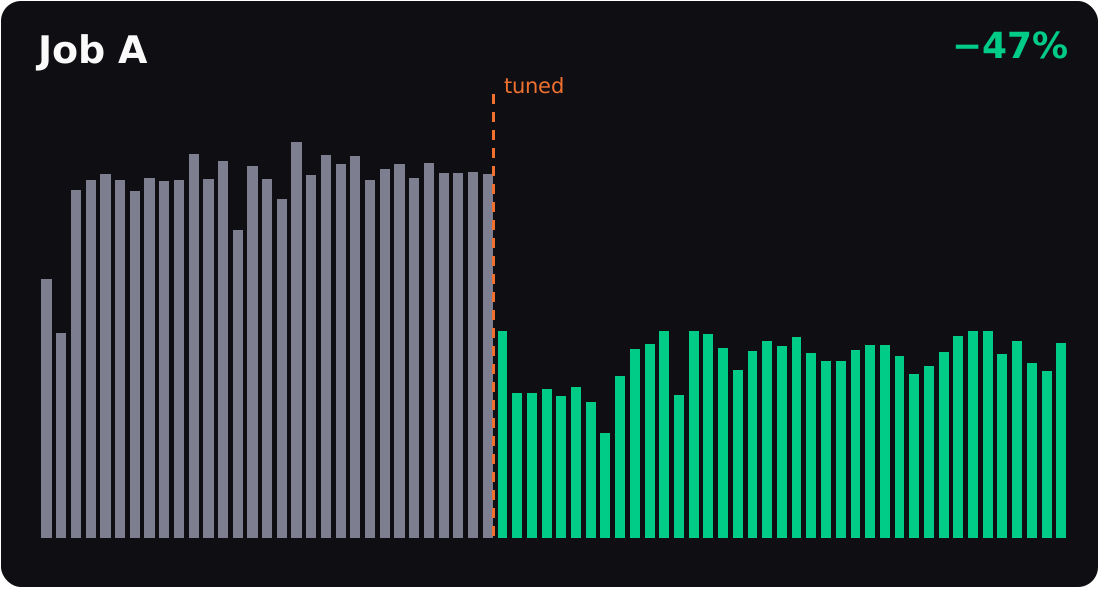
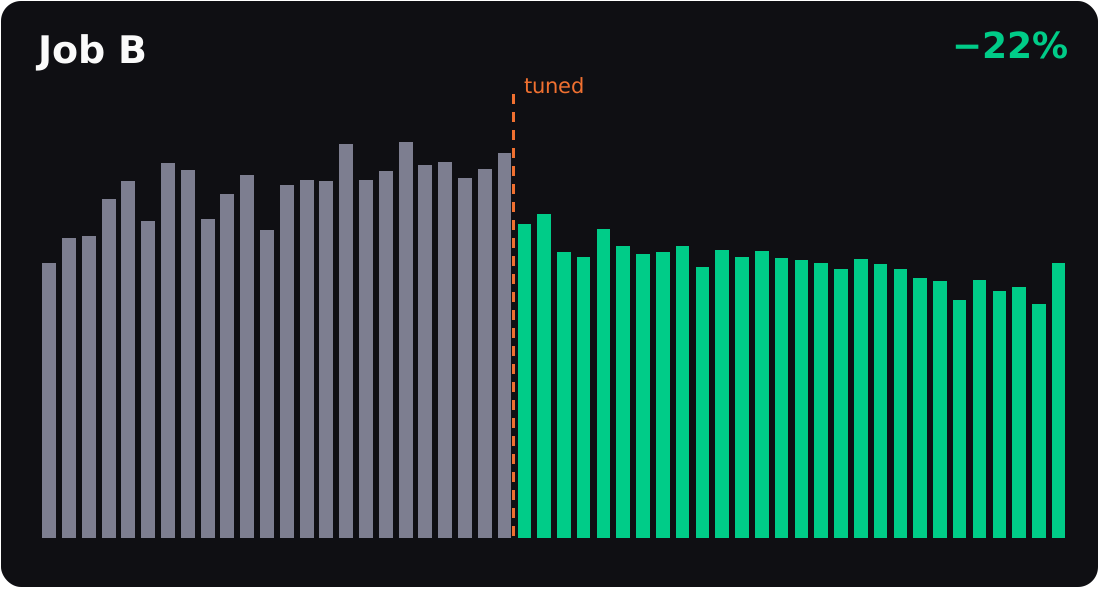
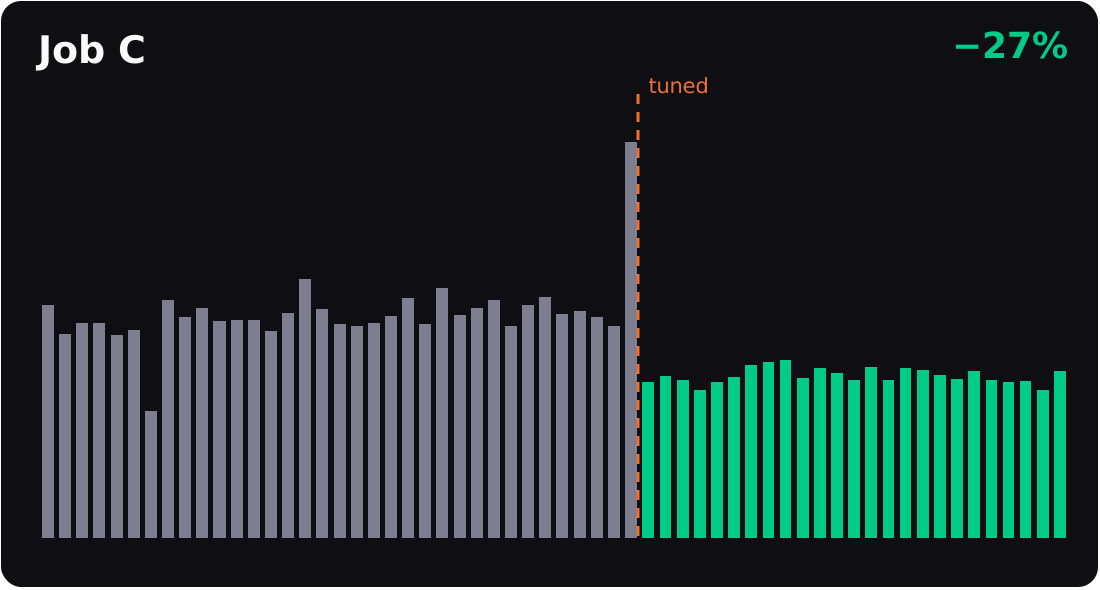
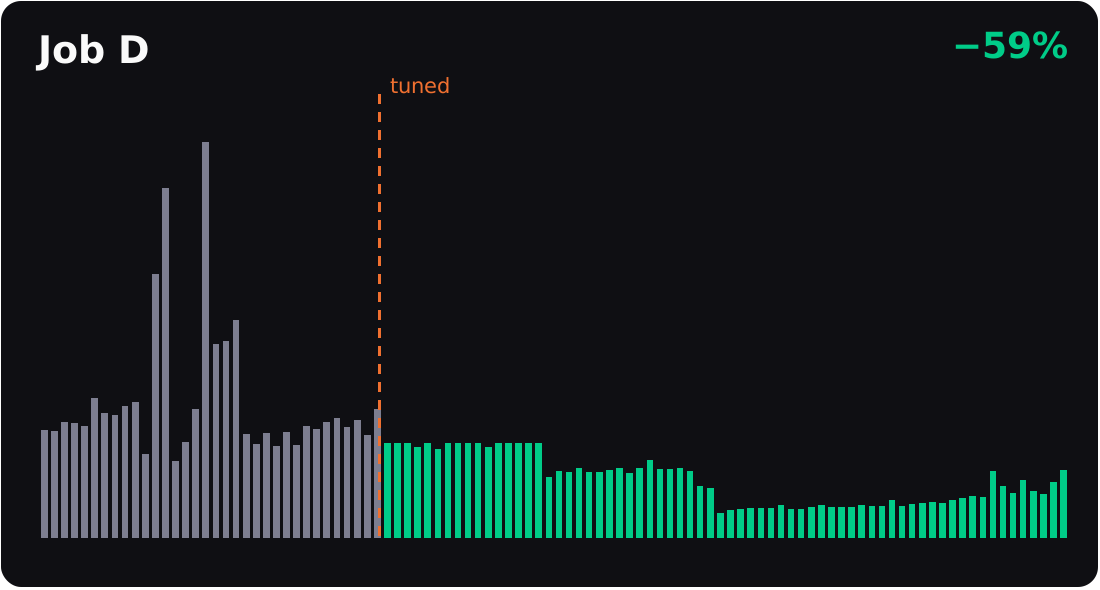
| Job | Daily cluster cost after tuning |
|---|---|
| Job A | 47% lower |
| Job B | 22% lower |
| Job C | 27% lower |
| Job D | 59% lower |
Each chart is one representative job’s daily cluster cost, before and after tuning. Heights are the real daily cost, and the dashed line marks when tuning was enabled.
Hundreds of jobs tuned every day.
The median actively tuned job runs 33% cheaper, with no regressions.
A tenant also configures the bounds it is willing to accept, and those bounds decide how aggressively Auto Tune trades runtime for cost. Tighter bounds keep it conservative and it will only propose changes that leave runtime almost untouched. Looser ones let it go further for a larger saving.
Do Lakeflow jobs cover every Databricks workload?
What about jobs Lakeflow doesn’t schedule?
Plenty of Databricks work is not scheduled by Lakeflow at all. It is triggered by an external orchestrator such as Airflow or Azure Data Factory. Those jobs go through the same recommendation engine.
What changes is the last step. Their cluster configuration lives in the customer’s own pipelines and repositories rather than in Lakeflow, so Auto Tune cannot apply a change live. Instead it produces the recommendation, can open a pull request that updates the configuration at its source, and raises an alert when a job breaches its expected cost or runtime. The engine and evidence are the same as for Lakeflow jobs. Only the last step changes, from a live edit to a pull request the team reviews and merges, after which Auto Tune resumes watching.
Databricks job cluster vs all-purpose cluster, which should run scheduled work?
Scheduled work belongs on a job cluster. The Databricks job cluster vs all-purpose cluster choice is not about capability, because both run the same code, but about how each is billed and how long it stays up.
Interactive clusters get recommendations of their own: sizing the auto-termination window to how the cluster is actually used, lowering the minimum worker count on an over-provisioned autoscaling cluster, and turning autoscaling on where a fixed-size cluster sits idle.
More often, though, the finding is that scheduled work is living somewhere it should not. Recurring jobs, continuously running jobs and repeated one-off submissions end up on a shared all-purpose cluster because that is where someone first tried them, and they never moved. Auto Tune identifies them and recommends moving each onto its own job cluster, after which the tuning loop applies to it like any other. The all-purpose vs jobs compute split is what makes that move worth the trouble.
It pays because Databricks prices all-purpose vs jobs compute very differently: the DBU component on all-purpose compute runs roughly 3.5 to 3.7 times the jobs-compute rate.
What changes when Databricks job clusters stay right-sized?
The jobs nobody goes back to no longer have to drift. Right-sizing stops being a periodic project and becomes a property of the platform, running quietly in the background.
The real question isn’t whether your scheduled jobs have headroom. It’s how much you’d let a system take back for you. Point Auto Tune at a workspace and it will answer that in your own numbers.
Frequently asked questions
What happens if a tuning change makes a job slower?
The configuration is restored automatically and the reason is recorded. Auto Tune measures the runs that follow each change against the job's own history, and a run that regresses beyond the bounds the workspace configured triggers the revert without anyone intervening. Those bounds are the control: tighter ones keep Auto Tune conservative and only allow changes that leave runtime almost untouched, looser ones let it trade more runtime for a larger saving.
How much cheaper does a right-sized Databricks job cluster run?
The median actively tuned job runs 33% cheaper, with no regressions, across hundreds of jobs tuned every day. Individual jobs vary more than the median suggests: the four representative jobs above came down by 22%, 27%, 47% and 59% on their daily cluster cost. Each figure is measured against that job's own cost before tuning rather than against a benchmark.
Does Auto Tune right-size serverless compute?
Not at present. Auto Tune targets classic job compute, which is the compute whose node types and sizes you choose, because right-sizing means changing those choices. Serverless bills on usage rather than on a cluster you have sized, so there is no node family, node size or worker count for the recommendation engine to change.
What are the two parts of a Databricks job’s cost?
Two meters on every job, and right-sizing brings down both.
A Databricks job’s hourly bill has two meters. Databricks charges a DBU rate for the compute tier, and the cloud provider charges for the infrastructure underneath it, the worker and driver machines and any storage attached to them.
Because Auto Tune resizes the node itself, its family and size, its disk and its network, a single change reduces both meters at once: the DBU spend and the infrastructure spend. Infrastructure is usually the larger of the two, so across the jobs tuned so far it accounts for most of the realized savings, while the DBU charge comes down alongside it.
Savings are reported as relative shares of each job’s own prior cost. Customer names withheld.