No field on a Databricks billing record names the team that should pay. With one team on Databricks, the monthly bill is enough. With several teams sharing workspaces, that gap blocks the first Databricks FinOps question: who spent what? Databricks cost attribution fills the gap with tags. Two kinds of spend stay unattributed even with tagging enforced. The first is serverless usage from users with no usage policy. The second is shared all-purpose clusters, billed as one unit.
This guide covers how Databricks billing records cost, three SQL queries that measure your tag coverage, and how to handle the spend no tag reaches. It ends with how to choose between showback and chargeback.
Cost attribution assigns Databricks spend to the team or project that incurred it. Showback reports each team's attributed cost while a central budget pays the bill. Databricks chargeback bills each team's budget directly. Both run on the same attribution data, so the same gaps limit both.
| Term | What it does | What it requires |
|---|---|---|
| Cost attribution | Connects usage to a team or project | Tags and a governed owner mapping |
| Showback | Reports each team's cost | Attributed cost, with shared amounts shown separately |
| Chargeback | Bills each team's budget | Allocation rules, reconciliation, and a dispute process |
A query that groups spend by custom_tags['team'] is one input to chargeback. It reports which tag each workload carries. It does not decide who pays for shared warehouses, platform jobs, discounts or untagged usage. Those are allocation rules, and chargeback requires them to be defined and documented. The FinOps Foundation calls this the invoicing and chargeback capability.
How Does Databricks Billing Work?
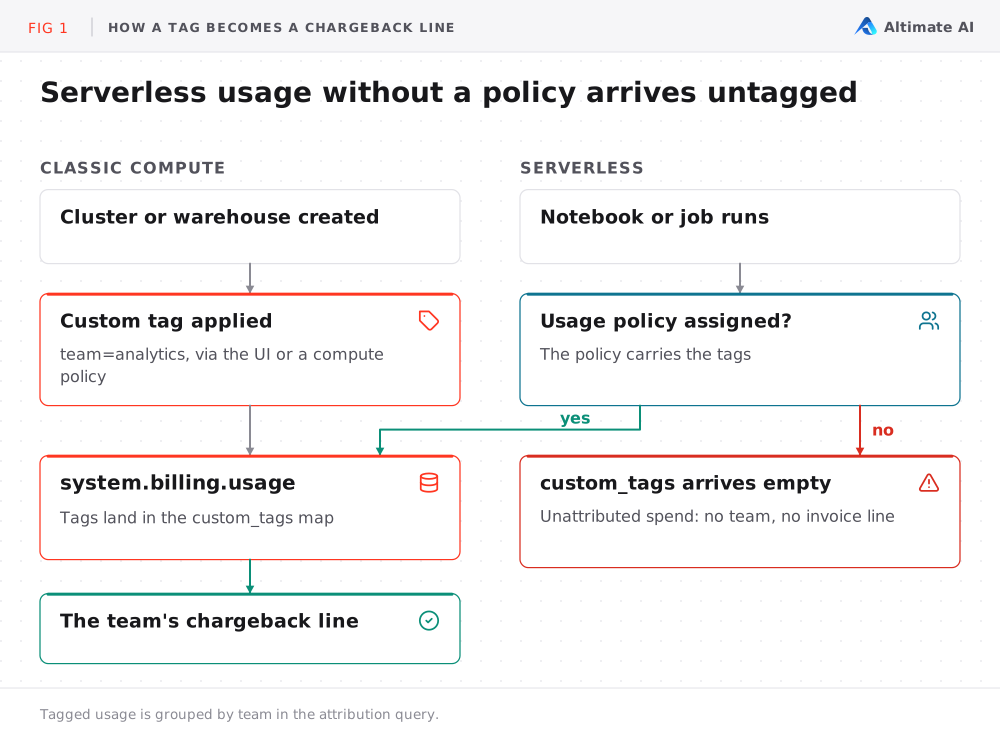
Classic compute generates two charges per workload. Databricks charges for DBUs (Databricks Units), priced per SKU. The cloud provider charges separately for the VMs, which classic compute provisions in your cloud account. Serverless compute runs in the Databricks-managed serverless compute plane, so the DBU charge is the full cost.
Attribution follows the same split. Tags in system.billing.usage attribute the DBU charge. The VM charge for classic compute appears in the cloud provider's billing export, such as the AWS Cost and Usage Report.
Databricks propagates default and custom tags to the instances it launches, so you can join the export to Databricks usage on ClusterId. Instances for clusters created from a pool carry pool and workspace tags, not cluster tags. So set team tags for pooled compute on the pool or the workspace. Serverless has no VM charge in your account.
For DBU cost, system.billing.usage records usage quantity per SKU, and system.billing.list_prices records the list price per SKU over time. Joining them gives estimated list cost. How accurately that cost maps to teams depends on tag coverage. The billable usage system table reference documents every column, and what DBUs cost per compute type covers the pricing side.
Why Does Databricks Cost Attribution Depend on Tags?
The billing record shows what was consumed, not who should pay for it. Tags are the only ownership field on the record. Databricks applies these default tags:
| Compute type | Default tags |
|---|---|
| All-purpose compute | Vendor, ClusterId, ClusterName, Creator |
| Jobs compute | Vendor, ClusterId, ClusterName, Creator, RunName, JobId |
| SQL warehouses | Vendor, ClusterId, SqlEndpointId, Creator |
| Pools | Vendor, DatabricksInstancePoolId, DatabricksInstancePoolCreatorId |
These identify the resource and the user who created it. None identifies the team that pays. Custom tags fill that gap. Set a tag such as team or cost-center on a cluster, SQL warehouse or pool, or enforce it with a compute policy. The tag appears in the custom_tags map column of system.billing.usage. Databricks documents the full model in use tags to attribute and track usage.
How serverless tagging works
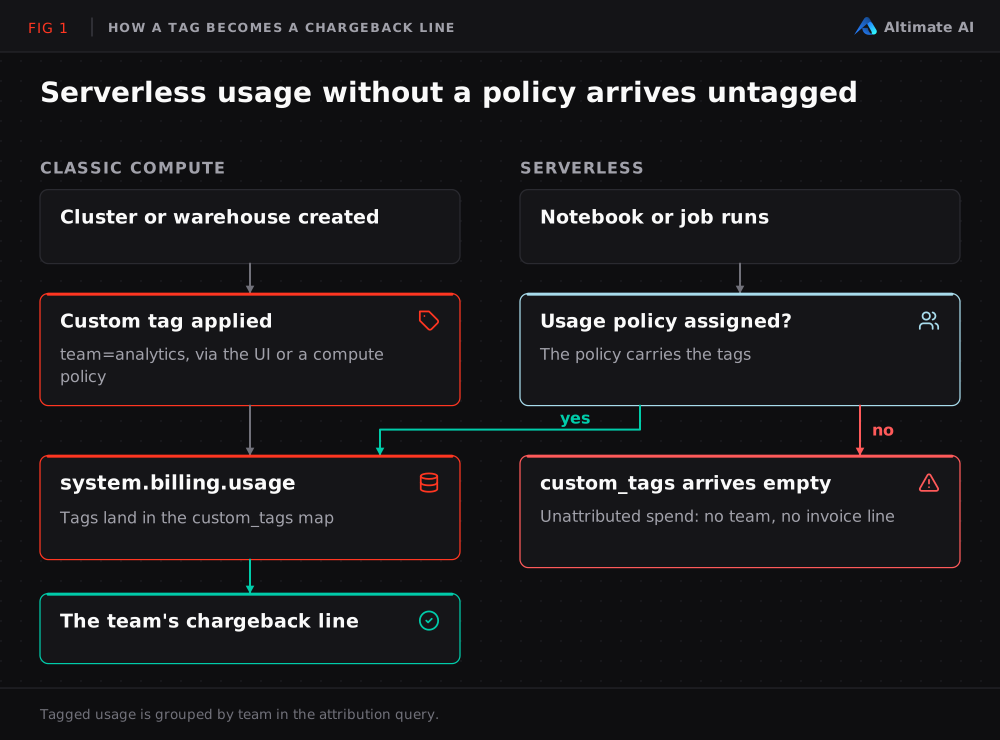
Serverless workloads are not tagged through compute settings. Their tags come from serverless usage policies. An admin creates a policy with tags and assigns users to it, and those users' serverless usage carries the policy's tags in custom_tags. Policies apply to serverless notebooks, jobs, pipelines and model serving endpoints.
Two cases reduce attribution accuracy:
- No policy assigned. The user's serverless usage is recorded with an empty
custom_tagsmap. - Several policies assigned. The user selects a policy when creating the workload. If they do not, Databricks defaults to the first policy in alphabetical order. The resulting tag reflects policy name order, not the intended cost owner. A wrong tag is harder to detect than a missing one, because it passes a null check.
How Do You Measure Your Current Attribution?
The three queries below show how much spend is attributable today. They require USE and SELECT on the system schemas, or an admin role. The system tables documentation lists the exact grants.
Query 1 shows spend by team and SKU
Estimated list cost per team tag and SKU for the last 30 days:
SELECT
  u.custom_tags['team'] AS team,
  u.sku_name,
  SUM(u.usage_quantity) AS usage_quantity,
  SUM(u.usage_quantity * lp.pricing.effective_list.default) AS list_cost
FROM system.billing.usage AS u
JOIN system.billing.list_prices AS lp
  ON u.account_id = lp.account_id
  AND u.cloud = lp.cloud
  AND u.sku_name = lp.sku_name
  AND u.usage_unit = lp.usage_unit
  AND u.usage_end_time >= lp.price_start_time
  AND (lp.price_end_time IS NULL OR u.usage_end_time < lp.price_end_time)
WHERE u.usage_date >= current_date() - INTERVAL 30 DAYS
GROUP BY u.custom_tags['team'], u.sku_name
ORDER BY list_cost DESC;
Read the rows where team is NULL first. Their share of total cost is your actual tag coverage. It is often lower than the coverage your tagging policy reports.
Query 2 shows attribution status
This query sorts last month's cost into three states. Cost is directly attributable, missing a team tag, or tagged with a value outside the governed owner list. Replace the sample values in valid_cost_owners with your owner list.
WITH valid_cost_owners AS (
  SELECT team
  FROM VALUES ('analytics'), ('finance'), ('ml-platform') AS t(team)
),
priced_usage AS (
  SELECT
    LOWER(TRIM(u.custom_tags['team'])) AS team,
    lp.currency_code,
    u.usage_quantity * lp.pricing.effective_list.default AS estimated_list_cost
  FROM system.billing.usage AS u
  JOIN system.billing.list_prices AS lp
    ON u.account_id = lp.account_id
    AND u.cloud = lp.cloud
    AND u.sku_name = lp.sku_name
    AND u.usage_unit = lp.usage_unit
    AND u.usage_end_time >= lp.price_start_time
    AND (lp.price_end_time IS NULL OR u.usage_end_time < lp.price_end_time)
  WHERE u.usage_date >= CAST(ADD_MONTHS(DATE_TRUNC('month', current_date()), -1) AS DATE)
    AND u.usage_date < CAST(DATE_TRUNC('month', current_date()) AS DATE)
),
classified AS (
  SELECT
    p.*,
    CASE
      WHEN p.team IS NULL OR p.team = '' THEN 'missing_team_tag'
      WHEN v.team IS NULL THEN 'unrecognized_team_tag'
      ELSE 'directly_attributable'
    END AS attribution_status
  FROM priced_usage AS p
  LEFT JOIN valid_cost_owners AS v
    ON p.team = v.team
)
SELECT
  attribution_status,
  currency_code,
  ROUND(SUM(estimated_list_cost), 2) AS estimated_list_cost,
  ROUND(
    100.0 * SUM(estimated_list_cost)
      / SUM(SUM(estimated_list_cost)) OVER (PARTITION BY currency_code),
    1
  ) AS pct_of_cost
FROM classified
GROUP BY attribution_status, currency_code
ORDER BY estimated_list_cost DESC;
Do not filter on record_type = 'ORIGINAL'. Databricks writes corrections as a RETRACTION record with a negative usage_quantity, usually followed by a RESTATEMENT record with the corrected values. Summing all record types gives the corrected total.
We ran it on one of our workspaces. 82% of cost was directly attributable, 10% was missing a team tag, and 8% carried a value outside the owner list. So 18% of estimated cost had no confirmed owner.
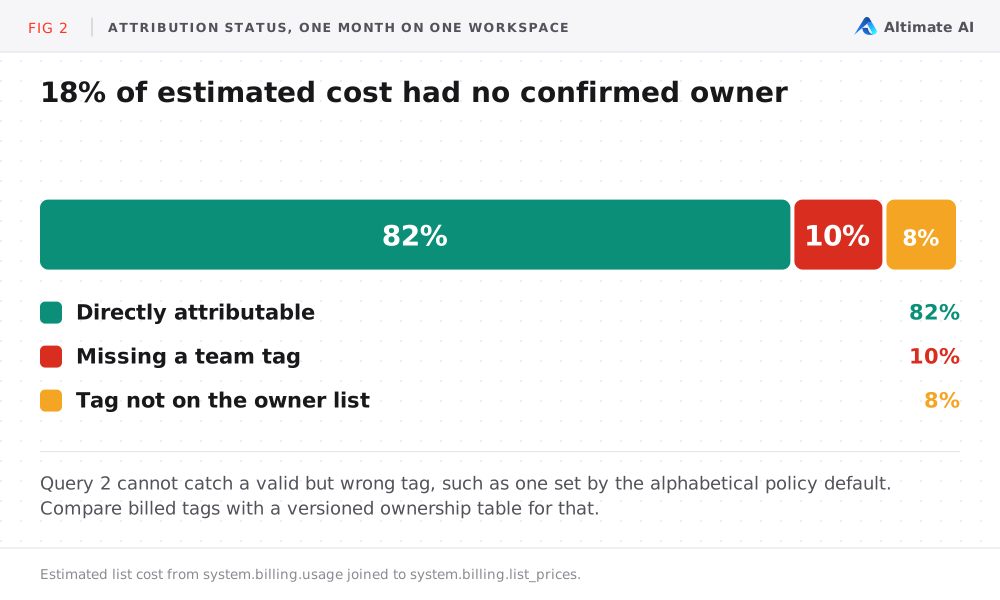
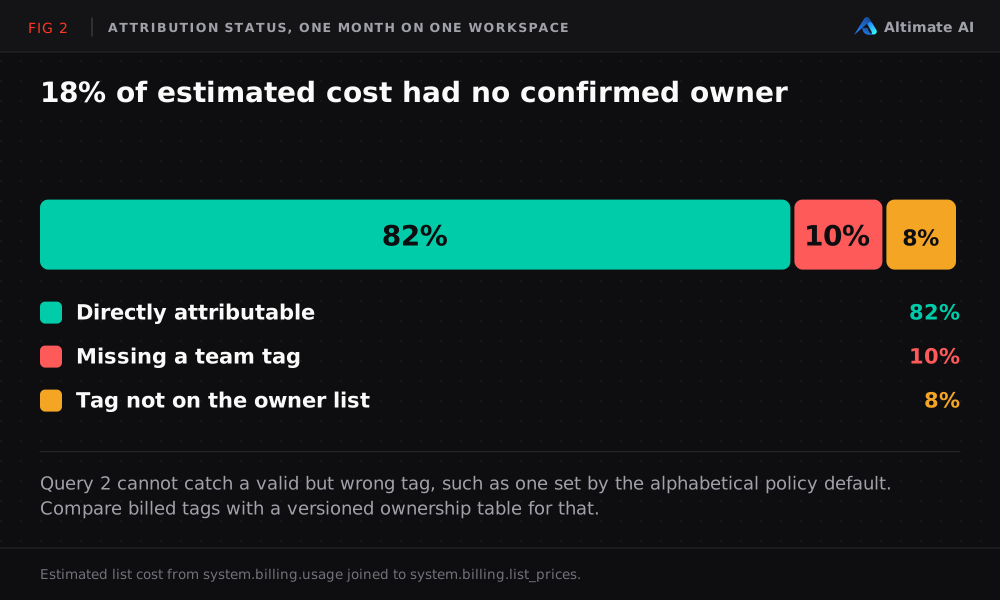
The query cannot detect a valid but incorrect tag, such as one assigned by the alphabetical policy default. To catch those, maintain a versioned ownership table with workspace_id, resource_type, resource_id, expected_team, valid_from and valid_to. Then compare the billed tag with the expected owner for each period.
Query 3 shows spend by identity
identity_metadata.run_as records the identity behind the usage. For jobs compute and serverless jobs, it is the job's run-as user or service principal. For all-purpose compute, it is the identity that created the cluster, not necessarily the user who ran a given workload. On mature platforms, most high-cost rows resolve to service principals, which appear as application IDs. The query below resolves IDs to names.
Before running it: system.information_schema.users and system.information_schema.service_principals are not among the information schema views Databricks documents. Confirm both exist in your account.
SELECT
  u.identity_metadata.run_as AS principal_id,
  COALESCE(sp.display_name, usr.user_name) AS resolved_name,
  SUM(u.usage_quantity) AS usage_quantity
FROM system.billing.usage AS u
LEFT JOIN system.information_schema.service_principals AS sp
  ON u.identity_metadata.run_as = sp.application_id
LEFT JOIN system.information_schema.users AS usr
  ON u.identity_metadata.run_as = usr.user_name
WHERE u.usage_date >= current_date() - INTERVAL 30 DAYS
GROUP BY u.identity_metadata.run_as, resolved_name
ORDER BY usage_quantity DESC;
Where Does Databricks Cost Attribution Break?
Two categories of spend cannot be fully attributed even with complete tagging. Measure both before chargeback goes live.
- Shared all-purpose compute.
usage_metadata.job_idandjob_run_idare populated for serverless jobs and jobs compute, but not for jobs run on all-purpose compute. When several users or notebooks share an all-purpose cluster, the billing record covers the cluster as a whole. No field splits its cost across the workloads that ran on it. A Databricks community post describes one workaround. It joinssystem.access.auditcommand events to billing records. Then it splits each hour's cost by execution time. The result is an estimate, suitable for budget discussions but not for exact allocation. How job compute and all-purpose compute differ covers when to move a workload off a shared cluster. - Untagged serverless usage. Serverless usage from users without a usage policy has an empty
custom_tagsmap. No tagging error is involved. This remains the default until policy assignment is part of user onboarding.
How Do You Classify Costs for Chargeback?
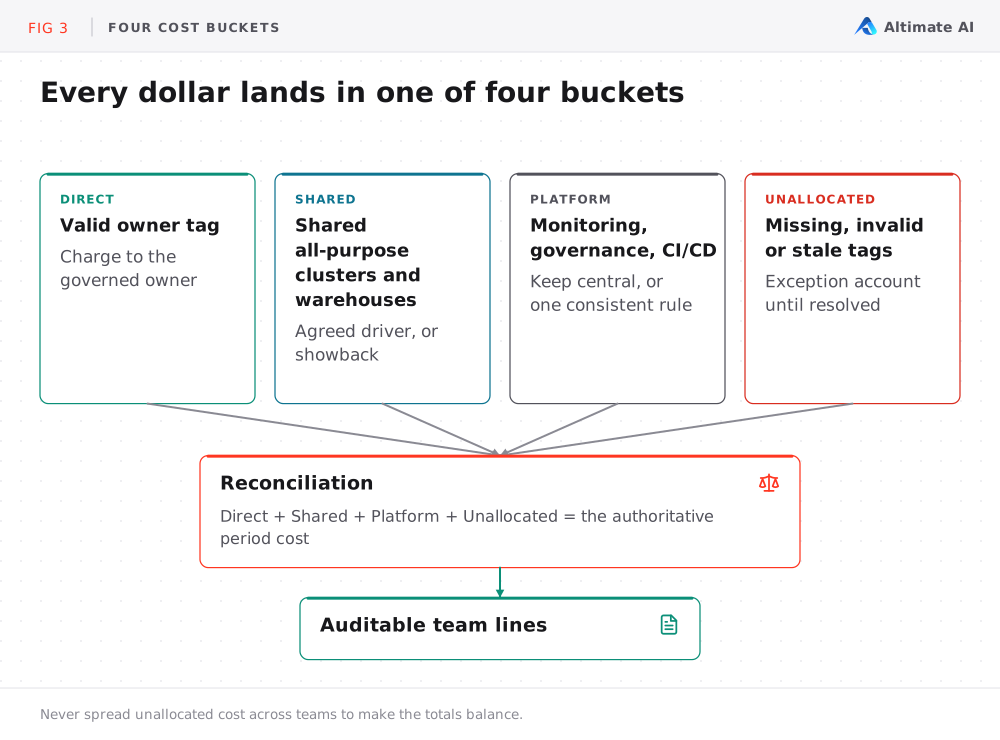
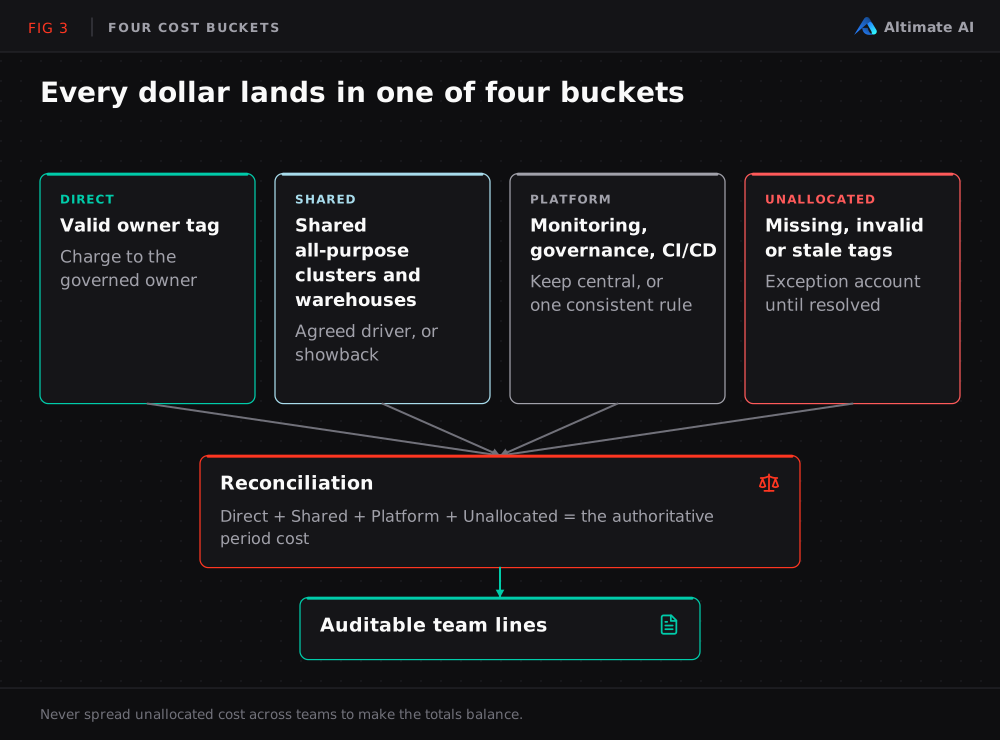
Assign every cost to one of four buckets. The bucket depends on how reliably you can attribute the cost:
| Bucket | Typical examples | Treatment |
|---|---|---|
| Direct | Dedicated jobs compute, a team-owned warehouse, serverless usage with a valid policy | Charge to the governed owner |
| Shared | Shared all-purpose clusters, shared SQL warehouses | Apply a documented allocation driver, or report as showback |
| Platform | Central monitoring, governance, security, CI/CD | Retain in the platform budget, or allocate by one consistent rule |
| Unallocated | Missing tags, invalid values, stale mappings | Hold in an exception account until resolved |
Here is one month we measured, with the Databricks charge and the classic-compute cloud cost combined into a $100,000 cost pool:
| Bucket | Amount | Treatment |
|---|---|---|
| Direct | $72,000 | Post to the identified owners |
| Shared | $12,000 | Allocate using an agreed driver |
| Platform | $8,000 | Retain centrally or allocate by one rule |
| Unallocated | $8,000 | Hold in an exception account until resolved |
| Total | $100,000 | Must reconcile to the cost pool |
Keep unallocated cost in an exception account, with an owner responsible for resolving it. Do not spread it across teams to make totals balance. The reconciliation check is:
Direct + Shared + Platform + Unallocated = Authoritative period cost
Operational reporting often uses list prices while finance requires actual cost. Apply that adjustment at the most granular reliable level: cloud, product or SKU. Do not apply it as one account-wide percentage.
How Do You Run a Monthly Chargeback Close?
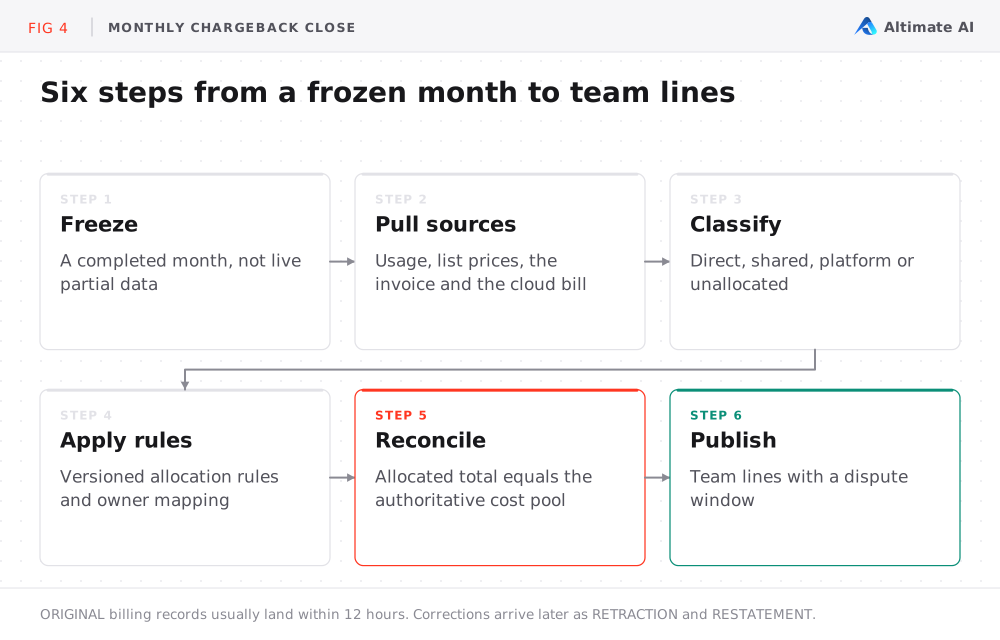
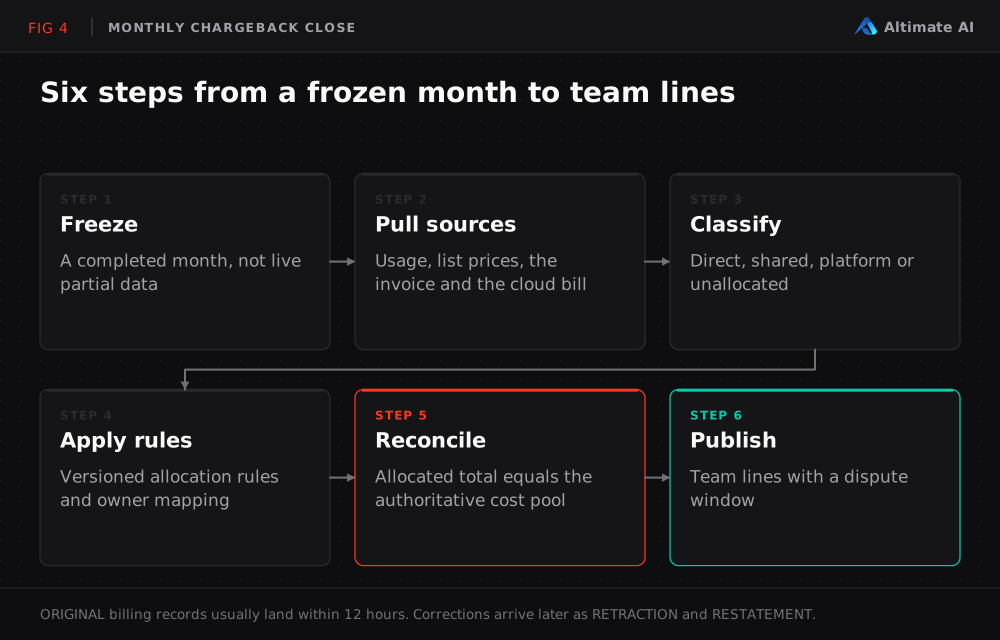
Dashboards cover in-month visibility. Databricks chargeback needs a controlled monthly close:
- Freeze a completed month.
ORIGINALbilling records are typically available within 12 hours, and new workspaces can take longer. That timing does not apply toRETRACTIONandRESTATEMENTrecords. - Pull the complete source set. That is
system.billing.usage,system.billing.list_prices, the invoice, cloud billing for classic compute, the owner list and the ownership mapping. - Classify every amount into the four buckets. Record missing, invalid and mismatched ownership as separate reasons.
- Apply versioned allocation rules. Each rule has a name, an owner, an effective date and a change history.
- Reconcile the allocated total to the authoritative cost pool.
- Publish team lines with a dispute window. Record dispute outcomes and update the ownership mapping.
A list-price total that does not match the invoice is not necessarily a broken query. List price may be the wrong financial basis for chargeback. Committed-use discounts (CUDs) and custom contract terms change the actual cost.
How Do You Choose Between Showback and Chargeback?
| Model | Use when |
|---|---|
| Showback first | Tag coverage is inconsistent, or teams do not yet trust the numbers |
| Chargeback | Custom tags and serverless usage policies are already enforced |
| Hybrid | Most workloads are tagged, but some teams run heavily on shared all-purpose compute |
Hybrid is the most common outcome. Shared all-purpose compute cannot be split exactly, even after tagging is enforced.
What to Track After Chargeback Goes Live
| Metric | What it shows |
|---|---|
| Directly attributable cost % | Share of cost assigned to a team without allocation |
| Missing-owner cost | Spend with no team tag |
| Invalid-owner cost | Spend with a team tag that is not on the owner list |
| Shared and platform % | Spend that is allocated rather than directly attributed |
| Unallocated cost and age | Spend in the exception account, and how long it has been there |
| Corrections and disputed lines | Count and value |
| Time to resolve an exception | How quickly ownership gaps are closed |
These Databricks FinOps metrics show whether attribution coverage improves. A report can reconcile while coverage stays flat.
How Altimate Tracks Databricks Spend by Team
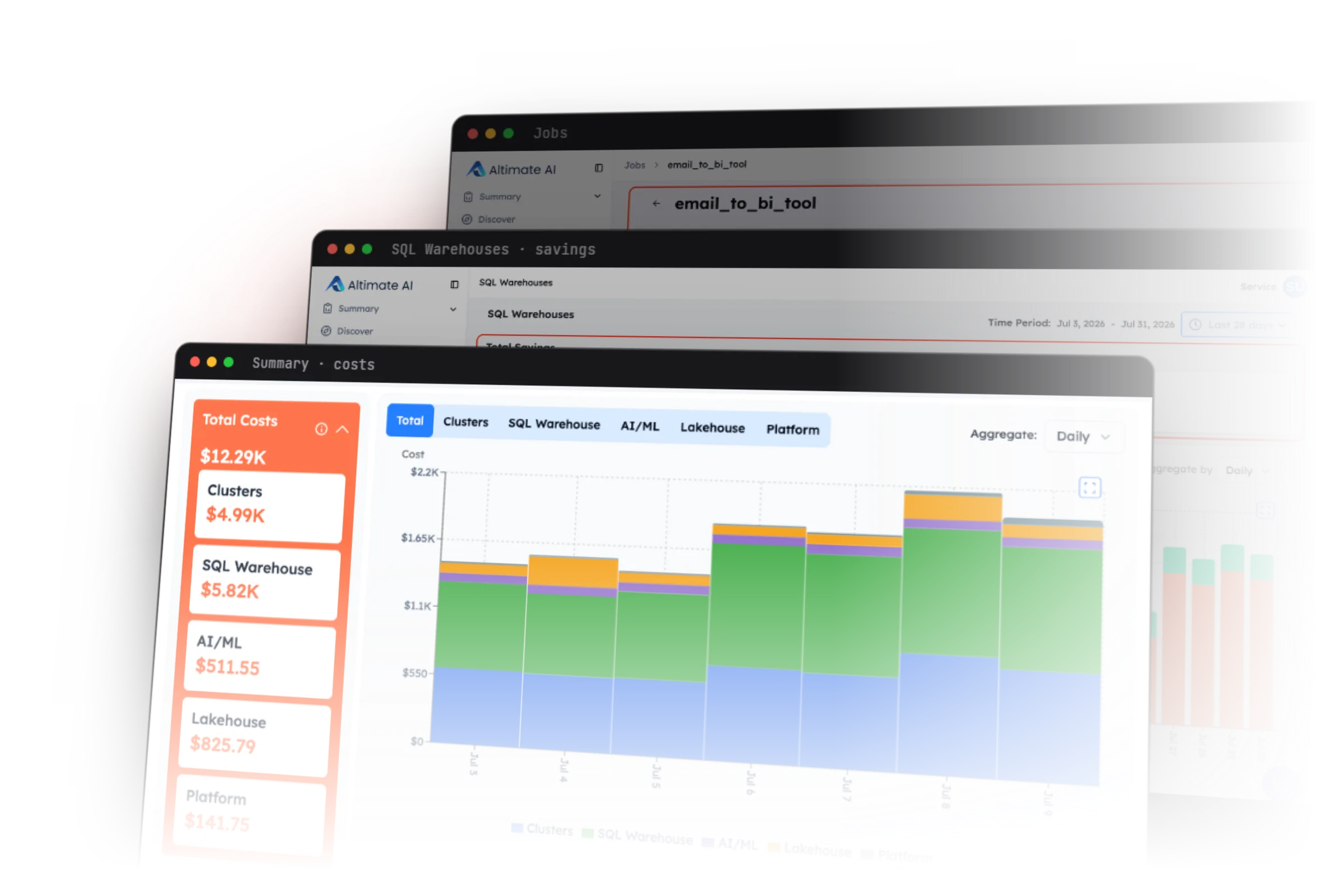
For a Databricks FinOps team, the queries above give a point-in-time view. Databricks chargeback needs the same numbers every month, with coverage gaps tracked over time. Altimate for Databricks splits spend by team first, then by workspace, SKU, product and user. It rolls every dollar up to an owning team before the invoice arrives. The Databricks cost breakdown shows the same split from the Summary page down to one warehouse.
It also reports the size of both structural gaps continuously: shared all-purpose compute and untagged serverless usage. It does not close them. Shared all-purpose cost still cannot be split exactly. Serverless usage stays untagged until an admin assigns a usage policy.
What Databricks FinOps Needs for Chargeback
Databricks chargeback requires five things:
- Tags for attribution.
- Documented allocation rules for shared and platform cost.
- An exception account for unallocated cost.
- Reconciliation to the authoritative cost pool.
- Published team lines with a dispute process.
Measure your Databricks cost attribution coverage with the queries above before you choose between showback, chargeback and a hybrid model. That measurement is where a Databricks FinOps practice starts.
Frequently Asked Questions
What is Databricks chargeback?
Databricks chargeback bills each team's budget directly for the Databricks spend it incurred. It runs on Databricks cost attribution data from tags. It also needs allocation rules, reconciliation to the authoritative cost pool and a dispute process. Showback reports the same attributed cost while a central budget pays the bill.
How does Databricks chargeback work?
Tags in system.billing.usage attribute the DBU charge to a team. Every cost then goes into one of four buckets: direct, shared, platform or unallocated. A monthly close freezes the month, applies versioned allocation rules, reconciles to the authoritative cost pool and publishes team lines with a dispute window.
Why is my Databricks cost attribution incomplete?
Two kinds of spend stay unattributed even with tagging enforced. Serverless usage from users with no usage policy arrives with an empty custom_tags map. Shared all-purpose clusters are billed as one unit, with no field that splits their cost across the workloads that ran on them.
How do you tag serverless usage in Databricks?
Serverless workloads take their tags from serverless usage policies, not from compute settings. An admin creates a policy with tags and assigns users to it. A user with several policies who does not pick one gets the first policy in alphabetical order.