Snowflake Cortex AI cost is climbing fast, and a resource monitor never sees it. Snowflake Cortex pricing bills every AI service on its own line, separate from warehouse compute. Each one meters on tokens, messages, pages or gigabytes of data indexed. If your cost controls predate Cortex, no rule catches that growth.
In short:
- Four billing units. Every Cortex AI service bills on tokens, messages, pages processed or GB indexed, never on warehouse time.
- Five services accept a hard spend cap. Four do not, and for those a usage-history view plus a manual monthly review is your only control.
- Every cap lags. A budget action can take up to 8 hours to take effect.
- Two credit types. Snowflake splits the bill into Platform Credits and AI Credits. One quota watches only one type, so capping a person's whole spend takes two quota objects.
Every rate below comes from Snowflake's documentation and its Service Consumption Table, read in August 2026. Snowflake changes these rates often, so recheck any figure older than a month.
Why Do Resource Monitors Miss Snowflake Cortex AI Cost?
Almost every Cortex AI service charges you for something other than warehouse time, and that charge lands on its own line. Snowflake runs Cortex AI calls on its own serverless compute, so none of your warehouses stays up to answer them. A resource monitor watches the credits a warehouse burns. A Cortex AI call never touches that warehouse counter.
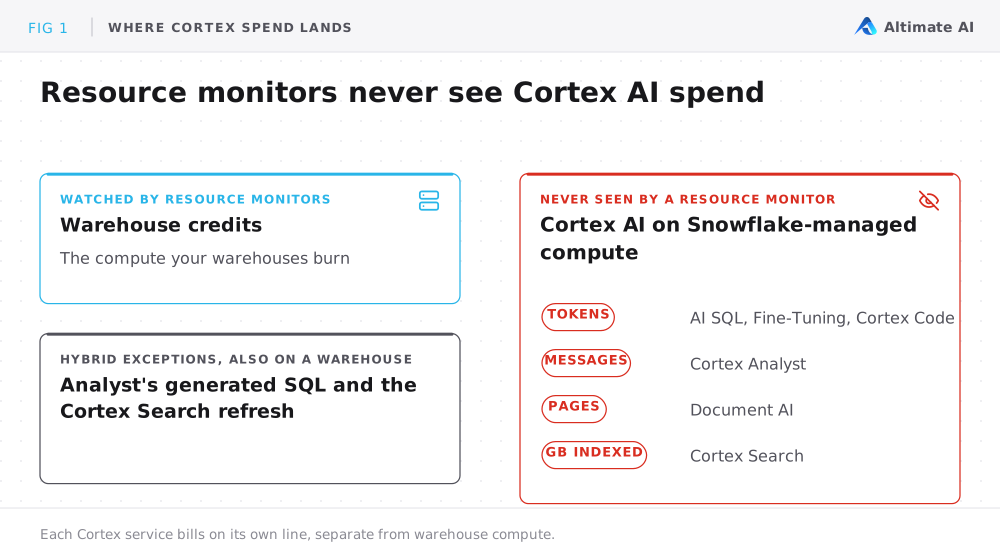
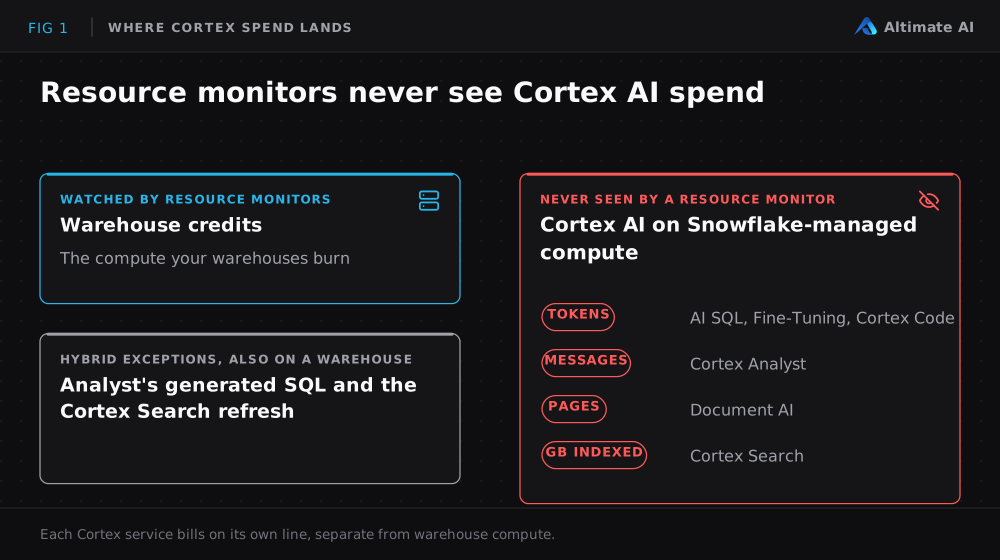
Two hybrid exceptions exist. The SQL that Snowflake Cortex Analyst writes runs on a warehouse you name. The index-refresh step for Cortex Search also runs on a warehouse. Those two pieces land on the warehouse bill, and the AI calls themselves do not.
So if your only cost controls today are resource monitors, nothing caps your Cortex spend and nothing alerts on it. Two other controls exist, budgets and per-user quotas. Both live under a different admin surface than the resource monitors your team already knows. For the warehouse side of the bill, see 12 Snowflake cost optimization techniques.
What Does Snowflake Cortex Pricing Look Like per Service?
Snowflake Cortex pricing follows one of four billing units per service, and every rate is on the Service Consumption Table.
| Service | Billing unit | What that looks like |
|---|---|---|
| AI SQL functions (AI_COMPLETE, AI_EMBED, AI_CLASSIFY, AI_EXTRACT, others) | Tokens in and out | You pay per million tokens. The rate differs by model. Embedding calls only charge for input tokens. (AI SQL Cost) |
| Cortex Analyst | Messages | You pay per message: 67 Platform Credits per 1,000 messages on the rate card, counting successful responses only. The SQL Analyst writes then runs on a warehouse, and that time bills separately. (Cortex Analyst) |
| Cortex Search | Data indexed, plus queries served | Two charges. Credits per token embedded when data loads or changes, plus 6.3 AI Credits per GB of indexed data per month to serve queries. Refresh bills as warehouse credits. (Cortex Search Costs) |
| Document AI (AI_PARSE_DOCUMENT) | Pages processed | You pay per 1,000 pages: 3.66 AI Credits per 1,000 pages in Layout mode, 0.68 in OCR. Layout costs 5.4 times as much. (Document AI Overview) |
| Cortex Fine-Tuning | Training tokens | You pay per training token, at a rate that varies by base model. The fine-tuned model then bills like any AI_COMPLETE inference call. (Cortex Fine-Tuning) |
| Cortex Code (CoCo) | Tokens, plus a subscription on two surfaces | You pay per token, metered on each surface. CLI and Desktop carry a $20 monthly subscription on top of the token charges. (Cortex Code) |
Snowflake Cortex Code pricing is the only one in this table with a subscription: $20 a month for CLI and Desktop, on top of the tokens. Model choice is the biggest lever on the token bill. A Claude or GPT-class model costs several credits per million output tokens. A Llama or Mistral model costs a fraction of one.
Why Does Every Snowflake Spend Cap Lag by Eight Hours?
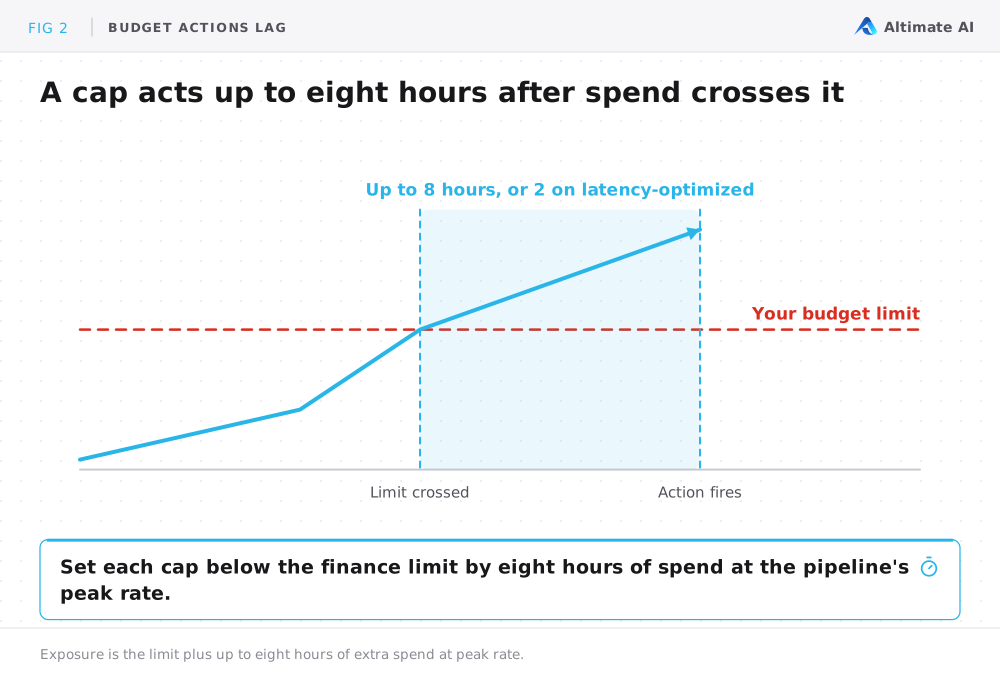
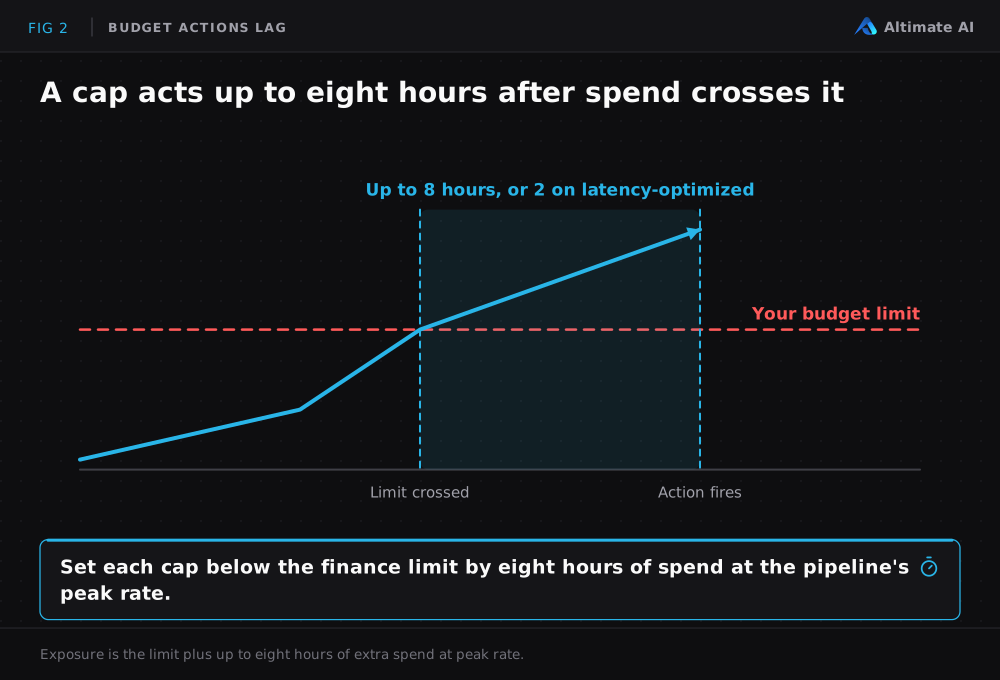
Snowflake evaluates budgets periodically rather than instantly. Its docs put a budget action at up to eight hours to take effect, or up to two hours on the latency-optimized option. Between two evaluations, spend passes the limit. Your real exposure is the limit plus up to eight hours of extra spend at the pipeline's peak rate.
Budgets come in three forms, and they are not interchangeable. Two of them can stop spend and one only reports it. Pick the wrong one and you get a report where you needed a cap.
- Shared resource budgets tag AI usage to a team or a cost center. A shared budget shows you who spent what, and it does not cap the spend. (Docs)
- Per-user quotas set a monthly credit ceiling per user or group, with an optional daily ceiling. A quota blocks usage automatically on the AI domains only. Warehouse spend gets a separate quota that tracks spend but never blocks it. (Docs)
- Resource budgets sit on one named object, so the cap applies to that object only. Three services support them: Cortex Agents, Snowflake CoWork and Cortex Search. At 80% or 100% of the limit, a resource budget fires an alert, revokes access or runs a custom action. (Docs)
Snowflake bills in two credit types: Platform Credits for warehouse compute, and AI Credits for AI services. One quota monitors only one type.
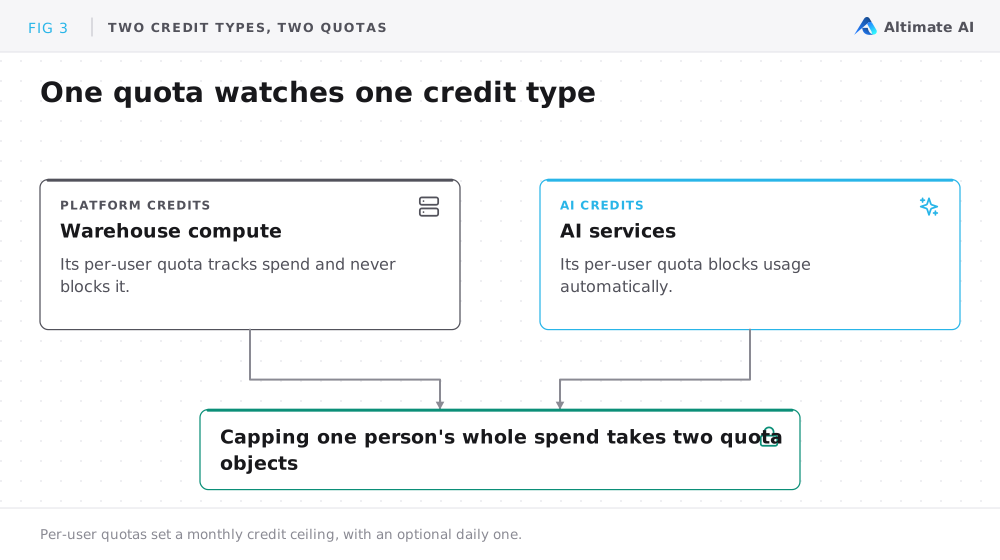
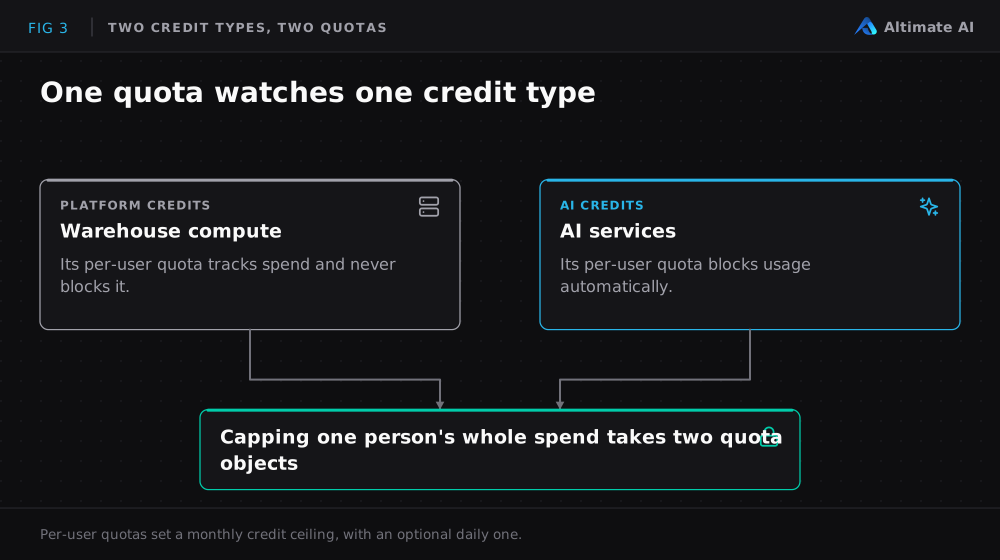
Set each cap below the finance limit by the amount your pipeline could burn in eight hours at its peak rate. A higher cap lets the lag window carry spend past the limit before the cap acts.
Which Snowflake Cortex Services Can You Cap?
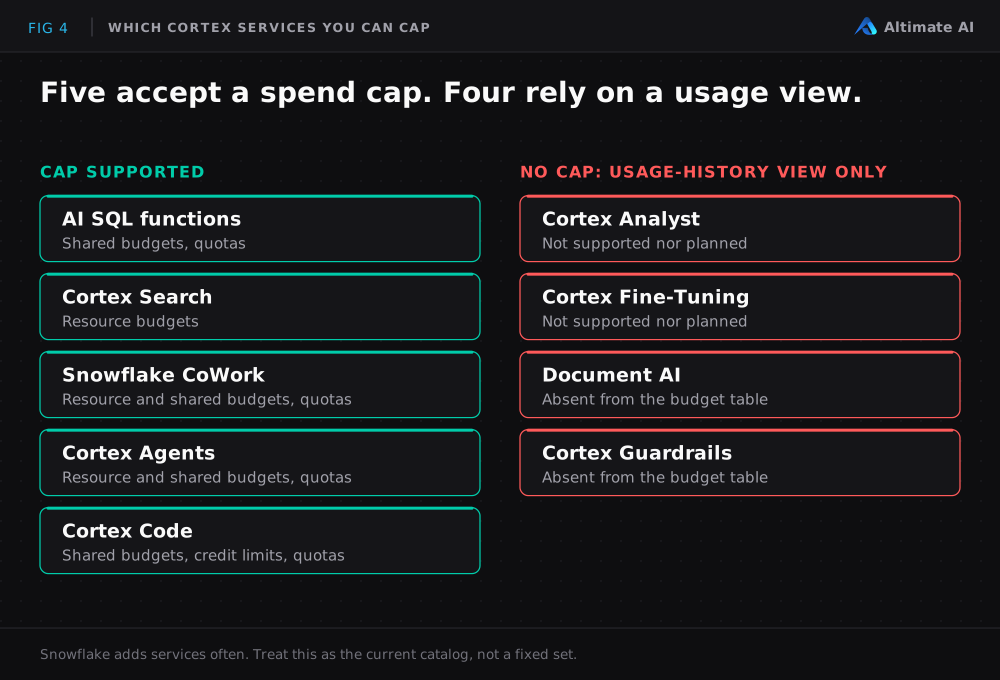
Five services accept a spend cap. Four do not, and for those a usage-history view is the entire cost control. The usage-history view shows spend after Snowflake bills it. Snowflake adds services often, so treat the table below as the current catalog rather than a fixed set.
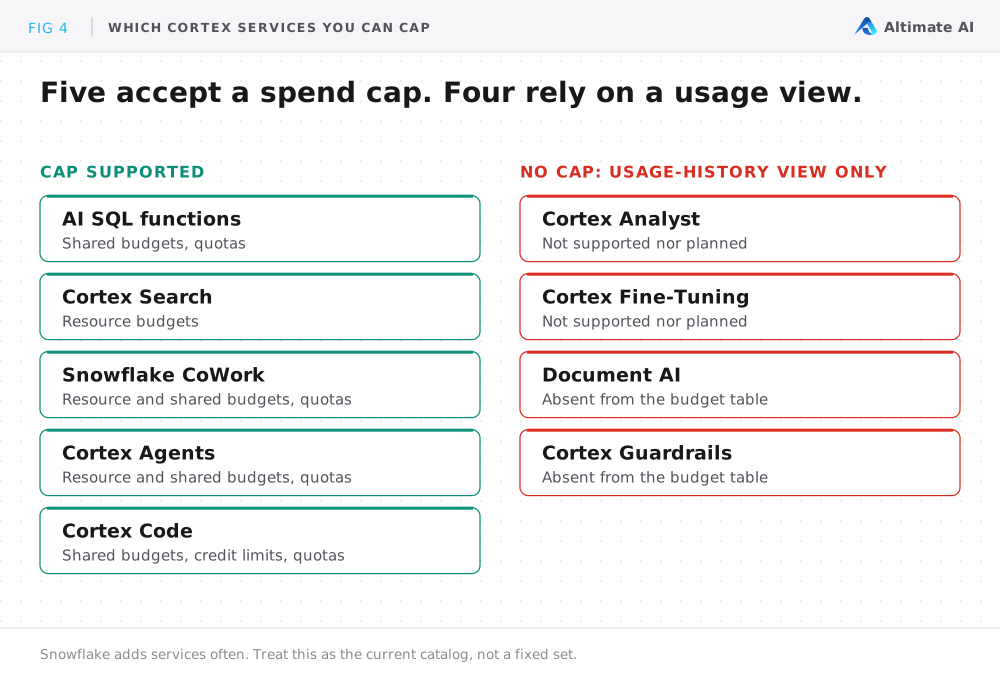
| Service | Status | Billing unit | Cap supported | Usage-history view |
|---|---|---|---|---|
| AI SQL functions (AI_COMPLETE, AI_EMBED, AI_CLASSIFY, others) | GA (some preview) | Tokens | ✓ Shared budgets, quotas | CORTEX_AI_FUNCTIONS_USAGE_HISTORY |
| Cortex Analyst | GA on AWS, Azure | Messages | ✗ Snowflake names this "not supported nor planned" | CORTEX_ANALYST_USAGE_HISTORY |
| Cortex Search | GA | GB indexed, plus queries | ✓ Resource budgets | CORTEX_SEARCH_DAILY_USAGE_HISTORY |
| Snowflake CoWork | GA | Rolled up under Agents | ✓ Resource budgets, shared budgets, quotas | SNOWFLAKE_COWORK_USAGE_HISTORY |
| Document AI (AI_PARSE_DOCUMENT) | GA / Preview | Pages processed | ✗ Absent from the budget table rather than refused | CORTEX_DOCUMENT_PROCESSING_USAGE_HISTORY |
| Cortex Fine-Tuning | GA | Training tokens | ✗ Named alongside Analyst | CORTEX_FINE_TUNING_USAGE_HISTORY |
| Cortex Guardrails | GA | Tokens scanned | ✗ Also absent rather than refused | CORTEX_AI_GUARDRAILS_USAGE_HISTORY |
| Cortex Agents | GA | Per step, per underlying tool | ✓ Resource budgets, shared budgets, quotas | CORTEX_AGENT_USAGE_HISTORY |
| Cortex Code (CoCo) | GA (SDK preview) | Tokens, plus $20/month CLI + Desktop subscription | ✓ Shared budgets, credit usage limits, quotas | CORTEX_CODE_CLI_USAGE_HISTORY, Snowsight, Desktop |
How Do You Track the Four Services You Cannot Cap?
Start with CORTEX_AI_FUNCTIONS_USAGE_HISTORY, the broadest single view. It lists every AI function call with its model, user, role, credits and tokens. The full reference has the schema, and METERING_HISTORY gives the account-wide total.
Do not sum usage across views. Snowflake's own footnote says CORTEX_SEARCH_DAILY_USAGE_HISTORY includes embeddings that also appear in CORTEX_AI_FUNCTIONS_USAGE_HISTORY. Add the two together and you double-count every embedding.
CORTEX_AISQL_USAGE_HISTORY does not cover every AI function. Snowflake's docs point readers at CORTEX_AI_FUNCTIONS_USAGE_HISTORY to see all functions, including AI_PARSE_DOCUMENT. A dashboard built on the narrower view silently under-counts the calls that the broader view carries.
How Altimate Helps With Snowflake Cortex AI Cost
Every check in this post runs on data you already have: the Cortex usage-history views, Snowflake billing records and the metering tables. The hard part is pulling it together across every service, user and model before next month's invoice shows the spike.
Altimate Lite is a Snowflake Native App, so your usage data never leaves your account. Its Cortex AI cost breakdown splits spend by service, user and model, and the three filters combine. It drills into single calls where Snowflake exposes them:
- AI SQL functions, Cortex Code, Cortex Agents and Snowflake Intelligence carry one row per call. Each row has a Query ID or Request ID, the user, the model and the token count.
- Cortex Analyst reports only hourly request counts per user.
- Cortex Search carries no user or request ID at all.
The Altimate Enterprise Platform covers the rest of the account. It attributes Snowflake spend to the team that owns it, by warehouse or by query.
Snowflake's usage-history views answer "what did we spend?" after the fact. The harder question is which workload burns the money, and what to change. Per-call rows and team attribution answer that question.
Frequently Asked Questions
Does Snowflake Cortex AI cost show up on the warehouse bill?
It almost never does. Nearly every Cortex AI service bills as its own line item, separate from warehouse compute. Cortex Analyst and Cortex Search are partial exceptions. The SQL that Snowflake Cortex Analyst writes runs on a warehouse, and so does the index refresh for Cortex Search.
Which Cortex AI services have no spend cap at all?
Four services today: Cortex Analyst, Cortex Fine-Tuning, Document AI and Cortex Guardrails. They support neither budgets nor per-user quotas. Snowflake names the first two as not supported nor planned. For all four, a usage-history view is the only control you get.
Does the Snowflake free trial cover Cortex AI usage?
It does, with two limits. The standard trial gives you $400 in credits over 30 days, and Cortex usage draws on that balance. A trial account with no valid payment method also gets roughly ten credits of AI Functions usage per day. The CoCo trial is a carve-out inside the $400, with $40 for CoCo inference and $360 for everything else.
Do Cortex Code subscriptions replace token billing?
They stack on top of it. Snowflake Cortex Code pricing adds a $20 monthly subscription for CLI and Desktop on top of per-token inference billing. One subscription covers all CoCo inference across those two surfaces. CoCo in Snowsight, the editor integrations and the SDK carry no subscription.