Model Serving and Vector Search endpoints on Databricks can keep billing after the project that used them has ended. A project like that usually runs on separate pieces. A model endpoint answers requests. If it looks things up in your documents, a search index serves those lookups. When the project shuts down, those pieces do not always go with it. In customer workspaces we found three idle model endpoints that cost about $194,000 over ten months, and Vector Search endpoints that billed for about a year.
Two mechanisms explain both cases:
- Idle Model Serving. Provisioned-throughput endpoints bill for their capacity continuously, whether or not anything calls them. The billing mode itself separates cost from usage.
- Orphaned Vector Search. A Vector Search endpoint is not tied to the agent or model that queries it. Delete the agent, and the endpoint and its indexes keep running and billing until someone removes them.
We confirmed both with direct evidence: invocation counts for Model Serving and lifecycle records for Vector Search. Neither finding is an inference from a flat bill.
Wasted cloud spend is a known problem well beyond AI. Flexera's 2026 State of the Cloud report puts estimated waste at 29%, the first increase in five years, and ties it to AI workloads. These two cases stood out for their mechanism. Each one is a deliberate design choice with a side effect nobody accounted for. For the classic-compute side of Databricks waste, see six levers that cut the Databricks bill.
What Do Databricks Model Serving and Vector Search Do?
- Model Serving is how Databricks hosts a model so other apps can call it. That can be a model your team built, an agent, or an LLM from Databricks or another provider.
- Vector Search is what an agent uses to look things up in your own documents before it answers. Your documents become an index, and the index lives on a Vector Search endpoint. Databricks now calls this product AI Search.
The first problem sits on the Model Serving side. Some endpoints hold capacity whether or not anyone calls them, so an endpoint set up for a test and forgotten keeps billing. The second sits on the Vector Search side. The endpoint is not tied to the agent that used it. Deleting the agent leaves the endpoint running.
Why Does Databricks Model Serving Cost Money When Idle?
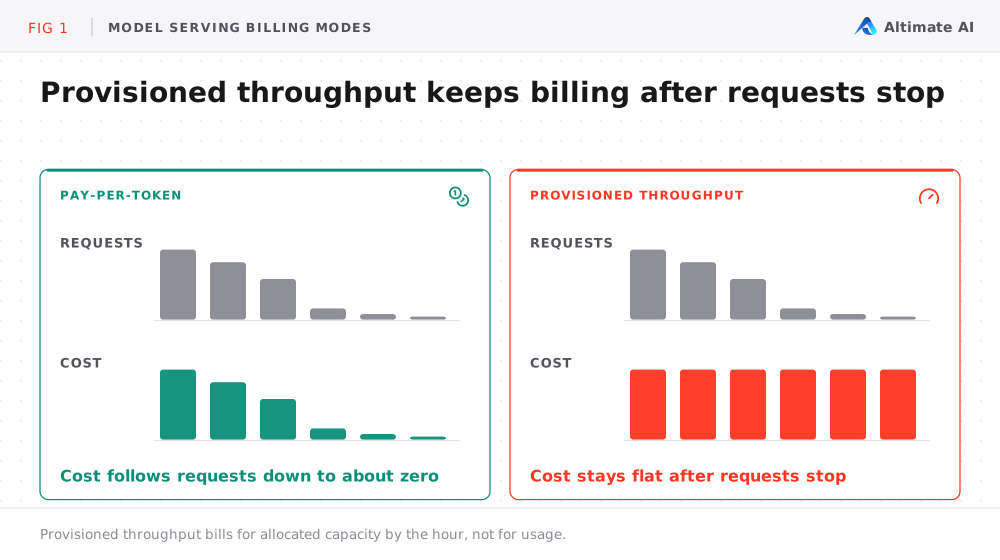
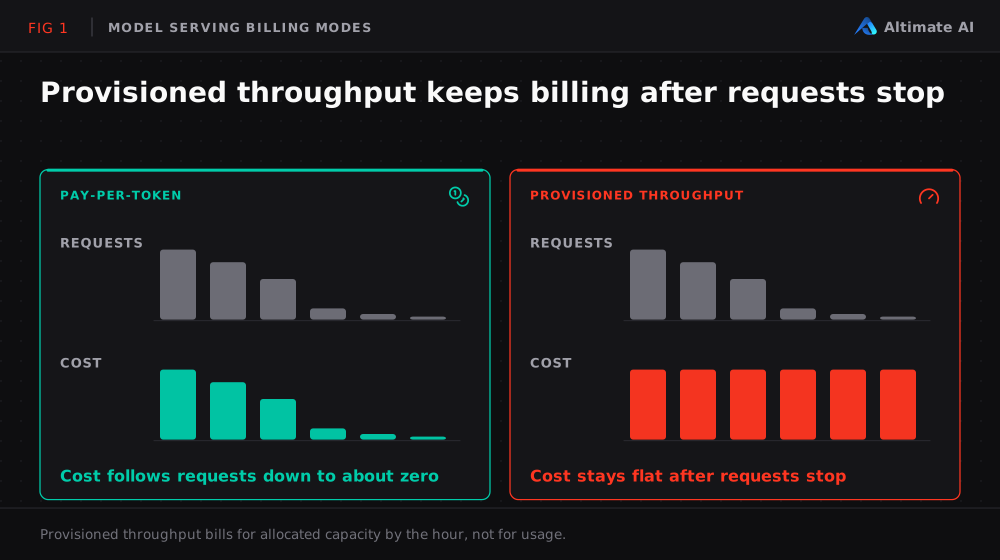
Not every Model Serving endpoint costs money when nobody uses it. Databricks Model Serving pricing for LLMs has three billing modes through the Foundation Model APIs. Pay-per-token bills for the tokens you actually use, so an unused endpoint costs nothing. Provisioned throughput bills for dedicated capacity by the hour, whether or not anything calls it. It comes in two kinds: on-demand, with no term commitment, and reserved, for a fixed term.
| Billing behavior | What you pay for | Cost when nobody calls it |
|---|---|---|
| Pay-per-token | The tokens you actually use | Nothing |
| On-demand provisioned throughput | Allocated capacity, with no term commitment | The allocated capacity, until you scale it down or remove it |
| Reserved provisioned throughput | A fixed-term capacity reservation | The full reservation, until the term ends |
| Custom model, scale-to-zero on | The compute it runs | Nothing, after 30 minutes without traffic |
| Custom model, scale-to-zero off | The compute it runs | The minimum warm capacity |
Provisioned throughput is often the right choice for production. It is also why an endpoint built for a test and never taken down keeps billing for its capacity, with nothing to prompt a review.
Custom models, which include your own models and agents, bill for the compute they run. Scale-to-zero is optional for them, and an endpoint only scales down after 30 minutes without traffic. With scale-to-zero off, a minimum amount of capacity stays warm so the endpoint can answer quickly. That capacity bills even when no one calls it.
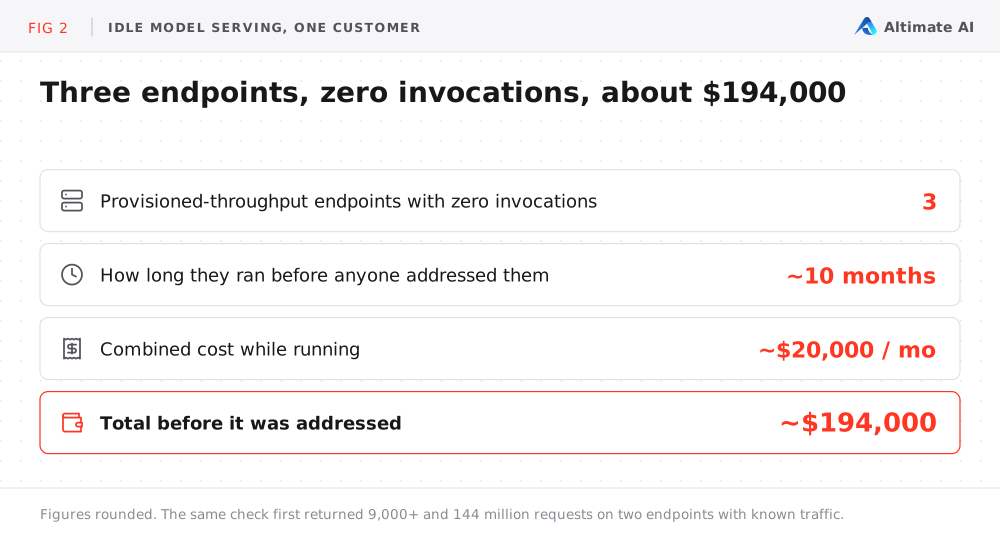
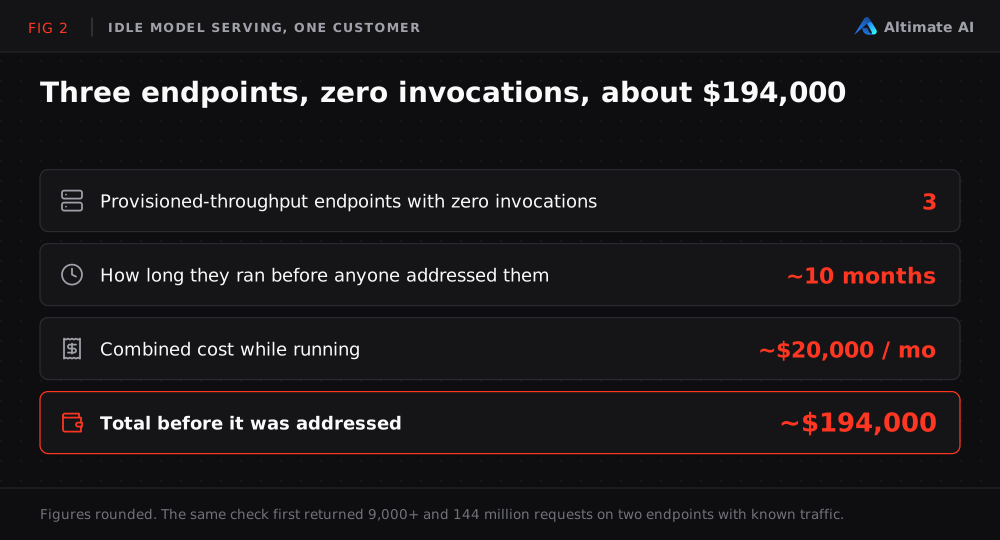
In customer workspaces, we found provisioned-throughput endpoints that had run for months with zero invocations. Three of them ran for about ten months at a combined cost of about $20,000 a month, about $194,000 in total before anyone addressed them. Finding them was the hard part. Once the pattern was visible, the fix was straightforward.
The fix comes down to two calls:
- You are sure the endpoint is not needed. Decommission it.
- You have any doubt. Scale it to zero or lower its minimum capacity, leave it for a while, and decommission it once you are sure.
If the endpoint is on reserved capacity, the saving comes when the term ends, so do not renew it.
The zero was a direct count. With usage tracking turned on, an AI Gateway setting, Model Serving logs every request made to an endpoint. So we read zero requests over the full tracked period of each endpoint. To test the check itself, we first ran it against two endpoints with known traffic. One returned just over 9,000 requests and the other 144 million, before we trusted a zero from the same method.
Why Does Vector Search Outlive the Agent It Served?
A retrieval-augmented agent answers from your own documents instead of guessing. It runs on two separate resources. A model endpoint talks to the user. A Vector Search endpoint holds the searchable index of those documents. Nothing ties the two together.
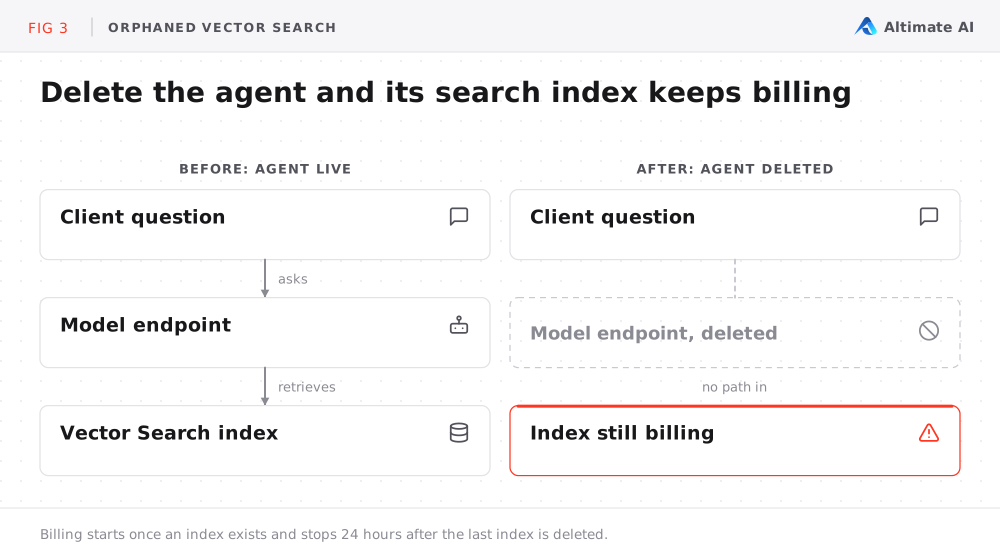
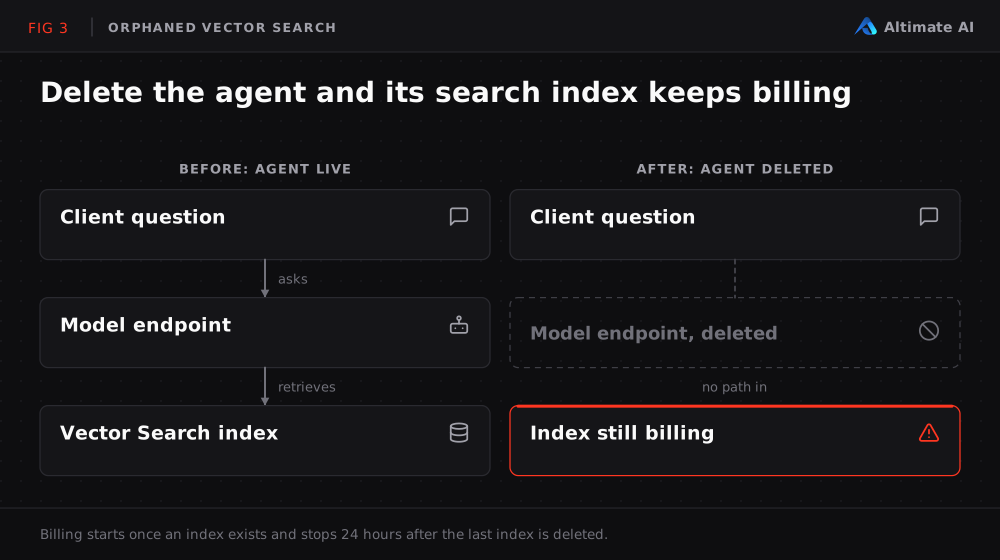
Delete the agent or its model endpoint, and the Vector Search endpoint and its indexes keep running. Databricks Vector Search pricing starts once an index exists and stops 24 hours after the last index is deleted. The endpoint keeps billing for its provisioned capacity even when nothing queries it. Nothing tells it that its agent is gone.
At a marketing analytics company, several Vector Search endpoints had billed this way for close to a year before anyone identified the pattern. Decommissioning them saved more than $70,000 a year.
This surface is larger than it was a year or two ago. Retrieval-augmented systems moved from experiments to production infrastructure quickly. Not every pilot survives. A project that was built, tested and abandoned is a candidate for exactly this problem: a retrieval index with no agent left to serve.
How We Found the Orphaned Endpoints
Nothing links a Vector Search endpoint to the agent it served. So we matched each Vector Search endpoint that was still billing to a model endpoint with the same name. That caught some orphans and missed most of them, because the two names often differ slightly. So we loosened the match to allow for that.
Not every flagged endpoint was equally certain, so we sorted them into three groups:
- Confirmed orphans had an explicit record that the parent agent was deleted.
- Unverified endpoints had the same flat billing but no record either way.
- Do-not-touch endpoints still had a live agent in production, so removing them would have broken something.
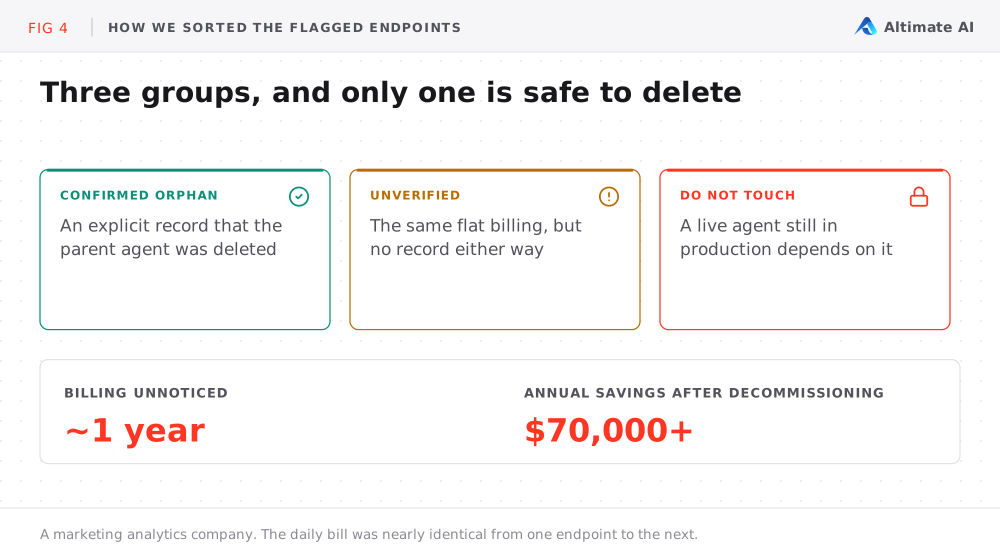
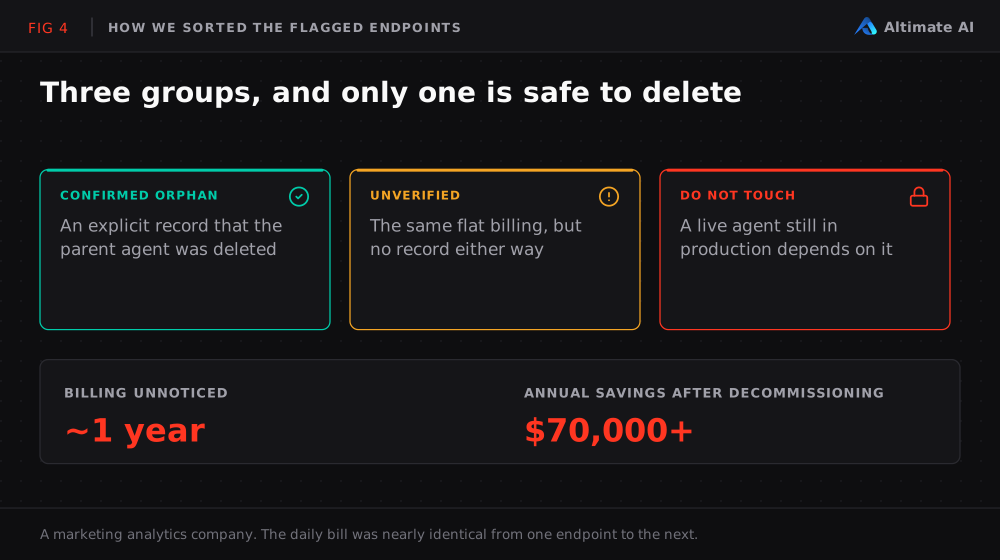
Across the confirmed and unverified endpoints, the daily bill was nearly identical from one endpoint to the next. There was no single large offender, only many similarly sized ones. That made the cost easy to overlook and expensive to ignore.
How to Check Your Own Databricks Workspace in Five Minutes
- Model Serving. List your provisioned-throughput endpoints and pull each one's request count for the last 90 days from its invocation log. First check that usage tracking has been on for the endpoint for the whole 90 days, because a zero from a period without tracking tells you nothing. Any endpoint at zero is a candidate for scale-to-zero or decommissioning.
- Vector Search. Pull every Vector Search endpoint from
system.billing.usagethat still shows usage in the last few days. Cross-reference it against your live Model Serving endpoints, and treat any endpoint billing with no living counterpart as a candidate. This is a billing-and-lifecycle check, because Vector Search has no per-request invocation log the way Model Serving does. - Before you delete. Talk to the project owner about anything you cannot confirm.
How Altimate Surfaces This Spend
These are two patterns we found in real customer environments. We check Databricks tenants for spend that bills while nobody watches it. The review runs continuously, not as a one-time audit. Altimate for Databricks surfaces each finding as an opportunity, sizes the saving and shows when it was first detected. The Databricks cost breakdown shows where the rest of your Databricks Model Serving cost sits, by workspace and SKU.
Want us to run this same check against your environment? We will walk through how we surfaced these patterns for other Databricks tenants, at no cost and no obligation.
Frequently Asked Questions
Does a Databricks Model Serving endpoint cost money when no one calls it?
It depends on the billing mode. Pay-per-token bills only for the tokens you use, so an unused endpoint costs nothing. On-demand provisioned throughput bills for allocated capacity until you scale it down or remove it. Reserved provisioned throughput bills the full reservation until the term ends. A custom model endpoint with scale-to-zero off keeps minimum capacity warm and bills for it.
What is the difference between pay-per-token and provisioned throughput?
Pay-per-token bills for the tokens a model actually processes. Provisioned throughput bills for dedicated capacity by the hour, either on demand or as a fixed-term reservation. Provisioned throughput often suits production, and an endpoint built for a test on it keeps billing for its capacity.
Does deleting an agent delete its Vector Search endpoint?
Deleting an agent leaves its Vector Search endpoint running. A Vector Search endpoint is not tied to the agent or model endpoint that queries it. Billing starts once an index exists and stops 24 hours after the last index is deleted. The endpoint keeps billing after the agent is gone.
How do you find idle Databricks Model Serving endpoints?
Turn on usage tracking in AI Gateway, then pull each provisioned-throughput endpoint's request count for the last 90 days from its invocation log. Usage tracking must have been on for the whole period. An endpoint with zero requests is a candidate to scale to zero or decommission.