A data engineer on the Databricks community forum described a daily load that ran "with only half of its tables actually updated". Their platform ran VACUUM at uncoordinated times across many tables. Some downstream data products saw an update and others did not, and the trigger started the next load anyway.
That load ran on a Lakeflow Jobs table update trigger. Lakeflow Jobs is the Databricks orchestrator for notebooks, SQL, pipelines and other tasks. A table update trigger starts a job run when a monitored table gets a new commit. Your job usually needs something else: a complete, valid batch.
This post follows one example from start to finish. A downstream job reads two tables, orders and payments. It should run once, after both tables hold the same day's batch. A table update trigger cannot express that rule on its own. Three patterns can: a SQL condition on the trigger, a readiness table, and a check inside the job.
A Table Update Trigger Fires on a New Commit Before the Batch Is Ready
A table update trigger answers one question: did a monitored table get a new commit? The orders and payments job needs a different answer. Do both tables hold today's complete batch? Three documented or reported behaviors show where the two answers split.
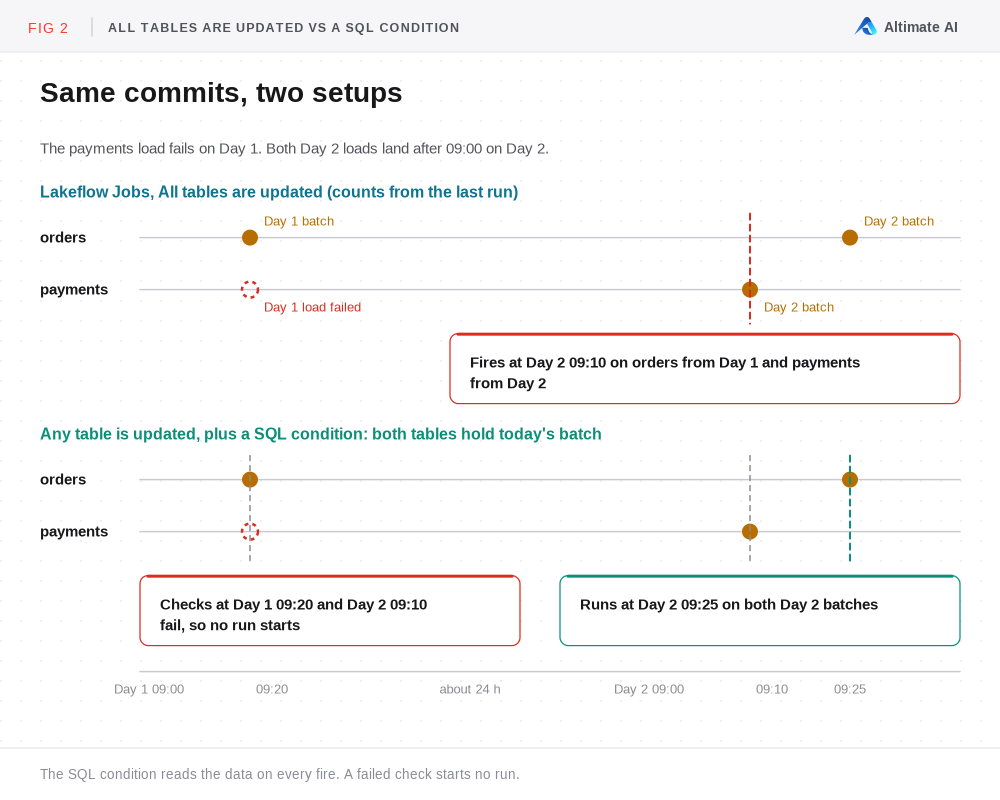
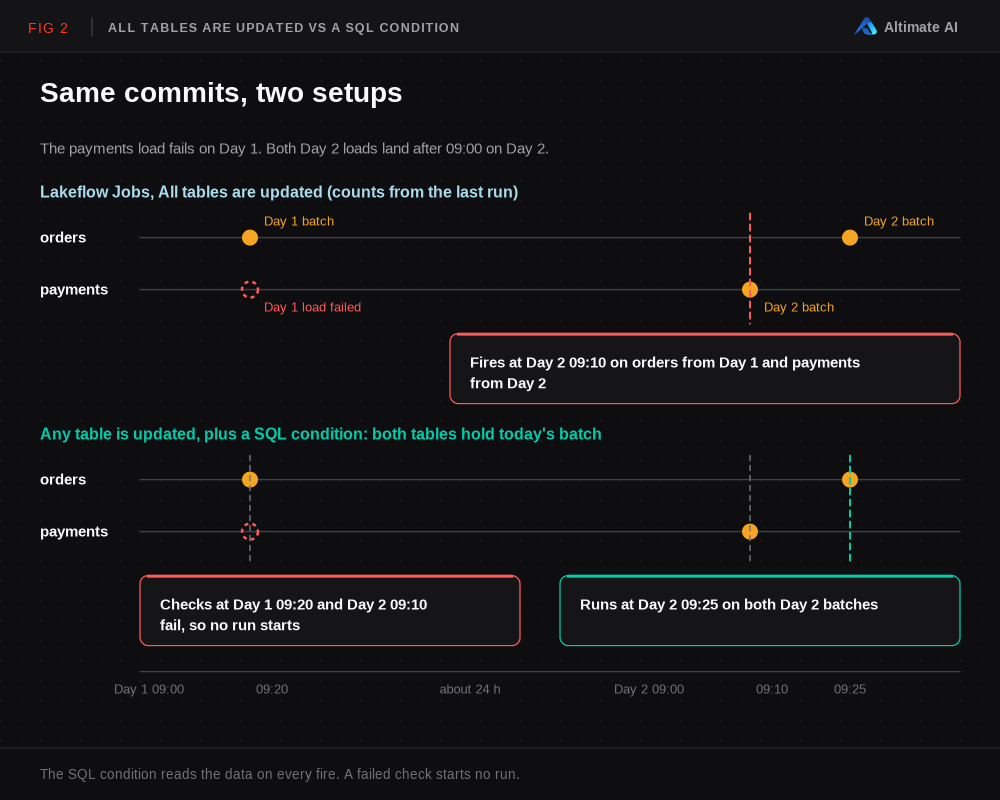
"All tables are updated" has no time window. The Trigger when setting picks Any table is updated or All tables are updated. "All tables" fires once each monitored table has had at least one update since the last run. A Databricks employee said on the forum that no time window applies. In that thread, three tables updated across about ten hours and still started one run. So suppose the payments load fails on Day 1. The Day 1 orders commit and the Day 2 payments commit then satisfy the rule together, and the run starts on mixed days.
A debounce timer mistakes a pause for a finished batch. Debounce means holding a trigger until commits stop arriving for a set time. The Wait after last change setting is that timer, and each new commit restarts it. If the orders producer pauses mid-batch for longer than the wait, the pause looks like the end of the batch. The trigger then fires on part of the data. A longer wait lowers the chance, and it delays every run by the same amount.
Maintenance commits can fire it too. The trigger reacts to commits that change data. The accepted community answer in the first forum thread says DELETE, RESTORE, a shallow or deep CLONE into the table, and REORG TABLE ... APPLY (PURGE) start a run. The same answer says a standalone VACUUM does not. The Databricks docs don't list which operations count, so test any operation your platform runs. A RESTORE to an older version can start the downstream job when nobody loaded a new batch.
The diagram below runs one failed payments load through two setups. The top lane uses "All tables are updated" alone. The bottom lane uses "Any table is updated" with a SQL condition, the first pattern in the next section.
Neither timer and neither Trigger when option reads what the commits contain. Readiness is a fact about the data, such as a business date, a batch ID, a row count or a validation result. Use a table update trigger on its own only when a new commit is all that ready means for your job.
Three Ways to Start a Run Only When the Batch Is Ready
Add a SQL Condition to the Trigger
A SQL condition is a saved query attached to a trigger. It is in Beta. When the trigger fires, Databricks runs the query on a SQL warehouse you choose. A run starts only if the condition is met. In the words of the docs, "The trigger decides when to check." The condition decides whether a run starts.
A SQL condition has two types:
- Query returns rows passes when the result holds at least one row.
- Result value changes passes when a one-row, one-column result differs from the value at the previous check.
For the example, the query below returns a row only when both tables hold today's batch. It assumes both tables carry a business_date column.
SELECT 1
FROM (SELECT MAX(business_date) AS d FROM main.sales.orders) AS o
JOIN (SELECT MAX(business_date) AS d FROM main.sales.payments) AS p
  ON o.d = p.d
WHERE o.d = current_date()
Put the readiness test in WHERE or HAVING. The docs warn that SELECT count(*) > 100 FROM main.sales.orders returns one row even when the comparison is false, so a Query returns rows condition always passes on it.
Pair the condition with Any table is updated on orders and payments. Each producer commit fires the trigger and runs the check again. The run starts on the commit that completes the day's batch, and every earlier check starts nothing.
The docs list these setup rules:
- A workspace admin turns the feature on from the Previews page.
- It works on scheduled, table update, file arrival, model update and job completion triggers. It does not work on continuous triggers. Each trigger takes one condition.
- The query runs read-only, as the job's run-as identity. That identity needs CAN USE on the warehouse and read access to every table the query reads.
These behaviors shape the design:
- A check times out after 5 minutes, warehouse startup included. A timed-out check starts no run.
- The saved query cannot use query parameters. So it cannot read the commit version that fired the trigger.
- Run now and other manual runs skip the condition.
- Checks bill as SQL warehouse usage. The docs recommend a serverless warehouse for faster startup.
Point the Trigger at a Readiness Table
A readiness table is a small table that the producer writes to only when a batch is complete and passes validation. It holds one row per batch, with the batch ID, business date and status. The downstream job's table update trigger watches the readiness table instead of orders and payments. A new commit on that table and a ready batch then become the same event. Some teams call this a control table. The Databricks docs use that name for the work-item list that drives a For each task, so this post says readiness table.
This pattern fits when readiness depends on something a query cannot see. One example is a validation step that runs in the producer's own tool.
The flow below shows the pattern end to end, from the producer's writes to the consumer marking its batch done.
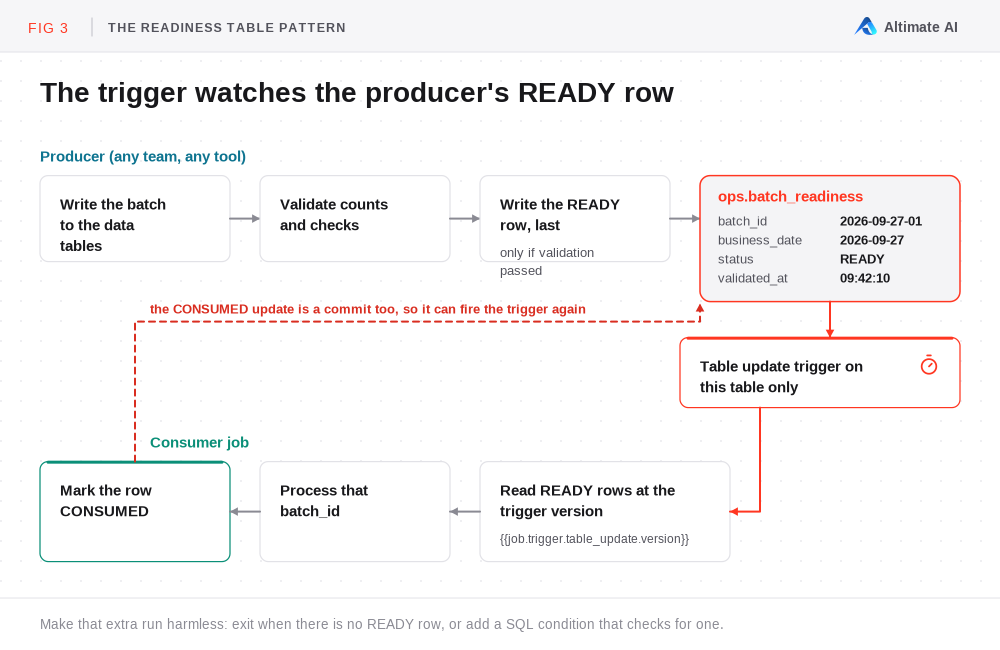
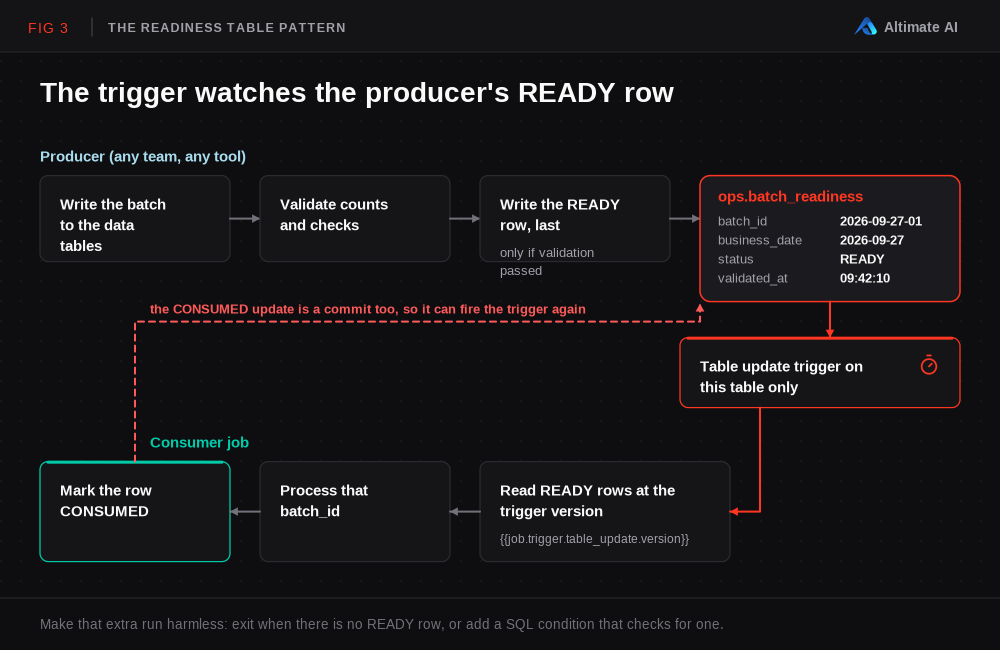
Here is one example shape. Databricks defines no schema for this table, so adjust the columns to fit your producer.
CREATE TABLE ops.batch_readiness (
  batch_id        STRING        NOT NULL,
  business_date   DATE          NOT NULL,
  expected_inputs ARRAY<STRING>,
  status          STRING        NOT NULL,  -- READY or CONSUMED
  validated_at    TIMESTAMP     NOT NULL
);
Four details make the pattern hold:
- The producer writes the row last, after the data write and its validation succeed. A producer retry can write the row twice, so write it with
MERGEonbatch_id. - The trigger monitors one table, so the choice between Any and All stops mattering. The missing time window stops mattering too.
- Pass
{{job.trigger.table_update.version}}into the job as a parameter. This is a dynamic value reference, a placeholder that Databricks fills in when the run starts. Read the readiness table at that version with time travel, so the run sees the commit that fired it. - The job marks the row
CONSUMED, or keys its writes onbatch_id, so a rerun does not process the same batch twice.
Marking the row is also a commit to the readiness table, so it can fire the trigger again. If that run starts, it finds no READY row and exits, and it still bills for its startup. A SQL condition that checks for a READY row stops that run from starting.
The readiness table adds one more table that every producer has to write correctly. A READY row can also describe data that a later backfill changed. Lakeflow Jobs does not check the promise the producer made.
Check Readiness Inside the Job
The third pattern keeps the trigger on orders and payments and moves the decision into the job. A first task queries whatever readiness means for you, such as row counts, a watermark or a validation flag. It then sets a task value, a small result that later tasks in the same run can read. An If/else condition task uses that value to gate the rest of the graph. Its operands can be job parameters, task parameters or task values. A job parameter looks like {{job.parameters.<name>}}. A task value looks like {{tasks.<task_name>.values.<value_name>}}. Dependent tasks attach to its (true) or (false) outcome.
For example, a first task named check_batch sets a task value called missing_inputs. The condition below sends the job down the (true) branch when inputs are missing. You attach the transformations to (false).
{{tasks.check_batch.values.missing_inputs}} > 0
Use a numeric operator here on purpose. The == and != operators compare their operands as strings, so 12.0 == 12 evaluates to false. The operators >, >=, < and <= compare numerically.
This pattern costs a run every time the trigger fires, ready or not. The asker in the first forum thread made the same point about a check that exits early. The cluster still starts before the check can exit, and the run appears in run history.
Which One to Use
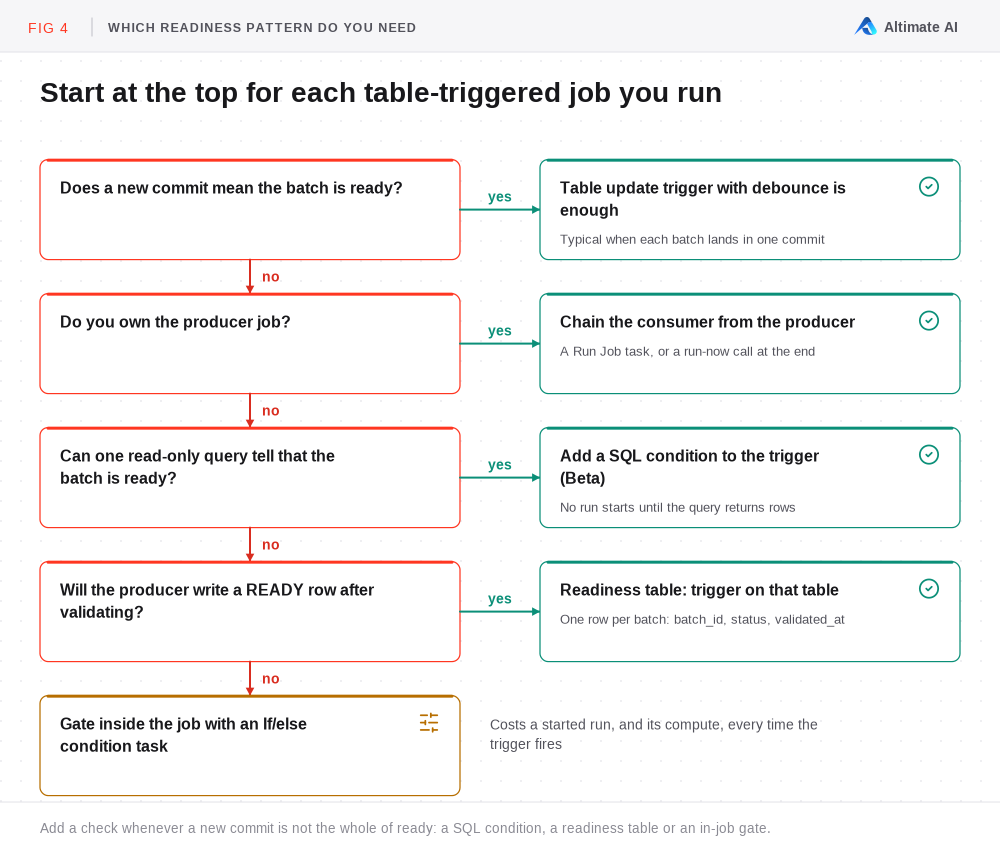
The table below compares the four setups for the orders and payments job.
| Approach | Run starts when | Catches | Misses | A not-ready fire costs |
|---|---|---|---|---|
| Trigger on the data tables alone | Any or all monitored tables commit, after debounce | New data exists | Partial batches, mixed days under "All", maintenance commits | A full run on the wrong data |
| Trigger plus a SQL condition (Beta) | The trigger fires and the query passes | Any condition one read-only query can test | Checks a query cannot run, such as validation in another tool | One warehouse check, and no run |
| Trigger on a readiness table | The producer writes a READY row |
Completeness as the producer defines it | A wrong READY row, or a later backfill |
One empty run after CONSUMED, unless a SQL condition blocks it |
| Trigger on data, gate inside the job | The trigger fires and the If/else task passes | Any condition a task can compute | Readiness a task cannot compute | A started run and its compute |
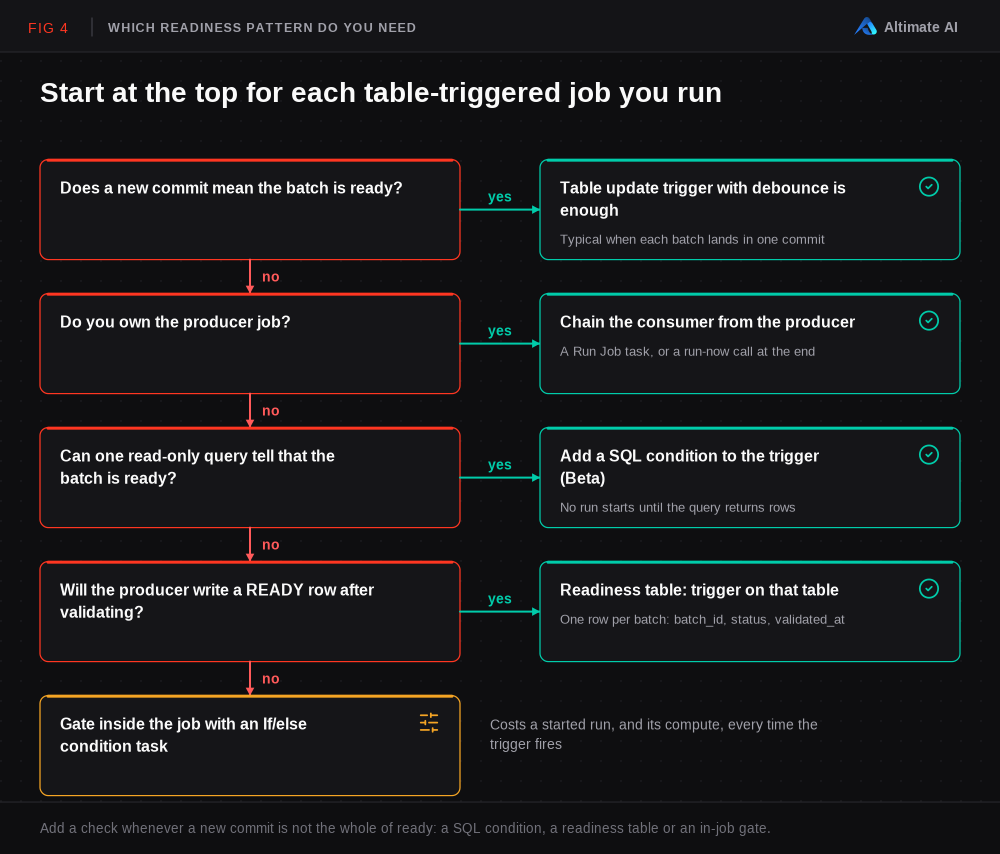
The decision tree below covers the same ground as questions. It adds one more option. When you own the producer job, you can skip triggers and start the consumer from the producer. Use a Run Job task, a run-now call, or a job completion trigger, which is in Beta.
How a Table Update Trigger Decides When to Fire
A Lakeflow Job starts on one of seven triggers. The schedules and triggers reference lists a schedule, a table update, a file arrival, a model update, a job completion, a continuous trigger and a manual or API call. The docs mark model update and job completion as Beta. By default, only one run of a job can be active at a time. The job skips a run that would exceed its maximum concurrency, so a trigger that fires during an active run does not queue a second run.
A table update trigger can monitor these objects:
- Unity Catalog managed tables (Delta or Iceberg)
- External Delta tables
- Materialized views and streaming tables
- Views over supported tables
- OpenSharing objects and system tables
The Two Debounce Settings
Two advanced settings control timing. Minimum time between triggers is the shortest wait after a run completes before the trigger can start another one. Wait after last change holds the trigger for a set number of seconds after a table update, and any further update resets the timer.
The docs walk through both settings with one example. The minimum time is 120 seconds, the wait after last change is 60 seconds, and updates arrive at 5 and 115 seconds.
| Time | What happens |
|---|---|
| 5 s | An update lands, and the 60-second wait timer starts |
| 115 s | A second update lands, and the wait timer resets to 60 seconds |
| 120 s | The minimum time between triggers has passed, but the wait timer still has 55 seconds left |
| 175 s | Sixty seconds have passed since the last update, and the run triggers |
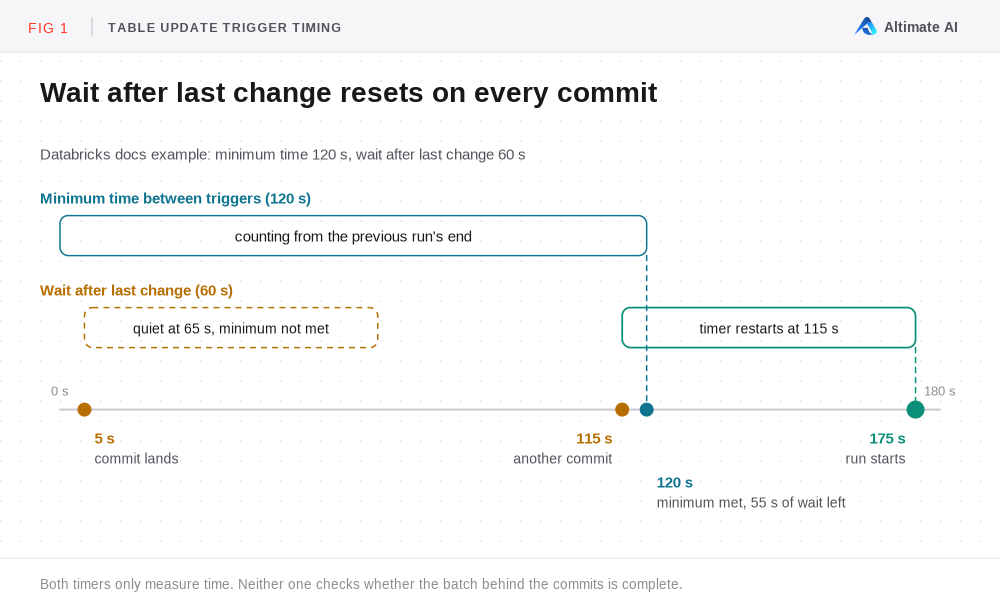
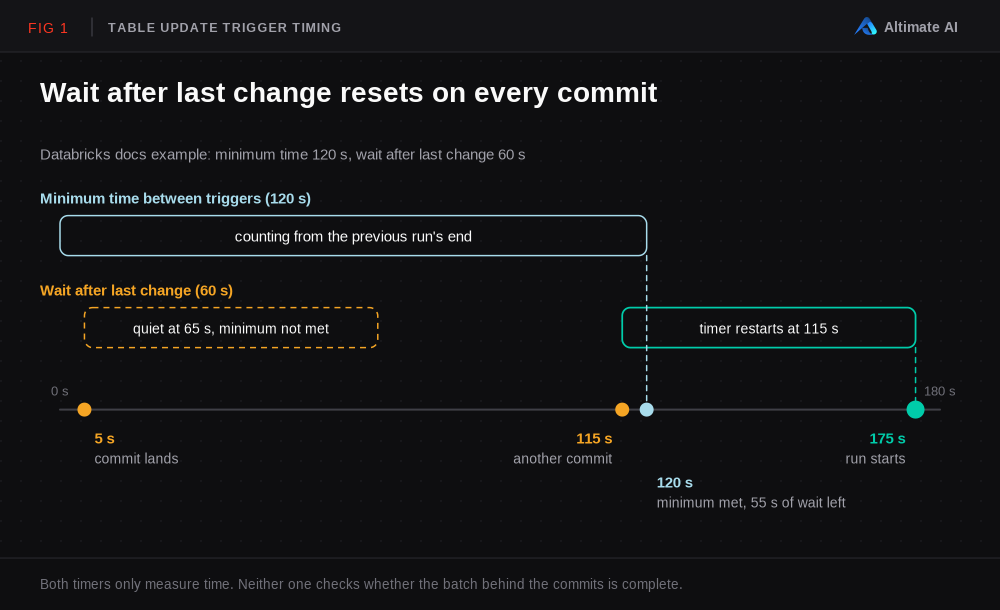
A community answer says both timers sit on a best-effort check that runs about once a minute. Plan for one to two minutes of latency plus compute startup. The docs give no latency figure.
Limits and View Caveats
Here are the documented limits on table update triggers. File events are a Unity Catalog setting on a storage location that tracks file changes through cloud notifications.
| Limit | Value |
|---|---|
| Tables per trigger | 10, or up to 25 when file events are enabled on every monitored table |
| Jobs with table update triggers, for tables in locations without file events | 1,000 |
| Table update triggers on OpenSharing objects or system tables, per workspace | 1,000 |
Views add three caveats:
- Source tables count toward the limit. A trigger on two views that each depend on six tables counts as 12 tables, so it needs file events.
- Any source change counts as an update. A run can start for changes that the view's definition filters out.
- Some dependencies are not supported. The docs list a view that uses
read_filesand a view over non-Unity Catalog or federated tables. Check any view-based trigger against that list, and test that it fires before you rely on it.
What the Job Receives When It Fires
When a table update trigger starts a run, the job can read three dynamic value references as parameters.
{{job.trigger.table_update.updated_tables}}
{{job.trigger.table_update.<catalog.schema.table>.commit_timestamp.iso_datetime}}
{{job.trigger.table_update.<catalog.schema.table>.version}}
The first is a JSON list of the tables updated since the last job run. The other two carry the latest commit timestamp and version that fired the run. With a single monitored table, the table name drops out, as in {{job.trigger.table_update.version}}. If a run starts and you can't tell why, log updated_tables and compare it with DESCRIBE HISTORY on those tables.
List Your Table-Triggered Jobs and Check Each One
The query below lists your table-triggered jobs from system.lakeflow.jobs. That table adds a row every time a job changes. So the query takes the latest row per job first, then drops deleted jobs, in the order the Databricks docs recommend. To turn run counts into cost, see our system tables cost guide.
WITH latest AS (
  SELECT
    *,
    ROW_NUMBER() OVER (PARTITION BY workspace_id, job_id ORDER BY change_time DESC) AS rn
  FROM system.lakeflow.jobs
  QUALIFY rn = 1
)
SELECT workspace_id, job_id, name, trigger_type, paused, triggers
FROM latest
WHERE delete_time IS NULL
  AND trigger_type IN ('TABLE', 'MULTIPLE')
ORDER BY name;
Two details matter when you read the result. MULTIPLE means a job has two or more triggers of any type, so read its triggers array to see whether a table trigger is among them. trigger_type is empty for rows written before early December 2025, so a job nobody has edited since then shows NULL and won't appear here.
For each job in the list, ask whether a new commit on its tables is all that ready means. If it is, keep the trigger with debounce and delete any readiness table beside it. If ready means a business date, a batch ID or a validation result, add a SQL condition, a readiness table or an in-job check.
Frequently Asked Questions
What Triggers Can Start a Lakeflow Job?
A Lakeflow Job starts on one of seven Databricks job triggers. The triggers are a schedule, a table update, a file arrival, a model update, a job completion, a continuous trigger and a manual or API call. The docs mark model update and job completion triggers as Beta.
When Does a Databricks Table Update Trigger Fire?
A table update trigger starts a job run when one or more monitored tables get a commit that changes data, such as an update, merge or delete. Two optional timers control how quickly it fires after a change. Neither timer looks at what the commits contain.
Can a Table Update Trigger Tell When a Batch Is Ready?
A table update trigger alone cannot, because it reacts to commits and not to batch content. A SQL condition, a Beta feature, runs a saved query when the trigger fires and starts a run only if the query passes. A readiness table or a check inside the job also works.
How Do You Check Readiness Inside a Job?
A first task queries whatever readiness means for you and sets a task value. An If/else condition task uses that value to gate the rest of the graph. A run still starts and appears in run history every time the trigger fires, whether or not the data was ready.