
- Pain. A small schema change, like renaming a column, can silently break downstream dashboards and semantic-layer definitions that
dbt buildnever checks, turning a one-word edit into a production incident. - Who it is for. Analytics engineers and data platform leads needing downstream impact before shipping a schema change.
- What it is. Altimate Code maps the downstream impact of a column change across SQL, YAML, and the semantic layer, then waits for approval before applying it.
"Rename Total_Cents" Is A Fire Drill The Day After Merge
A small request lands in the analytics inbox. Finance wants stg_orders.total_cents renamed to gross_revenue_cents to align with GAAP. The engineer greps the project for total_cents, edits four SQL files, runs dbt build, watches green checks, opens the PR. CI passes. It merges Tuesday. Wednesday morning the CFO dashboard is blank. The cause is buried in models/semantic/sem_orders.yml, where two metric expr fields reference total_cents by string. The semantic layer is not compiled by dbt build, so the only thing that catches that miss is the dashboard refresh.
This is not a rare failure. It is the default failure for any column change in a project with a semantic layer or any YAML-driven downstream surface. A code-only impact analysis misses the YAML; a model-level DAG walk misses the column.
Column-Level Checks Across SQL, YAML, And The Semantic Layer
The dbt-analyze skill drives a blast-radius analysis that runs before the change does. The walkthrough in the Altimate Code blast-radius blog renames total_cents to gross_revenue_cents end to end on a public dbt project. The agent does five things in order, every one based on real ASTs and parsed YAML, no warehouse round-trips:
- Dependency scan. Walks the DAG from
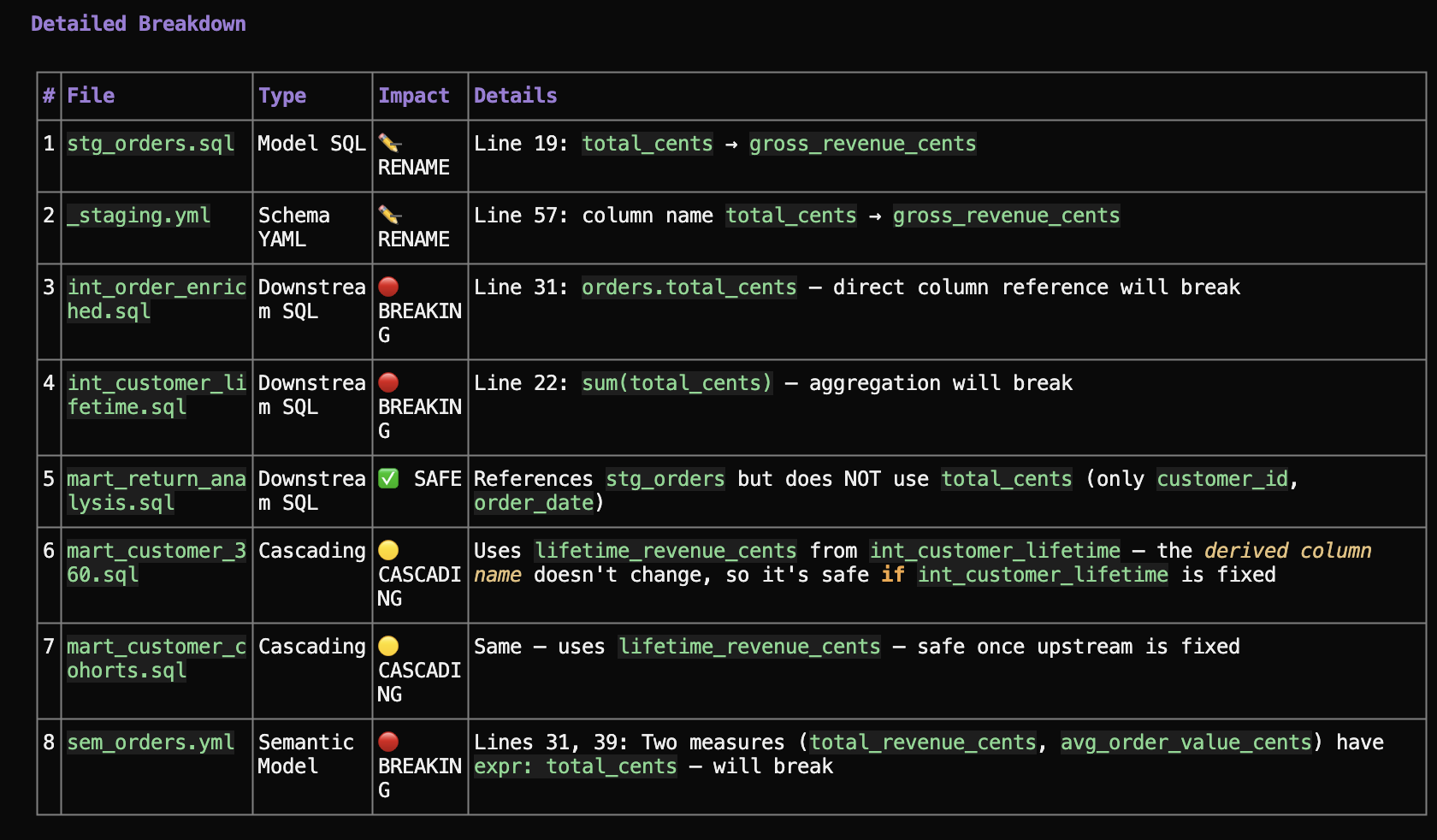
stg_ordersand lists every file that references it. Five files in the public example:int_order_enriched.sql,int_customer_lifetime.sql,mart_return_analysis.sql,sem_orders.yml,_staging.yml. - Column-level reference check. For each dependent file, parses the SQL or YAML and labels the column reference.
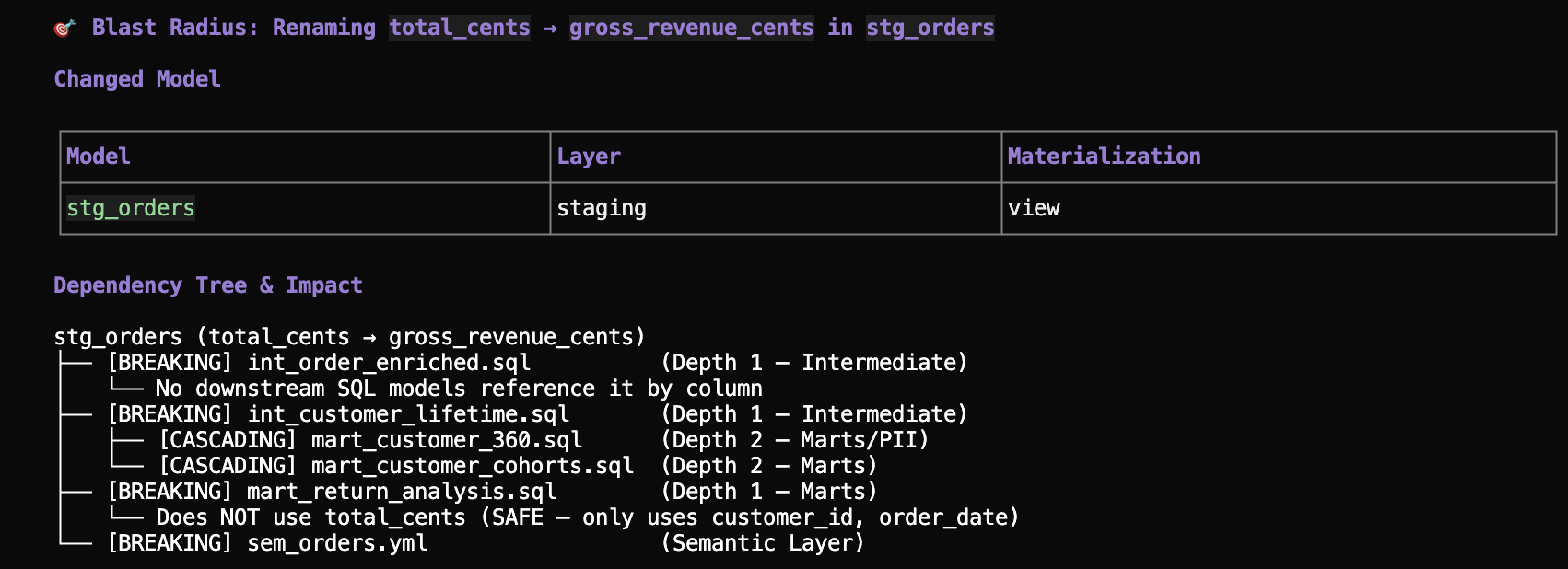
int_order_enriched.sqlline 31 usesorders.total_centsdirectly: BREAKING.int_customer_lifetime.sqlline 22 usessum(total_cents): BREAKING.mart_return_analysis.sqlonly usescustomer_idandorder_date: SAFE. - Semantic-layer awareness. Reads
sem_orders.ymland finds two metricexprfields referencingtotal_centsby name. Labels them BREAKING. - Downstream cascade trace.
mart_customer_360andmart_customer_cohortsare downstream ofint_customer_lifetimebut reference the derived namelifetime_revenue_cents, nottotal_cents. Labels them CASCADING (safe after the upstream fix). - Compliance flag surfacing.
mart_customer_360carriesmeta: { compliance: 'CCPA / GDPR', contains_pii: true }. The report surfaces the tag even when no code change is needed.
The output is a single report, not a wall of grep matches. It separates "files to change" from "files to verify" from "files to ignore", in one pass.
Four Labels, One Report
The report is mechanical and small. Every dependent asset gets one label:
| Label | Meaning | Action |
|---|---|---|
| BREAKING | The asset uses the changed column directly. Will fail. | Update before or alongside the change. |
| CASCADING | Depends on a breaking file but does not use the changed column directly. | Verify after the upstream fix; usually no code change. |
| SAFE | Depends on the changed model but never uses the column. | Nothing. |
| UNKNOWN | Impact cannot be determined statically (dynamic SQL, runtime-generated names). | Manual review. |
In the public example, the agent reports 8 files total, 5 need changes, 3 are safe and asks for approval before touching anything. The phrasing is intentional: a real DAG of 200 models produces a long report, and the engineer needs to see the count of changes alongside the count of safe assets to know whether to proceed. The grouping is by label, not by file path, so the answer to "is this rename a one-day job or a one-week job" comes off the top of the report. The numbers tell you the scope before you commit a single keystroke.
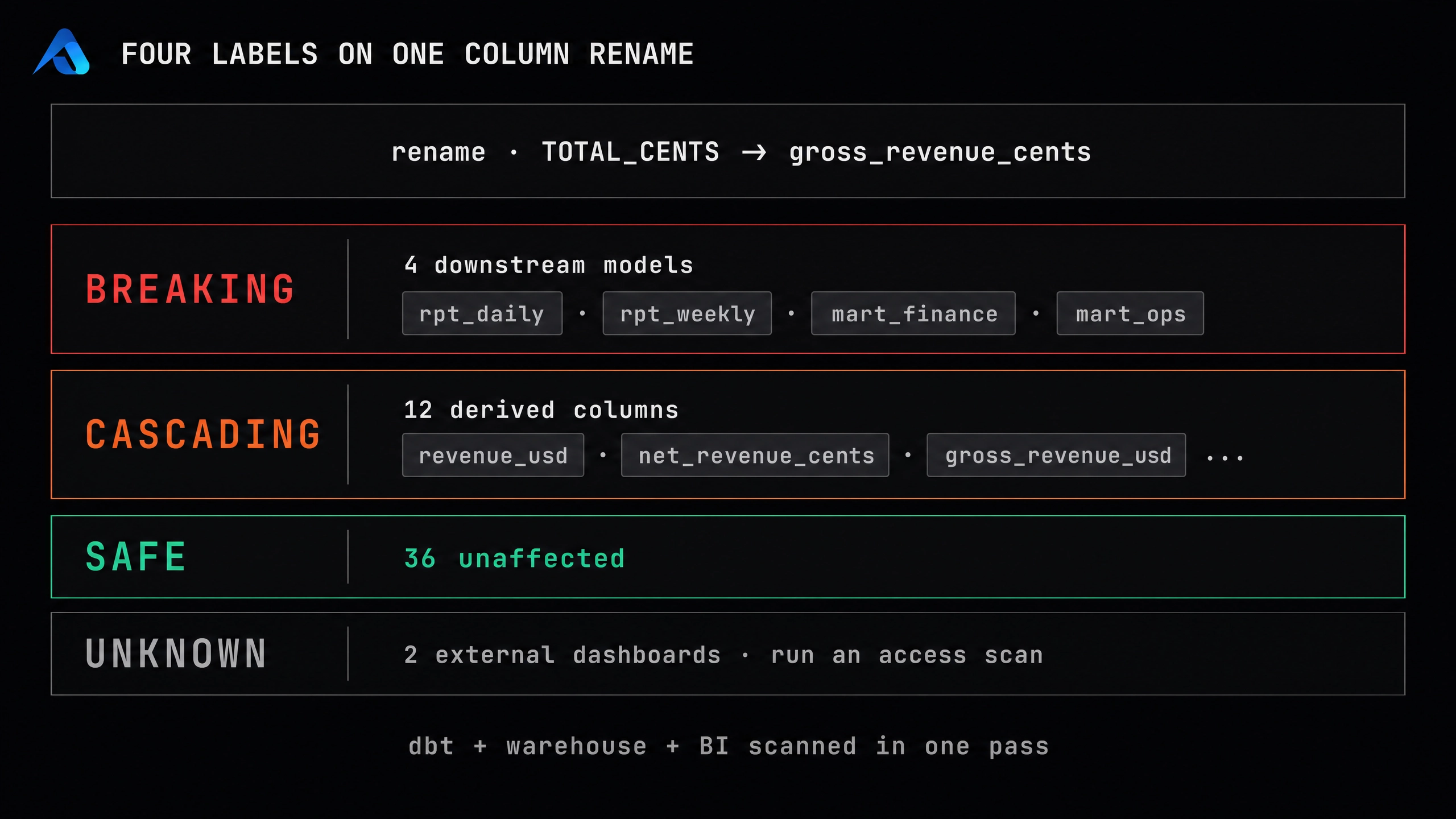
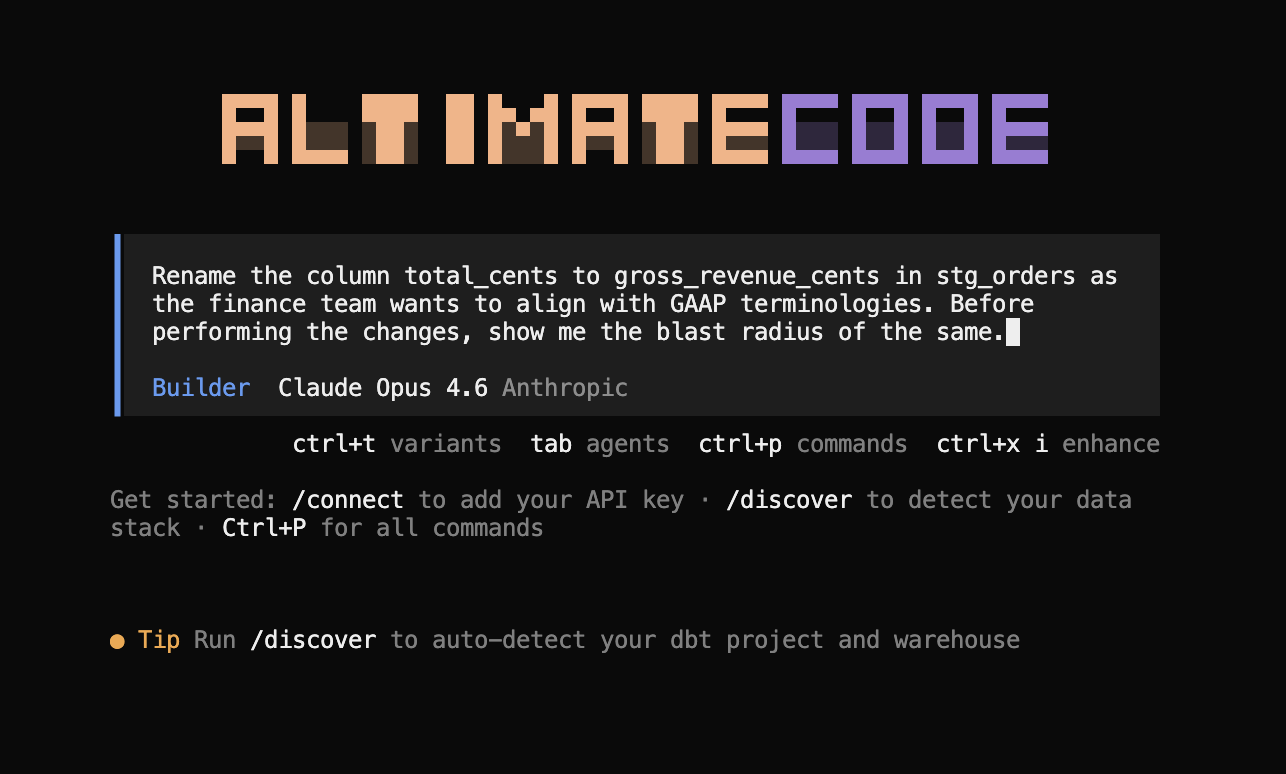
Here is that exact rename, captured end to end. The engineer asks for the blast radius before touching anything:
The agent walks the dependency tree before changing a single file, tagging each downstream model BREAKING, CASCADING, or SAFE:
Each of those tags comes with the exact file and line number to fix, so there is no guessing where to start:
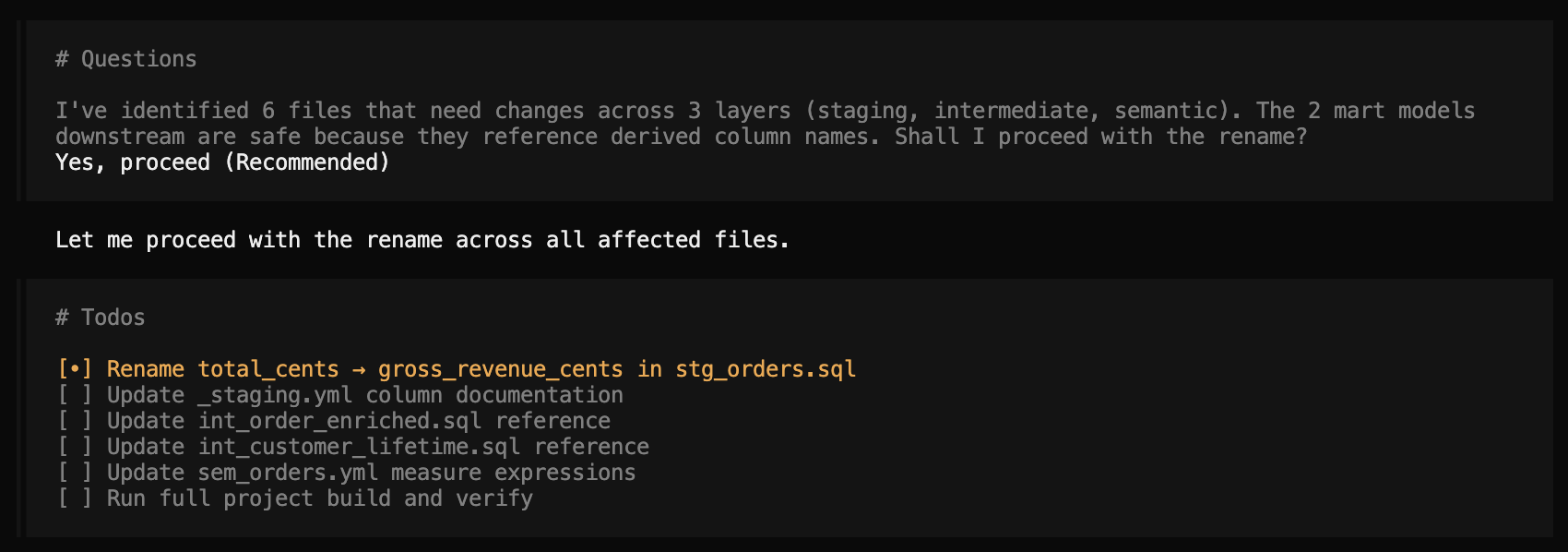
With the scope confirmed, one approval is all it takes. The agent then works the checklist itself:
Approval, Atomic Update, Then dbt build And A Lineage Check
After the report, the agent does not apply changes silently. It writes a one-paragraph summary ("I've identified 6 files that need changes across 3 layers (staging, intermediate, semantic). The 2 mart models downstream are safe because they reference derived column names. Shall I proceed?") and waits. The blog's walkthrough shows the approval prompt verbatim.
After approval, the change is atomic: every file is updated in one pass to avoid a partial state where some models reference the old name and some the new. stg_orders.sql aliases the source column (total_cents as gross_revenue_cents), int_order_enriched.sql and int_customer_lifetime.sql use the new name, both sem_orders.yml and _staging.yml update the metric expr fields and the column descriptions.
Then verification:
altimate-dbt build
# 34 models, 36 passed, 0 errors

lineage_check stg_orders.gross_revenue_cents
# TOTAL_CENTS source column → gross_revenue_cents (staging alias) → ...
# derived names downstream unchanged
The dbt build confirms the project compiles and tests pass. The lineage_check traces the renamed column from source through the staging alias to confirm the propagation. The change is reversible right up to the build, and the build is what closes the loop.
A Skill That Names The Breakage Before It Ships
What the dbt-analyze skill ships is a class of impact analysis that lives at the column level, knows about semantic-layer YAML, surfaces compliance tags, and pauses for approval before applying anything. The four labels (BREAKING, CASCADING, SAFE, UNKNOWN) collapse the "what do I need to do" question into a count. The atomic multi-file update avoids the partial-rename trap. The altimate-dbt build and lineage_check close the loop. The companion article on the deterministic correctness layer covers the underlying Rust engine that powers the column lineage; the PR review is the surface that runs the same impact-analysis fact as a blocking finding when a PR is opened. A column rename stops being a fire drill because the agent ran the report before the rename ran.
Get the agent on your warehouse
$ npm install -g @altimateai/altimate-code